MailerLite Review (2026) – Should You Give It a Try? What you need to…

MailerLite is an affordable email marketing software. The company was founded in 2005 and has grown impressively. Over 1,000,000 companies use MailerLite. So they are very popular, but is MailerLite the best email marketing service for you?
MailerLite added 30+ new features since our last update. So of course I am excited to try them all out. Especially the monetization features and AI functions.
I signed up for a fresh account and tested the complete platform to see what stands out. Get ready for a run-through of all the features, pros, cons, and MailerLite pricing using our review methodology and scoring.
MailerLite Review Summary:
- MailerLite is a simple, effective, free email newsletter software that does the job.
- The free forever plan is great for a trial with 250 subscribers and 2,500 emails.
- Automation is better than it was. The new visual automation builder, workflow templates, and ecommerce triggers are a real upgrade.
- The email editor is intuitive. It includes 40 pre-built layouts and AI writing tools to create, rewrite, and translate content.
- MailerLite has features to monetize your list: sell paid newsletter subscriptions, digital products, and free or paid bookings.
- You get 24/7 email support on paid plans, and higher plans have live chat support.
- We found this email tool easy to use and easy to set up.
- With all the features you expect, MailerLite is certainly worth its salt.
👉 MailerLite packs a lot into an affordable, easy-to-use email marketing platform. We definitely recommend giving it a try.
Try MailerLite for free here
MailerLite’s Core Features

For an easy email marketing service, MailerLite has some cool functionality up its sleeve. Here are the most notable MailerLite features:
- Send email campaigns. Create email newsletters with MailerLite, send your email promotions, or use RSS to automatically send digests from your blog content. A/B test subject lines and email content.
- Segment your subscribers. “Marie Kondo” your subscribers to deliver the most relevant messages. You can group by their characteristics (for example, age, gender, country), by their activities (emails clicked, opened) and make lists.
- Build your website and landing pages. With MailerLite, you can build landing pages, opt-in forms, and (mini) sites. They’ll even host it for you. You can also sell digital products and offer bookings.
- Build automations. Start with a simple automatic welcome email flow. Or, build a ten-stage, multi-flow-step onboarding process for new customers. Powerful. MailerLite’s automation builder has a clean drag-and-drop interface and 15 ready-made templates.
- Write content with AI. MailerLite’s AI writes headlines, product descriptions, and even full newsletters. And it will suggest ideas to make your content more engaging.
- Track your results. MailerLite has a visual reporting tool where you can even generate your own custom reports. Group and filter data by campaign, time period, or subscriber group, compare metrics, save your reports, and export the results.
- Great pricing and value for money. MailerLite is still one of the cheapest email marketing services. Comfort plan starts at $12/month for 500 subscribers. Power starts at $25/month and has unlimited monthly emails.
- Solid support. 24/7 email support and 24/7 live chat support if you run into any problems. Free users get chat and email during the trial period. MailerLite’s support team was quick and responsive during testing.
MailerLite Pros & Cons
Pros:
- It’s an affordable email marketing tool. MailerLite is cheaper than almost anyone else with a similar feature set. It stacks up well against the market leader, Mailchimp. And it’s a lot cheaper.
- Solid landing page and website builder. This part is where MailerLite is especially strong. You won’t find many other email marketing platforms that have a website builder.
- No-nonsense automation editor. MailerLite’s drag-and-drop automation builder has triggers like someone joining a group, filling out a form, or clicking a link. Workflow steps include emails, delays, conditions, and actions to guide subscribers through the journey.
- Simple, clean interface. MailerLite keeps things easy without holding you back from doing sophisticated email marketing.
- Strong email editor with great pre-made modules. Having lots of predesigned layouts makes it very quick to create and customize templates.
Cons:
- Doesn’t have website tracking. ActiveCampaign and others have automation that can trigger directly from website visits.
- The free plan got smaller. MailerLite reduced the free plan to 250 subscribers and 2,500 emails. The upside is that free users now get templates, the custom HTML editor, and pop-ups.
- Missing a few advanced features. MailerLite has detailed reporting now. It lacks a built-in CRM and website tracking. Even some similarly priced MailerLite alternatives like Brevo have an integrated CRM.
Get MailerLite for free
Is MailerLite for you?
Recommended if:
- You’re a small business, solopreneur, or creator. MailerLite is easy to use and has more than enough features to handle regular newsletters, automations, landing pages, and forms. Creators can monetize their audience with paid newsletter subscriptions and digital products.
- You’re looking for a budget email marketing tool with premium features. MailerLite is 24% cheaper compared to Mailchimp. MailerLite’s plans start from $12/month. And you get similar features and more email sends on MailerLite.
- You’re a smaller ecommerce store. MailerLite has Shopify, WooCommerce, Wix, PrestaShop, and Shoper integrations. Add products to emails, segment by purchases, track revenue, and trigger journeys for abandoned carts, abandoned checkouts, specific products, and purchase frequency.
- You sell services. MailerLite Bookings lets coaches offer free or paid 1:1 sessions and group calls, sync Google or Outlook calendars, and start an automated email sequence after someone books.
- You’re looking for a free tool to get started with email marketing. MailerLite is one of the best free email marketing tools. You get most of the features, 250 subscribers, 2,500 emails, 3 automations, A/B testing, and newsletter templates.
Not recommended if:
- You’re looking for advanced marketing automation. MailerLite’s automation builder can power quite sophisticated workflows. It’s better than Mailchimp’s automation, but it isn’t as advanced as ActiveCampaign’s.
- You’re looking for an integrated sales CRM. If you’re looking for marketing and sales tools in one platform, MailerLite isn’t for you. Check out our overview of the best CRMs with email marketing.
Sign up to MailerLite for free
MailerLite Review Rating Details
Ease of Use |
MailerLite is very easy to use. In our test, we found the interface clean and straightforward with clear navigation and consistent editors across emails, forms, landing pages, and automations. It’s quick for beginners to learn, but you can still build custom reports, advanced segments, multi-step automations, and send out all your ecommerce campaigns. |
Email Editor |
MailerLite makes creating email campaigns simple. You can build your emails with the drag-and-drop editor or import custom HTML. The editor has 12 modules like video blocks, product features, countdown timers, and surveys. The AI assistant can help write and translate your content. The new custom HTML editor has live preview, syntax highlighting, and an AI agent that can edit code from your own prompts. |
| Email Templates |
100+ email templates with lots of variety. They are modern, mobile responsive, and easy to adapt. Brand styles can automatically apply your logo, fonts, colors, and social links to supported templates. |
Email Types |
MailerLite has 5 different types: newsletters, AB testing, auto-resend, RSS-triggered, and automated. |
Marketing Automation |
MailerLite’s automation has had a major upgrade. The new drag-and-drop builder makes workflows easier to edit, and there are 15 automation templates to start from. Triggers now include Joins a segment, plus improved ecommerce options. You can preview all emails in a workflow at once and manually add subscribers. Multiple automation triggers are part of the Power plan. |
| Newsletter Monetization |
Sell paid newsletter subscriptions, digital products, and free or paid bookings. Groups and automations help manage paying subscribers and follow-ups. Stripe handles payments. It’s not as creator-focused as beehiiv or Kit, but having these is very useful for creators, coaches, and small businesses. |
| List Management |
The subscriber and list management features in MailerLite are solid without being overwhelming. You can build segments based on fields, behavior, and purchases. Save these filtered groups as segments to use in campaigns. Import subscribers with file uploads or directly from Mailchimp. MailerLite gives you the tools to keep your list well-organized. |
| Personalisation |
Personalize with any contact field and dynamic content. A caveat with dynamic content is that if you want to show one block for men and one for women, you need to use two blocks. You can’t have variations of the same block without duplicating them. |
| Landing Pages & Forms |
MailerLite’s form builder, landing page builder, and website builder are better than you’ll typically find in email software. You can create smaller sites and take payments. It has 30+ landing page templates. Inline forms and pop-ups. The pop-up forms have several triggers to automate virtually anything after a form is filled. You can host pages on MailerLite or your custom domain. |
Reporting & Analytics |
Email reports show list growth, opens, clicks, and unsubscribes. You can also check top domains and email clients. New is ecommerce sales stats. And the new custom reports let you choose and save reports on the metrics that matter to you. Group results by campaign, time period, or subscriber group, filter the data, and compare trends. |
| Customer Service |
Well-organized knowledge base with tons of articles and videos. MailerLite’s support team is easy to reach. Paid plans get 24/7 email support. Power includes 24/7 live chat support as well. It was easy to find answers during our testing. |
| Deliverability |
MailerLite has full support for SPF, DKIM, and DMARC authentication. Domain verification is required for sending to make sure your emails are properly authenticated. It automatically includes List-Unsubscribe headers for easy opt-outs, reducing spam complaints. Domain alignment is available for the email header, tracking links, and image links, with automatic setup for 40+ DNS providers. The clean-up tool helps maintain an engaged list, and high-volume senders can request a dedicated IP. |
| Spam and Design Check ❌ | MailerLite’s spam and design checks are bare-bones. It lets you preview your newsletter on desktop and mobile and send yourself a test email. But it won’t show you how emails render in various clients or catch broken links and HTML formatting issues. |
| AI Writing ✔️ | MailerLite’s AI writing tools are useful for getting campaigns out faster. Generate headlines, product descriptions, subject lines, and full newsletter drafts. You can also translate and rewrite existing copy. I found the AI writing very good for first drafts, ideas, and quick rewrites, but you still want to review the copy and add your own voice before sending. |
| Integrations & API ✔️ | 125+ integrations, including ecommerce platforms, email verification services, landing page builders, and CRM platforms. If you can’t find an integration, you can use Zapier to integrate MailerLite with 5000+ apps or the API for custom integrations. |
| User Permissions ✔️ | Assign custom user permissions for campaigns, subscribers, forms, landing pages, websites, automation, billing, settings, and templates. 4 default user permissions are available: administrator, manager, viewer, and accountant. |
| GDRP & Legal Compliance ✔️ | MailerLite has your back, protecting your subscribers’ data so you can focus on your business. Data stays fully within EU servers. Consent collection is clean: you can add GDPR fields to forms, and the system automatically logs consent timestamps, IPs, and sources. Subscriber data exports or deletions take just a few clicks. |
| Interface Languages | MailerLite is available in 3 languages: English, Spanish, and Polish. |
| Customer Satisfaction |
MailerLite gets lots of positive reviews from customers. It has 4.7 on Capterra and 4.6 stars on G2 during our research. |
Overall Score

MailerLite is a strong pick for small and mid-size businesses looking for an easy-to-use email marketing tool with room to grow. Its drag-and-drop editor, solid automation, and 100+ email templates make building campaigns simple. With the website builder, helpful AI tools, and good support, MailerLite is a well-rounded, budget-friendly choice for most email marketers.
Get started with MailerLite for free here
Getting started with MailerLite
Starting a MailerLite account takes 1 minute. You just need to fill in your company, name, email, and a password. After you sign up to MailerLite, you’re asked to verify your email and complete your profile. Both take about 5 minutes to complete, and then you can start exploring the platform.
Creating your first email list and adding contacts is a walk in the park. I was done in 5 minutes. MailerLite will automatically remove duplicate and role-based emails during import.
MailerLite has a clever authentication setup. It will detect your DNS provider, so you can just log in and set it up in 2 minutes.
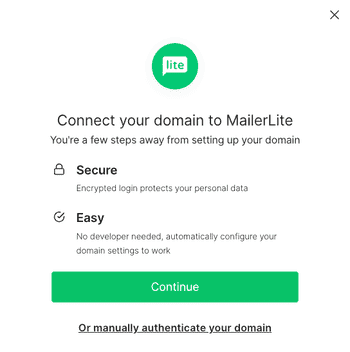
I was able to set all this up in less than 30 minutes and start creating campaigns and pages.
Get started with MailerLite for free
In-Depth MailerLite Review: Email Marketing Platform
You can use MailerLite to send emails, promotions, and newsletters to your subscribers. But it can host web pages, automate emails, and more. Read our full platform walkthrough to find out how MailerLite performs.
Creating and sending newsletters with MailerLite
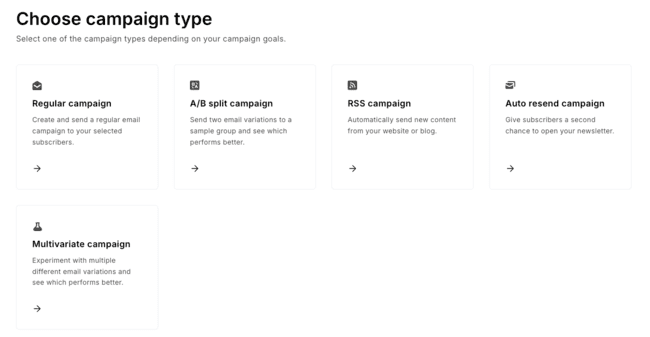
MailerLite has 5 types of email campaigns you can send:
- Email campaigns: Your standard email send. Give the campaign a name, target a group of subscribers, and create an email to send them.
- A/B split and multivariate campaigns: Test subject lines, content, sending time, or From name variations to find out which delivers the best results. You can set up 8 email variations.
- Auto resend campaigns: Similar to a regular campaign, but now the campaign is resent to those who didn’t react to your first send. Handy to increase opens and clicks.
- RSS campaign: Have a blog? Automate new campaigns going out as you publish your new content on your website. Ideal for bloggers and low-maintenance email newsletters.
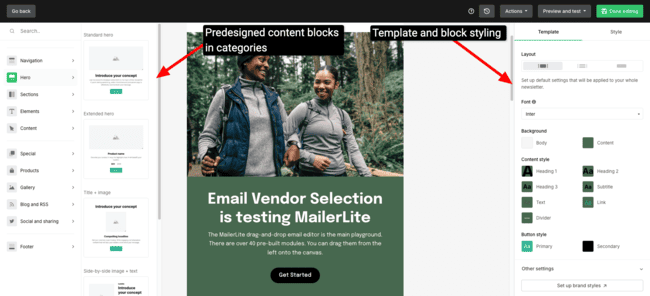
The MailerLite drag-and-drop email editor is the main playground. There are over 40 pre-built modules. You can drag them from the left onto the canvas.
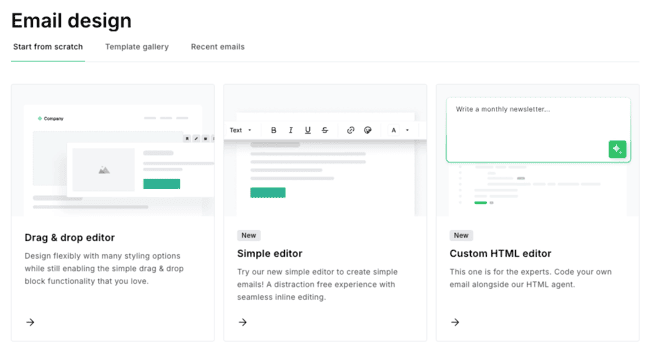
The new Simple editor replaces the old rich-text editor and is aimed at clean, writer-style newsletters. Paste from Google Docs, Notion, or an AI tool, and it keeps the formatting.
The custom HTML editor has been rebuilt too. It has a cleaner user interface, live preview, syntax highlighting, and an AI agent. You can tell it what you want to change in plain language instead of editing every line of code. ZIP imports now support files up to 10MB.
Dynamic content blocks
In MailerLite, you can make the content dynamic. Show a block only to one group for instant personalization. A caveat is that if you want to show one block for men and one for women, you need to use two blocks. You can’t have variations of the same block without duplicating them. No deal-breaker.
Special drag-and-drop blocks include:
- Video blocks with animated GIFs
- Product feature blocks
- Social media posts
- Countdown timers
- RSS templates
- Survey blocks
Your header, footer, and global styles can be easily standardized across all emails. So you don’t have to change all of those individually every time you update them.
AI writing assistant
A standout feature of MailerLite’s drag-and-drop email editor is the AI writing assistant. Write headlines, product descriptions, and even full newsletters. It can also help to localize your email content with translations. And if you’ve hit writer’s block, it can suggest ideas to make more engaging content.
YouTube email embeds
Video in email is hot. MailerLite makes it easy to embed a video from YouTube. You enter the URL, and the email editor will turn the video into an animated GIF for you. This is pretty cool, I wish I had that functionality in Marketo.
Send preview
Once your email is done, share it with colleagues with a preview send, to let them check it before sending your email. Or you can share a link, or download a PDF. Email reviews are in desktop and mobile modes. Personalization isn’t included in those previews.
Schedule sending
Now we can go on to select our email subscribers. MailerLite has advanced logic for targeting your email to exactly the right segments. You can schedule a send at a static time, or based on subscriber time zone (so all subscribers get the email at the same local time).
Most time in email marketing software is spent in email creation, so it needs to be good. MailerLite doesn’t disappoint.
Overall, I’m impressed by what you get for the price here. The email editor has loads of features. With the email templates, you will have a head start on creating beautiful email campaigns. It’s very easy to use (Mailchimp users will feel right at home), and at the same time, you can do quite advanced things.
There are plenty of large companies that I know aren’t taking advantage of half this functionality. So it will take you a while to outgrow the platform for email editing and campaign sending.
Biovie, a vegan food ecommerce store, is a good example. It uses MailerLite to email more than 50,000 subscribers. Auto resend increased campaign opens by 45%, and around 90% of sales from its limited-time product promotions come from email.
Email templates in MailerLite
To quickly start your campaign, you can use one of the more than 100 free email newsletter templates that MailerLite gives you in the paid plan. There is a lot of variety, and templates have modern and mobile-responsive designs. It’s easy to quickly build a beautiful email.
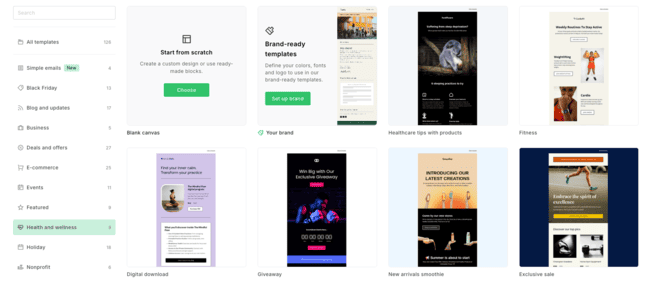
If you want to create your own template, no problem. Your business is unique, dammit! 😀 Most will start with the drag-and-drop email editor, but you can also import HTML and edit it with the custom HTML editor. Once made, you can reuse previous emails as an email template for your next campaigns.
MailerLite has improved its Brand styles with recent updates. Save your logo, fonts, colors, and social links once and MailerLite applies them automatically to new emails, landing pages, and pop-ups. You can now update and save brand colors directly from the drag-and-drop email editor instead of jumping back into account settings. There are also new templates that automatically pull in your saved styles.
Test-drive the MailerLite editor here
Email marketing automation in MailerLite
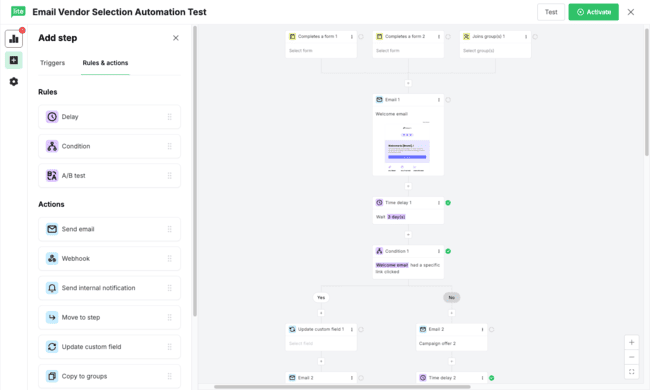
MailerLite’s automation builder had one of the biggest recent updates. The new builder has a proper drag-and-drop interface. You can grab a trigger, email, delay, condition, or action and move it into place. Reordering steps is much quicker than before.
There is also a new Joins a segment trigger. Segments can combine subscriber fields, engagement, and purchase data. A contact can enter an automation when they meet those rules. You can also send a test of every email in a workflow at once and manually add subscribers to an automation.
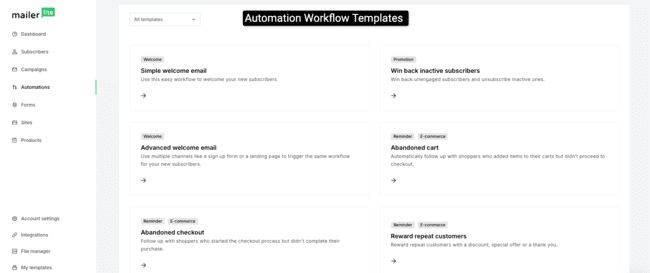
MailerLite now includes 15 ready-made automation templates for welcome sequences, re-engagement, online courses, reviews, and ecommerce. Ecommerce automation has improved too. Abandoned cart and abandoned checkout are now separate triggers, and purchase frequency can trigger after a customer’s 3rd, 5th, or other purchase milestone.
Ecommerce targeting is now more precise. The Buys specific product trigger can now target the exact product variant someone bought. So you could trigger a workflow for buyers of a red hoodie in size L, a particular SKU, color, or material. Variant targeting is live for Wix, with support for Shopify, WooCommerce, BigCommerce, PrestaShop, Shoper, and the ecommerce API coming soon.
We’ll create a workflow and build out our automated flows in the automation editor. Start with a trigger.
Available automation triggers in MailerLite:
- When a subscriber joins a group
- When a subscriber completes a form
- When a subscriber clicks a link
- When a subscriber field is updated
- The anniversary of a date
- The exact match of a particular date
- When a subscriber joins a segment
- Abandoned cart
- Abandoned checkout
- Buys any product
- Buys a specific product
- Buys from a specific category
- Purchase frequency
This gives you plenty of ways to start an automation. Trigger workflows from form fills, clicks, subscriber data, dates, or dynamic segments. Connect an ecommerce store and you can also automate abandoned carts and checkouts, post-purchase emails, product-specific campaigns, and loyalty emails based on purchase frequency. Unfortunately, you can’t trigger based on web page visits. Multiple automation triggers are a Power plan feature.
You use steps to guide people through the flow. There are four steps to choose from email, delay, condition, and action.
By adding conditions in MailerLite, you can build quite advanced automation. It’s more than enough for those who don’t have super complex needs. And MailerLite has tutorial videos available to help you get started.
The email automation in MailerLite is great value for money. It’s included in every plan. You can use automation to power quite sophisticated setups. In Mailchimp vs MailerLite, MailerLite takes the automation cake, but isn’t as advanced as, for instance, ActiveCampaign.
For example, Pathpages sells Notion templates and has grown to 5 figures in monthly sales. MailerLite automations are central to the setup, turning free-template signups into customers, increasing order value with upsells, and collecting testimonials automatically.
If you are looking to do more triggered email marketing and autoresponders, you will get a lot of value out of MailerLite’s automation.
Growing your list with MailerLite
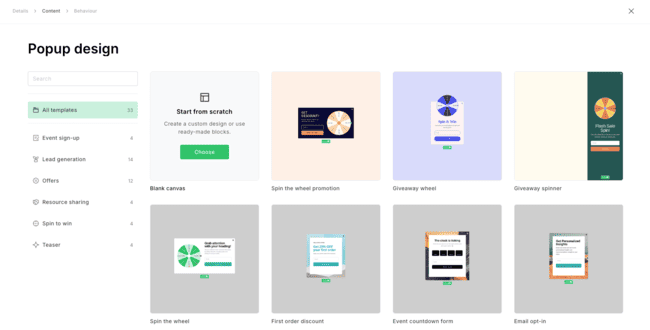
With MailerLite Forms, you can design your newsletter subscription forms for site visitors and promotion pop-ups that advertise a sale. There are two types of forms: pop-up forms and embedded forms.
The Form and Pop-up Editor
When building a website pop-up, templates are the preferred starting point. Or you could jump straight to the editor and build it all exactly as you want. Creating a form or pop-up is pretty straightforward.
You can customize fonts, text, color, and add images. You can add form fields, so you get more than only an email address. Ask for customer preferences, names, addresses, whatever you like.
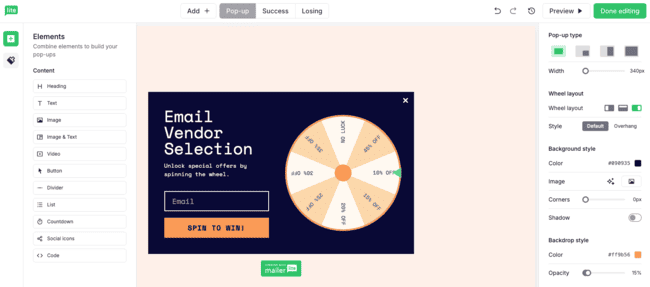
MailerLite also has spin-the-wheel pop-ups to gamify list growth. Visitors enter their email address before spinning for discounts or other prizes. You can create 4 to 8 wheel slices, set the winning probability for each one, and automatically email winners their coupon code.
Now we set when your pop-up appears, based on time, scroll depth down the page, or only on certain pages. Exit intent pop-ups are very effective, showing a pop-up when someone starts to leave a webpage.
Forms are simpler than building pop-ups or emails. You choose a format (default, horizontal, or card with image), and that is what you get.
After building the opt-in form, you add the follow-up flow. Maybe you want new subscribers to confirm their subscription, and then send multiple automated follow-up emails.
It’s nice to be able to choose double-opt-in form-by-form. You don’t need to specify it for your whole account. That’s a nice bit of flexibility. You can build out a Europe form for GDPR legislation, and another for the US, where email laws are a bit more, shall we say….loose!
There are MailerLite WordPress plugins and a Shopify integration, so the form and pop-ups snippet can be added automatically on those platforms.
Forms in MailerLite are included in all of their plans, and it’s quite advanced, so you won’t need to have separate pop-up software. The pop-up forms have several triggers, and you can automate virtually anything after a form is filled.
A marketer can use this functionality to build advanced campaigns where a user fills in a form and goes through a series of emails designed to convert on a particular product. Can’t beat that for this price.
ProShot & Tidal Sports, for example, used MailerLite’s list-building tools for a product launch. They used embedded forms and pop-ups to collect hundreds of signups before releasing a new iPhone case. Combined with launch emails and countdown timers, the campaign generated more than 15,000 sales on the first day.
MailerLite Website and Landing Page Builder
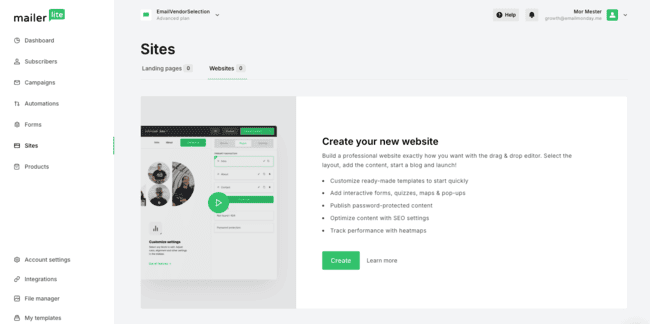
MailerLite has a website and landing page builder. But are MailerLite’s landing page features competition to a CMS like WordPress?
You can host MailerLite’s landing pages and websites either on their domain (.mailerpage.com) or display it on your site. So if you already have a website set up, you might want to use MailerLite’s landing page creator to add a few extra landing pages.
Alternatively, if you don’t have a website, use the website builder to create a minisite of your own. Quickly get a page up and running with MailerLite’s hosting, and in the future, you could migrate to something else.
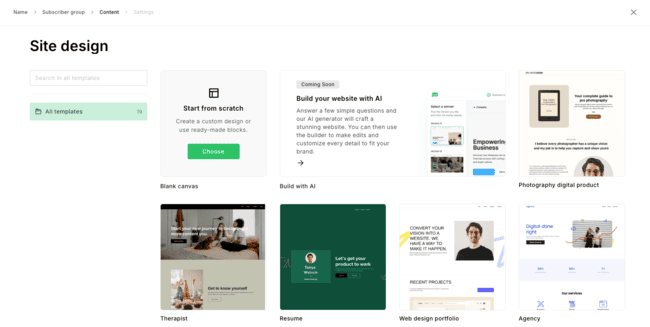
You can create a landing page from scratch, or use one of the 30 MailerLite premade landing page templates (on the paid plan).
The page editor looks and feels the same as the email editor (as it should!). You can add in modular “content blocks” with the drag-and-drop builder.
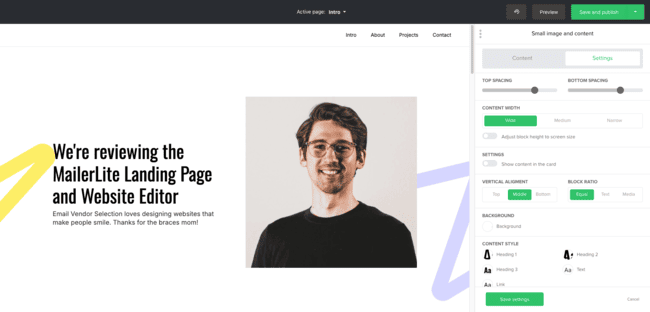
On the final page, you can edit the landing page settings. These include:
- Page title
- The URL of the page
- SEO settings such as page metadata
- Social sharing descriptions and metadata
- Google Analytics tracking codes
The MailerLite website builder allows you to create simple websites with multiple pages.
The only quirky thing is that when you create a MailerLite site, you have to connect it to a subscriber group. It doesn’t affect anything negatively, but it was a bit confusing at first. Forms can be connected to multiple groups.
The site templates are based on different industries and use cases. For testing, I picked a real estate website: a five-page template with featured properties on the homepage, individual listing pages, and a “meet the team” page. I haven’t sold a house yet, but who knows. 😀
The editor is the same as the landing page editor. The templates are quite good. You don’t need to change that much.
Selling digital products with MailerLite
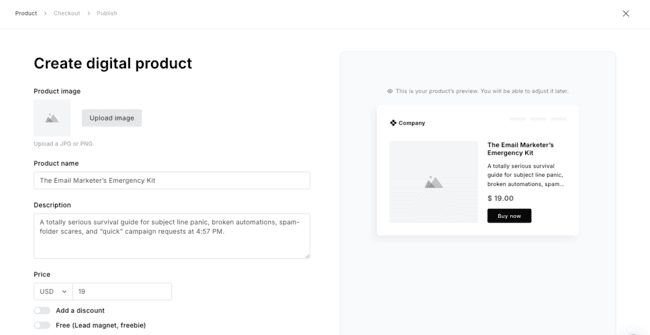
MailerLite lets you create and sell digital products without adding a separate ecommerce platform. Upload PDFs, EPUBs, or images directly to MailerLite. You can also send buyers to an external URL for other content types. It uses Stripe for payments. You just set your price, customize the checkout and confirmation email. MailerLite delivers the product after purchase. Stripe’s normal payment processing fees still apply. MailerLite charges 0% commission.
You don’t need a website either. Share the checkout URL directly or add your product to emails, landing pages, and websites with the Product block. Sales data stays alongside your subscriber data, so purchases can also trigger automations, update groups, or feed into your segmentation.
Paid newsletter subscriptions
MailerLite also lets you charge for newsletter subscriptions. Connect Stripe, create a landing page or website, and accept recurring payments directly from the signup page. You can set weekly, monthly, yearly, or custom subscription periods.
You don’t need to manage paid subscribers manually. MailerLite updates groups when someone starts, changes, or cancels a paid subscription. You can trigger follow-up emails, promote paid plans to free subscribers, and send exclusive content only to paying readers.
I like that this sits inside the same platform as your email campaigns, landing pages, and subscriber data. For creators and publishers, it means you can build and monetize a newsletter.
MailerLite Bookings
MailerLite now includes Bookings alongside its digital products. You can sell or offer free 1:1 sessions and group calls without adding another scheduling app. Connect Google Calendar or Outlook, set your availability, and use Stripe for paid sessions. MailerLite takes 0% commission, although Stripe’s normal processing fees still apply.
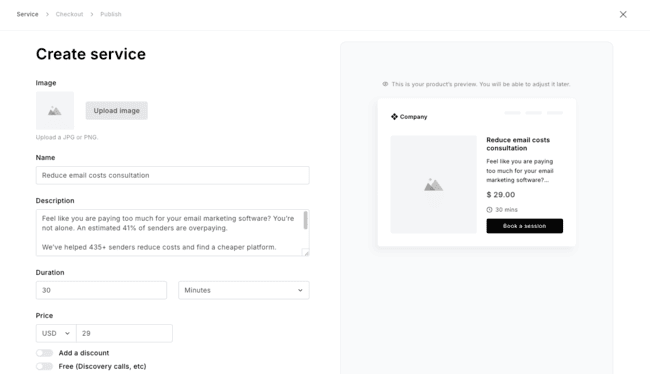
MailerLite also makes it easier to turn a product into a marketing campaign. Click Promote on a digital product or booking, and you can create an email campaign, website, or automation directly from the product page. There’s also a Promote specific product automation template. It opens with the purchase trigger, customer group action, and a “You may also like” follow-up email.
MailerLite’s email marketing functionality might be similar to competitors. Its landing page and website functionality is better. Using MailerLite as WordPress for their CMS and hosting. Not everyone will use it, but when you do, it will save quite some dollars.
Managing subscribers in MailerLite
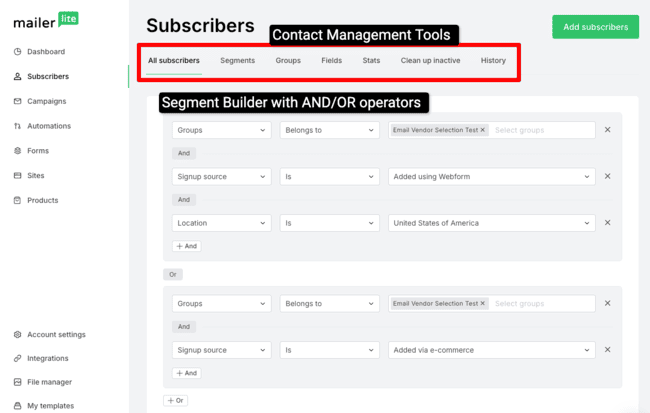
Let’s review the “Subscribers” section in MailerLite. This is where you will manage your email list, create segmentation groups, create new fields, and do list reporting. Let’s zoom in on the email list management features.
Start at the All Subscribers section
This is where you will find all of your subscribers. With filters, you can drill into subsets. Filter on any database field or behavioral filters such as a member of a campaign/number of emails sent, and the like.
You can combine filters to get more advanced. After nailing down your selection, save the segment for use in other parts of MailerLite.
Add new subscribers as they sign up. Other options are to upload a CSV/TXT file, copy and paste from Excel, or import from a linked Mailchimp database. If you are migrating from Mailchimp, that is very handy.
Segmenting your subscribers in MailerLite
Segments and groups are powerful in MailerLite. Here you build automated dynamic or static groups of your subscribers. For Mailchimp users, MailerLite groups are similar to Mailchimp Lists. MailerLite segmentations are similar to….Mailchimp segments.
So, how would you use segments? You can create a segmentation or group based on:
- Existing group membership (static lists)
- Any database field
- Any other segment
- Automation workflow activity
- Behavioral (number of emails sent, opened or clicked)
- Purchases (with an integration to your online store)
You can combine all segmentations above. That should take care of… every crazy segmentation scheme you can come up with.
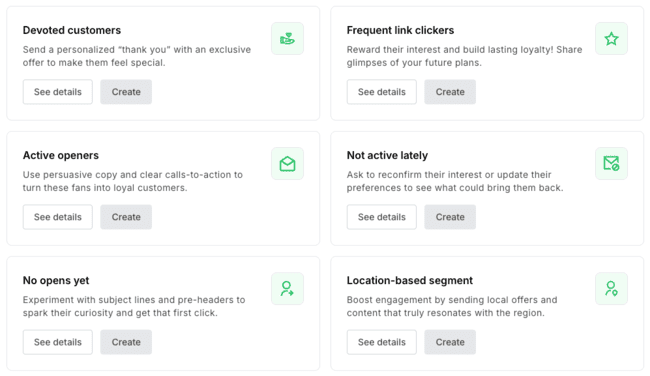
If you don’t want to build segments from scratch, MailerLite has 7 segment templates for loyal customers, email engagement, location, and time zone.
The subscriber and list management features in MailerLite are solid without being overwhelming.
MailerLite has rebuilt its subscriber preference center. Comfort and Power customers can create a branded page where subscribers choose what they want to receive, how often they want emails, or update details like location and interests. It uses the same drag-and-drop builder as MailerLite’s other editors and supports multiple languages.
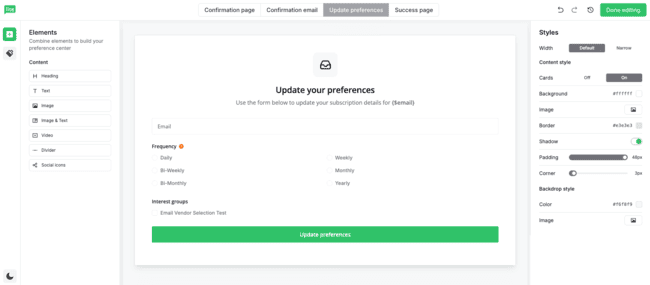
Answers can update a custom field or move the subscriber into a group. I like this because it gives people another option before they unsubscribe. It also turns the preference center into a useful source of data for segmentation and dynamic content.
MailerLite’s segmentation features allow you to do more sophisticated email marketing. Compared to Mailchimp, MailerLite’s subscriber management and reporting are solid.
The Festival at Sandpoint is a good example of using groups and segments. The nonprofit sells around 25,000 tickets across 9 concerts each year. It segments subscribers by previous purchases and music genre, and says a typical email sends 300 to 500 clicks to its ticketing platform.
Deliverability in MailerLite
MailerLite does a lot of the technical deliverability setup for you. You need to authenticate your sending domain. MailerLite guides you through adding SPF and DKIM records and checks that everything is set up correctly. You can also add DMARC to your domain.
Domain alignment is supported, too. This matches the email header, tracking links, and image links to your own domain. MailerLite can set this up automatically with 40+ supported DNS providers. Or you can add the A, MX, and TXT records manually.
MailerLite automatically includes the one-click List-Unsubscribe header required by Gmail and Yahoo.
Cool feature: Automatically remove non-engaged subscribers
The “Clean up inactive” feature quickly finds and unsubscribes people on your list who haven’t opened an email for 6 months. You can unsubscribe them or save them as a segment for a re-engagement campaign. This will help you keep a clean and engaged list, improving deliverability and reducing the chance of landing in spam.
High-volume senders can request a dedicated IP. MailerLite recommends this for accounts sending at least 50,000 emails a week. Their deliverability team assesses the account and takes care of adding and warming the IP if you’re approved.
Overall, MailerLite covers the important deliverability basics well and makes authentication surprisingly straightforward. I’d still like to see more testing inside the platform. There isn’t an inbox placement test, and the design checks are limited.
Reporting and Analytics in MailerLite
You can run the stats for all subscribers or a specific group in reporting. MailerLite will pull together all the data for this group and give you a drill-down.
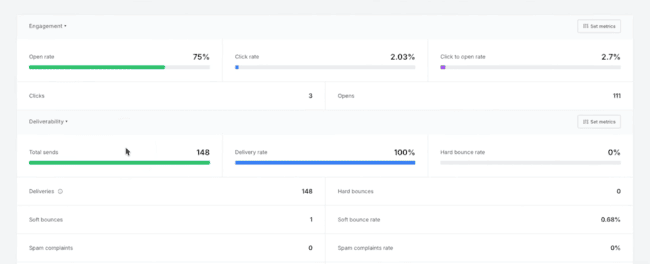
MailerLite’s reporting used to be one of the more basic parts of the platform. That has improved. The regular reports still show campaign and subscriber metrics such as sends, opens, clicks, unsubscribes, ecommerce sales, domains, email clients, and list growth.
The new Custom reports tool is the bigger change. Pick the metrics you care about, then group results by campaign, time period, or subscriber group. You can add filters, compare two metrics on a visual trend line, save reports for later, and export the data when you need to share it.
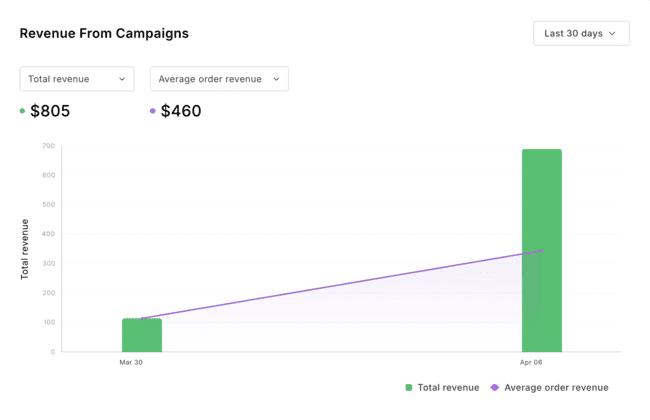
This is much more useful for a growing digital marketing team than checking email campaigns one by one. It still is not a full analytics platform, but it fixes one of my bigger complaints about MailerLite.
MailerLite Integrations and API
MailerLite has 125+ integrations, including CMS and ecommerce platforms, email verification tools, landing page builders, CRM platforms, payment processors, and form builders. Popular integrations include Shopify, WooCommerce, WordPress, Stripe, and Canva. You can also connect 5,000+ tools through Zapier, or use the MailerLite API for custom integrations.
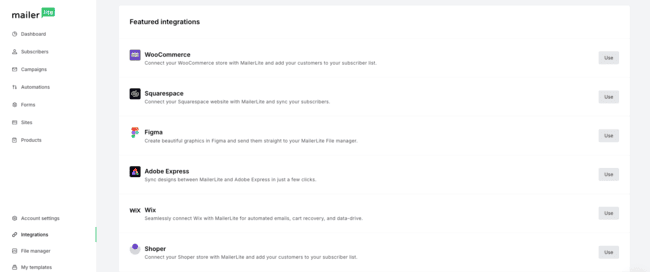
These integrations will save you lots of time, since you can avoid manual imports of subscribers, trigger an abandoned cart email, pull your products from Shopify into the email editor… You get the idea.
The interesting new addition is MailerLite’s MCP server. It lets compatible AI assistants like ChatGPT and Claude work with data in your MailerLite account. You can use natural-language prompts to analyze campaign results, work with subscriber groups and segments, and interact with campaigns, automations, and forms.
Don’t forget that MailerLite has a lot of the functionality of these external tools. For example, MailerLite does list growth pop-ups, as does, for instance, NinjaPopups. The beauty is now, you can use the tool that works best for you.
MailerLite Plans and Pricing: How Much Does It Cost?
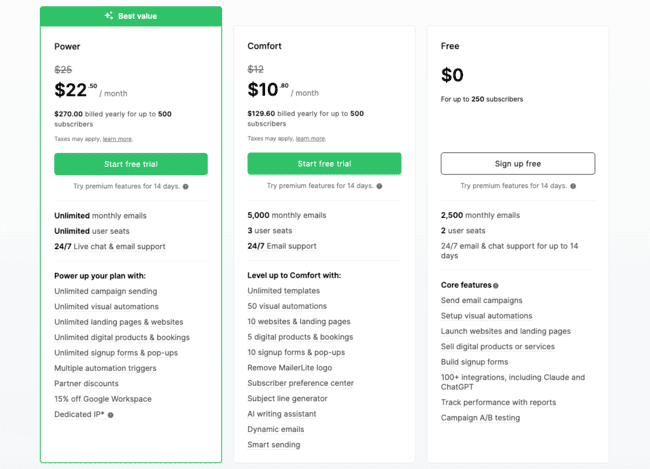
MailerLite pricing is based on the number of subscribers. Prices start at $10.80/month for the Comfort plan with 500 subscribers and annual billing. You get unlimited emails on the Power plan. Monthly email sends on the Comfort plan are 10 times your subscriber tier.
Comfort has 3 users, 24/7 email support, 50 active automations, 10 forms, 10 websites and landing pages, and 5 digital products or bookings.
Power is the plan for heavier use. It has unlimited monthly emails, unlimited users, unlimited automations, unlimited landing pages and websites, unlimited forms and pop-ups, and multiple automation triggers. You also get 24/7 live chat support.
If you want to try out the software, MailerLite is free for up to 250 subscribers and 2,500 emails a month. You get most of the features on the free plan.
| Free | – 250 contacts – 2,500 email sends – 3 automations – 3 forms – 3 email editors – Newsletter templates – 1 landing page – 1 website |
| $12 | – 500 contacts – Comfort plan with 5,000 email sends. |
| $19 | – 1,000 contacts – Comfort plan with 10,000 email sends. |
| $33 | – 2,500 contacts -Comfort plan with 25,000 email sends. |
| $69 | – 5,000 contacts – Power plan with unlimited email sends. |
| $99 | – 8,000 contacts – Power plan with unlimited email sends. |
MailerLite prices are low for what you get. It’s worth hopping on the free plan and having a look at their email marketing, forms, site builder, and marketing automation tools.
See full pricing here
MailerLite Discount
If you are ready to try MailerLite, we have an extra discount for you. When we spoke to the MailerLite team, they wanted you to get started on your favorite plan.
New customers and free plan users get 50% off their first month on the monthly Comfort and Power plans. Get started for free here and use code GOLITE50 at checkout to get the discount. The offer is available until September 24, 14:00 UTC.
Try MailerLite for free > (Extras included)

If you register for a new account and start your free trial via this page, you get…
- Full free plan with all features
- Another 10% discount if you pay for the year
MailerLite Customer Support
MailerLite customer support depends on your plan. Comfort includes 24/7 email support. Power gets both 24/7 email and live chat support. New free accounts get email and live chat during the 14-day trial.
When the trial ends, free users can use MailerLite’s self-service support and community. The knowledge base is well organized, with hundreds of help articles, video tutorials, courses, and live training. I found it pretty easy to get answers while testing the platform.
MailerLite’s support team was quick and helpful in our own testing. MailerLite doesn’t list phone support among its standard support options, so choose the Power plan if you want real-time help.
Final Conclusion: Is MailerLite the right email tool for you?
MailerLite is an email marketing service with much more punch than just email blast software. For $12/month, you can create email campaigns, automate a new subscriber onboarding process, and build and host your landing page. Can’t beat that.
The MailerLite email editor is easy to use, and the whole system is easy to set up. They have a free plan, and paid plans are cheaper than competitors like Mailchimp. Landing pages, the website builder, signup forms, digital products, and bookings make MailerLite more than a basic email service.
The biggest improvements are automation and reporting. Workflow templates, the segment trigger, easier drag-and-drop editing, and improved ecommerce triggers make the automation tools more useful. Custom reports finally give you a better way to look at trends instead of opening campaign reports one by one.
And if you’re just starting, they have a free plan for up to 250 subscribers and 2,500 emails.
I can say that MailerLite is one of the best choices for bloggers, small businesses, and senders who like a clean email interface. Everyone who was thinking about Mailchimp can find a great home at MailerLite.
Get started with MailerLite for free
MailerLite Frequently Asked Questions
Is MailerLite free?
How do I sign up for MailerLite?
Does MailerLite have live chat?
Yes, MailerLite has 24/7 live chat support on the Power plan.
Where does MailerLite store my database?
MailerLite stores the data in the EU. It’s covered by EU data protection laws and in line with GDPR requirements. This makes it a good option for international, US, and European users.
What is the account approval process in MailerLite?
MailerLite checks all senders before their first send. You can start using the platform, but just not send the first day. The process is automated, and you don’t have to do much beyond providing your company / personal details. While a small annoyance, approval benefits everyone since you won’t have spammers using the platform.
What is MailerLite customer support like?
MailerLite’s support team was quick and helpful in our testing. Paid customers can contact support directly from their account. Comfort gets 24/7 email support, while Power adds 24/7 live chat. Free users get direct support during the trial and then use the knowledge base and community.
MailerLite Alternatives
MailerLite vs Mailchimp
The biggest reason to choose MailerLite over Mailchimp is value for money. Both free plans now allow 250 contacts. But MailerLite gives you 2,500 emails a month, compared with just 500 on Mailchimp. MailerLite Comfort starts at $12/month for 500 subscribers. Mailchimp Essentials starts at $13, and the more comparable Standard plan starts at $20.
The difference gets bigger as your list grows. At 5,000 contacts, MailerLite Comfort costs $49/month compared with $100/month for Mailchimp Standard. MailerLite also has strong landing pages, forms, a website builder, digital products, bookings, and the new drag-and-drop automation builder. Upgrade to Power, and you get unlimited monthly emails. Mailchimp caps sends at 10 times your contact limit on Essentials and 12 times on Standard.
Mailchimp has more tools outside email marketing, including SMS add-ons and a broader marketing platform. But that also makes the platform more complicated. If your priorities are email marketing, automation, growing an audience, and keeping costs down, I’d choose MailerLite. It’s simpler and works out much cheaper.
Check out this MailerLite vs Mailchimp comparison guide and our full Mailchimp review for details.
MailerLite vs Constant Contact
MailerLite and Constant Contact both start at $12/month. But MailerLite gives you much more for that price. Its Comfort plan has visual automation, landing pages, websites, forms, digital products, bookings, and 24/7 email support. Constant Contact Lite is much more basic, with one automation flow.
Constant Contact gets more interesting if you run events. It has built-in event tools, 300 integrations, hundreds of email templates, social marketing features, and live phone and chat support. But to get stronger automation, you need Standard at $35/month. Fully customizable automation paths are a Premium feature, starting at $80/month.
For most small businesses, creators, and solopreneurs, I’d pick MailerLite. It’s easier to get sophisticated email marketing and automation without moving onto an expensive plan. Constant Contact makes more sense if event management or phone support are especially important to you.
Compare more similar platforms in our full review of Constant Contact alternatives.
MailerLite vs Brevo
MailerLite and Brevo are both very affordable, but their pricing works differently. MailerLite charges by subscribers. Brevo is priced based on email volume. Brevo Starter costs $9/month, compared with $12 for MailerLite Comfort. Brevo also has the more generous free plan for storing contacts, with 100,000 contacts and 300 email sends a day. MailerLite Free has 250 subscribers and 2,500 emails a month.
Brevo is the stronger choice if you want marketing and sales in one platform. It has a sales CRM, transactional email, SMS campaigns, WhatsApp, push notifications, and website tracking. You can even trigger automations when someone visits a particular webpage.
For straightforward email marketing, I’d choose MailerLite. Its interface is cleaner, and the forms, landing pages, website builder, digital products, bookings, and improved automation builder are a better fit for creators and most small businesses. Power also gives you unlimited monthly emails. Pick Brevo if you need a CRM and multichannel marketing. Pick MailerLite if email, audience growth, and ease of use matter more.
