9 Best Kit Alternatives in 2026 (Tested, Reviewed, Compared)
Kit (formerly ConvertKit) is an email marketing platform for creators to turn content into cash. With over half a million customers, it’s very popular as it is an easy starting point for newsletters.
Maybe you’re looking for your first email platform as a creator. Or you already use Kit and want to replace it. There are plenty of reasons to consider alternatives.
When I talk to creators, their email list is usually very important. And they talk about how they started with a platform that worked fine in the beginning. Then they end up choosing another over time that works better for them. I’ve tested and reviewed more than 30 email marketing services. These are the 9 Kit alternatives we’d consider for creators.
9 Best Kit Alternatives Overview
Maybe you wonder why every creator doesn’t use the same platform? Well, it’s because not every creator is the same. And so the 9 alternatives below range from simple newsletter tools to complete marketing platforms. I’ll compare what each one does better than Kit, where it falls short, and who I’d recommend it to.
Brevo – best budget-friendly Kit alternative, multichannel platform for your newsletter.
MailerLite – gives creators an affordable way to send newsletters and sell digital products.
Beehiiv creator-specific newsletter service for growing and monetizing your newsletter.
Moosend – affordable email platform with automation and behaviour tracking.
ActiveCampaign – most advanced marketing and sales automation tools.
Omnisend – strongest choice for ecommerce brands selling physical or digital products.
GetResponse combines email marketing with funnels, webinars, courses, and monetization.
Substack – free alternative for easy newsletters and a few caveats.
Ghost – publishing platform for building a website, newsletter, and paid memberships
Where Kit struggles
Kit works well for a certain type of creator. But there are many kinds of creators with different needs. And some users find they outgrow Kit as their needs evolve, so what are the most common downers?
It’s email only. Kit is fine if you only use email to communicate with subscribers. But it has limited support for SMS marketing. Or for WhatsApp, web push notifications, and other channels. Alternatives like Brevo, ActiveCampaign, and GetResponse have more channels.
No CRM or funnels. Kit’s combination of email marketing and direct content selling is a strength. You’ve got to love the convenience. But there are two downsides. One, the sales process is pretty generic. Other platforms give you more control over what happens between capturing a lead and closing a sale. GetResponse lets you build targeted sales funnels. Brevo and ActiveCampaign include full sales CRMs, with pipelines and deal management.
Sponsor network only above 10,000 subscribers. You need at least 10,000 subscribers and publish weekly to join Kit’s Sponsor Network. Kit also takes 20% of the sponsorship fee. So this monetization channel won’t do much for you while you’re still building a smaller newsletter.
Kit isn’t great for ecom or physical sales. A lot of creators end up wanting to sell physical merchandise too. For that, you need an ecommerce site. Kit offers integrations with a couple of ecommerce platforms like Shopify and Wix. But it has nowhere near the choice and sophistication of Omnisend, ActiveCampaign, or GetResponse.
Kit gets a bit expensive. It starts at $39 a month for 1,000 subscribers. That’s high compared to most affordable email marketing software. You get built-in monetization tools for that higher price. But you can sell digital products directly in MailerLite for a fraction of the cost.
What to look for in a Kit alternative
There are lots of reasons to look for a Kit alternative. Here are some core must-haves to stick to:
- Affordable pricing and value. Kit’s prices are higher than many alternatives. And its subscriber-based pricing can get expensive fast. Alternatives like Brevo (email-based pricing) or MailerLite (starts at $10.80/month) give you more room to grow.
- Monetization features. Check out what monetization alternatives offer. Beehiiv offers monetization like Kit, but with an even broader network. You can sell digital products, newsletter subscriptions, and bookings with MailerLite. You’ll need to connect an ecommerce platform with other alternatives. Make sure any service you choose will connect to your web store. Or suit the types of products you sell.
- Messaging channels. Kit is an email-only marketing service. Most email marketing platforms also include SMS marketing. Plus WhatsApp, or web and mobile push notifications. If email isn’t your only channel, check whether you can add SMS, WhatsApp, or push messages without using more tools.
- Automation. Kit’s automation is reasonably good. So you want an alternative that can at least match it. Look for multiple workflow triggers, conditional logic, automated tagging, segmentation, and sending. Creators should also look at the automations they use to make money: lead magnet delivery, welcome sequences, product launch follow-ups, and purchase triggers.
- Segmentation and targeting. Kit uses tagging for segmentation. And to manage subscribers entering workflows. It’s easy and effective. But you can improve on this with behaviour-based segmentation. Look for alternatives that support web tracking and customer engagement scoring.
Check out our full Kit review to find out more about its features, pros and cons.
9 Best Kit Alternatives
Brevo – Best for multichannel marketing on a budget
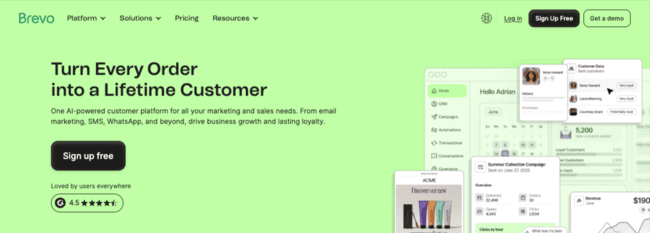
Brevo is an all-in-one marketing platform for small businesses. It combines email campaigns, automation, CRM, WhatsApp, and SMS. Meaning it’s ideal if you want a single platform that can cover marketing and sales. But still keeps costs low and is easy to use.
Features that make Brevo a good Kit alternative:
- Email marketing with automation workflows
- Unlimited subscribers on most paid plans
- Built-in CRM with pipelines and contact tracking
- SMS and WhatsApp messaging
- Transactional emails
Brevo’s pricing is a real standout. It starts with the free plan. You can send 300 emails a day and store 100,000 contacts for free. Brevo pricing is based on email sending, not contact count. Growing your list doesn’t automatically increase your costs. The free plan also includes the drag-and-drop visual email builder, 48+ templates, automations, AI content generation, and personalization.
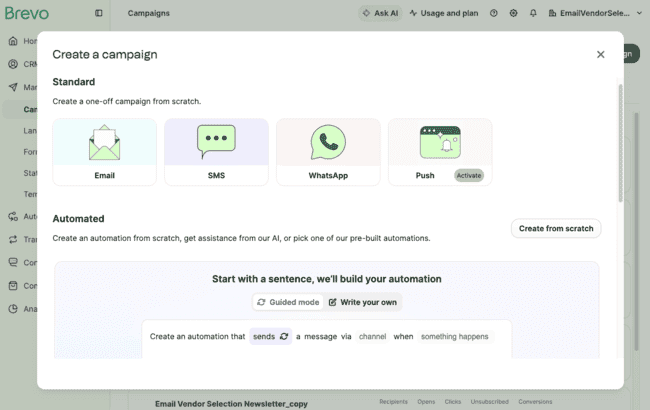
Brevo has a lot more channels than Kit. You can include email, SMS, WhatsApp messages, and push notifications in the same automations. And use Brevo to send transactional messages, like sign-up emails and sales confirmations.
You can grow your audience with Brevo’s customizable signup forms and landing pages. It doesn’t have a recommendation network, like Kit.
It has 48+ email templates to get started designing your emails. You can connect easily to an ecommerce platform for selling digital or other products.
If you want to just send a newsletter, for low cost, and may add some other channels too, Brevo is a good deal.
Brevo Pros
- Generous free plan, great for creators starting out
- Low-cost pricing based on emails sent supports audience growth
- Multichannel automation with email, SMS, WhatsApp and web push
- All-in-one marketing and sales platform with CRM and transactional messaging
Brevo Cons
- If you want more than one user, you have to get the Standard plan.
- No recommendation network
Brevo plans start at $9 a month, with a 10% discount if you pay annually. This includes 5,000 emails a month.
Brevo is already one of the most affordable email marketing services. To make it an even better deal, Email Vendor Selection readers can get a 60% discount for 3 months if you start your free account here and add the coupon code Insider60.
Get started with Brevo for free or read our full review
MailerLite – Best for low-cost newsletter monetization
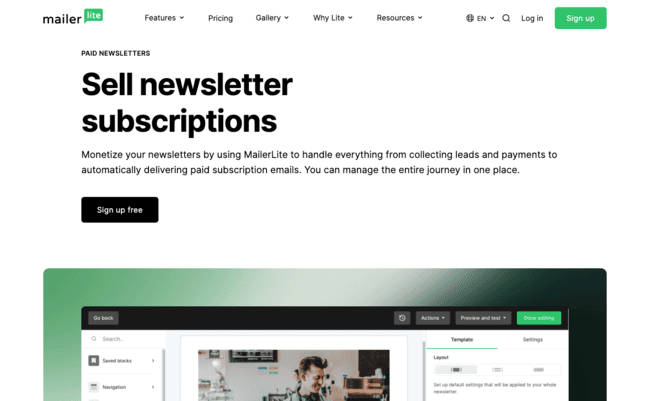
MailerLite is a no-nonsense email marketing platform. Its simplicity and low cost make it very popular. But it’s also customizable. You can build websites with it. And it lets you sell digital products and newsletter subscriptions. You can start for free.
Features that make MailerLite a good Kit alternative:
- Free plan with 250 contacts, and 2,500 emails
- Built-in digital product sales with Stripe integration
- Email campaigns and automation workflows
- Website builder for blogs and landing pages
- Flexible segmentation
MailerLite’s free plan is enough to get a newsletter up and running. You can sell one digital product for free. And accept payment directly via a Stripe integration. The free plan also includes access to the drag-and-drop email editor and templates. Sign-up forms, website and landing page builders. And simple automation workflows. So everything you need to collect subscribers, send newsletters, and offload some of the manual work.
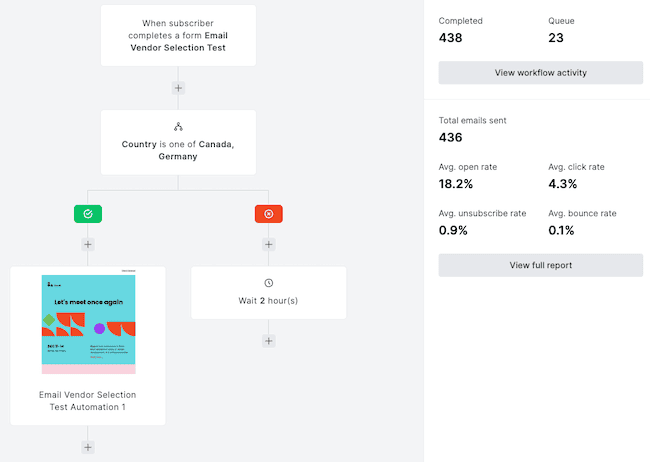
All of MailerLite’s email marketing tools are simple and intuitive to use. But it’s got some really cool features. Like dynamic content for personalizing emails and segmentation with custom attributes and behavior tracking. You can build segments around the subscriber data and behaviour.
MailerLite doesn’t have Kit’s creator-specific monetization like the creator network and paid recommendations. But it beats Kit hands down on price. And it’s a more flexible all-round marketing tool. You can do more than sell newsletter subscriptions and digital products.
A big difference here is that you can build full websites. Including blogs that you can then also monetize. Plus, MailerLite connects directly to ecommerce platforms like Shopify and WooCommerce. So you can sell physical products too.
MailerLite’s email verification feature checks every email subscriber. So you won’t get caught out by spammers and bots. MailerLite is part of the same company as transactional email platform MailerSend. That gives the company plenty of experience running email infrastructure. Where your emails land still depends on your list quality, authentication, and sending habits.
MailerLite Pros
- Free plan to get started
- Great value for money
- Full website builder
- Customizable email designs and personalization
MailerLite Cons
- Automation is functional but not as advanced as, for example, ActiveCampaign.
MailerLite plans start at $10.80 a month if you pay yearly. This includes 500 contacts, 5,000 emails, 3 users, and paid newsletters. The free plan has 250 contacts, 2,500 emails, and 2 users.
Get started with MailerLite for free or read our full review
beehiiv – Best for monetizing newsletters
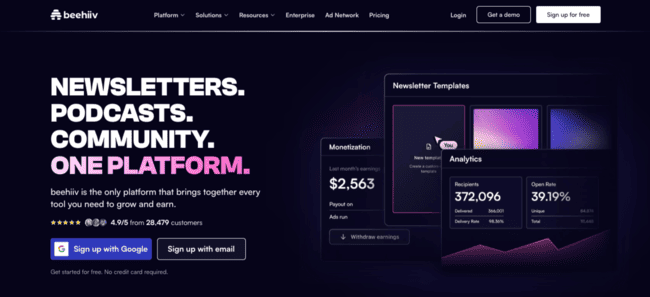
Beehiiv is one of Kit’s most direct competitors. It’s an email platform for creators with an emphasis on growing a newsletter and making money from it. You get 4 ways to monetize, plus referral and recommendation networks for finding new subscribers.
Features that make beehiiv a good Kit alternative:
- No-code website and blog builder
- Marketing automation tools for newsletter distribution and promotion
- 4 monetization features, including paid newsletter subscriptions and paid referrals
- Network-based paid and organic list growth
- Advanced analytics for tracking subscriber growth and revenue
Beehiiv doesn’t work like most email marketing platforms. For one, you don’t really build HTML emails. You create blog-type posts that beehiiv hosts on a simple website. These then serve as the newsletters you distribute to subscribers.
Design is simple and less flexible than drag-and-drop HTML editors. But you can personalize what you send with dynamic content. Beehiiv is excellent for segmenting your audiences. You can use custom attributes, behavior tracking, and engagement analysis. Beehiiv will update who belongs to different segments automatically.
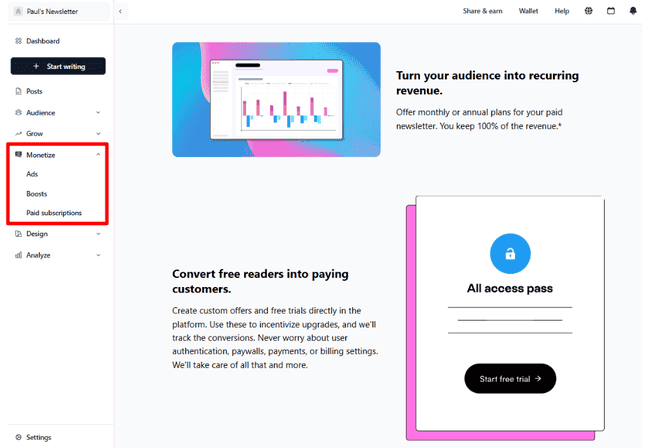
Beehiiv really differs from standard email platforms in how closely its growth and monetization features work together. On list growth, it starts with usual sign-up forms. Referrals and recommendations are where it gets more interesting. You can incentivize subscribers to recommend your newsletter to their contacts. Or pay for or trade recommendations from other creators. This can also be an earning opportunity for paid newsletter subscriptions. And beehiiv runs an advertising and sponsorship network.
This is very similar to Kit. The differences are subtle. Beehiiv is set up for creators to grow an audience quickly. It also runs its own ad network, while Kit doesn’t. That ad model becomes much more attractive once you have a large audience.
Beehiiv shines if the newsletter is also a content product. Or when you have expertise to share or a prominent voice to promote and need a longer-form publication platform.
If you want your newsletter to live on the web as a publication, Kit gives you a Creator Profile and newsletter feed. But beehiiv is a better fit if you want your website and archive to be a bigger part of the publication.
beehiiv Pros
- 4 ways to monetize for generating multiple revenue streams
- Powerful audience growth features
- Combines blog and newsletter in one platform, ideal for long-form publications
- Dynamic personalization and targeting to build engagement
- Free plan to try out and build your first subscriber list
beehiiv Cons
- Newsletter monetization requires a paid plan
- Email design is more limited than other platforms
Beehiiv plans start at $43 a month if you pay annually. This includes 3 users, 1,000 subscribers, and unlimited emails. There is a free plan that lets you run a publication. And add 2,500 subscribers using forms and the recommendation network. Newsletter monetization is only available in paid plans.
Get started with beehiiv for free or read our full review
Moosend – Affordable email platform with automation
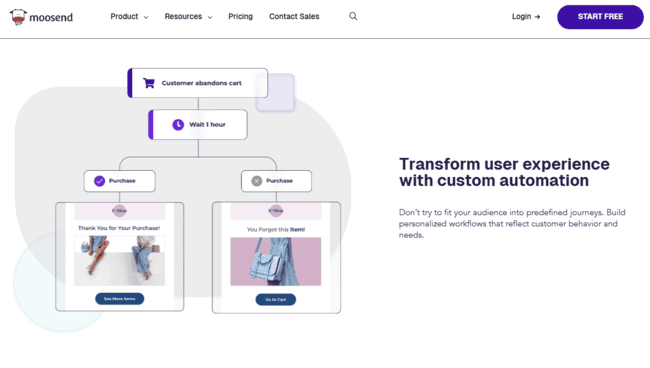
Moosend is a popular email marketing service for SMBs. It’s cheap, user-friendly, and focuses on the fundamentals of email marketing. But for its price point, it stands out for the quality of its features.
Features that make Moosend a good Kit alternative:
- Visual automation builder with 18 pre-built workflow templates
- Advanced segmentation based on behavior tracking
- Drag-and-drop editor and email templates
- Ecommerce integrations
- Real-time analytics
Moosend is great if you want to get started sending emails quickly. It’s got a well-thought-out email editor. There’s a ton of design options. The interface layout is very intuitive and easy to learn. There are 100+ customizable templates to start with. Including plenty for newsletters.
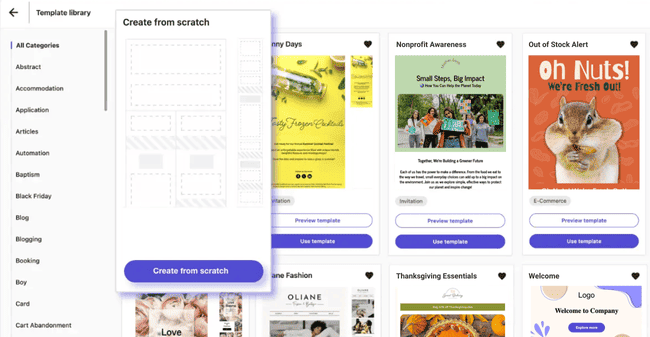
Web tracking is where Moosend starts to pull ahead of simpler email tools. You can connect Moosend to a website. It then tracks user behaviour like page visits and uses this data to trigger automations. If someone visits your course sales page but doesn’t buy, you can follow up with a testimonial or reminder email. Repeat visits to your coaching or services page can flag a higher-intent lead, while visits on several pages on the same topic can trigger an interest tag and more relevant follow-up content.
For a $7/mo starting price, the automation is surprisingly capable. Its visual workflow builder is easy to set up. With colour-coded steps and pop-up explanations of what everything does.
Both Kit and Moosend make it easy to automate customer journeys and respond to customer actions. But overall, Moosend has the edge. It has more triggers and actions, with more control over how you filter contacts to build segments. You can be much more precise about who enters a workflow and what you send. And it’s cheaper.
Moosend Pros
- Powerful automation at a superb price
- Real-time behavior tracking for segmentation and automation
- Clean, user-friendly interface
- Unlimited emails on all plans
Moosend Cons
- No free plan, but you can try it with a 30-day free trial
Moosend plans start at just $7 a month if you pay annually. That includes 500 contacts and unlimited emails. You can try it out on a 30-day free trial.
Try Moosend for free or read our full review
ActiveCampaign – Best for advanced marketing automation
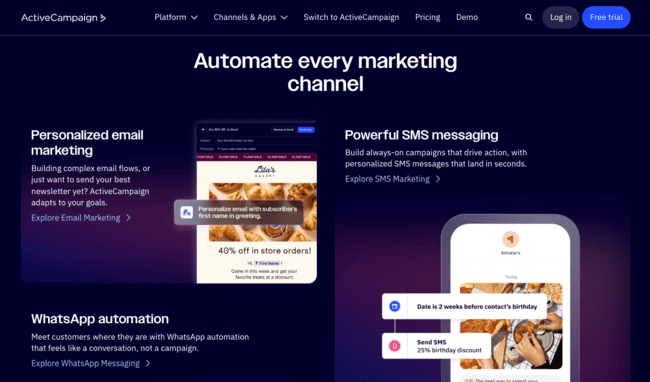
ActiveCampaign is one of the best marketing automation platforms for SMBs. It combines multichannel campaign automation with a sales CRM. It’s popular with more established businesses, especially in ecommerce, SaaS, and B2B.
Features that make ActiveCampaign a good Kit alternative:
- Advanced visual automation builder with conditional logic
- 1000+ pre-built automation templates
- Behavioral tracking across emails and websites
- Dynamic segmentation and personalization
- Built-in CRM with pipelines and lead scoring
ActiveCampaign lets you build much more advanced automation than Kit without starting every workflow from scratch. It has 1000+ automation workflow templates. The templates include welcome sequences, lead magnet delivery, course launches, and paid newsletter promotions.
They’re all fully customizable in a user-friendly visual editor. This means you can automate pretty much anything: campaigns, messaging, segmentation, and sales pipeline tasks. You can also connect marketing to CRM tasks, deals, and sales follow-ups.
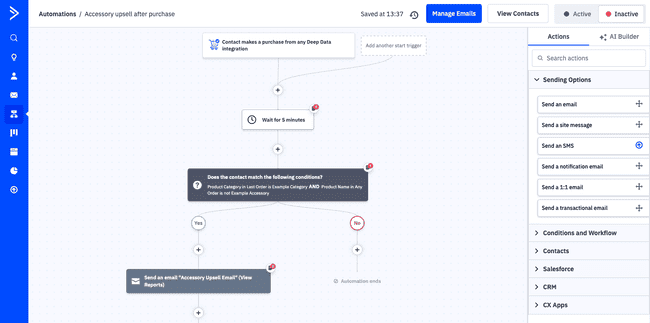
For marketing campaigns, ActiveCampaign supports email, SMS, WhatsApp, and web push. And forms and landing pages for lead generation. Another strength is its AI tools. You can use them to generate content and build custom automated workflows. And all kinds of agentic stuff nowadays.
ActiveCampaign starts making more and more sense once your wishes go beyond what Kit has to offer. Kit is great for creators looking to build a relatively simple digital business. Its workflows are easy to use and efficient. But the narrow focus on newsletters and selling digital products is limiting. Once you have more products, segments, and sales journeys, ActiveCampaign gives you more control.
In Kit, automations follow a simple tag-trigger-send logic. In ActiveCampaign, you get more flexibility to add and define conditions. Have multiple triggers for the same workflow and link workflows together. As your audience grows, the CRM tools help manage sales in a structured way. Rather than just a ‘hit and hope’ marketing approach. You also get lead scoring, predictive sending, and AI recommendations. Overall, ActiveCampaign is much better suited to bigger, more mature businesses looking for advanced automation.
ActiveCampaign Pros
- Highly flexible automation with 1000+ workflow templates
- Strong link between marketing and sales tools
- Multichannel messaging across email, SMS, WhatsApp, and web push
- AI tools make advanced features accessible
ActiveCampaign Cons
- Overkill if you only set out to send a simple newsletter
- More interesting once your list is bigger.
ActiveCampaign plans start at $15 a month. This covers core email marketing and marketing automation features with 1,000 contacts and 10,000 emails. CRM and multichannel messaging are paid-for add-ons. It has a 14-day trial with all Pro features.
Try ActiveCampaign for free or read our full review
Omnisend – Best for ecommerce marketing
Omnisend is an email marketing software for ecommerce businesses. It works best with ecommerce platforms like Shopify and WooCommerce. And has features 100% focused on online retailers’ needs. That means it’s great for making sure marketing campaigns actually drive sales.
Features that make Omnisend a good Kit alternative:
- Purpose-built automation workflows for ecommerce marketers
- Drag-and-drop email editor with 350+ templates
- Behavior tracking for segmentation and customer lifecycle mapping
- Has integrations for all major ecommerce platforms
- Advanced reporting and analytics
Omnisend uses your store data in campaigns and automations. You can pull products straight into your emails. Then pair that with customer purchases to create personalized recommendations.
Similarly, you can use browsing data to build segments and trigger automations. So every time someone views a certain product, you add them to a segment to receive promotions about it. If they leave a page or abandon a cart, you can trigger a pop-up offer or an email in real time. Omnisend supports email, SMS, and web push messaging.
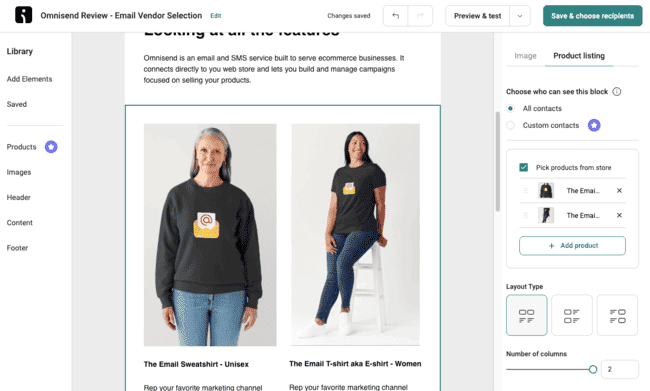
Another strength of Omnisend is how intuitive it is. It has 350+ attractive email templates mostly geared around product promotions. And 30+ automation templates. It walks you through how to build common workflows for abandoned carts. That’s useful if you don’t want to build every workflow from scratch.
Kit gives you everything you need to get started selling digital products. Omnisend is for businesses that already have a web store. It suits businesses that sell physical and digital products.
Omnisend also gives you much more customer data to work with after someone joins your list or buys from your store. Kit sticks to simple tag-based targeting. Which is often fine for small content creators. Omnisend tracks interactions and outcomes and gives you a customer lifecycle map based on that data. Telling you exactly what stage a lead is at. And which customers are most likely to buy again. Combined with sales-focused analytics, it gives you more tools to drive conversions. And stay in control of revenue growth.
Omnisend Pros
- Easy integration with major ecommerce platforms
- Uses store data to drive targeting, personalization, and automation
- 350+ email and 35+ workflow templates make it easy to get started
- Puts growing sales and revenue at the heart of marketing activity
Omnisend Cons
- Doesn’t have landing pages with add-to-cart buttons and checkout.
Omnisend plans start at around $11.20 a month if you pay three months up front. This is for 6,000 emails and 500 contacts. There’s a free plan with 250 contacts, 500 emails, 500 web push notifications, and all Pro features.
Get started with Omnisend for free or read our full review
GetResponse – Marketing platform for creators

GetResponse is an email marketing platform with many strings to its bow. It covers the basics of campaign building, marketing automation, and list building. And it also has a plan for creators. This lets you build and sell newsletters, webinars, and courses. With websites to host them on.
Features that make GetResponse a good Kit alternative:
- Drag-and-drop builder with 120+ email templates
- Autoresponders, drip campaigns, and conditional workflows for automation
- Landing page and website builder
- Sales funnels and conversion tools
- Paid-for newsletters, webinar and course tooling.
GetResponse has a unique product structure. Each plan is aimed at a different audience. It’s a straightforward email marketing service with the base plan. You get a user-friendly email builder. Simple autoresponder and drip campaigns. And landing pages and forms to grow your contact list.
Then it expands into ecommerce-focused marketing automation. You can connect most major ecommerce platforms. Build automated workflows triggered by customer behavior. Engage with customers on your site with web push notifications and create complete sales funnels.
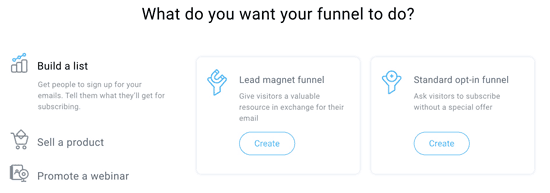
On its Creator plan, GetResponse focuses on… yes… creator marketing. You can build webinars and courses. And sell subscriptions directly.
GetResponse simply gives you more to work with than Kit outside of creator marketing. It has more email templates. More pre-built automation workflows. GetResponse’s sales funnels are a core difference. Kit does let you build journeys from lead capture to sales or paid subscriptions. In many ways, that’s the whole point of the platform. But GetResponse’s funnels are more specific and give you more control to customize customer purchase paths.
GetResponse is also more than a creator marketing service. It works well for ecommerce. It’s a better fit if you already run a business and want to add courses, webinars, or paid content alongside what you already sell.
GetResponse Pros
- All-in-one platform combining marketing automation, sales tools, and content creation
- Customizable automation for multiple use cases
- 120+ email and 40+ workflow templates
- 9 ecommerce integrations and direct selling
GetResponse Cons
- The Creator plan is more expensive than most direct rivals.
GetResponse’s Starter plan starts at $10 a month for 500 contacts and unlimited emails. The Creator plan with webinar, course, and newsletter monetization starts at $69 a month. You can get 18% off for paying annually. GetResponse has a free plan with 500 contacts, 2,500 emails, and 1 landing page.
Get started with GetResponse for free or read our full review
Substack
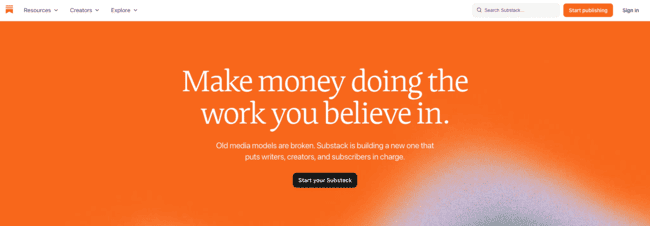
Substack is a popular newsletter platform. You can launch for free, send posts by email, build a simple publication website, and add paid subscriptions when you’re ready. There’s no monthly platform fee, but it takes 10% off your paid newsletter subscription fees.
In practice, it’s more like a blogging platform with some email features. It’s okay for easy, low-cost publishing. And Substack followers aren’t email subscribers. You don’t get their email addresses and can’t take those followers with you if you leave the platform.
Features that make Substack a good Kit alternative:
- Free publishing with no subscriber limit
- Monthly, annual, and founding member subscriptions
- Recommendations and subscriber referrals
- Built-in discovery through the Substack network
- Subscriber filtering and targeted emails
- Automated welcome and paid-conversion emails
You write a post, publish it to the web, send it by email, and make it available through the Substack app. You can choose whether a post goes to everyone, free subscribers, paid subscribers, or founding members.
Audience growth is one of Substack’s advantages. Its Recommendations feature lets other creators promote your publication to their readers. Subscriber Referrals lets you reward your own readers for bringing in new subscribers. And Substack also has discovery features like category leaderboards and its wider social network.
Monetization is straightforward. Connect Stripe, and you can charge monthly or annual subscriptions, plus offer a higher-priced founding member tier.
Compared to Kit, Substack puts more emphasis on publishing and discovery than email marketing. Kit gives you visual automations, sequences, tags, and triggers for building workflows. It also lets you sell one-time digital products directly. Substack gives you subscriber filters, targeted emails, welcome emails, and some automated monetization features. But Kit gives you much more control if you want to build automated funnels around courses, lead magnets, products, and different subscriber actions.
The other big difference is how you pay. Substack is free until you start charging subscribers. Then it takes 10% of every paid subscription transaction, on top of Stripe fees. That makes it very easy to start, but the cost can become significant once your paid newsletter grows.
Substack Pros
- Free to start regardless of subscriber count
- Strong built-in discovery and recommendation network
- Simple setup for paid subscriptions
- Subscriber referrals and automated conversion tools
- Very little technical setup
Substack Cons
- Takes 10% of paid subscription revenue
- You can’t export Substack followers
- Less control over email automation than Kit and other alternatives
- Not suitable if you want to sell digital products
Publishing on Substack is free. Substack takes 10% of each transaction, plus Stripe processing fees. Connecting your own custom domain costs a one-time $50 fee.
Ghost
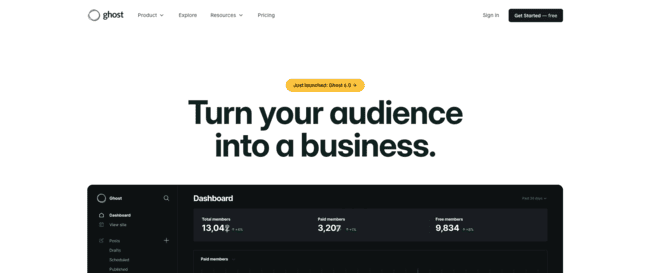
Ghost is a publishing platform for creators with newsletter features. You can run your website, blog, newsletters, memberships, and paid subscriptions. It’s a particularly good Kit alternative if you want your website to be the center of your creator business.
Features that make Ghost a good Kit alternative:
- Full website and publishing platform
- Unlimited newsletter sends
- Paid membership tiers with no Ghost transaction fee
- Recommendations and audience growth tools
- Built-in web, email, and membership analytics
- Automated welcome sequences
Ghost treats your website and newsletter as two sides of the same publication. You can publish an article on your site and send it to subscribers by email from the editor. You can also create multiple newsletters with separate subscriptions and designs. That works well if you want a free and paid newsletter.
The website builder is much more advanced than Kit’s Creator Profile. Ghost gives you a complete publication website with custom themes, your own domain, pages, posts, and SEO features. It also tracks website traffic alongside newsletter engagement and member growth, so you can see which articles bring in subscribers and paid members.
Ghost is also strong for memberships. You can create different paid tiers with monthly and yearly pricing, offer free trials and discounts, collect tips and donations, and sell gift subscriptions. Payments run through Stripe. Ghost doesn’t take a percentage of subscription revenue. You just pay Stripe processing fees.
Automation used to be a clear weakness compared to Kit, but Ghost’s automation is improving with automated email sequences for new free and paid members. You build them in a visual canvas using email and wait steps. It’s still in beta and currently much simpler than Kit’s visual automation builder.
Kit is better if email automation and selling different digital products are at the center of your business. Ghost is better if your website, articles, newsletter archive, and paid membership are the product.
Ghost Pros
- Full website and newsletter platform
- Flexible membership tiers, trials, discounts, and donations
- Strong website and newsletter analytics
- Unlimited newsletter sends
Ghost Cons
- Automation is still basic compared to Kit and other alternatives
- Paid subscriptions require the Publisher plan
- More setup and customization than Substack
Ghost Pro starts at $15 per month billed annually. It includes 1,000 members, a website, and email newsletters. The Publisher plan starts at $29 per month and adds paid subscriptions, custom themes, and advanced analytics.
Kit Alternatives – Honorable Mentions
If none of the tools above feel like the right Kit alternative for you, check out these platforms:
- AWeber is a well-established email marketing platform. Its “Payments” feature lets you sell digital products, subscriptions, and memberships. Either directly from emails or via landing pages.
- EmailOctopus is a simpler, lower-cost Kit alternative for sending newsletters and automating the basics. Its free plan has 2,500 contacts and 10,000 emails. But it focuses on email campaigns, forms, landing pages, and automation rather than Kit-style creator monetization.
- Flodesk is best known for its high-quality email designs. You can sell digital products and subscriptions through its Checkout feature.
- Mailchimp used to be one of the most popular email marketing platforms in the world. It provides user-friendly tools for creating newsletters, blogs, and websites. It connects to ecommerce platforms. But monetization isn’t its main focus.
- Constant Contact is another long-running and popular email marketing service. It has an easy-to-use interface. You can make great-looking newsletters in no time at all. But it lacks monetization features.
The Best Kit Alternatives for Different Industries and Budgets
There’s no single ‘best’ Kit alternative out there. Here’s a breakdown of which ones suit different types of businesses and budgets:
Kit Alternatives for Creators
Kit gives creators tools to promote and monetize content. These alternatives offer similar features:
- Beehiiv is a very close Kit competitor. It’s better suited for turning online publications into revenue-generating products. Rather than marketing other digital products for sale. For publications with large distributions, its ad network can unlock significant earning potential.
- MailerLite is a lower-cost Kit alternative for creators. It’s very beginner-friendly and lets you sell digital products. It’s a great starting point for creators who want to monetize.
- GetResponse is a solid all-round marketing platform that suits lots of different audiences. For creators, it has tools for webinars, courses, and paid newsletters. But it covers more ground than Kit. Including better ecommerce integrations and sales funnels.
- Brevo is a good choice for creators who want to grow beyond email. It has newsletters, SMS, WhatsApp, automation, and CRM tools. Pricing is based on email volume rather than subscribers. So it’s cost-effective for creators building a large audience.
If you’re a creator and want to start selling courses, check out our review of the best online course platforms.
Kit Alternatives for Ecommerce
For ecommerce businesses, a newsletter is a nice-to-have. But it’s not the main marketing priority. If you run an online store, you’ll probably care more about product data, abandoned carts, and purchase triggers than newsletter monetization. The best Kit alternatives for that are:
- Omnisend is a great purpose-built marketing service for online retailers. It connects easily to platforms like Shopify. And provides advanced ecommerce features. Like importing product listings directly into emails. And automating messaging from product views, cart activity, and purchases.
- ActiveCampaign is a strong choice for growing ecommerce brands. Its advanced automation tools work well for more complex customer journeys. And it drives conversions with features like dynamic segmentation and sales pipelines.
Browse the best ecommerce email marketing software to find the perfect tool for your store.
Free Kit Alternatives
These platforms let you get started with email marketing for free.
- Brevo has one of the best free plans around. It gives you 100K contacts and supports multi-channel marketing campaigns. Plus simple automations and sales pipelines. Having 100,000 contacts in the free plan makes Brevo especially useful if your list is growing faster than your sending volume.
- MailerLite offers a strong free plan with monetization. You can sell digital products and manage email campaigns. It has 250 contacts, 2,500 emails, and 2 users in the free forever plan.
- Substack is free to start. You pay Substack once you turn on paid subscriptions, when it takes 10% of each transaction. And don’t forget that you can’t export followers if you want to move to a different platform.
Cheaper Alternatives to Kit
One common criticism of Kit is that its pricing is on the high side. These tools are great picks if you’re looking for better value.
- Brevo has flexible pricing based on email volume, not contacts. This is more cost-effective as your audience grows compared to Kit’s subscriber-based model.
- Moosend is one of the cheapest email marketing platforms. It delivers strong workflow and segmentation features at a fraction of Kit’s price.
- MailerLite is consistently recommended as one of the best-value tools on the market. It combines low pricing with solid features and performance.
Find more low-cost Kit alternatives in our full review of cheap email marketing tools.
What are the best Kit alternatives?
I’ve shared 9 great Kit alternatives. But I know what you’re thinking. Which would I recommend from my own personal experience?
If you want better value with more features, try Brevo, MailerLite, and Moosend. All three cost less than Kit and give you useful marketing features.
If you already have an ecommerce store or if you want to expand from digital into physical products, I’d recommend Omnisend. It’s one of the best ecommerce marketing platforms out there. And it’s particularly good for Shopify users.
If you want to build and monetize a newsletter at scale, beehiiv is the strongest choice. And if advanced automation is your priority, ActiveCampaign gives you much more control over complex customer journeys.
Kit Alternatives FAQ
Is there a free version of Kit?
Brevo and MailerLite are the best free Kit alternatives to try.
Is Kit like Substack?
What is better, Flodesk or Kit?
Kit is better for building and monetizing an audience. It has stronger automation tools and email marketing features. Better tagging and segmentation and more ways to sell digital products. This makes it the better choice if your goal is to generate revenue from your email marketing efforts.