Email Personalization: Strategies, Examples & Data
Email personalization uses unique customer data points to make each email more relevant to the person receiving it. It runs across the whole email marketing customer journey rather than one send at a time.
This guide covers what email personalization is, what you can personalize, and how to build a strategy around it. Every example is an email an actual store sent, and five carry the result the store published.
Use Omnisend’s automated email workflows to send personalized messages that convert
Quick sign up | No credit card required
What is email personalization?
Email personalization involves changing what a subscriber sees based on data you already have about them. That data comes from three main sources:
- Profile details, which include information such as a subscriber’s name, city, country, or phone number
- Properties you collect, through a pop-up sign-up form or a connected app, such as birth date, clothing size, or loyalty points
- Event data, which comes from actions the person just did, such as abandoning a cart or viewing a product
The three data types don’t work the same way. Profile details and collected properties can work in any email you send to a subscriber.
Event data only exists inside an automated email triggered by the customer’s action.
A scheduled campaign cannot use an event that happened after the campaign was created. Automated emails are grouped by the customer action that triggers each message.
Each kind reaches the email through a placeholder, swapped for real data when it sends, with a backup word if the data is missing:
`Hello [[contact.first_name|default: “there”]]!`
Joe sees “Hello Joe”. A subscriber with no first name sees “Hello there”.
Nearly every visible part of an email can take a placeholder, although a few elements have limits.
What you can personalize in an email:
| Email element | What you can personalize | Example |
|---|---|---|
| Subject line | First name, product interest, location, browsing intent | “Joe, your jacket is waiting” |
| Preheader | The line that follows the subject in the inbox | “Free shipping ends tonight” |
| Greeting | Customer name, with a fallback for missing names | “Hi Joe”/“Hello there” |
| Body copy | Customer details, preferences, or other custom data | Mention their loyalty tier, preferred size, or birth month |
| Product recommendations | Complements what was bought, or the item just viewed | Products that match their recent purchase |
| Conditional blocks | Sections that appear for specific customer groups | Show new arrivals to browsers and rewards to VIPs |
| Offers and discounts | Discount value, eligibility, or customer-specific codes | Give new customers 10% off and VIPs early access |
| Buttons and links | Destination or URL based on customer behavior | Send cart abandoners directly to their saved cart |
| Header and footer | Content tailored to location or customer segment | Delivery information for the customer’s country |
| Send time | The time each recipient receives the email | Send when each customer usually checks email |
The Omnisend Subject Line Generator drafts personalized subject lines against your campaign goal and audience. Segment filters decide who each version reaches.
What do personalized emails earn?
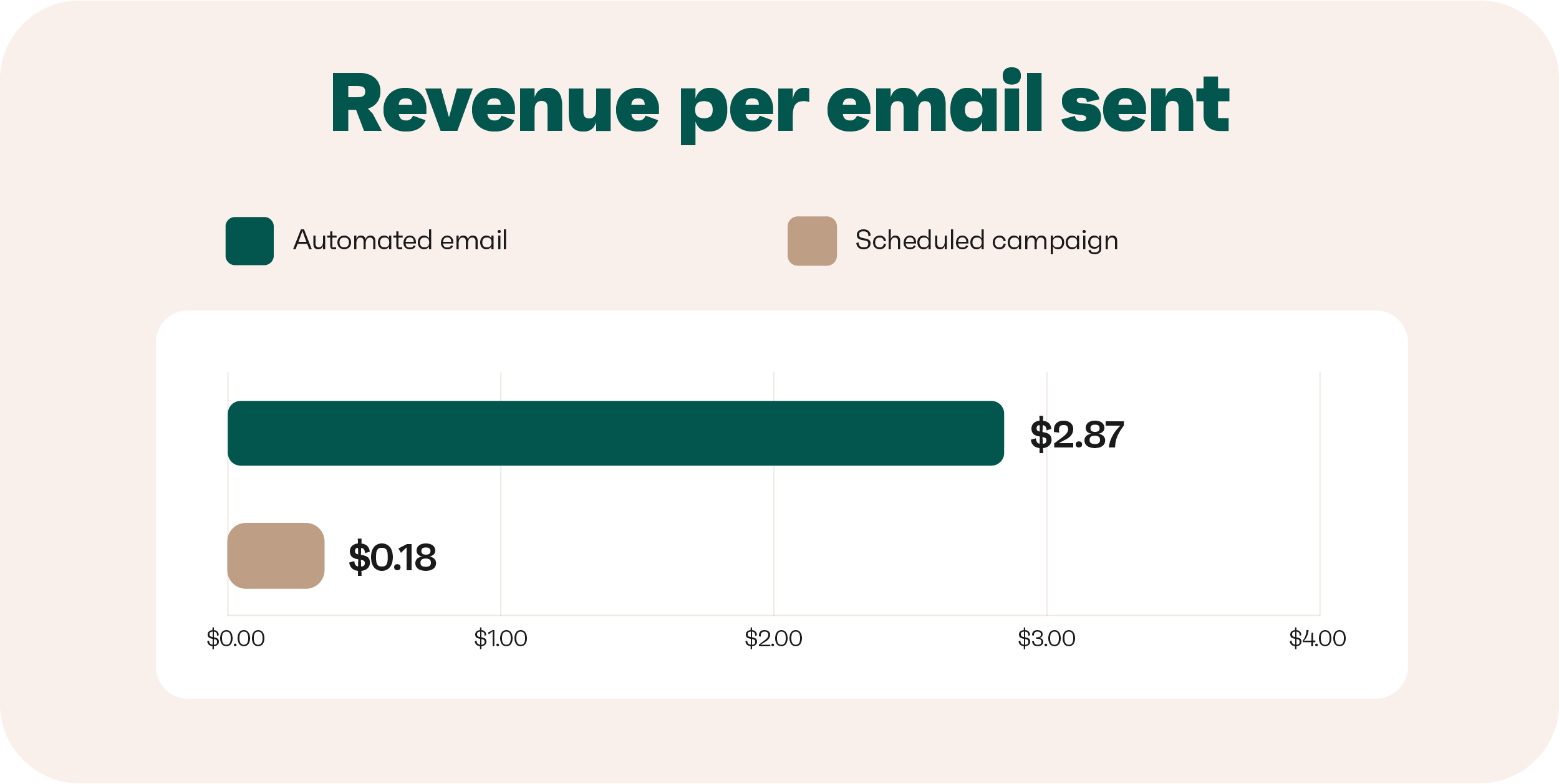
Our ecommerce research shows that automated emails earn $2.87 per send, compared to just $0.18 for scheduled campaigns. These numbers reflect trends across 150,000 brands and 27 billion emails.
Personalization shows up in purchases before it shows up in opens
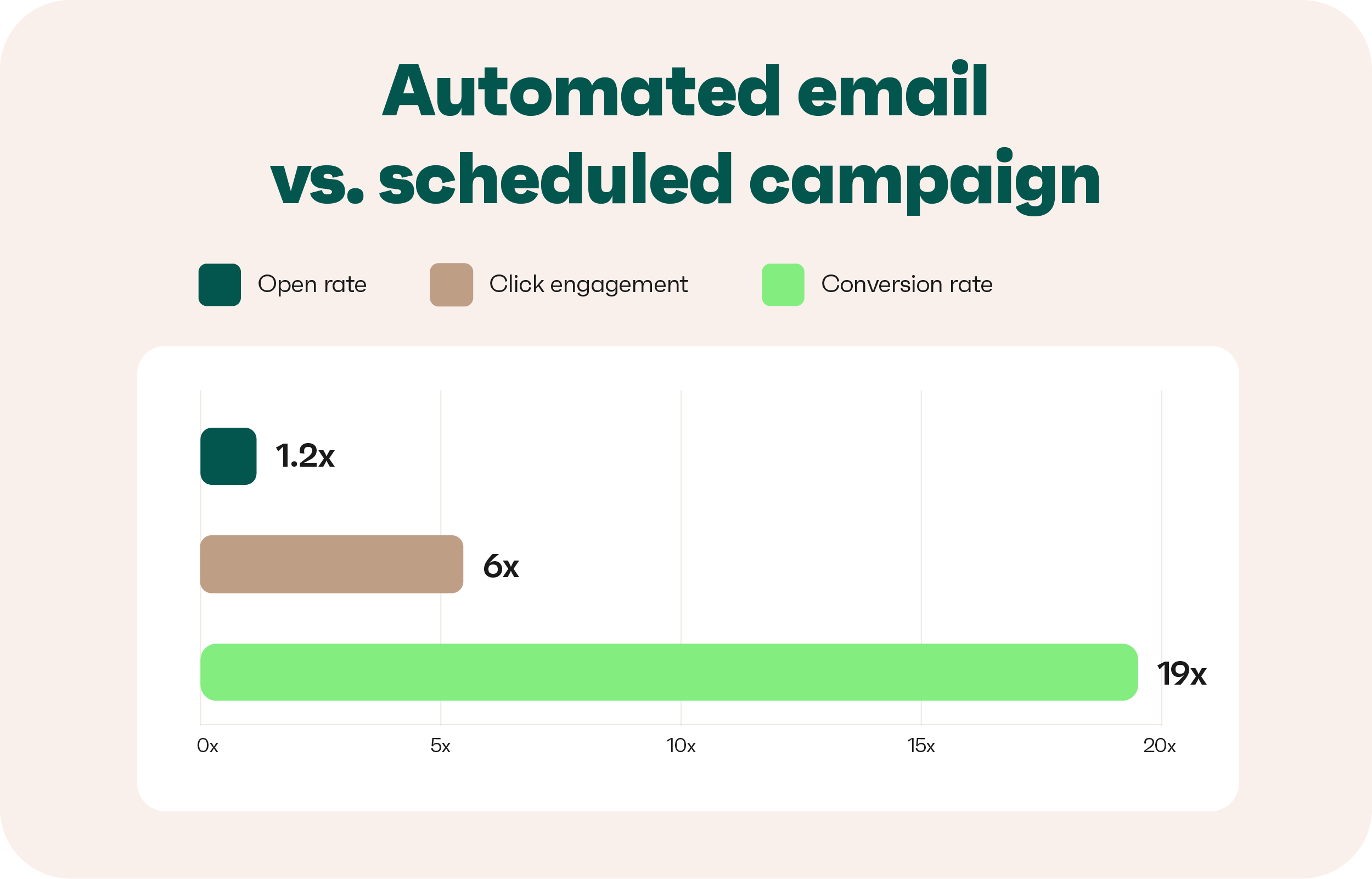
Set against scheduled campaigns, automated emails see open rates 24% higher. The gap widens sharply further down, reaching 19 times the conversion rate.
Their click engagement is also six times higher, which shows that sending emails based on user behaviour or characteristics pays off. Nearly one in three clicks on an automated email leads to a purchase:
A small share of the sending carries a large share of the revenue
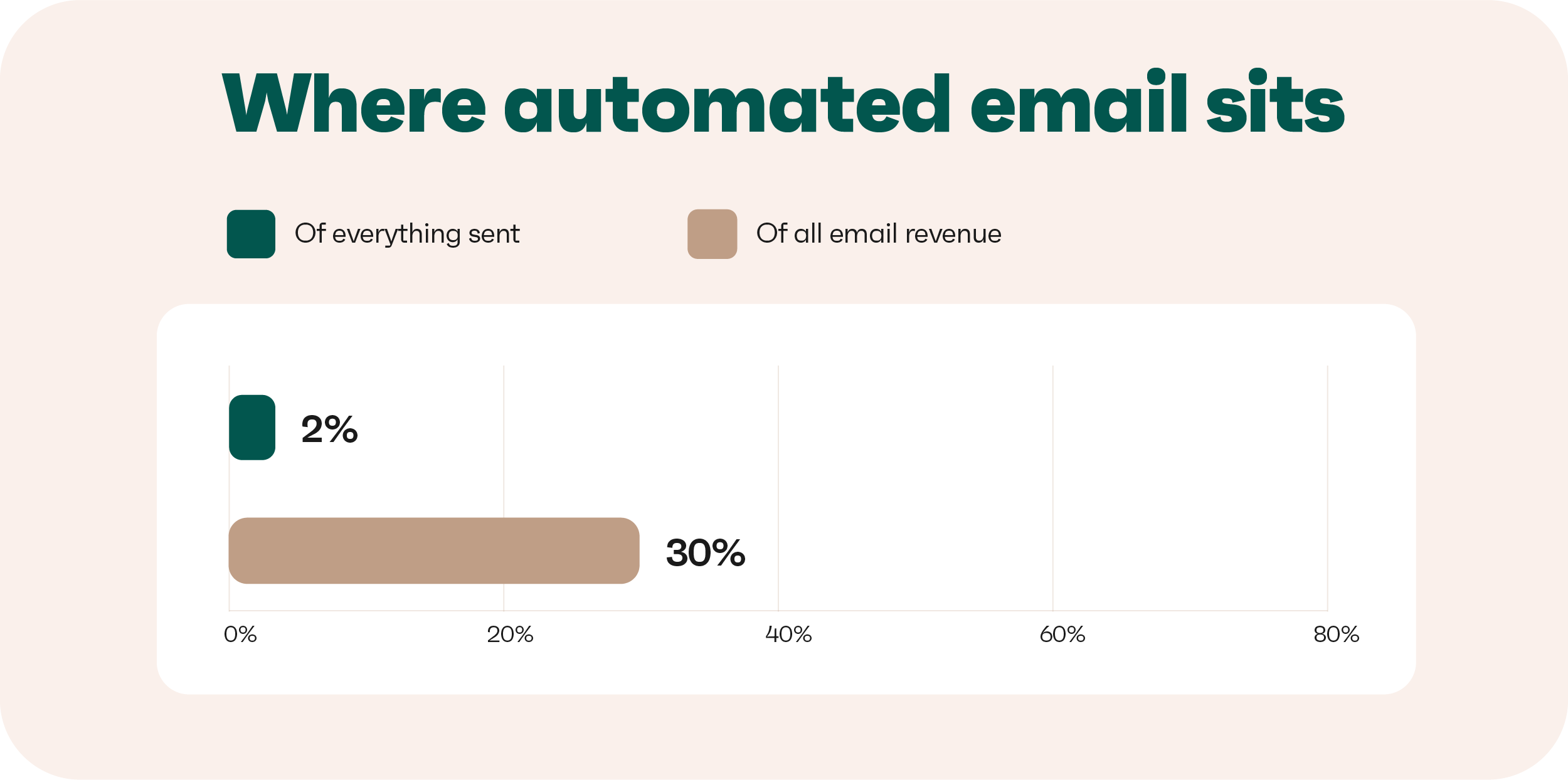
Automated emails make up only 2% of all emails stores send, yet they generate 30% of total email revenue. Welcome and abandoned cart emails drive most of that performance, accounting for 76% of all orders from automated emails.
These two flows reach customers at important moments when their interest or intent is clear:
The difference is clearest per message rather than per campaign
An automated email earns $2.87 each time it sends, against $0.18 for a scheduled campaign. Revenue per email sent is the metric worth reporting internally. It compares a campaign and an automation on the same basis of what each send generates.
It also sits alongside the other email marketing metrics you already track. Per-message revenue separates the two send types clearly:
Personalized email marketing examples and results
Every example comes from a real store and is grouped by the action that triggers the email. Five email personalization examples come from Omnisend customers, with the results published alongside:
Welcome email: Dukier tells its story before it hands over the code
Subject line: Your 10% EXTRA OFF is here! ❤️
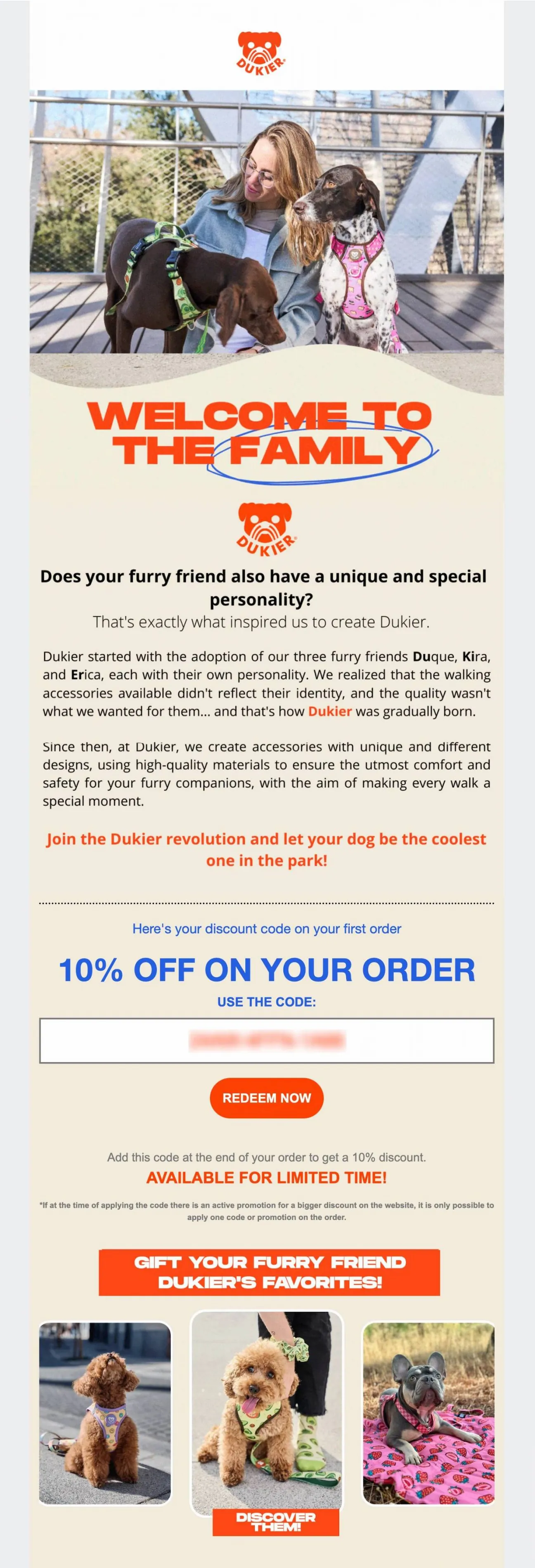
A welcome email is the first automation any store can switch on. Dukier uses it to introduce the brand through its founding story before presenting the offer. It features three named dogs, explains why the brand exists, and ends with a discount code.
The message feels like a brand introduction rather than a simple coupon. It also needs only a sign-up event, which makes it an easy first automation for most stores. Dukier’s automated emails, including this welcome email example, generated 55% of its total revenue.
What to take from this example:
- Use the welcome email to tell your brand story while new subscribers are most engaged
- Place the discount code after the story to give subscribers more context before the offer
- Adjust the message for different markets, just like Dukier runs its welcome flow in five languages
Cart recovery email: Rachel Riley shows the saved items with a deadline
Subject line: Your Cart Expires Today! 🛍️
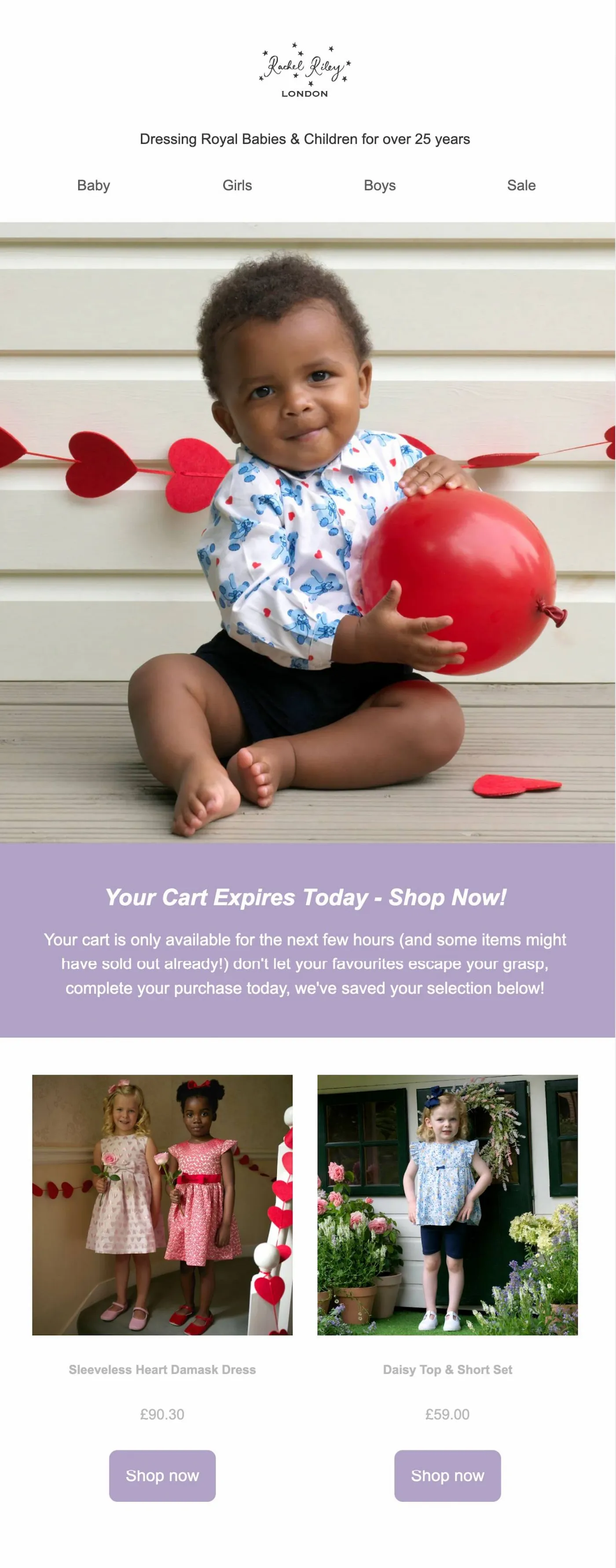
An abandoned cart email, in most cases, uses discounts to recover sales. Rachel Riley takes a different approach by using urgency without lowering the price. The email tells customers that their cart expires that day and warns that items may sell out.
This approach uses the abandoned cart contents as the main source of email marketing personalization. Rachel Riley added order confirmations to its automated email strategy, which generated 46% of the revenue.
How to run this in your own store:
- Use a genuine deadline when stock or cart availability can expire
- Show the exact items left in the cart with their current prices
- Send every button to the abandoned cart rather than the store homepage
Browse abandonment email: Bowy Made shows the exact item viewed
Subject line: Take a second look 👀
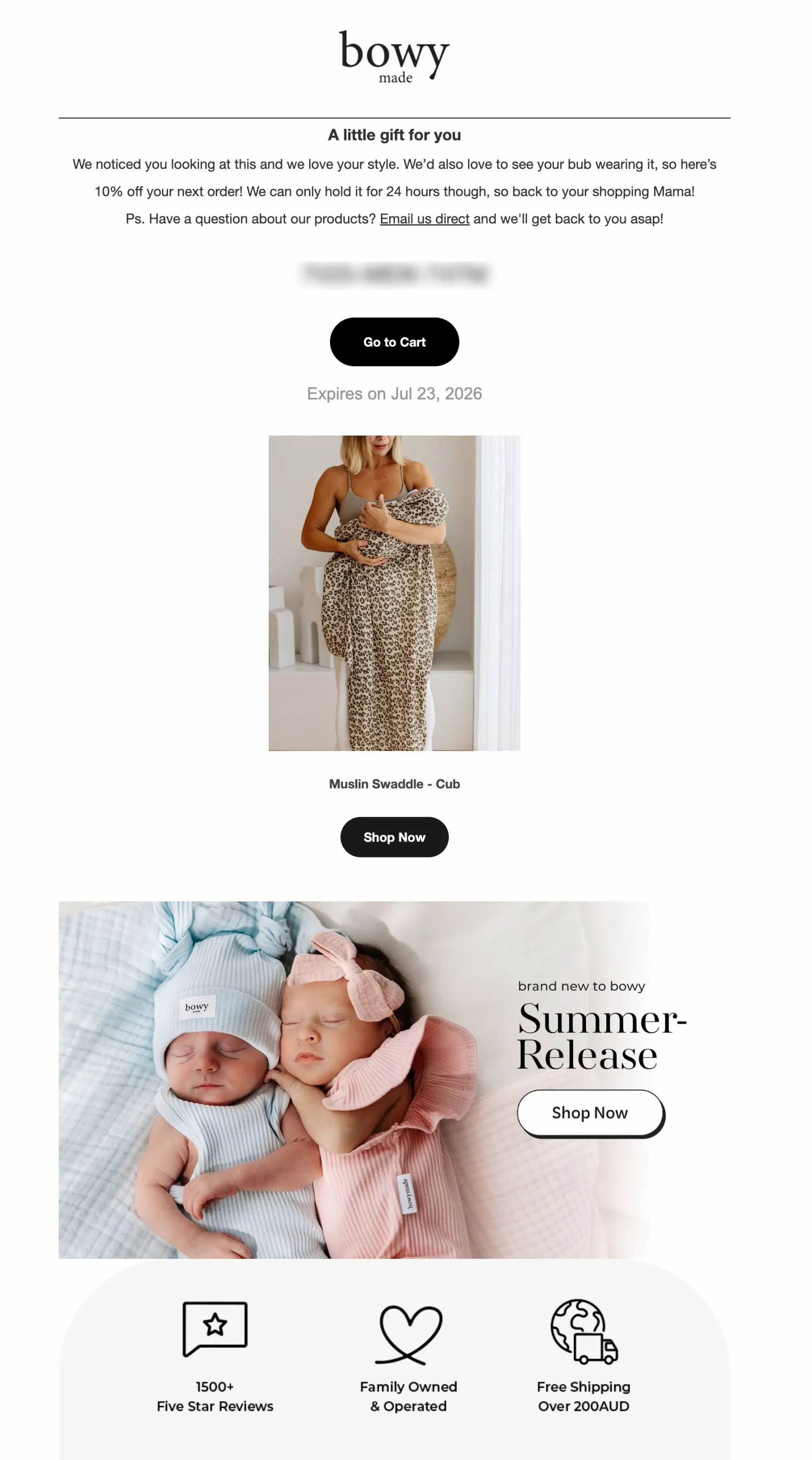
Bowy Made names the exact product and adds a 10% discount code valid for 24 hours in this browse abandonment email. The message speaks to the customer as a parent rather than treating them as a broad segment. It also uses personalized email marketing by connecting the message to the shopper’s browsing activity.
Bowy Made tested a subject line that used the shopper’s name too. The line “Jessica, you left something behind” converted 5 to 10 percent better than the generic version.
What makes this one work:
- Show the item the customer looked at, instead of replacing it with bestsellers
- Give the discount a clear 24-hour limit so customers have a reason to return
- Match the message to the customer, since tone carries as much of the email personalization as the product block
Back-in-stock email: To’ak reaches the shoppers who missed out
Subject line: Your To’ak favorites are back in stock!
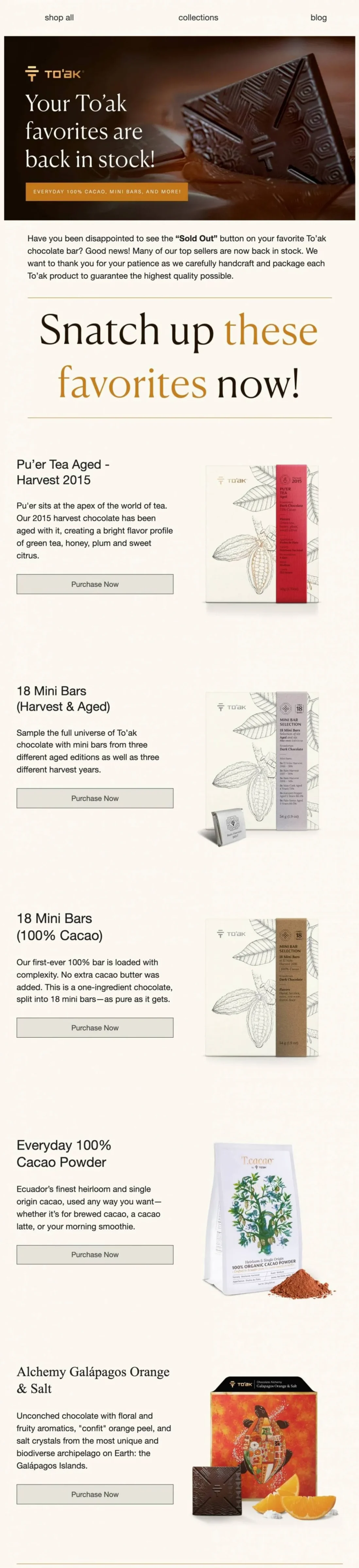
To’ak starts by addressing the frustration of finding a product sold out after wanting it. It then lists the returning products with a short tasting note and a buy button each. The email is only useful while the intent that created it is still alive, so the send window is short.
Across the brands in our research, back-in-stock email converts better than any other automation, at 6.46%. To’ak earned 39.4% of its email revenue from automations that made up 2.1% of its sends.
Worth copying here:
- Trigger the email when a customer views or tries to buy an out-of-stock product
- Add a short description to each returning product instead of showing a bare product grid
- Send the email as soon as stock returns while customer interest is still high
Birthday email: FiGPiN ties a dated code to what someone collects
Subject line: Happy Birthday from FiGPiN!
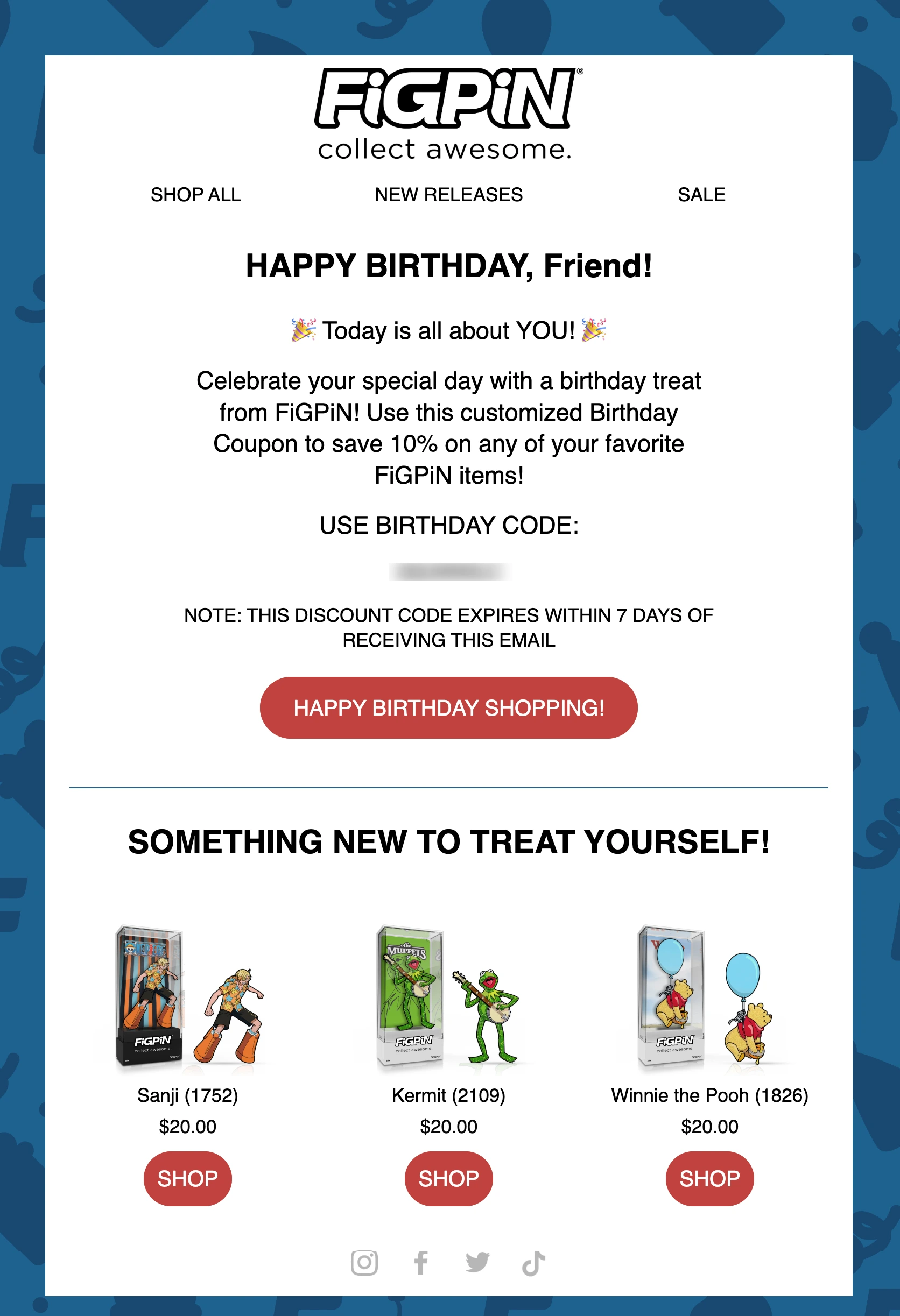
The email pairs a seven-day discount code with three products from licenses the customer already buys. The birthday offer gives customers a reason to open, while the product picks give them reasons to click. The automation only reaches customers who shared their birthday at sign-up or later and who are stored in their profiles.
Across our research, birthday emails have an average order value more than four times higher than average. For FiGPiN’s program, automated messages generated 24% of email revenue from about 9% of total sends.
How to get this right:
- Give the discount a short expiry to encourage a purchase within the birthday window
- Offer personalized email recommendations from product categories or collections the customer already buys
- Ask for a birth date at sign-up only when you have a clear reason to use it
Win-back email: Rothy’s sends a personal code and skips the reintroduction
Subject line: We miss you! $30 off inside.
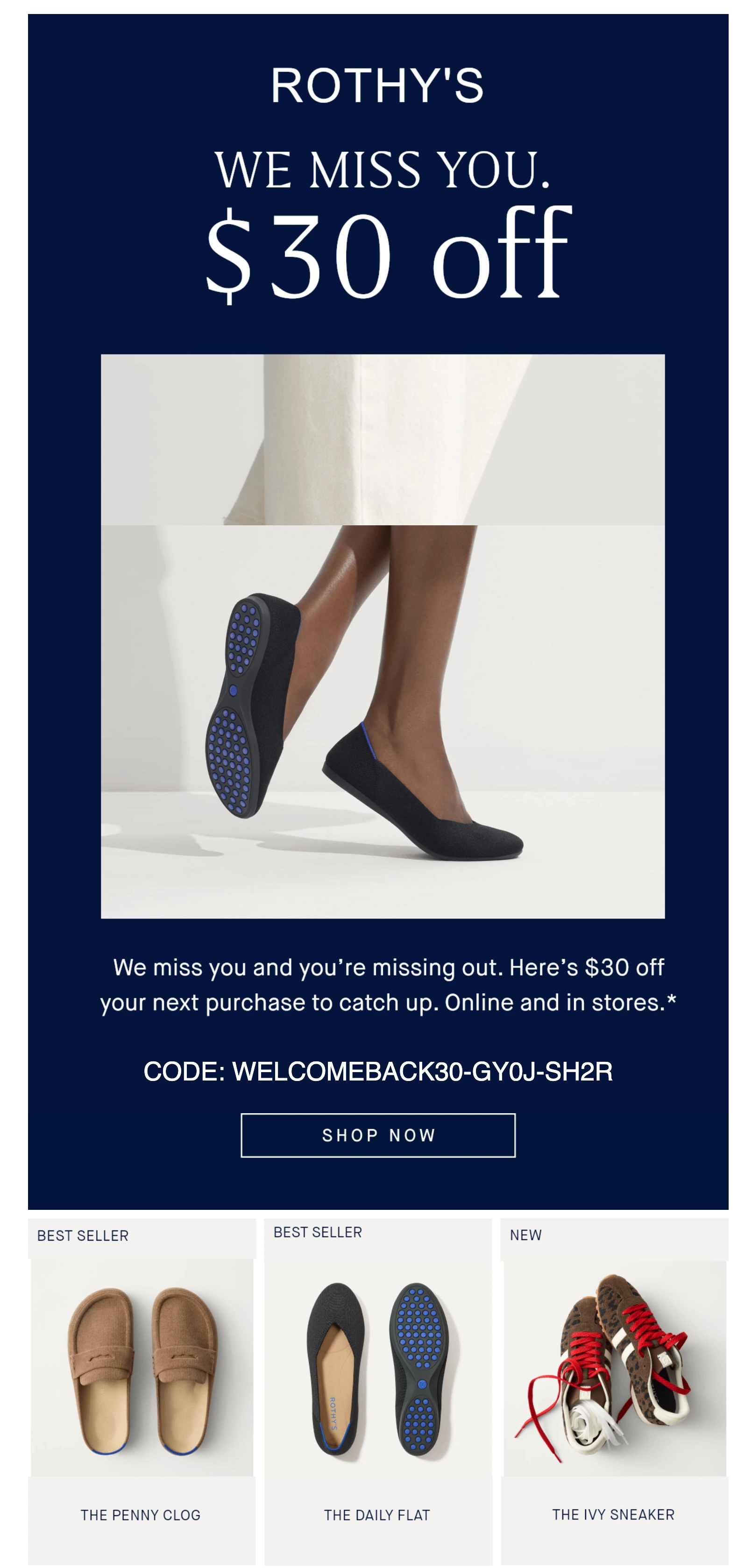
Rothy’s winback email offers $30 off with a unique code tied to the individual customer. The email uses one product image and skips the usual brand introduction since the customer has already bought from it. Three bestsellers appear below the main offer to give the customer a few products to consider.
A win-back email usually targets customers who have not placed an order for a set period. The main decision is the best time to send it based on the customer’s last purchase.
How to build a win-back that lands:
- Use a fixed amount rather than a percentage when you want a lapsed customer to feel the value
- Skip the brand introduction, because they bought from you before
- Show current bestsellers, so that lapsed customers can see what is popular now
Segment offer: Beardbrand makes membership the reward
Subject line: Exclusive Subscriber Deal Inside
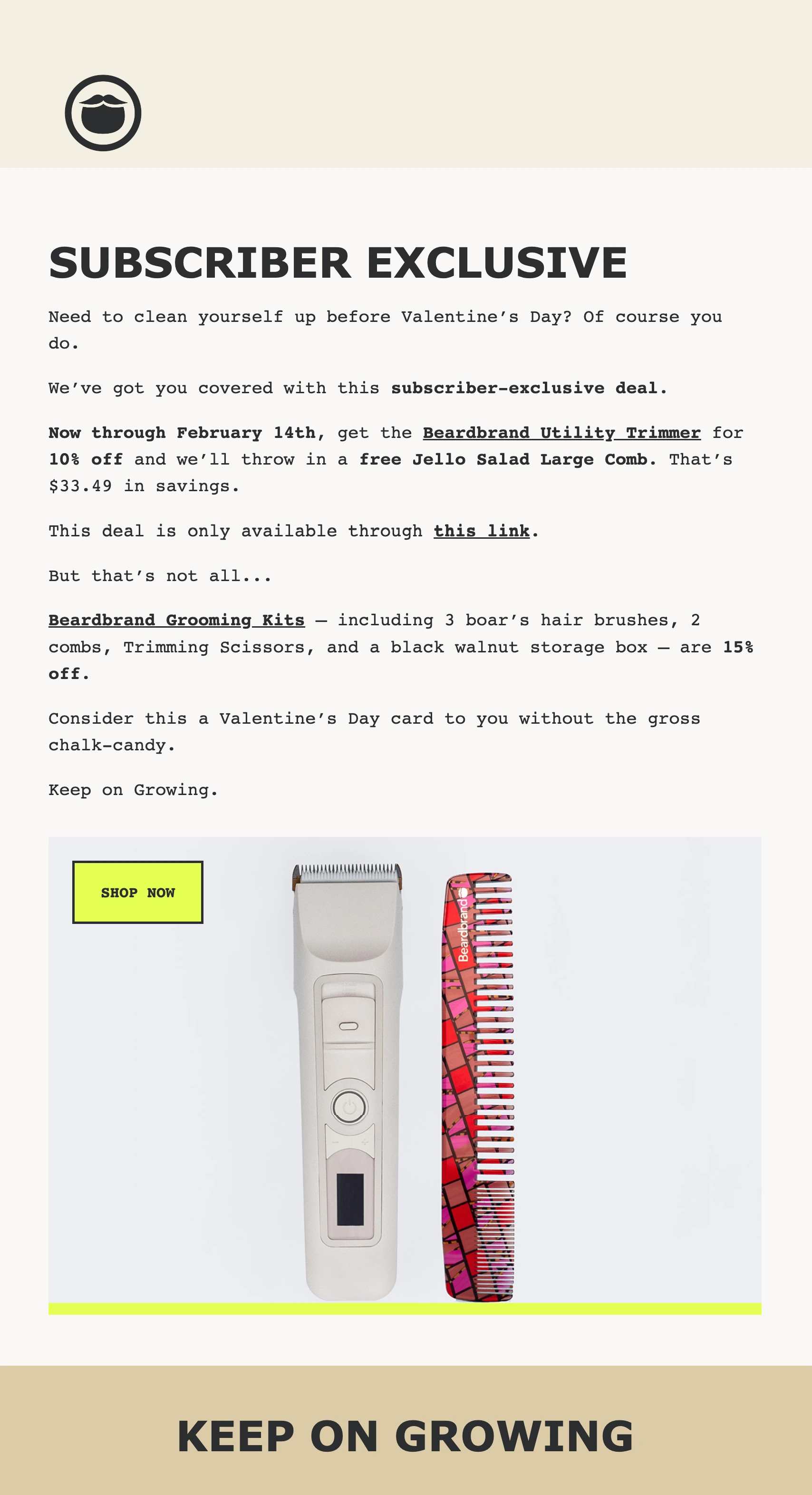
Beardbrand presents the offer in the email as an exclusive benefit for subscribers, not a general promotion. The email copy uses plain monospaced text and places the offer directly in the message. It doesn’t rely on browsing history, purchase data, or other customer behavior.
The email personalization comes from the subscriber’s membership rather than an inserted customer detail. This approach works well for stores that have a subscriber list but limited customer data.
What to do with a segment offer:
- Make the offer feel exclusive by tying it to the customer’s relationship with your store
- Test plain text against your usual design to see which performs better as a personalized message
- Show the discount in both dollars and percentages so customers can see the savings clearly
Loyalty reward: NOTIQ returns credit instead of discounting
Subject line: 🎉 $20 Loyalty Weekend
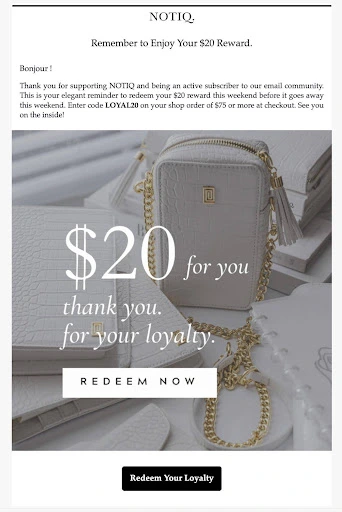
NOTIQ reminds customers about a $20 loyalty credit that they earned but haven’t redeemed. The email presents the credit as a reward for continued purchases instead of just another discount. Its weekend deadline adds a sense of urgency, while the $75 minimum order protects the store’s margins.
The email leads with the reward, then the expiry date. It targets customers who already have credit waiting to remind them to return.
Rules this email follows:
- Give loyal customers a fixed credit instead of reducing every order by a percentage
- Set a minimum order value so the reward encourages a larger purchase
- Send a separate reminder when customers earn credit but leave it unused
Re-permission email: Dusk asks before the list goes quiet
Subject line: Still want to hear from us?
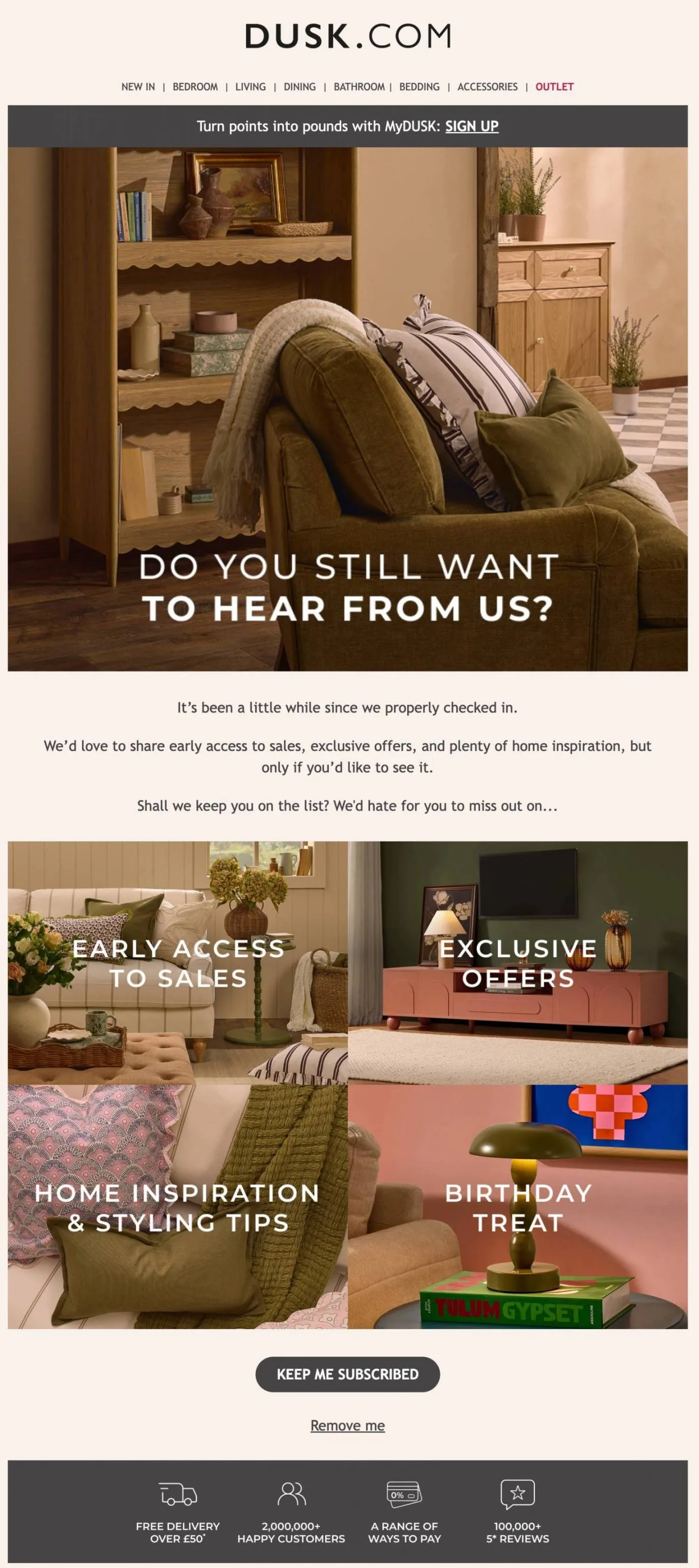
Dusk asks inactive subscribers whether they still want to receive its emails. The message lists what subscribers can expect, including early access, limited-time offers, styling ideas, and a birthday treat.
This email doesn’t personalize the message itself, but it protects the data and consent needed for future personalization. A clean, engaged list also gives future campaigns a stronger audience to work with. Run re-permission emails as part of regular list cleaning rather than waiting until the end of the year.
How to use this one:
- Show subscribers what they will miss instead of asking them to confirm their preferences
- Give subscribers one clear option to stay and another to unsubscribe
- Trigger the email after a period of inactivity rather than on a fixed date
How to build an email personalization strategy
An email personalization strategy works best when each decision starts with customer data. You can build it in seven stages, from lifecycle stage through behavior, timing, content, and prediction.
1. Personalize by customer lifecycle stage
Lifecycle stage is one of the strongest segments because it reflects how customers buy over time. Omnisend calculates each stage using recent orders, orders from the last 365 days, and average order value.
Common lifecycle stages are:
- Recent and needs nurturing: Customers under 40 days or 40 to 90 days since purchase need follow-up
- At-risk and about to lose: Customers at 90 to 180 days or beyond are candidates for win-back offers
- Champions and loyalists: Both groups buy often and recently, but differ in spending against your store average.
- Can’t lose: High-value customers who have gone quiet deserve a personal message before a general offer
These ranges are the default customer lifecycle segments for stores with fewer than 100 returning customers.
Related
Island Olive Oil re-engaged its at-risk and can’t-lose stages with automated emails. The first reached a 27% conversion rate, the second an average of $11.24 per email sent.
Learn more.
2. Segment on behavior rather than demographics
Age and gender tell you who a customer is, but behavior shows what they’re likely to do next. Omnisend gives you up to 500 data points to segment on.
Here are some practical email personalization tips for behavioral segmentation:
- Segment by opened messages, clicks, product and page views, and order counts
- Prioritize repeat buyers, active clickers without purchases, sale-only customers, and buyers who are inactive for 90 days
- Combine filters to tailor cart emails for non-buyers and past customers based on purchase status
- Use tags to capture interests that customer behavior alone cannot reveal
3. Personalize from purchase history
Purchase history shows what a customer has already bought, so it gives you a clear record to work with. It also gives you a strong base for post-purchase emails.
Follow these tips:
- Recommend products that complement the exact item they bought instead of showing general bestsellers
- Use average order value to decide who sees a free-shipping threshold
- Send care content for the product bought before you send another offer
- Check how often customers reorder, then send replenishment reminders around that time
4. Personalize by location
A customer’s location can change the products, prices, shipping details, language, and the best time to send emails.
- Match product recommendations to the season in the customer’s hemisphere
- Localize currency, shipping thresholds, and return information for each market
- Send emails in the customer’s language when you sell across different markets
- Use the customer’s time zone so emails don’t arrive during quiet hours
5. Set the trigger delay and the send hour separately
Email timing has two parts. The first is how long you wait after an action, and the second is delivery time.
Here are some email personalization best practices to follow:
- Send cart emails within an hour, browse emails after two to four hours, and review requests after delivery
- Treat send-time benchmarks as a starting point and adjust them based on your own results
- Our 2026 send-time research found clicks peak at 7–8 am and 4 pm, with conversions highest early Friday
- Cap frequency so one person can’t get a browse email twice a week
6. Swap blocks inside one template with dynamic content
One email can show different content to different customers without creating separate versions for each segment.
- Use dynamic email content to change product blocks based on purchases or browsing activity
- Use conditional blocks to show different copy by lifecycle stages
- Add a default version to every block for contacts with no matching data
7. Let prediction handle send time and next purchase
Predictive models use past customer behavior to estimate when someone may engage or buy again. This is one practical use of AI in marketing.
- Let send-time optimization adjust delivery hours based on each customer’s engagement history
- Use predicted next-purchase timing to set reorder delays instead of guessing
- Review model recommendations before scaling them
Email personalization mistakes
Personalization can fail because of small setup errors that reach customers before anyone notices them. Here are mistakes to avoid.
- Missing fallback values. A missing value can leave a greeting blank instead of showing the customer’s name. Set a default value to prevent this. Preview the email with a contact missing that field before sending.
- Assuming tags work everywhere. Event data, such as abandoned cart items, only exists inside the related automation. The same event tag in a scheduled campaign will not populate.
- Relying on test emails. Test sends show the email layout but do not populate dynamic content with contact data. Use Dynamic Preview to check how real customer details will appear.
- Personalizing the email but not the destination. Sending shoppers to the homepage after naming a specific product wastes the personalization. Link directly to the product, cart, or relevant category.
- Using outdated product recommendations. Old product feeds can show items that are sold out or have changed prices. Check that your product data sync stays current.
- Ignoring time zones. A 2 pm send can arrive at 4 am if the customer’s location is not considered. Use the time zone stored on the contact record.
- Using broken store links. A cart recovery button that opens an empty cart can lose the sale you were trying to recover. Test every destination before sending.
- Testing too many changes together. Changing the subject line, product block, and send time at once hides which change improved performance. Test one major variable at a time.
Best email personalization tools include Omnisend for omnichannel marketing, Nosto for on-site personalization, and Dynamic Yield for enterprises. That being said, the best choice for ecommerce personalization software depends on your store’s needs and the level of personalization you want.
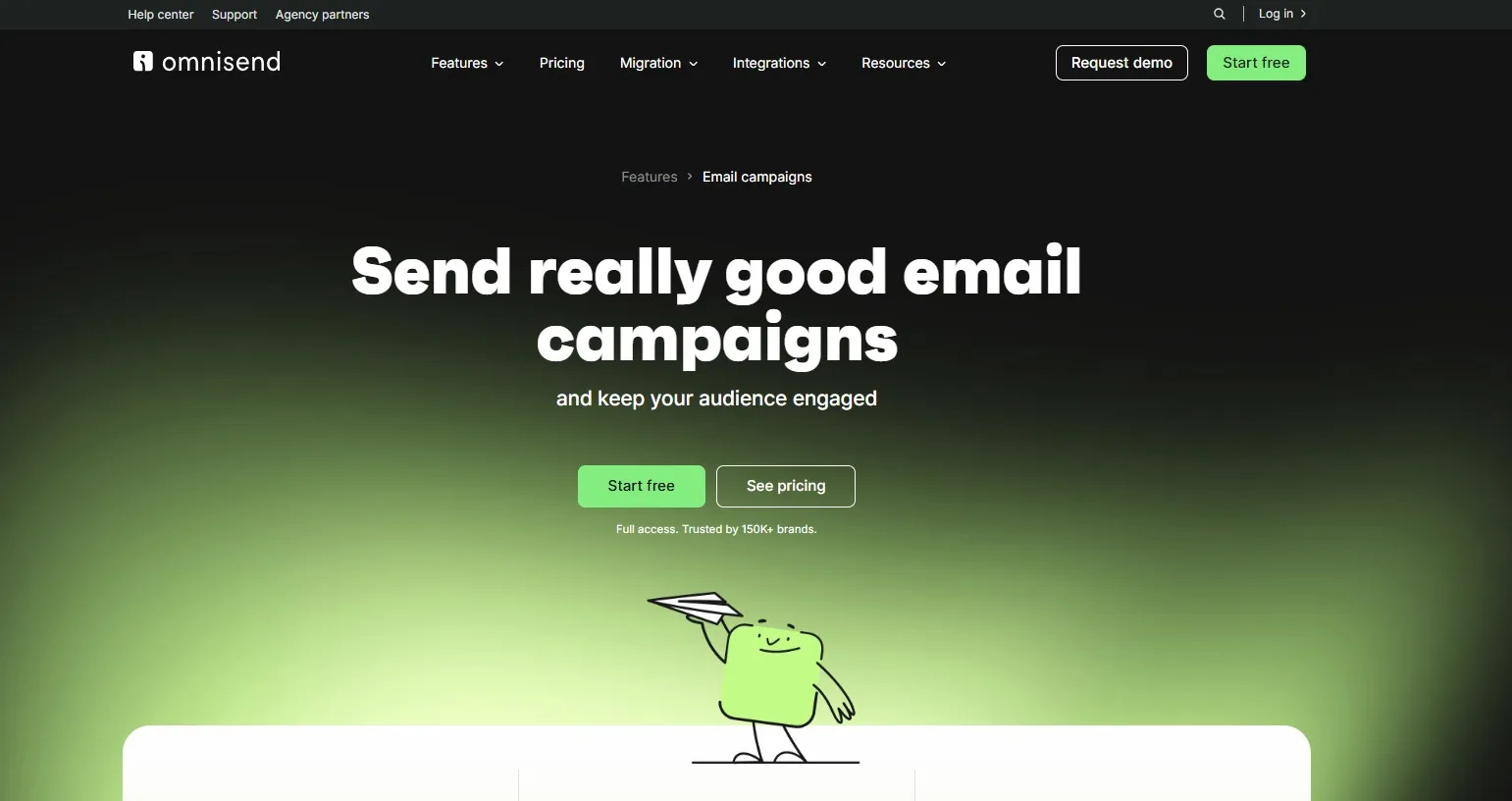
Omnisend, for personalized email, SMS, and push in one place
Email, SMS, and push sit in one ecommerce platform, so the data is there without extra setup.
What are Omnisend’s key features
- Tags cover any profile or custom property, and a saved default applies to every send
- Event data works inside automations, so cart contents and browsed products resolve
- Lifecycle stages calculate from purchase recency, frequency, and value
- Dynamic Preview renders a real contact’s data before you send
- Reporting attributes revenue per campaign and per automation
Nosto, for on-site personalization that feeds the email
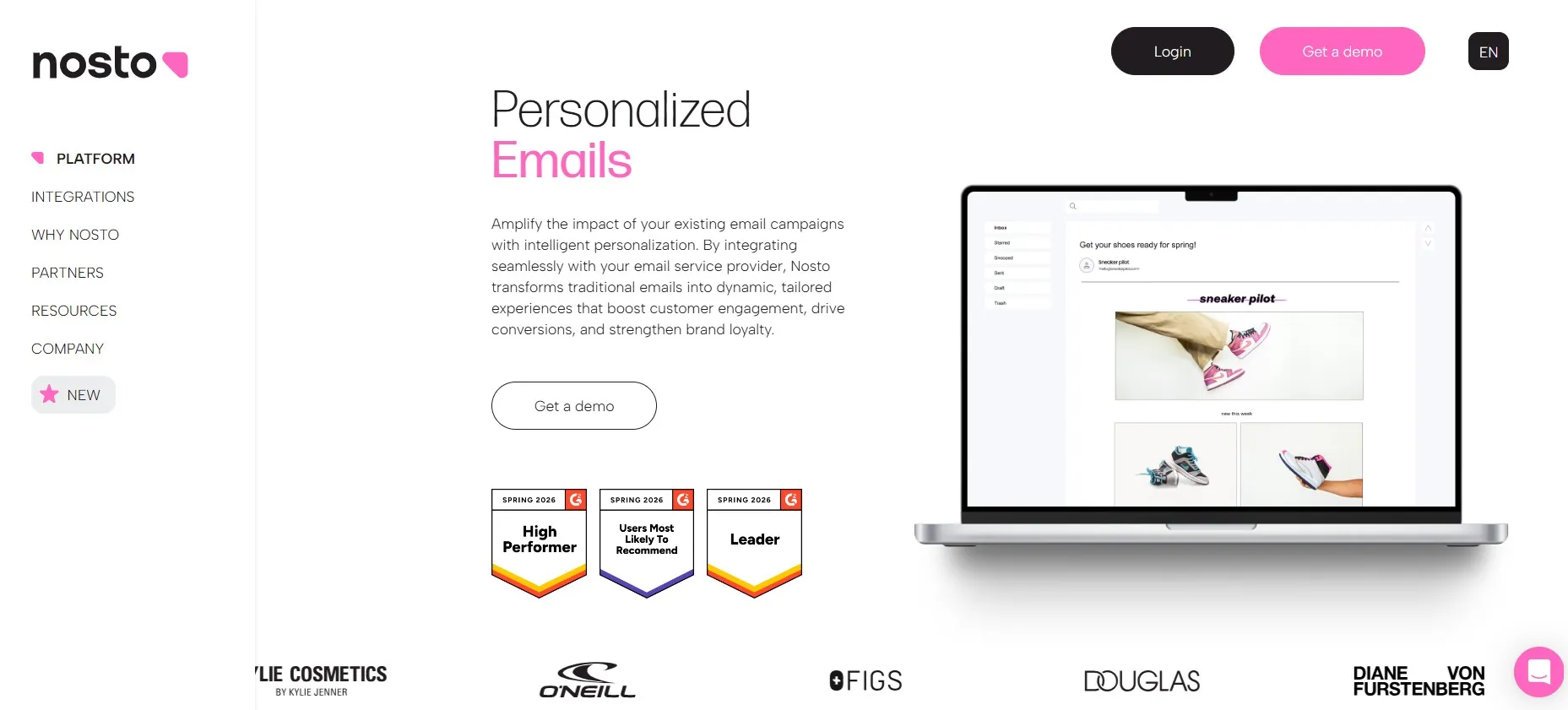
Nosto is built for mid-market and enterprise stores, personalizing search, recommendations, and product displays on the site. That on-site intelligence is what makes its recommendation blocks worth pulling into email.
What are Nosto’s key features:
- Recommendation widgets within existing email templates
- Product selection at email open time rather than during email creation
- Automatic removal of sold-out products and price updates at open
- Behavioral triggers for welcome, post-purchase, and cart abandonment emails
- Compatibility with ESPs such as Klaviyo and Dotdigital
Dynamic Yield, for enterprise orchestration across channels
Dynamic Yield suits data-rich brands, personalizing across site, app, and email.
What are Dynamic Yield’s key features
- Product recommendations predict the next purchase from behavior
- Audience Hub groups customers by behavior and intent
- A/B and server-side testing covers layouts and recommendations
- Channel prioritization routes each message to the channel a person uses most
- AI features include the AdaptML engine
Summary
Email personalization does not need a complex setup. Start with the customer data your store already collects, then build from there.
Welcome and abandoned cart emails are good starting points because they use existing customer and shopping data. From there, you can personalize browse abandonment, back-in-stock, birthday, loyalty, and win-back emails.
Knowing how to personalize email campaigns involves using the data you already have. Focus on useful customer behavior and activities, then test what drives more clicks and orders.