11 Free Templates + How to Make Your Own
I won’t bore you with a lecture about why you need a social media content calendar. You know you do.
You likely landed here because you’re looking for a content calendar template, a quick starting point for mapping out your content plan for the coming weeks or months.
I’ve worked as both a social media manager and content creator and live by my social media content calendar.
My current favorite tool is (of course) Buffer, but there are loads of other options out there. If you’re looking for something lo-fi to get started, I’ve got you.
Here’s a list of 13 calendar templates to help you be more efficient, plus how to build your own if none of them fit.
The quick version
A social media calendar template is a ready-made structure for planning what you’ll post, where, and when, so you’re not staring at a blank screen every week.
The fastest way to start: Pick a format that matches how you like to work (a spreadsheet like Google Sheets, a visual tool like Canva, a flexible workspace like Notion, or a scheduler like Buffer that also publishes for you), grab one of the 13 free templates below, and block 30 minutes to map out your next two weeks.
If you want to build one from scratch instead, skip to how to create a social media calendar.
🌱
| # | Template | Format | Best for | Free? |
|---|---|---|---|---|
| 1 | Buffer social media calendar | Scheduling tool | Planning and auto-publishing in one place | ✅ |
| 2 | Best times to post calendar | Timing posts for reach | ✅ | |
| 3 | Simple weekly calendar | Mapping a single week | ✅ | |
| 4 | Simple monthly calendar | Big-picture month view | ✅ | |
| 5 | Canva calendars | Canva | Customizing the simple calendars visually | ✅ |
| 6 | Notion calendar | Notion | Storing captions + media in one place | ✅ |
| 7 | Google Sheets calendar | Google Sheets | Customizable, spreadsheet-based planning | ✅ |
| 8 | Simon’s kanban calendar | Buffer | Organizing by content pillar | ✅ |
| 9 | Aiza’s email × ChatGPT calendar | ChatGPT + email | Generating and scheduling ideas | ✅ |
| 10 | My TikTok consistency calendar | Buffer | Staying consistent on a single platform | ✅ |
| 11 | Kiran’s personal-brand calendar | Notion | Building a personal brand | ✅ |
This is not a downloadable template, per se, but Buffer is so easy to plug and play, it might as well be.
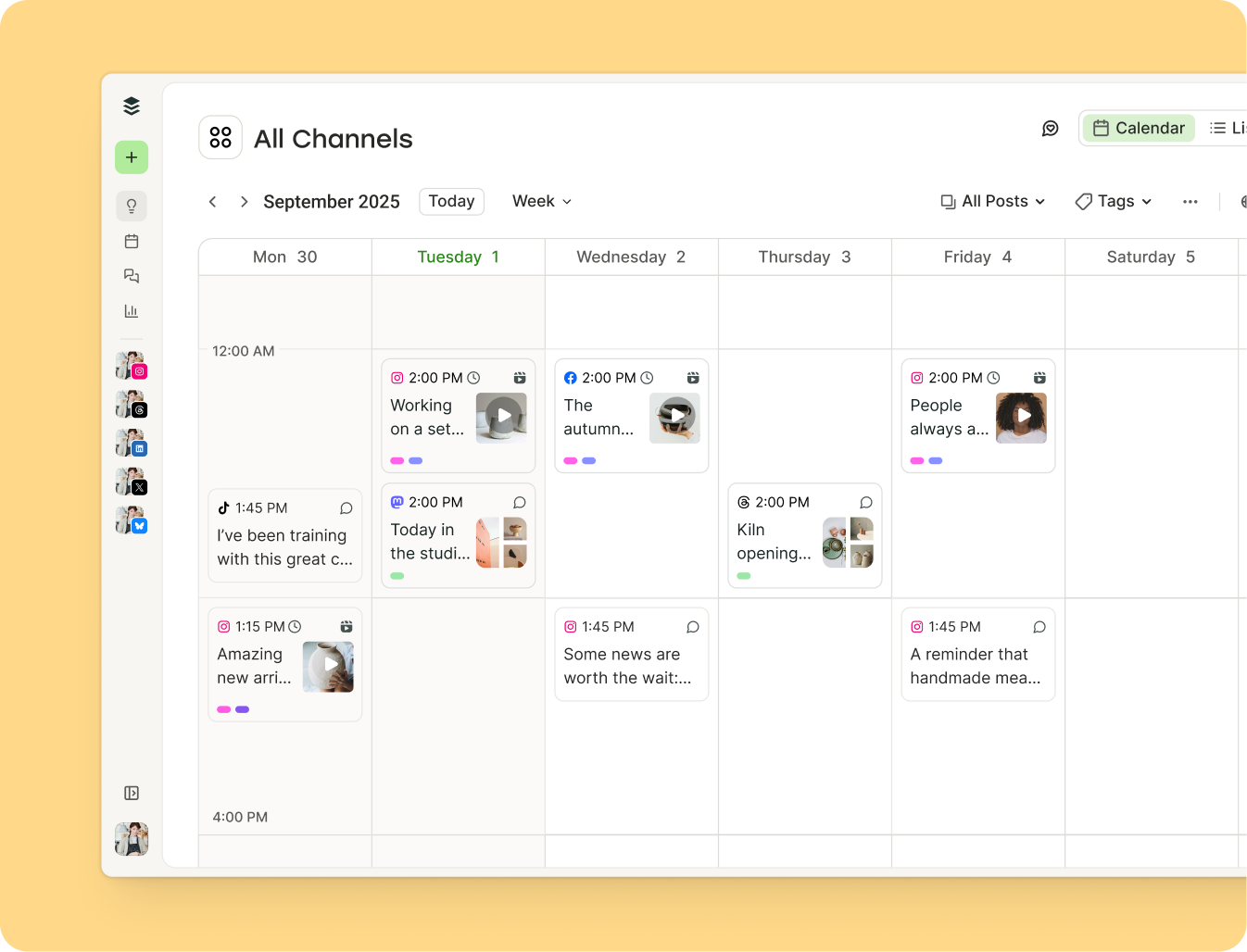
I’m definitely biased here, but take it from someone who has tried every tool and template on the block. I genuinely, wholeheartedly believe Buffer has the best social media calendar out there.
Here’s an overview of just some of the cool things you can do.
Let’s start with the basics: Buffer’s content calendar features a weekly and monthly calendar view. You can drag and drop posts to easily change publish dates and times in real time.
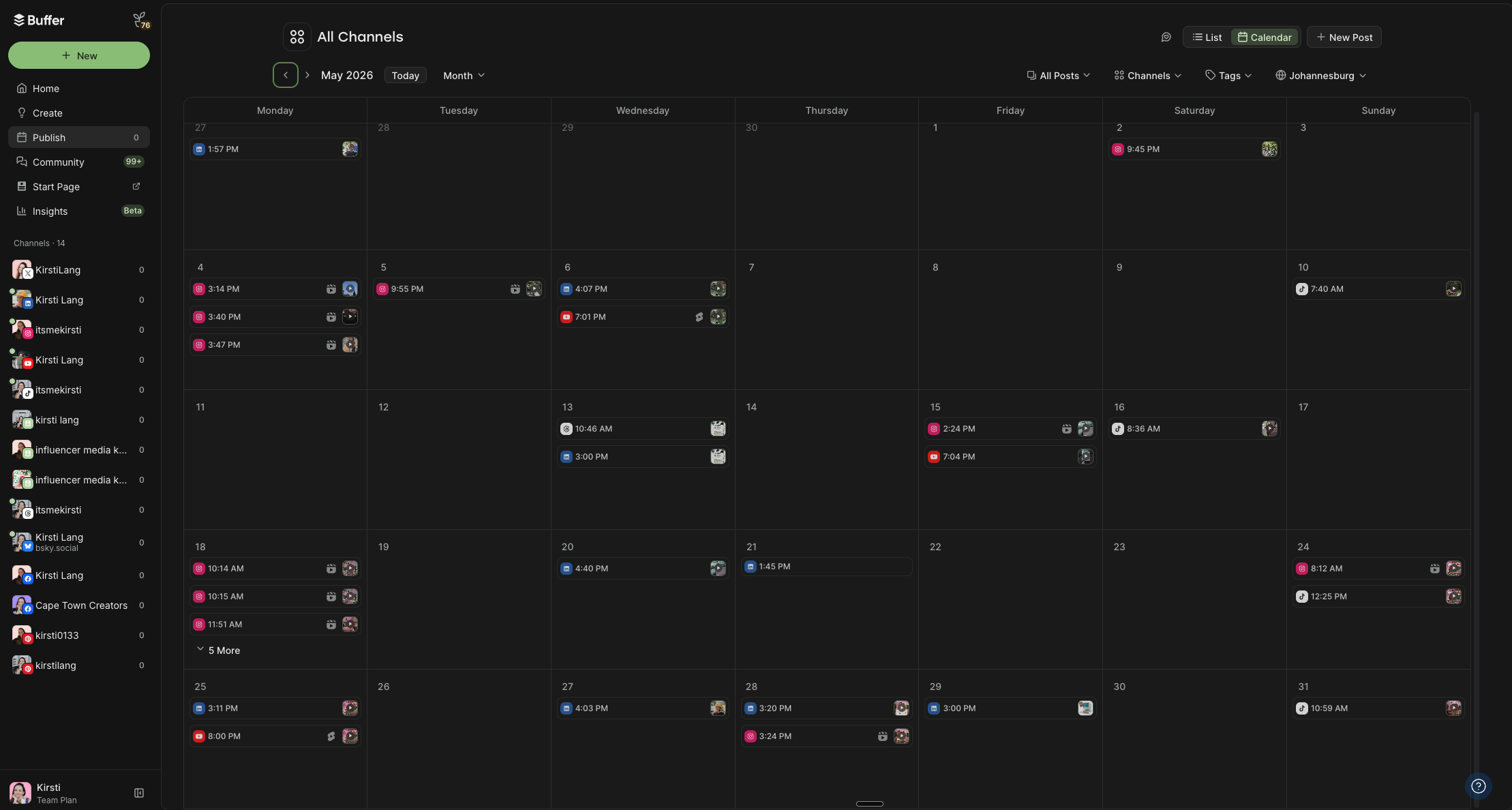
These views can be filtered by platform, so you can see all your posts in a list if you prefer. You can even optimize your posting schedule according to the best time to post on each platform (more on this below).
The Tags feature allows for custom social content categories and color coding (my personal favorite feature). You can organize your posts by status, content strategy pillars, target audience, marketing goals, or type of content, whatever works best for your content strategy.
The benefits of mapping out your content in Buffer go way beyond just planning. Buffer is a social media scheduling tool, not just a social media planning tool.
This calendar is the only one on this list that will publish the posts for you.
Buffer can automatically schedule your social media posts (whether they’re text, photos, or videos) on all major platforms to go live at precisely the time you want them to. If you’re juggling several accounts, it also makes it far easier to manage multiple social media accounts from one calendar.
It’s an excellent option for both solo creators and social media teams, too, with handy collaboration features like approval workflows and smart permissions.
Unlike the rest of the calendars on this list, there’s no need to cross-reference multiple tools or systems or manually post every single content piece on different platforms.
Buffer connects with Facebook, Instagram, TikTok, YouTube, LinkedIn, Twitter/X, Pinterest, Threads, Bluesky, Mastodon, Google Business, and more.
If you’re sharing the same posts on multiple social media platforms, you can schedule the posts in one go (and make minor tweaks to each platform if need be). I can’t even begin to tell you how much of a time-saver this is.
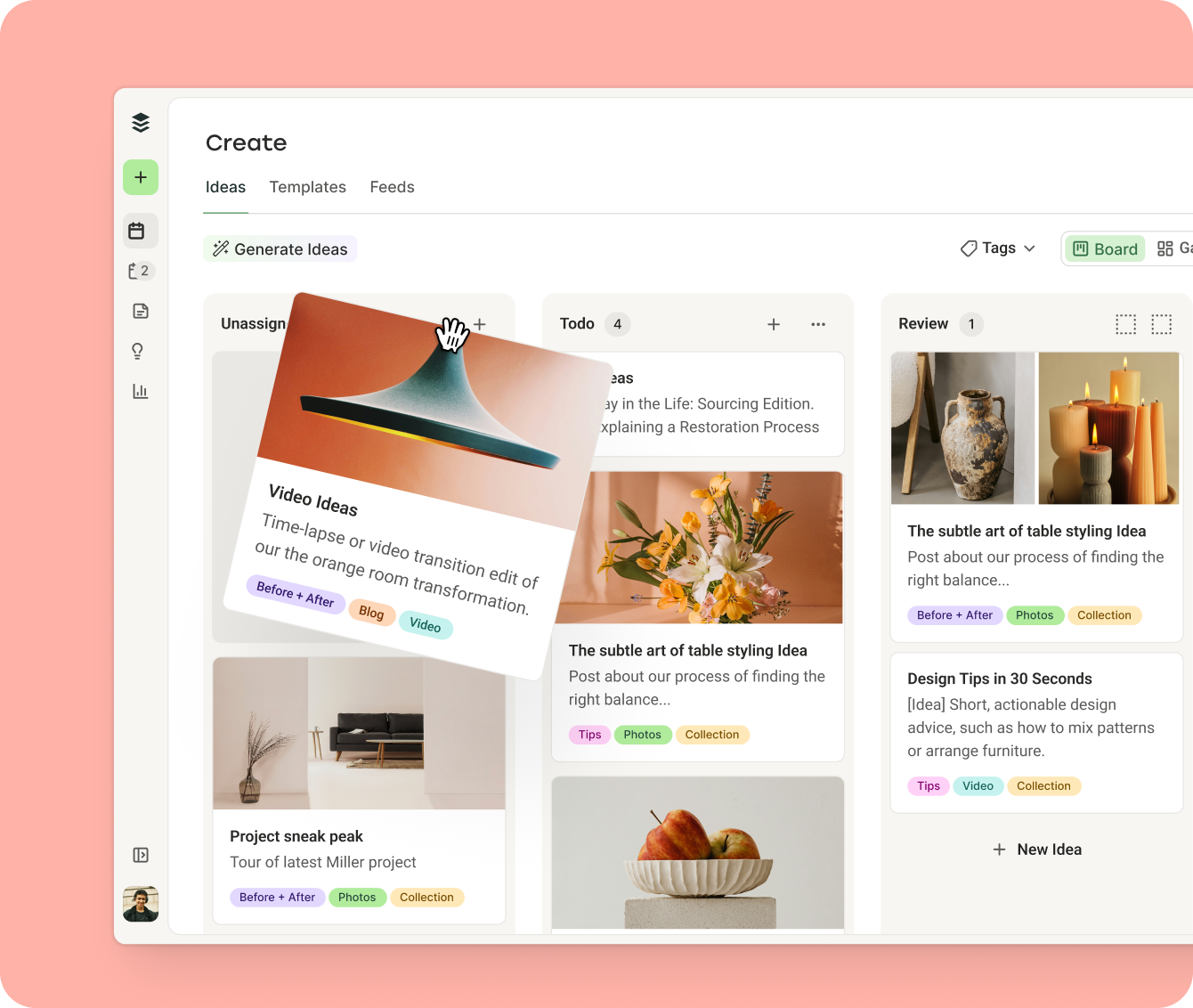
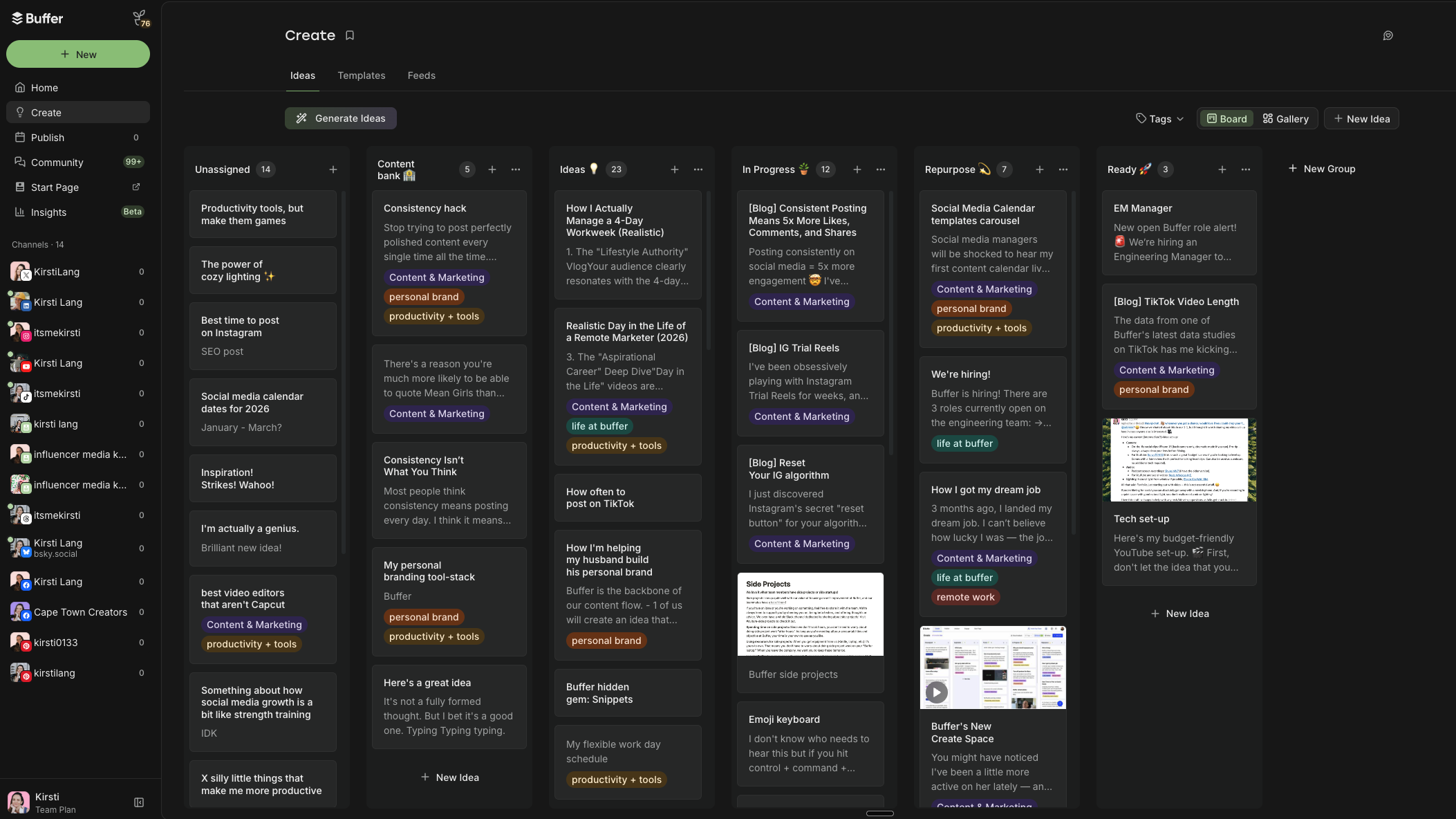
Outside the calendar, there’s the Create Space to help you brainstorm and organize your ideas, engagement tools to help you manage replies to comments, and the analytics tools to check in on metrics at a glance.
How to use this calendar
- Click on the Get started with Buffer’s calendar link below.
- Create your Buffer account if you don’t already have one (it’s free).
- Click Connect Channels (you can connect up to three on our forever-free plan).
- Choose the platform you want to start with and follow the steps.
- Click on the Publish tab on the top left.
- Welcome to your social media content calendar. Click New Post on the top right to start scheduling posts.
2. Social media calendar template with the best times to post
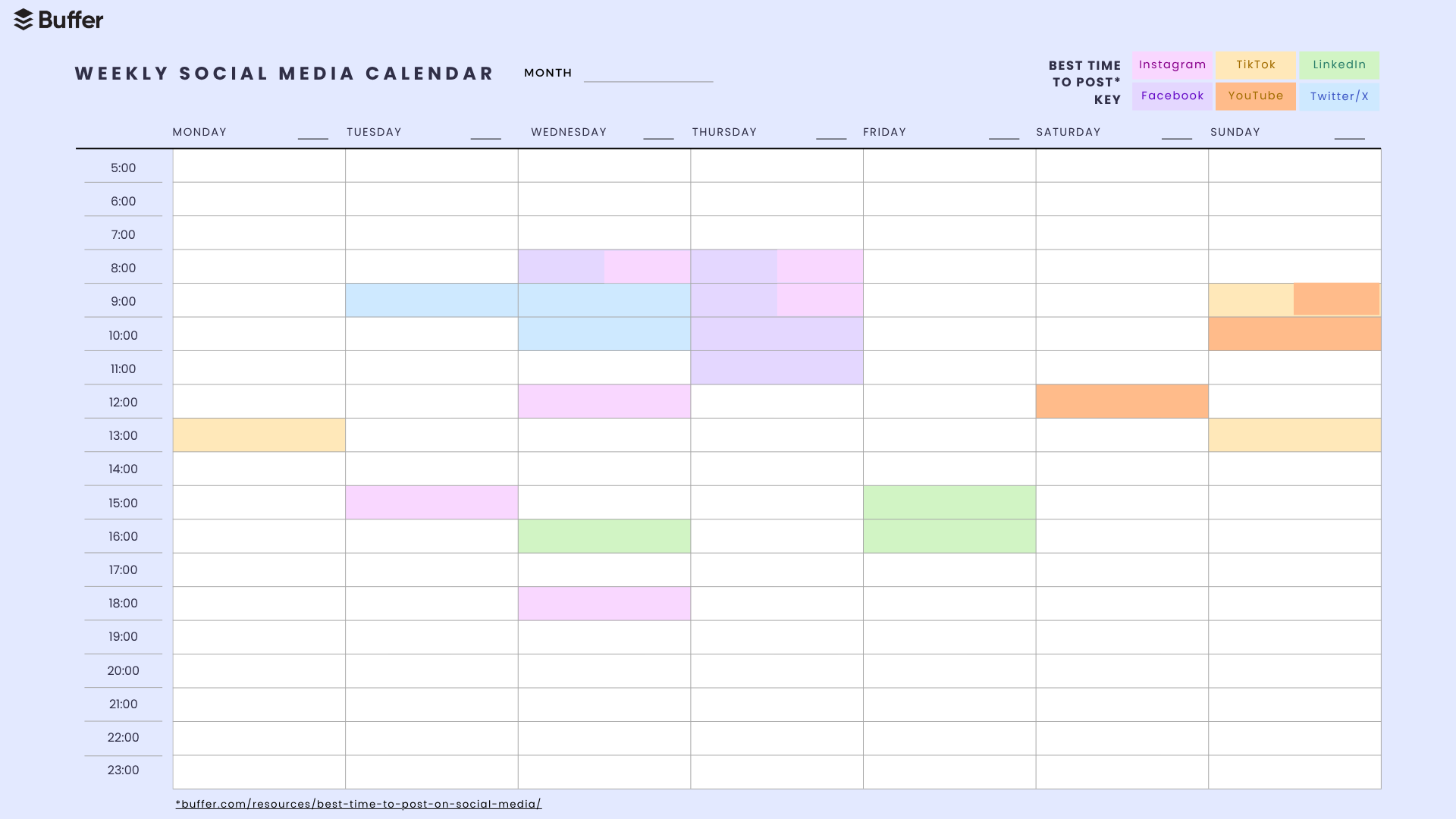
Timing your post just right can have a positive impact on both your reach and engagement in social media marketing, which is why we dove into the data from millions of social media posts in Buffer to uncover exactly that.
Thanks to this analysis, we’ve pinpointed several posting times for each social media platform during which posts get more engagement or views. I’ve highlighted these times for Facebook, Instagram, TikTok, LinkedIn, YouTube, and Twitter/X in this downloadable PDF calendar.
How to use this calendar
- Download the ‘Best Time to Post’ calendar template.
- Once downloaded, right-click on the file and open it with Adobe Reader or another PDF reader.
- Click Fill & Sign.
- Click within the time slot you want to use to start typing.
- Alternatively, you can always print these pages and fill them out with a good old-fashioned pen and paper.
- The social media content calendar template is yours to edit as you see fit.
⏰ Get ‘Best Time to Post’ calendar template
There’s a whole lot more nuance in figuring out the best time to post for your audience. I’d recommend checking out these resources:
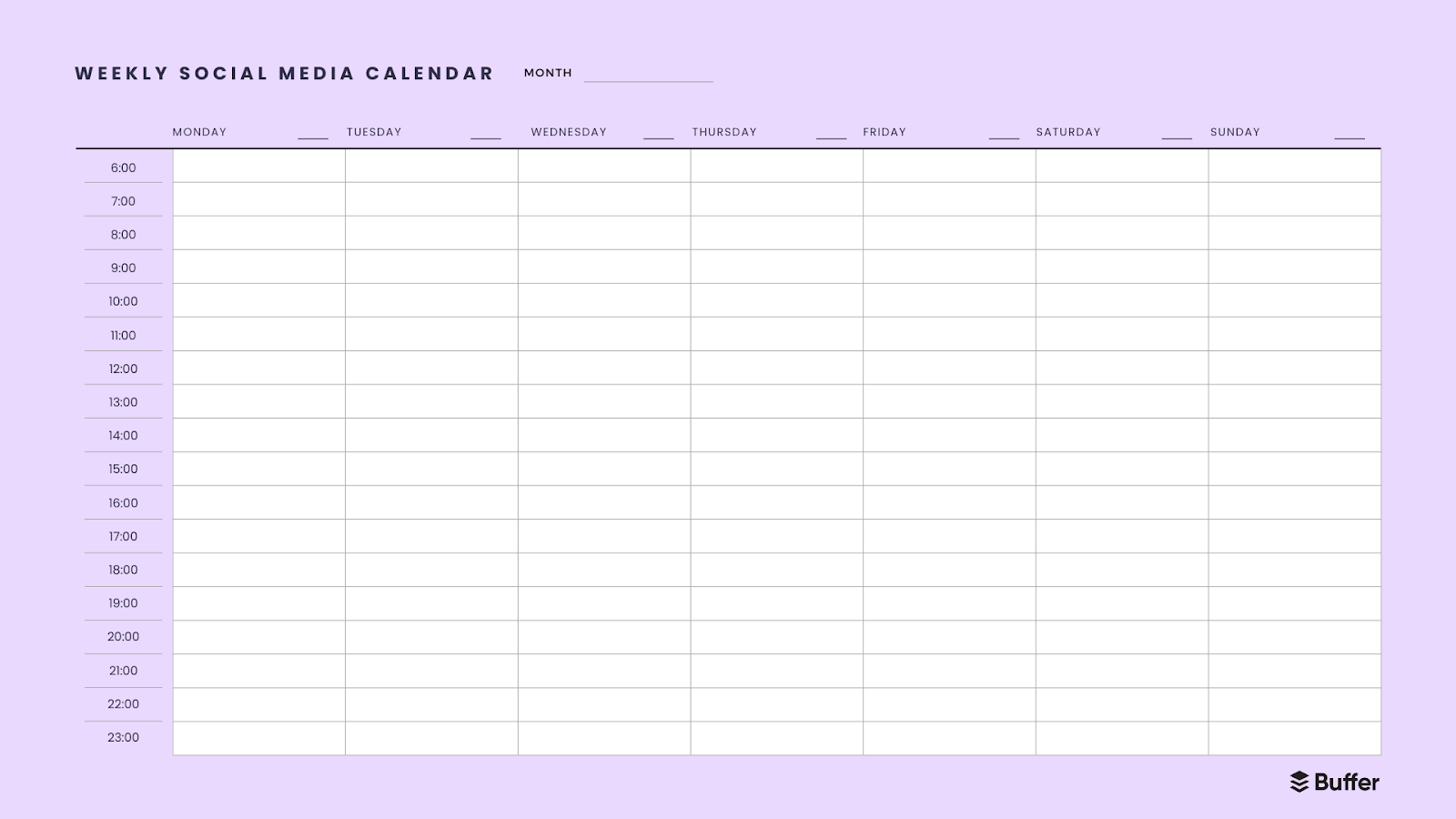
This free content calendar template features the same layout as the one above, with publishing schedule time slots from 6 a.m. to 11 p.m., just without highlights for the best times to post on each platform.
How to use this calendar
- Get the simple weekly calendar.
- Open with Adobe Reader.
- Click Fill & Sign.
- Click within the time slot you want to use to start typing.
- Alternatively, you can always print these pages and use pen and paper to fill yours out.
- The social media content calendar template is yours to edit as you see fit.
🗓️ Get the simple weekly calendar
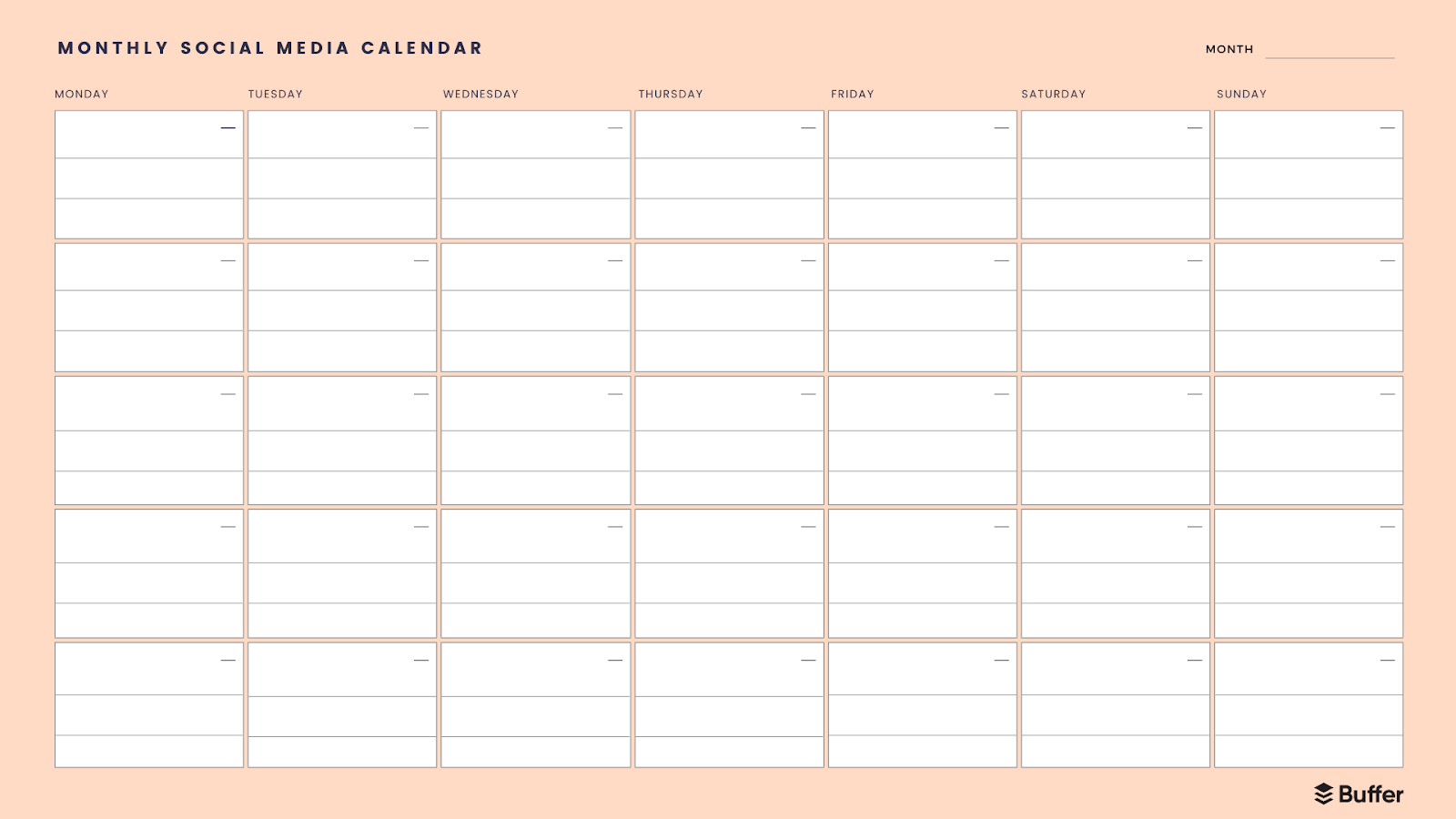
If you want to map out an entire month at a glance, this content calendar template is for you. Think of this calendar as your big-picture view. It can be helpful to map out the month in broad strokes by publish date using a layout like this one, to help you prioritize tasks.
How to use this calendar
- Get the simple monthly social media calendar.
- Open with Adobe Reader.
- Click Fill & Sign.
- Click within the time slot you want to use to start typing.
- Alternatively, you can always print these pages and use a good ol’ pen and paper to fill yours out.
- The social media content calendar template is yours to edit as you see fit.
📅 Get the simple monthly social media calendar
If you’d like to customize the simple calendars above to better suit you, here are the editable versions in Canva. You’ll need a free Canva account to tweak them.
How to use this calendar
- Click on one of the Get calendar links below. A preview will open in Canva.
- Click the View template button, then Open in Editor.
- An editable version will appear in your Canva workspace.
- The social media content calendar template is yours to edit as you see fit.
⏰ Get the best times to post calendar
🗓️ Get the simple weekly calendar
📅 Get the simple monthly calendar
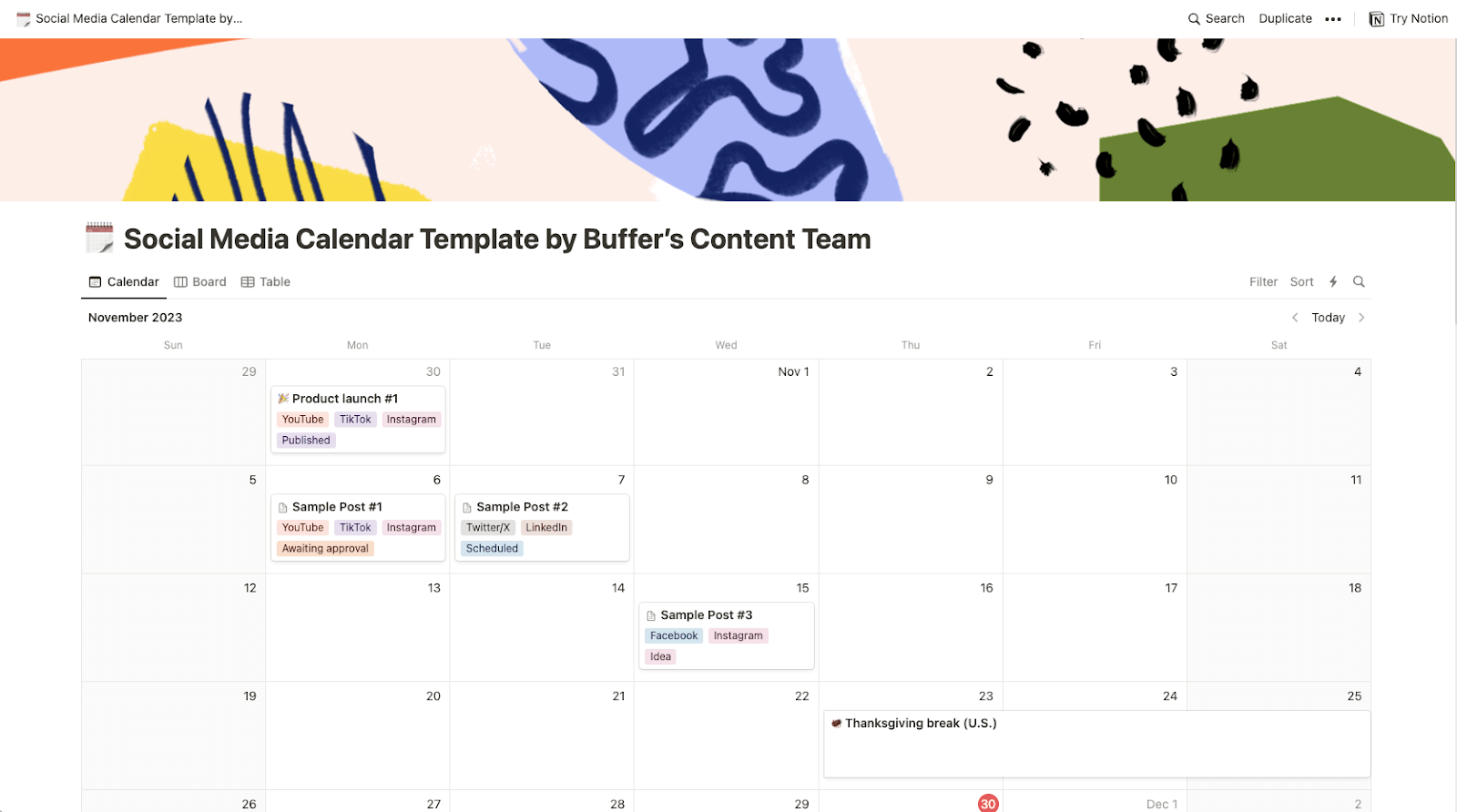
Notion is a flexible project management tool, where, unlike some of the simple content calendar templates above, you can easily store the text, captions, and media you plan to use for each post in the calendar itself.
You can also view all your posts in different views, like a list, table, Kanban board, or Gantt chart, which can be useful in planning. It’s a great choice for a content marketing or editorial calendar template too, as you can map out newsletters, blog posts, and other digital marketing campaigns.
How to use this calendar
- Get the Notion template.
- Click on the Duplicate button (the juxtaposed squares icon) in the top right corner
- Create a free Notion account if you don’t have one already
- The social media content calendar template is yours to edit as you see fit.
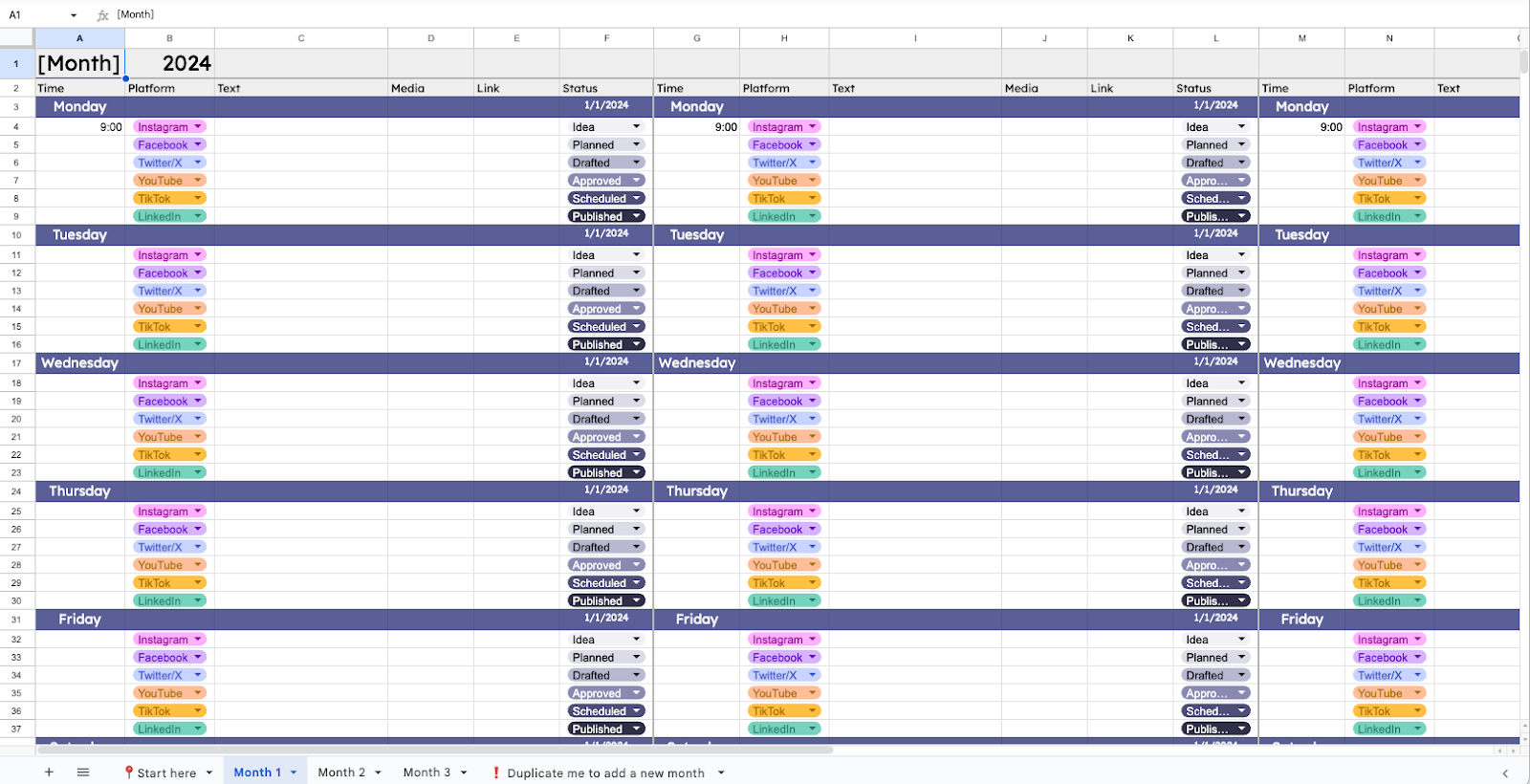
If a spreadsheet is your happy place, a Google Sheets social media calendar template is hard to beat — it’s free, it lives in the cloud, and you can customize it endlessly without learning a new tool.
I’ve never been a huge fan of using Sheets for anything outside data wrangling. But now that Google’s added a dropdown list feature, Sheets is growing on me as an organization and planning tool. It makes for a great social media planning calendar, too.
I particularly like how you’re able to use specific custom colors for the list options, too. I like my content calendars to be pretty.
This free content calendar template is, along with Buffer and Notion, one of the most customizable on this list. It’s also suitable for storing entire posts and captions, rather than just making notes, as you would have done in the simple calendar templates above. If Microsoft Excel is more your speed, you can convert it in a couple of clicks (I’ve covered that in the steps below).
How to use this calendar
- Make a copy of the Google Sheets template.
- Read the instructions on the Start here sheet. If Microsoft Excel is your spreadsheet tool of choice, click File > Download > Microsoft Excel.
- The social media content calendar template is yours to edit as you see fit.
📊 Get the Google Sheets template
Social media calendars are pretty personal, and what works for one marketer, creator, or entrepreneur might not work for another.
With that in mind, I turned to our community, which graciously shared their real-life calendars, or even turned them into templates that you can use and download.
8. Simon Heaton’s kanban calendar
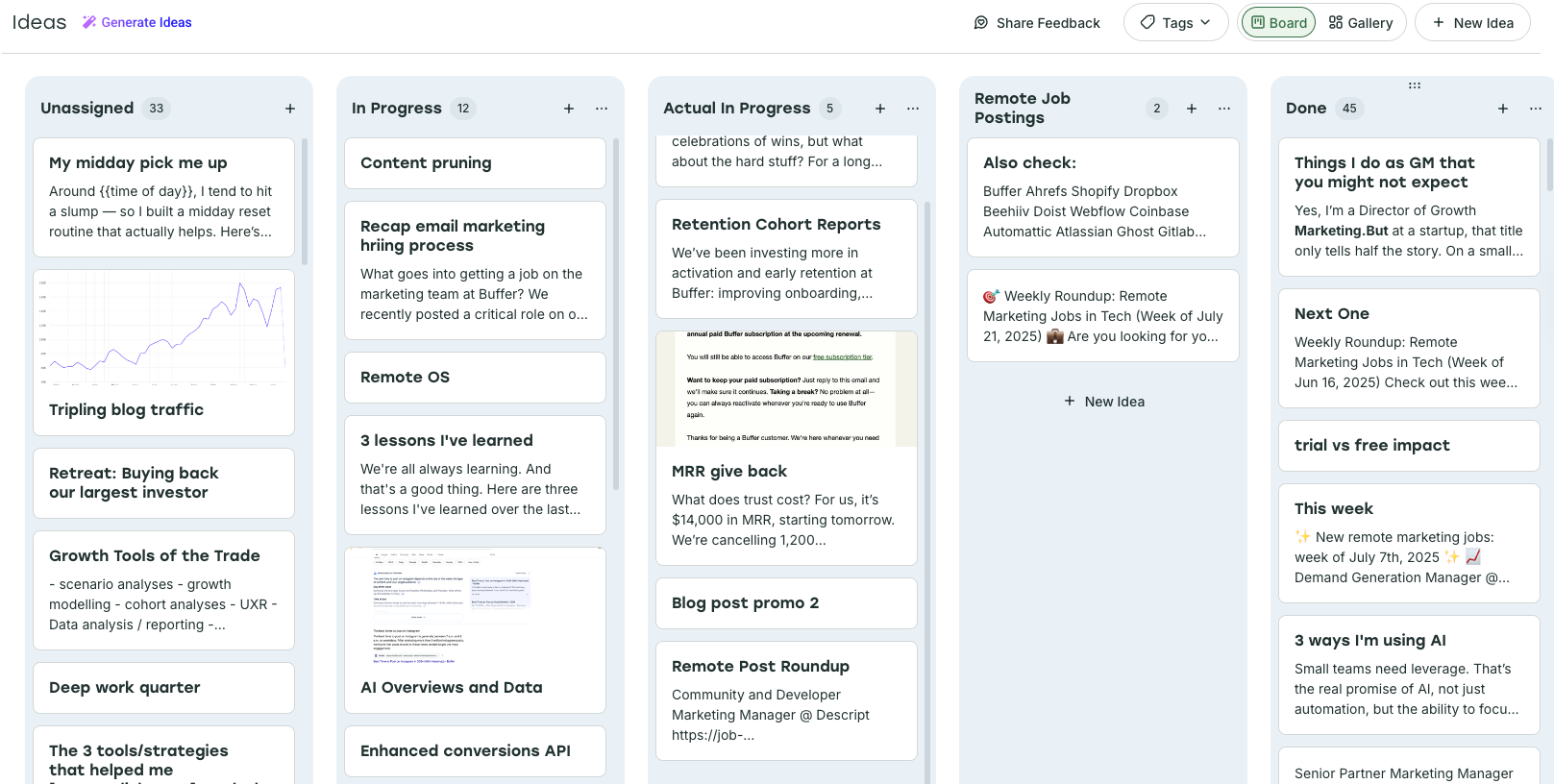
Buffer’s Director of Growth Marketing, Simon Heaton, leans on Buffer’s Create Space to plan his content and the calendar to schedule it.
He’s organized the Create Space kanban columns into content status like progress (there’s a big difference between ‘In progress’ and ‘Actual in progress,’ he told me).
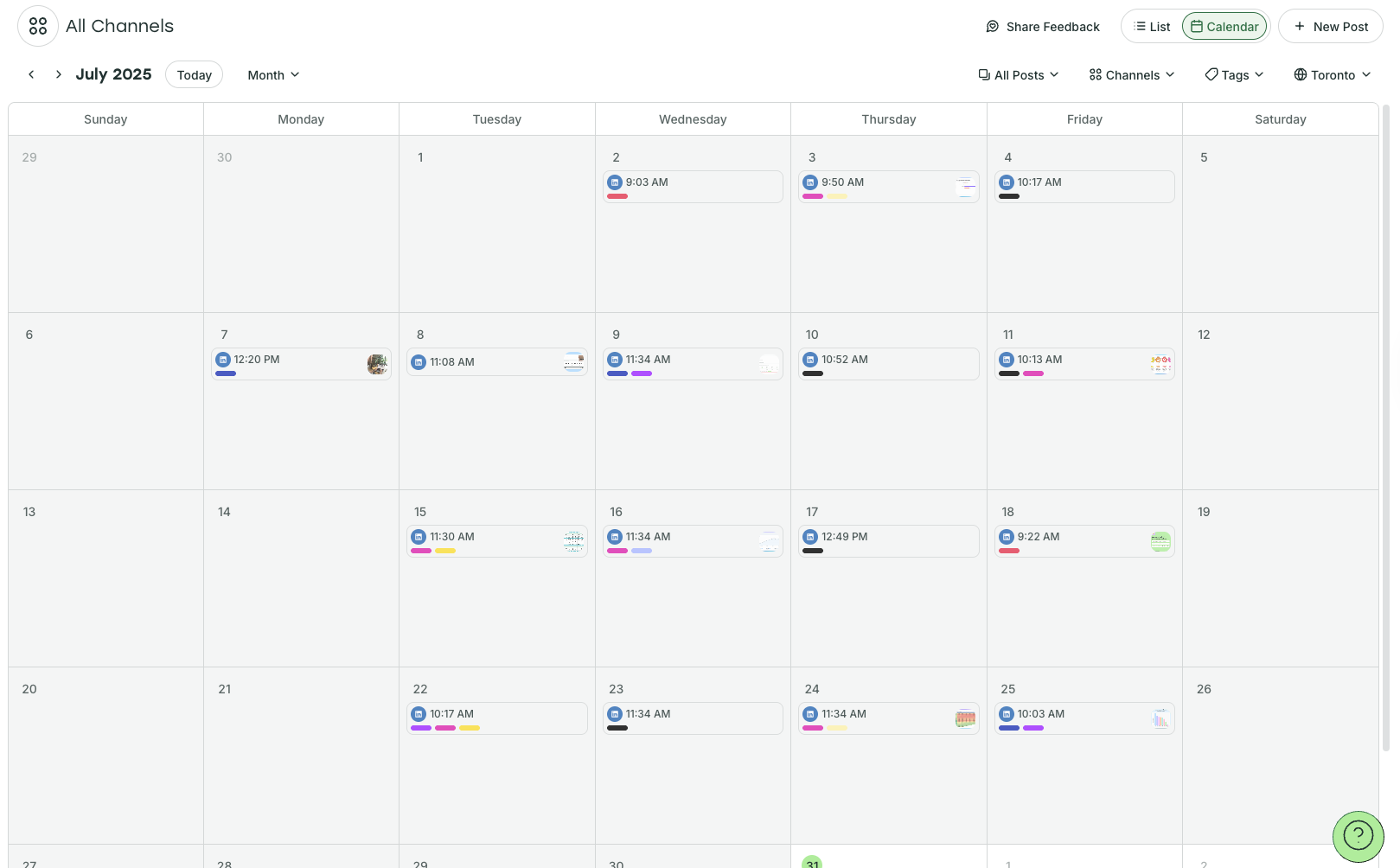
Simon used Tags as another layer of organization in his Buffer social media planning calendar, with each color-coded tag corresponding to one of his content pillars (note the colored bars on his publish calendar above).
As part of his social media strategy, Simon has defined Buffer Promo, General Growth Tips, Growth @ Buffer, Remote Job Postings, Posts with Data, and Posts about Social Media as his content pillars.
“I double them up sometimes as things can overlap,” he says. “For example, ‘Posts with Data’ overlaps with ‘Growth @ Buffer’ a lot.”
How to set up your Buffer like Simon
- Click on the Get started with Buffer link.
- Create your Buffer account if you don’t already have one, and click Connect Channels (you can connect up to three for free). Choose the platform you want to start with and follow the steps.
- Click on Create on the menu on the top left to navigate to the Create Space.
- Toggle on ‘board view’ on the top right. Choose + New Group on the right to start a new column, and choose your desired column names.
- Click on Tags (also top right) and the settings cog symbol to create your tags.
🌱 Get started with Buffer
9. Aiza Coronado’s email x ChatGPT calendar
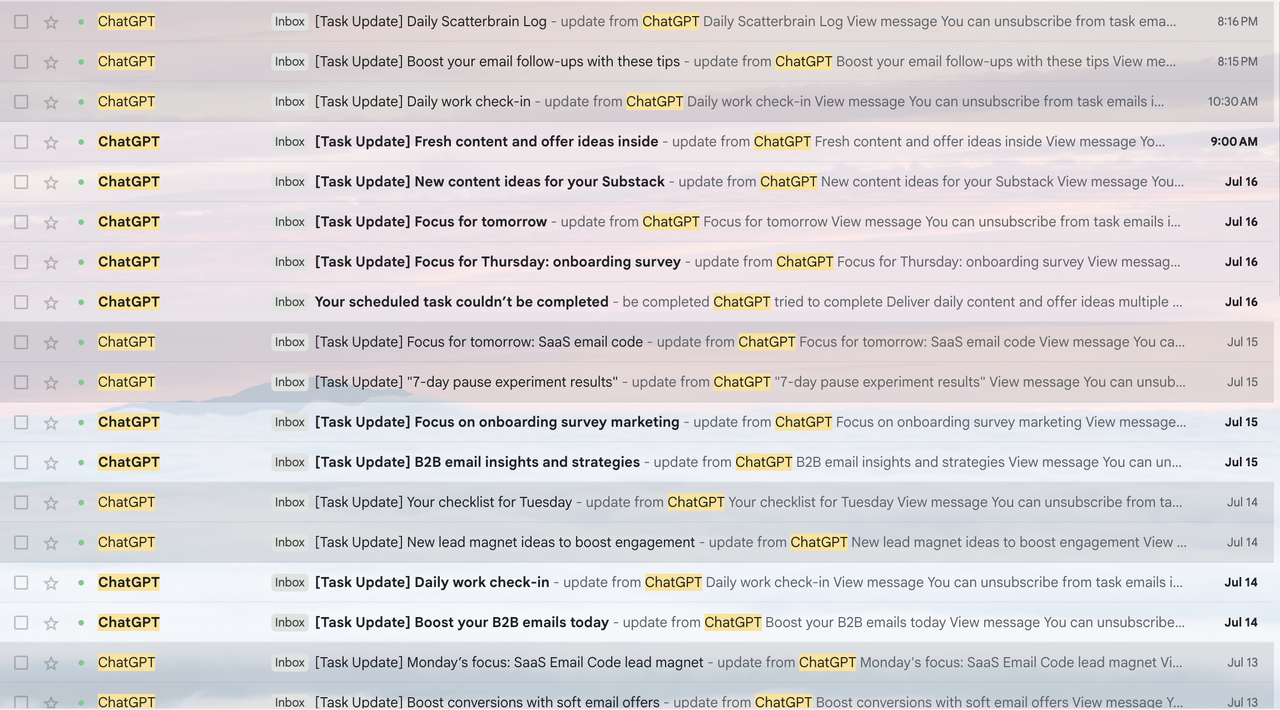
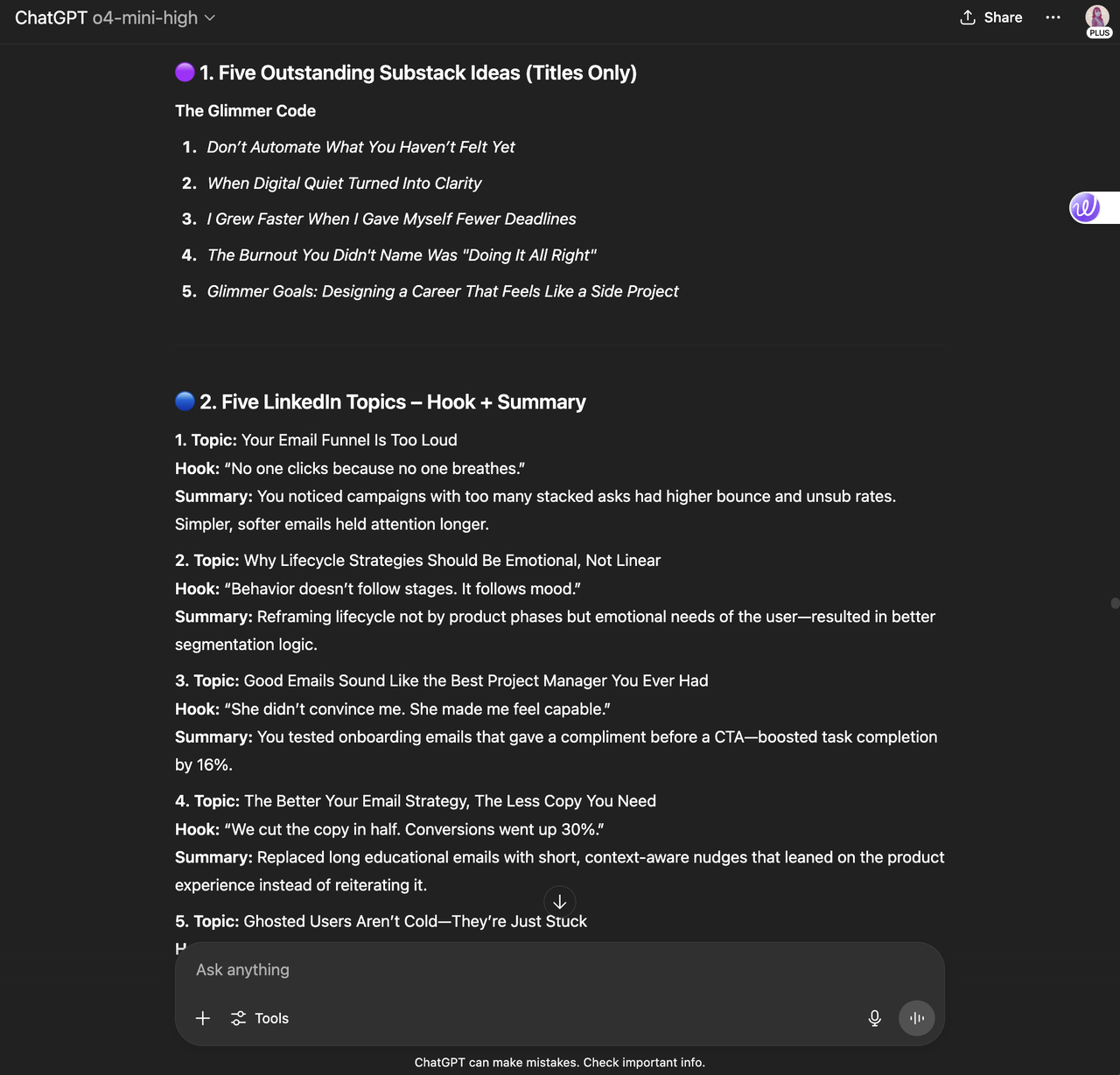
Aiza Coronado, Marketer and founder of The Glimmer Code, has a very unique approach to her social media content planner. She has it sent straight to her email.
Bonus: It doesn’t just help her plan when to share the content; it also helps her plan what the content will be.
She prompted her AI tool of choice, ChatGPT, to generate ideas for her, then set up a ChatGPT task to have them sent straight to her email inbox.
“The prompt is super simple,” she says. “I used something like, ‘From our past conversations, find and list email marketing insights, possible content ideas, and Substack topics I wanted to write about’.”
“The titles are cheesy, but it works as idea sparks,” she says. “I just need to remember what I did. And ask AI to uncover hidden insights I might have missed.”
How to create this system
- Once you’ve landed on an output you’re happy with, you can create a task in ChatGPT at a cadence that suits you. Prompt in the same chat: “Send me one of these content ideas every morning,” or similar. Here’s more info on how to create a task in ChatGPT.
- You’ll receive the tasks in your email inbox. Click on them to go back to ChatGPT and make changes before posting via the platform or social media scheduling tool.
I’ve created a more generic prompt you could use for the same purpose.
In ChatGPT, use a prompt like this one to start the conversation: “I’m a [job title/creator] who creates content about [X,Y,Z]. My target audience is [demographic]. I create [X] posts a week on [platform/s]. Find possible content ideas for me.”
Here’s some of the output it generates:
⚡
Pro tip: The more detail you add to this prompt, the better. You can include examples of past posts that have performed well, or ideas from other creators or brands that you love, for example.
10. My simple calendar for TikTok consistency
Like Sabreen, I rely on predetermined time slots and goals to stay consistent on TikTok.
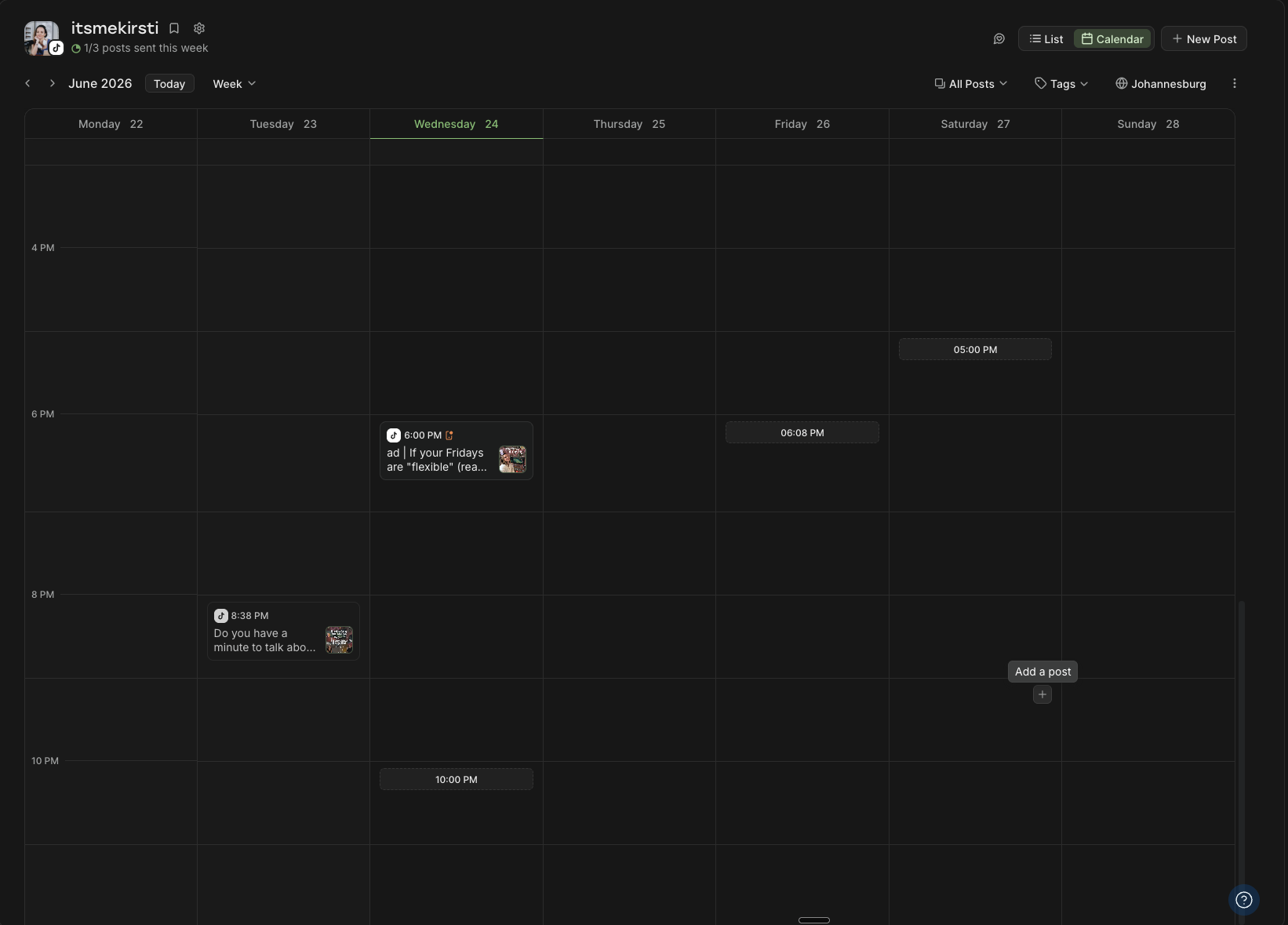
Using the info from our best time to post on TikTok study and analyzing my own video performance, I’ve pinpointed the best times for me to share a video on TikTok every day.
My posting goal is three times per week, but I have slots set up for every day to give me flexibility.
I’ve set up my Buffer content calendar to reflect those high-performing timeslots, so when the time comes to schedule social posts, I don’t even have to think about it. Removing that late-stage friction has been a game-changer for helping to stay consistent.
Bonus: This works for any social channels, not just TikTok.
How to set up your Buffer like me
- Get started with Buffer
- Create your Buffer account if you don’t already have one, and click Connect Channels (you can connect up to three for free).
- Choose the platform you want to start with and follow the steps. When you connect a new channel, you’ll be prompted to create a posting goal.
- If you want to create a posting goal for a channel you have already connected, choose your channel from the channels list on the left-hand side, then click on + Set a posting goal right below the channel title.
- To set posting times to appear in your calendar, click on the cog icon next to the channel name (also visible in the image above). Scroll down to Posting slots to add or remove slots to your calendar.
✨ Get started with Buffer
11. Kiran Shahid’s calendar for personal brand-building
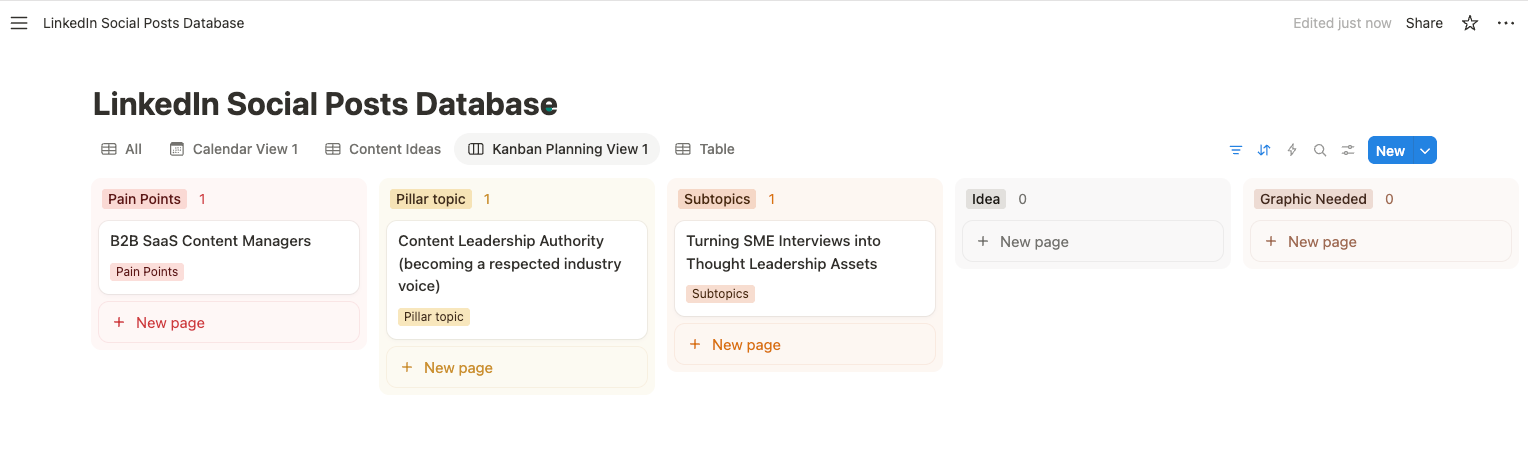
Kiran Shahid has built an impressive personal brand on LinkedIn, and she’s looking to branch out to Instagram, too.
Thanks to the robust system she created on Notion while growing on LinkedIn, she’s finding her new Instagram project a whole lot smoother.
“I have these systems in place, I’m finding it so easy to start and have a content bank ready before I launch,” she explains. “If an idea pops into my head, I can note it down on Notion and develop it later when I sit down to plan my weekly content.”
The system is great for anyone who wants to be intentional about building a personal brand, she adds.
“Apart from making sure I never run out of ideas, having them all in one place makes repurposing a breeze, too. On days I’m feeling a bit lazy, I can simply copy-paste an old idea to make sure there isn’t a big gap in my scheduling.”
How to use this calendar
- Get the Notion template.
- Click on the Duplicate button (the juxtaposed squares icon) in the top right corner.
- Create a free Notion account if you don’t have one already.
- Kiran’s social media content calendar template is yours to edit as you see fit (use the tabs to see different sections and views).
Templates are the fast lane, but if none of them quite fit, building your own calendar from scratch isn’t hard. Here’s the eight-step process I’ve used as both a social media manager and a creator.
1. Start with your strategy
Before you open any calendar tool, get clear on the basics: why you’re posting, who you’re trying to reach, and what you’ll actually post about. Random posting gets you random results. Having clear goals, understanding your target audience, and defining your content pillars will make your marketing efforts much easier and more successful in the long run
Even a single-page social media strategy — with your goals, your audience, and your content pillars — will make every decision after this easier.
🔎
2. Pick your tool and format
Choose the home for your calendar based on how you actually like to work, not what looks most impressive. A spreadsheet (Google Sheets, Excel), a flexible workspace (Notion), or a scheduler that also publishes for you (Buffer) are all solid starting points. The best system is the one you’ll actually keep using, so try not to overthink it. You can always migrate later.
It would be remiss of me not to point out that there are a host of perks to housing your social media calendar in Buffer beyond the ability to plan and schedule in a single tool:
- A high-level monthly view for big-picture planning.
- A more in-depth weekly view to see all the key details at a glance.
- The ability to exclude certain channels from view for extra clarity and focus.
- Access it anywhere. Thanks to Buffer’s mobile app, you can check or amend your calendar on the go.
📲 Download the Buffer app for iOS here
📲 Download the Buffer app for Android here
3. Set your cadence
Decide how often you’ll post on each platform, and be realistic. Three posts a week you can sustain beats seven you’ll abandon by Thursday. Consistency is the one piece of advice that survives every algorithm update, so build your calendar around a rhythm you can keep.
4. Build the skeleton
Map out your posting slots (the days and times you’ll publish). If you’re not sure when to post, our best time to post research, drawn from millions of posts analyzed in Buffer, is a useful starting point before you layer in your own performance data.
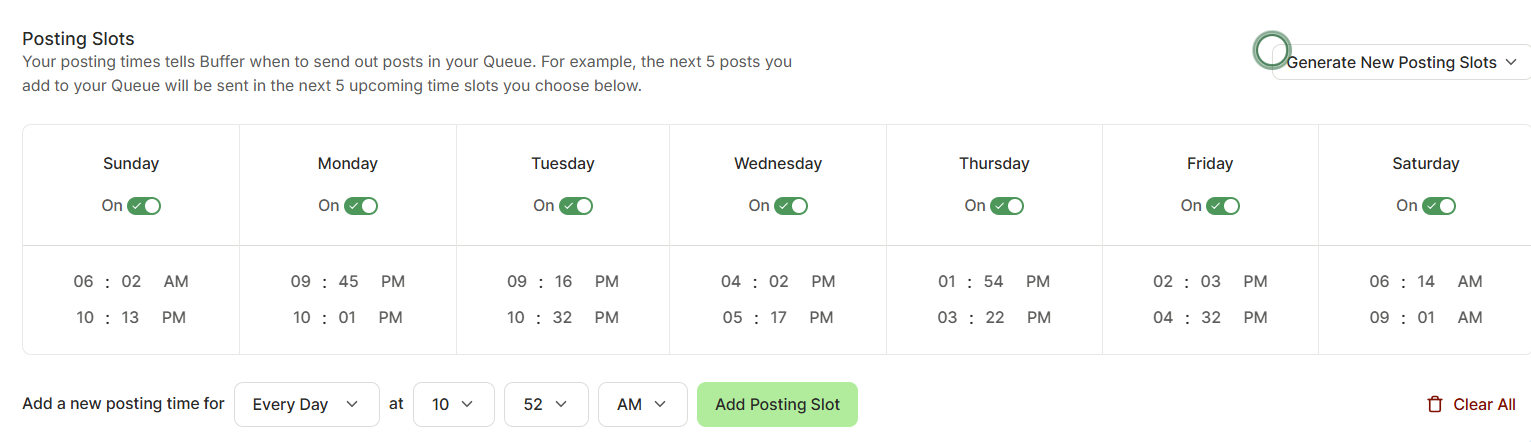
At Buffer, we think of the posting schedule for every social media platform as a Queue — basically, set time slots every week for posting.
You don’t have to stick to this, of course, but it’s a really handy way to commit to the cadence you laid out in your social media strategy. As time goes on and you experiment with different timings and frequencies on all the platforms you’re using, you’ll be able to pinpoint the slots that work well for your target audience.
To set up your Queue, click on your chosen channel, then click on the cog icon next to your name and profile picture. Here you’ll find the options for your posting slots, which you can edit according to your strategy.
5. Get your content ideas down
Ready for a brain dump? You likely have a solid idea of the kind of content you’re creating thanks to your strategy work in Step 1. Now, it’s time to roll up your sleeves and get to work on the actual content creation.
This is where Buffer’s Create Space comes in. It’s a versatile system that you can use in plenty of different ways, but if you’re working on building out your calendar, I’d advise you to start by using it as a hub for all your ideas.
You can view everything in a gallery or organize your ideas into boards.
💡
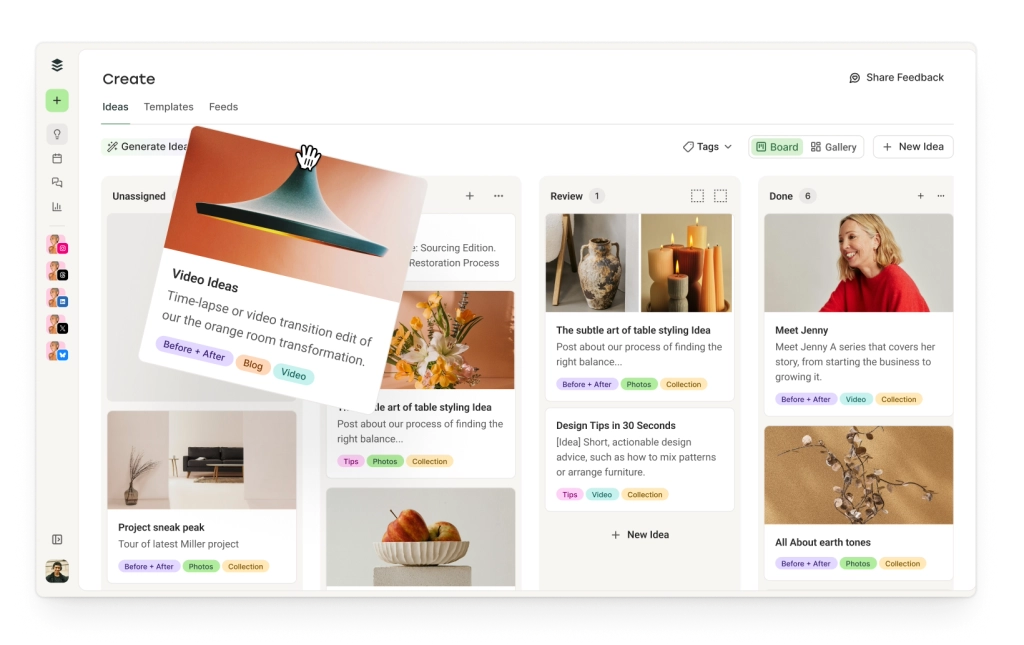
6. Organize in a way that makes sense to you
Color coding is my organizational love language (you should see my bookshelf). Color-coding or tagging by content pillar, status, or format makes a busy calendar legible at a glance. It also makes it far easier to spot gaps like three promo posts in a row, or a week with no video.
There are a host of ways to use Buffer’s Tags that will be incredibly useful in your social media management system. You could use them to tag posts by:
- Content pillar (my personal favorite)
- Post status (idea, draft, ready to publish)
- Format or type of content (text, video, photo, carousel)
- Platform (while you’ll be able to see which social media app your post is scheduled on in the calendar, this could be useful if you’re also saving ideas here for, say, a blog)
What’s really neat about Tags is that they translate over to the Analytics section, too, so you can measure the performance of one grouping against another. This has been incredibly useful for me as I experiment with my content pillars to see which resonate the most with my audience.
Here’s how to create and manage Tags on Buffer:
7. Start planning
Now comes the fun part: slot your ideas into the calendar. Now that you have a host of great ideas ready and waiting to be published on your social media channels, it’s time to get them on the calendar.
To do so, select an idea that’s ready to go in Create. Then click on the Create Post button at the bottom of the pop-up.
Next, choose which channels you want to post the update on.
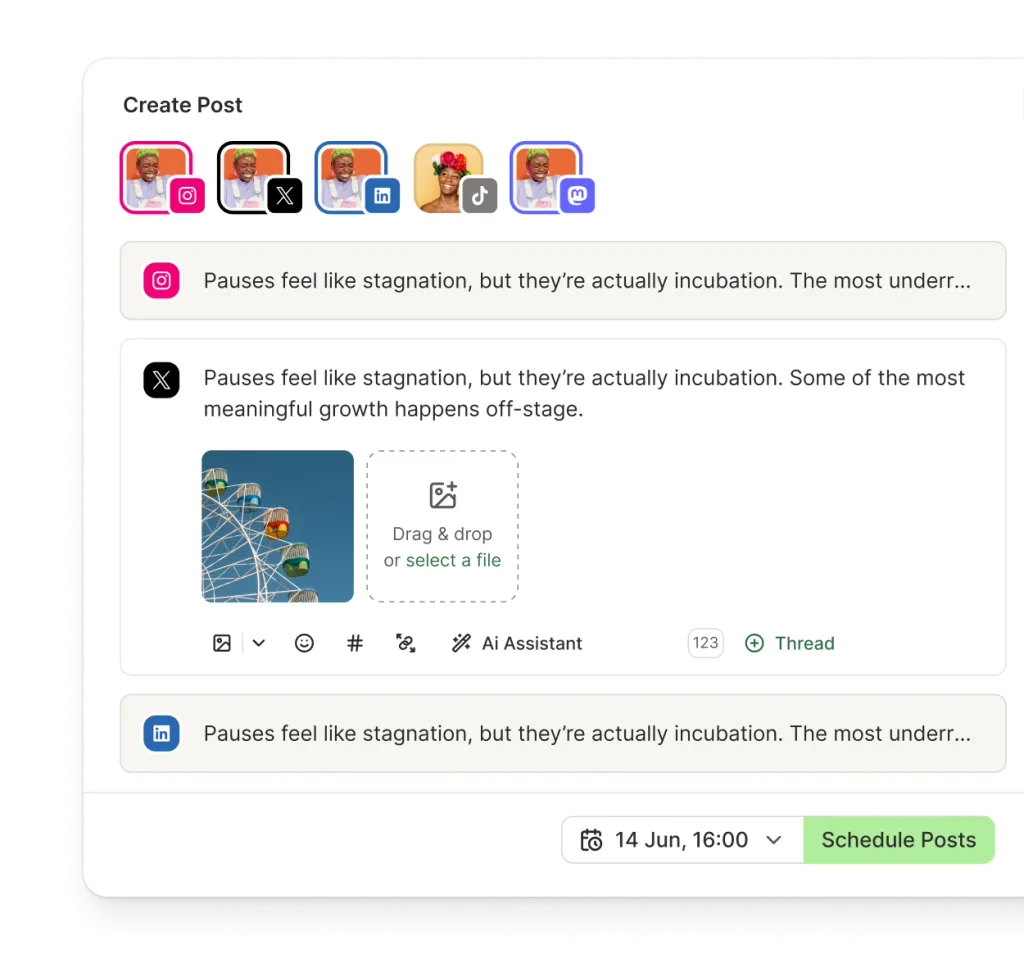
Tailor your post to each platform, then choose if you want to schedule, queue, or post immediately.
To schedule straight to your calendar, click the +New Post button at the top right, add your content, and schedule to the relevant platforms.
8. Review and adjust
A calendar isn’t set in stone. With your content ready and raring to go, play around with your calendar to find the perfect mix for each day, week, and month. As long as the post hasn’t been published, you can tweak everything to your heart’s content.
- Check in at the start of each week, move things around, and leave room for reactive posts, like a trending TikTok sound or a timely moment worth jumping on.
- Check in with your calendar at the beginning of each day to see what you have scheduled and refine your content if need be.
- Global events might mean you have to tweak your messaging, curate your content, or overhaul your plan completely.
- Over time, your own analytics will tell you what’s working, and you’ll repurpose your best-performing posts.
Vikki Tokarz, Head of Community at Scribe, finds calendars essential for anything bigger than a day or two: “Write timely, viral content when you have it, and schedule your ‘bread and butter’ (evergreen) content to cultivate a persistent, relatable social presence.”
ICYMI, calendars for the win!
As a content writer at Buffer, I spend a good chunk of my time poring over the (often cryptic) algorithm updates from the various social media platforms. We have loads of great blog articles (if I do say so myself) breaking down the algorithm for every single platform, which we update regularly.
While a lot of the guidance for social media success changes in those resources pretty often, there’s one tip that always, always remains in them: be consistent. Whether you’re a content creator, social media marketer, or small business owner, be as active on your social network of choice as possible. It’s the best route to success on any given platform, whether you’re posting to Instagram, TikTok, Facebook, YouTube, Mastodon, you name it.
And what’s the best way to ensure you are consistently posting on those networks? A social media content calendar! Got your template? Congratulations. You’re on the road to success.
🌱
Social media content calendar FAQs
If you’re new to using social media calendar templates (or just creating a social media content planner in general), here’s some handy guidance from someone who lives by them.
Why do I need to use a social media content calendar?
If you are on the fence about setting up a social media calendar (with a template or from scratch), here’s a quick overview of the benefits.
A social media calendar is a key part of building your social media strategy. It will help you:
- Stay on top of multiple social channels.
- Keep up with the content pillars in your social media marketing strategy.
- Stick to a consistent posting schedule.
- Schedule posts in advance and automate your content creation workflows.
- Work with team members (if you’re on a marketing team or social media teams), collaborators, or stakeholders.
- Stay on top of product launches, marketing campaigns, events, or even holidays.
- Streamline a system of approvals before posting.
- Save time with content batching.
- Repurpose content.
- Keep track of content ideas.
Why do I need to use a social media calendar template?
A template takes the guesswork out of getting started. Instead of staring at a blank screen wondering how to organize your content, you’ve got a ready-made structure to plug your ideas into.
It’s especially helpful if you’re short on time or juggling multiple platforms. All the heavy lifting of formatting is done for you, so you can focus on the content itself. Templates also make it easier to spot gaps, batch-create posts, and stay aligned with your broader social media strategy.
What should I include in my social media calendar?
Your calendar doesn’t need to be fancy; it just needs to work for you. Here are a few things most calendars include:
- Posting dates and times
- Platform and post format (Reel, Story, text post, etc.)
- Captions and visuals (or at least notes)
- Content pillar or category
- Status (drafted, scheduled, published)
Some people go all in with hashtags, CTAs, social media campaign labels, audience segments, and all the necessary details on their marketing calendar, but if that feels overwhelming, start with a simple social media planner and build from there.
How do I create a social media calendar?
Pick a tool, pick a format, and block some time to plan. You can start with a template (like the ones above) or build your own in the tool of your choice — Notion, Google Sheets, Buffer, whatever you’re most likely to actually use. Then set a recurring time each week or month to map out your content.
Even just planning three social posts in advance can make a big difference in your workflow.
How do I make a social media calendar template work for me?
The keyword here is template. It’s a starting point, not a strict set of rules. Tweak the layout, add color coding, rename columns, or delete sections you don’t need. If you’re not a morning poster, shift your suggested times. If you post more on TikTok than LinkedIn, prioritize that.
It’s your calendar. Make it reflect your social strategy or marketing strategy, goals, audience, and actual capacity.
What features should you look for in a social media content calendar template?
Look for flexibility and clarity. A great template should be:
- Easy to navigate
- Compatible with your planning style (visual? list-based? Kanban?)
- Customizable to fit your social or marketing strategy
- Shareable (if you work with a team or clients)
Bonus points if you can filter by platform, track post status, or include media files and notes directly in the calendar.