Should You Give Brevo a Go?

Brevo is a popular email marketing and CRM platform. Founded as Sendinblue in 2012, it has grown to over 600,000 customers.
It built its reputation as an email marketing platform for small businesses. Now, it also has a CRM, chat, and other channels.
Brevo has rolled out quite a few new features and pricing changes since our last review. So it was time to test it again to see how everything works in practice. We signed up for a Brevo plan to test new automation, AI, CRM, ecommerce, and deliverability features.
Brevo software summary
In a hurry? Here’s a summary of my Brevo review:
- Brevo is an effective email software for small & medium businesses.
- They have a great free plan, and even on paid plans, it’s one of the best-priced email tools out there.
- I found it easy to get started.
- Brevo lets you send emails, SMS, WhatsApp messages, and push notifications.
- The CRM makes it a good combo for marketing to sales.
- The email editor lives up to expectations. It’s enjoyable to put a newsletter together.
- Automation isn’t as elaborate as, for instance, ActiveCampaign, but very effective.
- Help is there. Email support on all plans and phone support on the Professional plan.
Use Brevo for free
Brevo’s Core Features
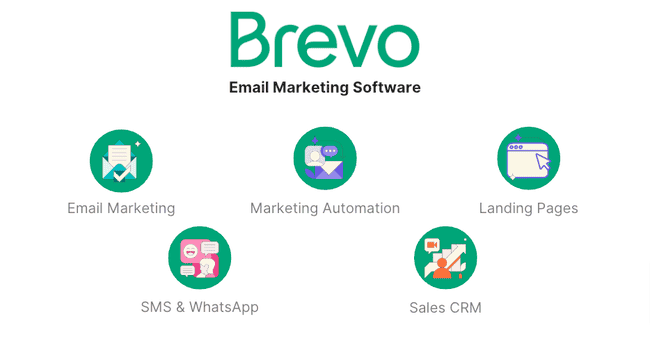
Brevo has lots to like. Here are the best bits:
- Drag-and-drop editor: It’s very easy to use. I’m a big fan of the new image editor, especially. It’s a great way to make interesting visuals for your emails. Even if you’re a complete beginner.
- Brand Library: Lets you apply your own brand style to all templates. This makes it easier to deliver consistent designs across your email campaigns.
- Automation builder: Very user-friendly. You can build quite sophisticated workflows using if/else conditions and track contact behaviour.
- Sales CRM: Monitor how deals progress and automate tasks. Great for sales-oriented teams. And best of all, it’s free.
Get started with Brevo for free
Brevo Pros and Cons
So what do real-life users think of Brevo? We interviewed longtime users to get to the nitty-gritty of their experiences with Brevo. Here are the pros and cons I picked up from user reviews.
Pros
- People love the free forever plan. It’s what initially attracts lots of people to Brevo.
- Most marketers agree that the platform is very easy to use.
- The drag-and-drop email editor and automation workflow builder get thumbs up.
- Users like the website integration and tracking tools. The WordPress plug-in is very popular.
- Segmentation in Brevo is quite impressive. Combine contact attributes with campaign and transactional email engagement in your filters with AND/OR operators.
- It also gets kudos for its multi-channel campaign options.
Cons
- A few point out that Brevo is less good value for bigger teams. You have to subscribe to the Standard plan to add more than one user per account. And even then, you pay for each user.
- In a similar vein, you have to be on the Standard plan to unlock features like A/B testing and landing pages.
- There are 48 pre-made email templates, which is fewer than other providers have.
Use Brevo for free
Is Brevo for you?
Recommended if:
- You are a small or medium-sized business on a budget. Brevo offers generous free and affordable plans, 72% cheaper than Mailchimp, with unlimited contacts. It’s email volume-based pricing (not contact-based), so you can store unlimited contacts without price spikes.
- You want multi-channel marketing or CRM in one platform. Brevo has most of the tools a small business needs for marketing and sales, including a sales CRM.
- You’re getting started with email marketing. It’s simple to find your way around Brevo, even for beginners. It has an easy drag-and-drop email builder. The interface is consistent and guides you through all the steps.
- You’re running a small ecommerce store. Brevo has integrations with the most popular ecommerce platforms, like Shopify and WooCommerce. And having email campaigns, Meta Ads, SMS, and WhatsApp covers most of the channels small ecommerce stores need. Larger ecommerce stores should look at ecommerce email marketing tools, like Omnisend.
Not recommended if:
- You’re looking for an email marketing tool with landing pages and A/B testing in free version. Landing pages and A/B testing in Brevo are only available on Standard and Professional plans, starting at $18/month. You can publish 10 landing pages for free in MailerLite. And MailerLite has unlimited landing pages with the $9 starting plan.
- You’re looking for advanced marketing automation. Brevo’s automation features are enough for most small businesses. If you’re looking for more advanced automation, check out ActiveCampaign.
Get started with Brevo for free
Brevo Review Rating Details
Ease of Use  |
Brevo makes creating and sending email marketing campaigns easy. The interface is consistent and guides you through all the steps. |
Email Editor |
Creating and sending newsletters is refreshingly simple with Brevo. The drag-and-drop editor is easy to use, with 12 content blocks and plenty of styling choices. You can personalize emails, edit images inside the editor, and access 8,000+ stock photos. A/B testing is available from the Standard plan. |
Email Templates |
Brevo has 48 professionally designed templates and 4 clean layout templates. While the selection isn’t huge compared to others, the available designs are polished and easy to work with. A standout feature is the Brand Library, which lets you pull your website’s fonts, colors, and logo into your email templates. |
Email Types |
Brevo has 4 email types: standard campaign, A/B testing, autoresponders, and automated workflows. Professional and Enterprise customers can send campaigns in multiple languages. |
| Marketing Automation |
Brevo’s marketing automation tools are easy to get started with, even for beginners. There are 12 ready-made automation templates for common workflows like welcome, abandoned cart emails, and product page views. You can customize these, generate workflows with AI, or build your own from scratch. The visual workflow editor has multiple entry points, A/B testing, conditions, emails, SMS, and push notifications. And website tracking allows Brevo to send targeted emails and SMS based on website visits. |
| List Management |
Import and list management in Brevo is straightforward and powerful. 8 filter options for actions. Combine email, SMS campaigns, and transactional email actions in your filters with AND/OR operators. Professional and Enterprise customers can use the Aura assistant to generate segments easily with prompts. |
| CRM |
Brevo’s Sales CRM is great for small sales teams that want a free, simple way to manage customer relationships. It tracks contact data and engagement while helping teams move deals forward. You can create custom pipelines, manage individual deals, assign and automate tasks, book meetings, and log calls directly inside the CRM. Contacts can be segmented by companies and deals for better visibility into sales activity, while Custom Views let you organize data by owner, priority, or region. Built-in AI from Aura summarizes conversations, suggests follow-ups, and keeps records updated automatically. |
| Personalisation |
Setting up conditional blocks and inserting contact fields is straightforward in Brevo. Personalize any text block in emails with any contact field. In block visibility, you can easily set conditions to display dynamic content for a segment. |
| Landing Pages & Forms |
Creating forms and landing pages in Brevo is smooth and beginner-friendly. The drag-and-drop editor lets you easily add fields and content blocks, with styling for colors, fonts, and spacing. You can use pre-set attributes or customize your own form fields. Brevo recommends double opt-in for better compliance. In the landing page builder, you can edit text, tweak layouts, and use the built-in image editor to create polished, professional pages for capturing leads. Landing pages are available from the Standard plan. |
| Reporting & Analytics |
Brevo’s reporting and analytics tools are clear. You can choose a date range and view totals for key metrics like sends, opens, clicks, and unsubscribes. You also get percentage breakdowns and separate stats for email and SMS. For individual campaigns, Brevo shows performance metrics and A/B test results, including open and click rates for each version, plus subject lines and test summaries. More advanced features, like AI data analysis and click heat maps, are available in the Standard and Professional plans. |
| Customer Service |
Brevo has a help link at the top right of every page. We could quickly find answers in the help center during testing. The help center is filled with articles covering all aspects of using the platform. Access to the knowledge base and email support is available on all plans. Phone support is available on the Standard plan. |
| Deliverability |
Brevo fully supports SPF, DKIM, and DMARC. It automatically inserts one-click List-Unsubscribe headers and manages bounce and spam complaint handling via feedback loops. It supports double opt-in and enforces domain authentication in line with Gmail/Yahoo requirements. Throttling isn’t user-configurable but is handled internally. The Deliverability Center is a nice recent addition. Customers get an overview of their sending reputation, including any issues that could hurt deliverability. |
| Spam and Design Check ❌ | Brevo’s previews help you spot design issues across devices, which is great for catching problems early. It doesn’t offer a built-in spam score or inbox placement test. You can easily send fully personalised test emails to yourself, but there is no automated link checking or HTML formatting issues. |
| AI Writing ✔️ | Brevo has a built-in AI writing assistant (Aura) integrated right into its SMS, WhatsApp, and email editors. It can suggest subject lines, generate email copy, and even polish your text. You can have it rewrite, shorten, expand, or change your content’s tone. And it even translates content into other languages. Brevo has updated Aura. Now it can generate images and make better subject line suggestions based on your historical performance and campaign content. |
| Integrations & API ✔️ | Brevo has integrations with 143 third-party apps. These include ecommerce tools, CRM platforms, email verification services, CMS software, and landing page editors. You’ll find integrations for popular services like WordPress, Shopify, WooCommerce, Pipedrive, and Salesforce. Brevo’s WordPress plug-in simplifies on-site tracking and embedding forms. You can also connect AI tools with Brevo’s MCP server. You can use Zapier to integrate Brevo with 5000+ apps or the API for custom integrations. |
| User Permissions ✔️ | Set custom permissions for multiple users for email campaigns, contact management, SMTP, templates, SMS campaigns, Meta Ads, and much more. Predefined user roles are available for marketing, deals, and campaigns on the Enterprise plan. |
| GDRP & Legal Compliance ✔️ | Brevo takes data protection seriously, so you can use it with confidence and peace of mind knowing your customers’ personal information is secure. Brevo’s consent checkboxes and easy unsubscribe options make it simple to stay on the right side of GDPR. They follow major privacy laws worldwide. Your data stays safe in European data centers and isn’t ever shared without your say-so. |
| Interface Languages | Brevo is available in 6 languages: English, French, Italian, Spanish, Portuguese, and German. |
| Customer Satisfaction | Brevo gets lots of positive reviews from customers. It has 4.6 on Capterra and 4.5 stars on G2 during our research. |
Overall Score
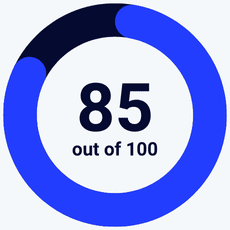
Brevo has most of the tools a small business needs for marketing and sales at a very reasonable price, without limiting your list growth. It has email marketing, CRM, transactional emails, SMS, live chat, Meta ad management, and WhatsApp messages. All this in a package that’s easy to use and grows with your business.
Get started with Brevo for free
Getting Started with Brevo
Signing up to Brevo takes about 5 minutes. I filled in my email and password and activated my account via email. Then Brevo asked a few questions about my company and list size.
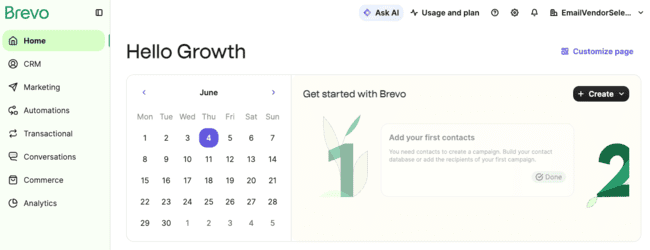
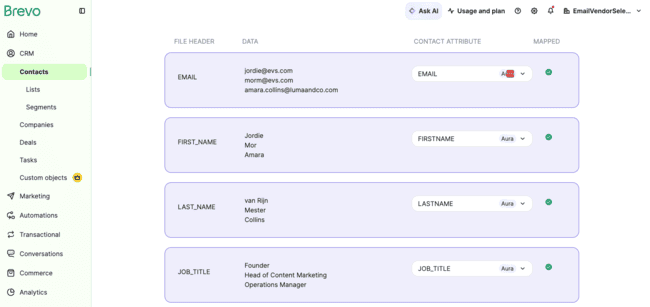
Brevo suggests importing contacts as the first step. It takes about 2 minutes to import 500 contacts. Brevo recently added AI to contact mapping. When you import a list, Aura analyzes the columns and automatically suggests how they should map to your contact fields, highlights irrelevant fields, and prompts you to create new attributes if needed.
The next step is to create a campaign. I made a quick email based on a template in 8 minutes. After this, you can start exploring Brevo on your own. You can create a free Brevo account to send 300 emails per day.
Get started with Brevo for free
In-Depth Brevo Review: Email Marketing and CRM Platform
Brevo makes creating and sending newsletters and marketing campaigns easy. It keeps all the options in one place and guides you through all the steps. The drag-and-drop email editor is straightforward with 40+ good-looking, responsive templates.
Creating and sending newsletters with Brevo
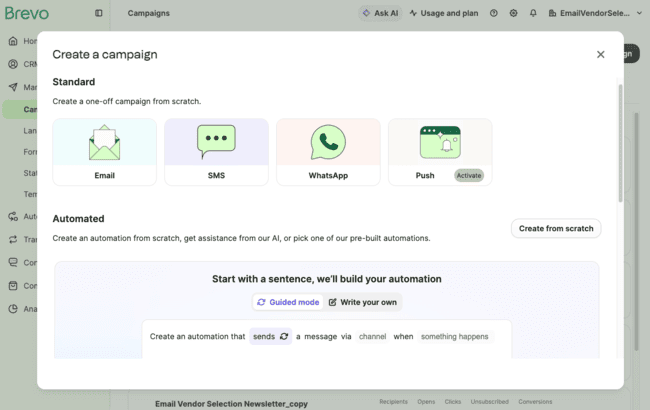
Let’s start with the basics. If you just want to send newsletters, choose Email. In Campaign Settings (below), you first choose your sender and email list.
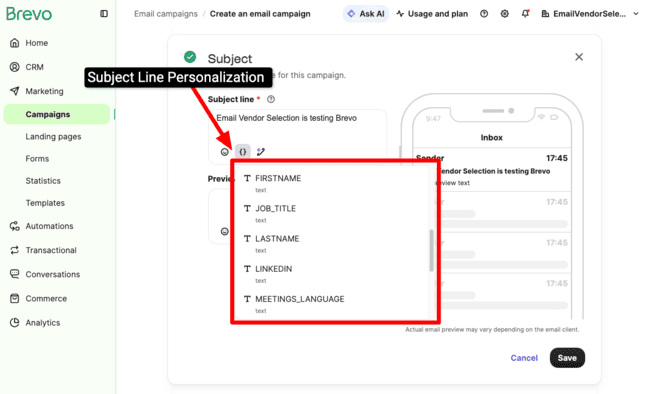
Add a subject line and preview text with the option to personalize both with any custom attributes you have.
Now to design and write your newsletter. The drag-and-drop editor is the default. For text emails, you can use the simple editor. Or add your custom HTML templates.
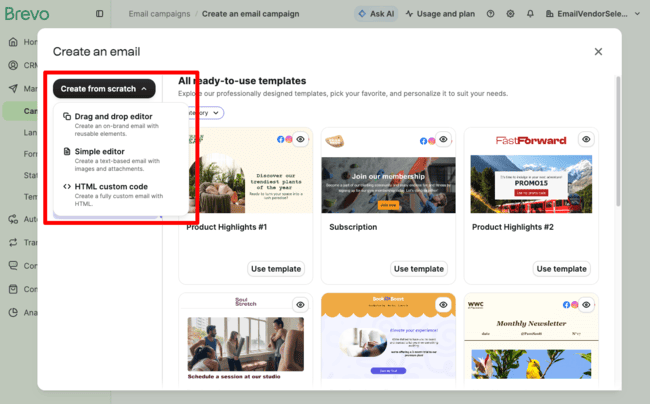
To use the drag-and-drop editor, you select a template. We’ll look at Brevo’s templates shortly. But let’s jump straight into the editor.
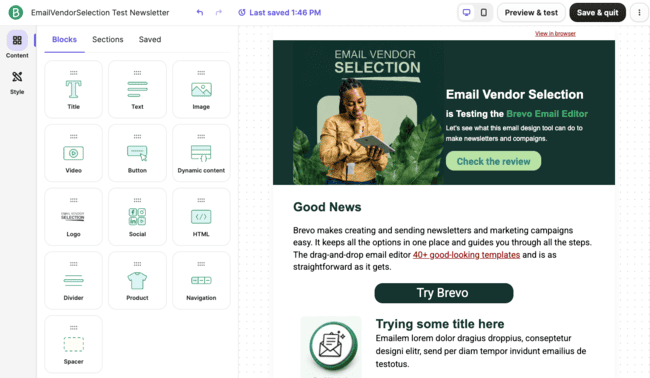
Like the rest of the platform, Brevo’s drag-and-drop editor comes with a user-friendly interface. The main menu on the left has 3 tabs:
- Content: Lists 14 content blocks, 27 pre-made sections, and your saved content to add to your template.
- Style: Design settings for the entire template.
- Aura AI: Generate subject lines and email copy, or polish your text.
The Style tab has styling rules for all text. And set a background colour or background image for all templates.
To edit and style individual blocks, you just click on them. This opens up a window to the left for each type of content. Here’s what it looks like when you click on an image:
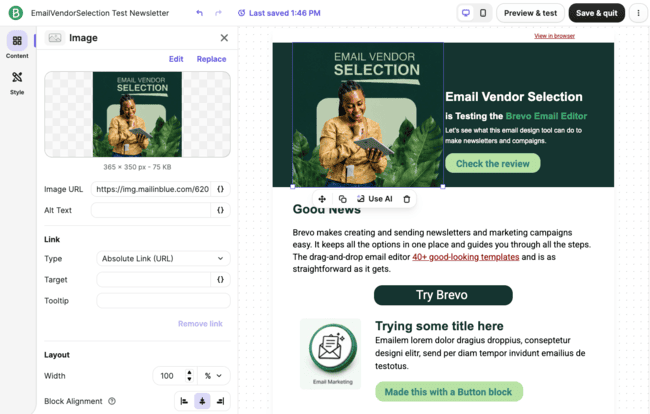
There’s an image editing tool that lets you edit and make eye-catching graphics.
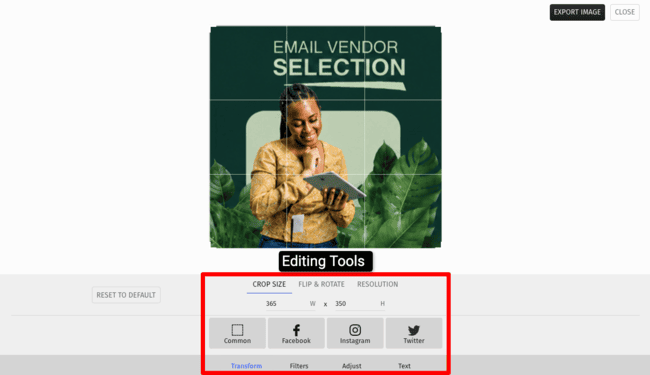
It took me just a few minutes to make the design above. The interface is very straightforward. But it still gives you loads of editing options. If you like Canva, you will love it. It’s a great tool. There are pre-made templates to get started with. And if you haven’t got any images of your own to upload, Brevo has 8000 stock images to choose from.
Brevo’s AI assistant, Aura helps you create marketing content faster by giving you smart suggestions. It can generate catchy subject lines, punchy paragraphs, and images. Or button text that isn’t snooze-worthy. You tell it what the campaign or template is about (a few keywords or a brief you have), pick your tone (friendly, urgent, etc.), and Aura gives you a version you can either use immediately or tweak until it’s just right. You can also add existing content into Aura to polish the style, change tone, or shorten it.
You can spice up your emails using Google fonts or your own custom fonts in Brevo. In the email editor’s Style menu, you’ll find Text Appearance. Click “Add web fonts” and either pick a font from Google Fonts or link your custom font (via a CSS file). Not all email clients play nice with fancy fonts. Brevo also lets you choose a safe fallback font. If someone opens your email in a client that doesn’t support Google or custom fonts, the fallback makes sure your text still looks good.
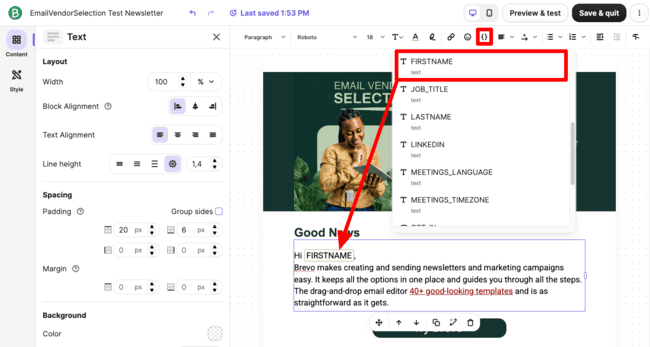
You can personalize the content in text blocks. This includes titles, headers and paragraph blocks. When you click on a text block, an Add Personalization option appears. Just like with subject lines, a contact attribute inserts personalisation.
In the content visibility, you can add conditional content. For example, if you invite people to an event, set a condition that the country or location tag has to be in that area. Otherwise, it isn’t included.
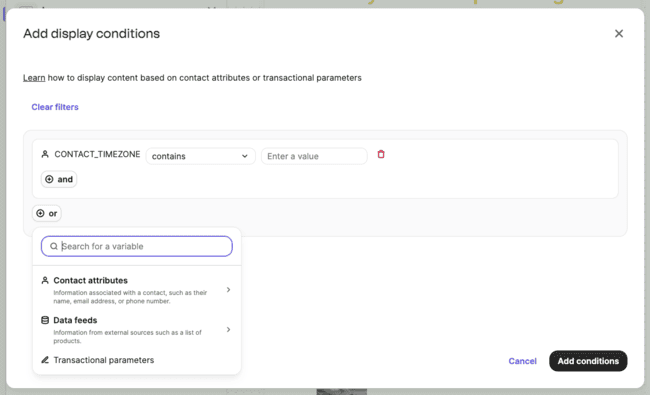
If you need even more advanced personalization, data and product feeds pull in live info from integrations or APIs, so recipients always see up-to-date content. Think stock levels, upcoming events, recently viewed products, or whatever data you have floating around. Brevo replaces variables in your templates with the latest values when the email is sent.
Brevo offers A/B testing on the Standard plan and above. A/B testing lets you send different versions of a campaign to a sample of your contacts to compare performance. To set up A/B testing, you need to select an element to test and a sample size. You can A/B test subject lines and content.
Just to pick out a couple of advanced settings, Brevo is big on privacy law compliance. That’s what the Unsubscribe Page options are about. Providing clear unsubscribe options is important under GDPR rules. Subscribers have to have the choice to opt out of receiving emails if they choose.
Brevo also supports multilingual email campaigns. Instead of duplicating campaigns for every language, you can handle everything within one campaign. This reduces production time and simplifies campaign management.
Brevo has a Google Analytics integration to automatically include UTM tags for your newsletters and other email marketing campaigns.
Overall, Brevo makes creating and sending newsletters and marketing campaigns convenient. It keeps all the options in one place. And guides you through all the steps, which is great for first-timers. The drag-and-drop email editor is straightforward. And it’s great that you can create your own graphics to bring your emails to life.
Email Templates in Brevo
Brevo has 48 pre-designed templates to choose from. This may well increase.
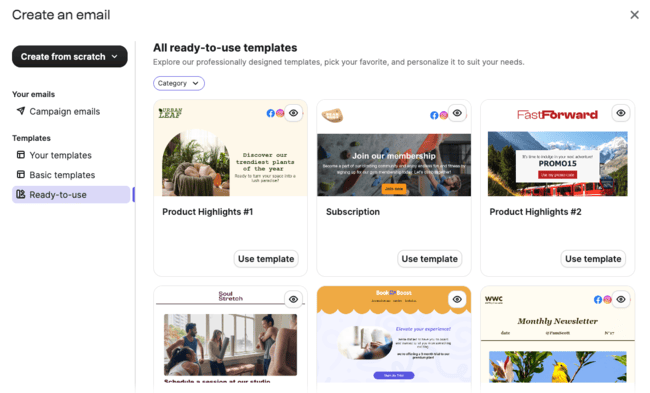
As well as designed templates, there are 4 layout templates to choose from. These don’t have any special styling but give you a good outline with content blocks to start with.
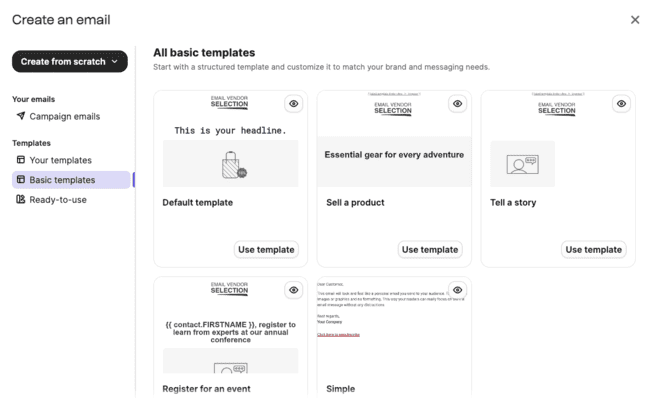
The Brand Library imports the brand style from your website into your templates.
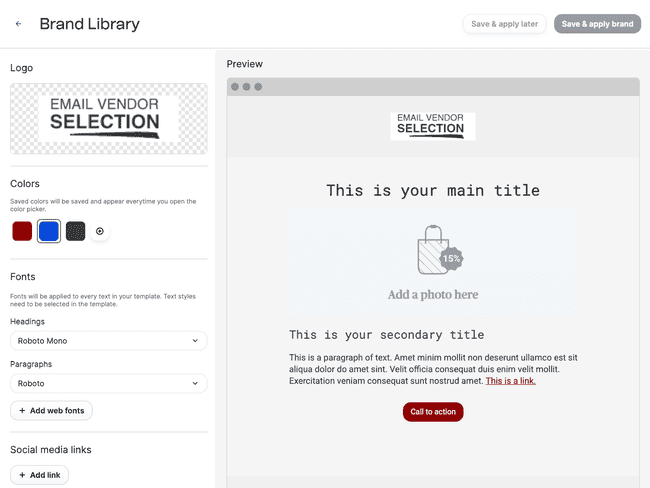
Once you set up your Brand Library, the colours, font types and logo you have on your website will become the default for your templates. If you don’t have a website or want to change the styling in your library, no problem. You can change logos, colours etc whenever you want. I set the image I made in the image editor as my logo.
You can create folders to organize email and WhatsApp templates to easily find that one newsletter or template you used “last Black Friday.” You group templates by theme, date, promotion, or audience type.
Brevo doesn’t have as many pre-designed templates as some other platforms offer. The templates that I tested are professionally designed and easy to edit. The Brand Library is a great addition for customising your own templates.
Try Brevo for free
Managing contacts in Brevo
The first thing you do with email campaigns in Brevo is choose a contact list. If you already have lists of contacts, you can bulk import these straight into Brevo.
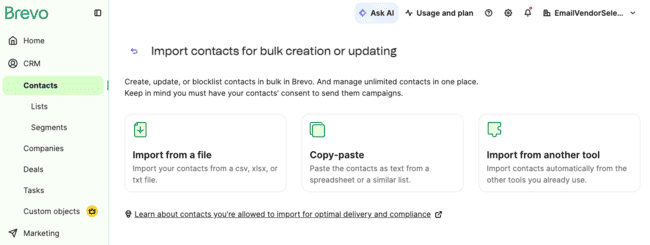
You can upload a spreadsheet (.csv or .xlsx) or basic text (.txt) file. Or if you have contacts stored in any other format, you can copy-paste. You get a preview to check you’re uploading the right data visually:
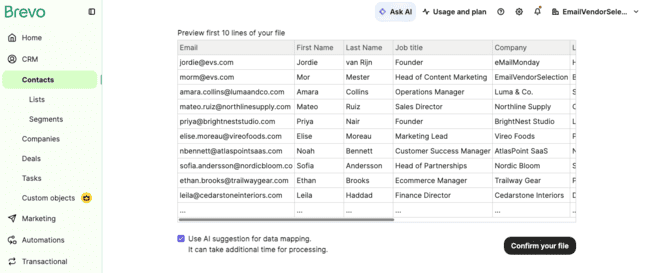
Data mapping is straightforward. Apart from email, the default for every attribute is ‘don’t import’. Add each to an existing contact attribute (field), or add your own custom attribute. You also get AI suggestions for mapping your fields.
List management in Brevo is straightforward and powerful. Creating segments starts with filtering the contact data. A filter can be based on actions, like opening an email or clicking a link. Or they can be based on contact attributes, like their country or when they subscribed.
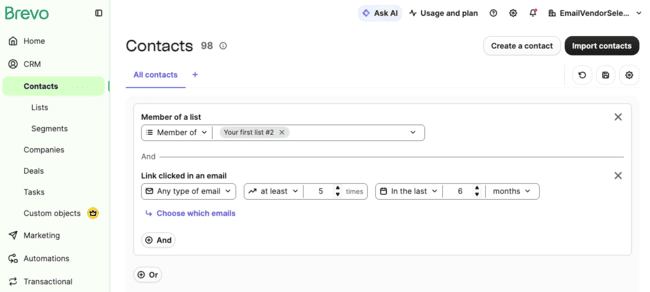
Brevo has lots of flexibility in combining filters. You can filter on actions and attribute data and even combine these. There are 8 filter options for actions. You can also combine email, SMS campaigns, and transactional email actions in your filters. The AND/OR operators are clearly defined on the page. Making it easy to see the logic behind more complex segments.
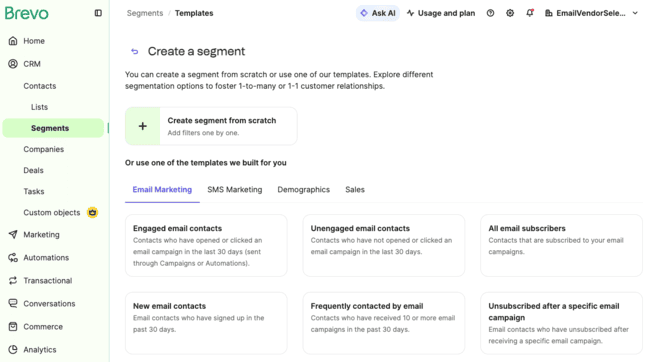
Brevo has 10 pre-made segments to speed things up. It’s found under CRM > Contacts > Use segment template. The unengaged contacts segment is really useful. It means you can strip out people who are unlikely to open or respond to a campaign. Or run reengagement campaigns to win them back.
You can also describe a segment to Aura and it will create the filters for you. You can check and fine-tune this to make it exactly as you’d like.
Save time with Email and SMS Automation
Marketing automation sounds complex. Especially if you are new to email marketing. Brevo gets you started with automation templates.
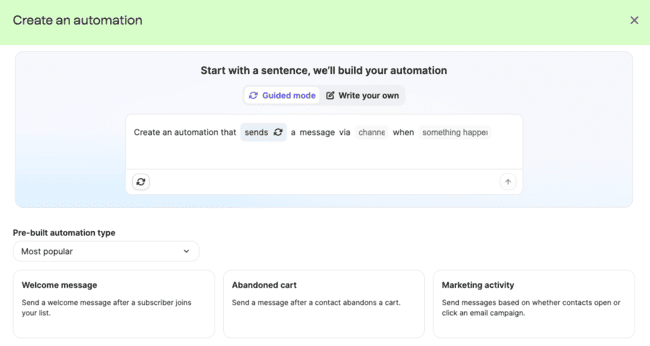
There are 12 marketing automation templates. Each is an automated email sequence that is pre-built. All you have to do is create the emails and change them as you want.
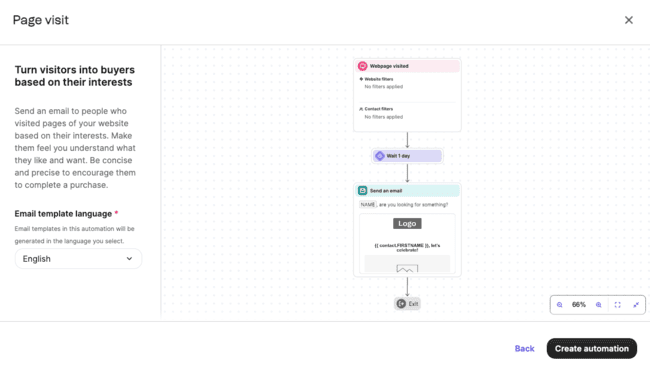
Say you want to trigger an email after browsing a specific product page. That is what the above workflow does. The delay is in case they come back and buy the product 24 hours after browsing.
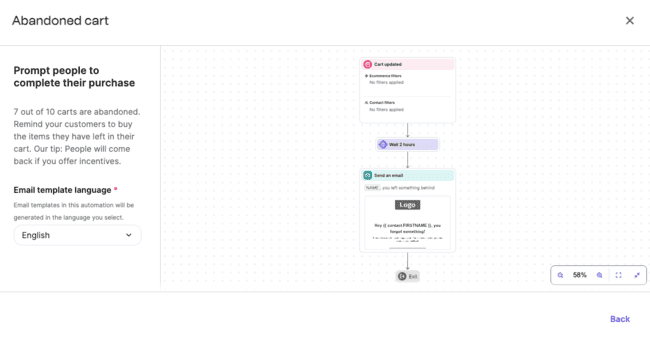
Abandoned cart sequences are another popular email marketing automation workflow. In this one, you can see the addition of an ‘exit condition’. This stops the sequence when the subscriber buys their product.
All of Brevo’s automation templates are simple to start, and you can add more in the workflow editor. And of course, build your own original automations as well in the workflow editor.
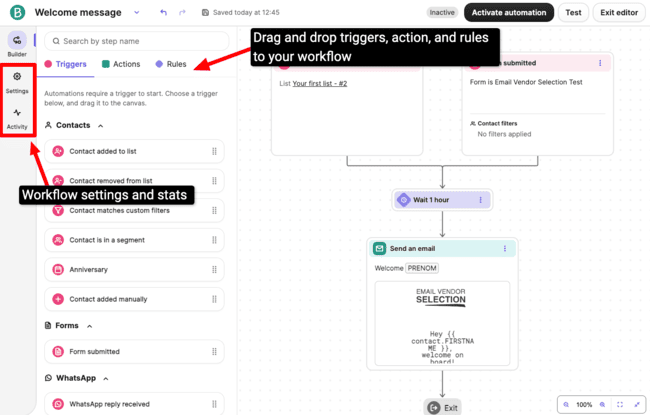
The workflow editor is simple. Drop an action or step onto the canvas to add it. Click on a step to edit it.
It’s really great that you can add more than one Entry Point. For example, you can trigger the same welcome message even when people come from different sign-up forms.
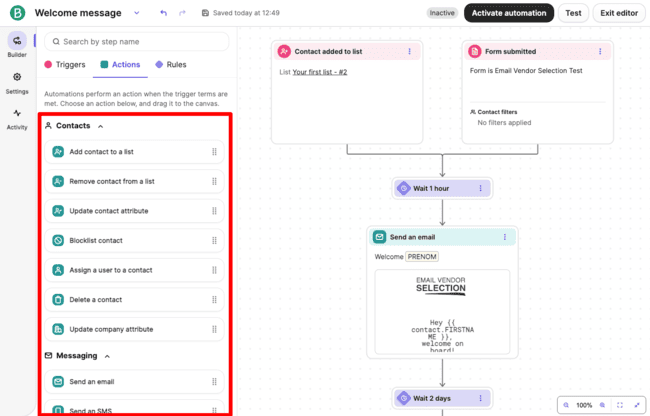
The workflow editor has lots of multichannel messaging steps. You can send WhatsApp and SMS messages, web push notifications, and emails. You can use automation for segmentation as well. Adding contacts to and from lists based on their actions.
You can add more smarts to your automation using conditions. A time delay pauses your automation for a set time or until a specific event takes place.
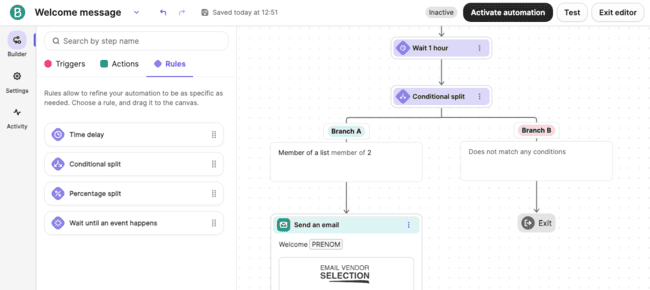
If/else conditions let you set one pathway for when that condition is met. And another if it isn’t met. A Yes path and a No path. It’s like having two bites at the cherry. Even if a contact doesn’t meet the criteria for triggering a message, you can set a different response. You get fewer ‘dead ends’ in your sequences and more chances to engage. You can add 10 paths into 1 condition.
Brevo tracks link clicks and navigation through your site after you set up website tracking. And can trigger automated sequences based on website behaviour. Say a contact goes to a product page but doesn’t buy. Tracking lets you automatically send a targeted discount to tempt them. If you have an ecommerce integration set up, Brevo can automatically send back-in-stock alerts to subscribers.
Exit and restart conditions stop or reset the automation for a contact if something changes. Let’s say someone left their cart and then returns to purchase. You don’t want them to get the abandoned cart emails. You just set up an exit condition, so Brevo stops sending them reminders. Or maybe someone adds something new to their cart after receiving a cart reminder. That could trigger a restart, so your emails will include their updated cart.
The automation builder also has a percentage split to run A/B tests in your automations. You can randomly split your audience into groups and test different emails, timings, or offers. This is useful when you want to see which subject line, promotion, or sequence actually drives more opens, clicks, or conversions. You can also play it safe by sending most people the “tried and true” version, while experimenting with a smaller group on something new. Setting it up is quick: just drop the Percentage Split step into your automation, assign the percentages, and build your paths. You can add 10 branches per split.
Brevo recently rolled out an update to SMS personalization in automations. You can now pull in data from any event in your workflow, not just the one that triggered the SMS. That means your texts can be way more relevant and personalized. For instance, if the trigger is “Checkout Started,” you can also reference details from a “Cart Updated” event, like the total value left behind. And send a message that hits closer to home: “Hey, looks like you left $30 worth of items in your cart.”
Building automations has also become a lot faster with Aura. Instead of starting from scratch, you can simply describe the workflow you want, and Aura will generate the automation for you. You can review it, make adjustments, add your own content, and fine-tune the logic before activating it.
Get started with Brevo for free
SMS Marketing in Brevo
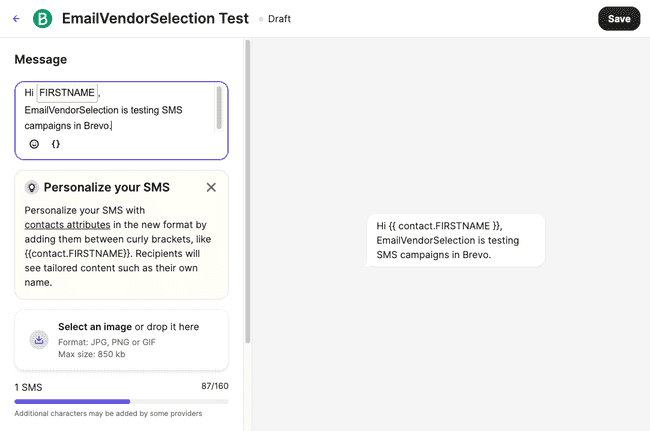
Brevo is also a user-friendly SMS marketing tool. For mass SMS, simply type your message in Brevo. Then add recipients and send. You can use Brevo’s AI assistant Aura to write or refine content.
SMS has become more than a broadcast channel with two-way SMS. You can now receive and reply to customer texts from Conversations. This makes it easy to handle appointment confirmations, support requests, and other customer interactions.
For SMS marketing, you need phone numbers for contacts. As with email, you should have permission to use every number. Brevo is based in Europe. So if you want to send SMS in the US or Canada, you have to register for a toll-free number to comply with the regulations there. Anywhere else, you just add a mobile number when you set up an SMS marketing campaign.
As with email campaigns, you can personalise SMS messages using contact attributes. All you do is put the attribute in { } tags, for example {FIRSTNAME}.
Brevo also supports shortcodes. These are shortened numbers marketers often include in SMS campaigns for contacts to reply to. At five or six digits rather than the standard 10 or 11 for phone numbers, they take up less space in a message.
Brevo Social Media and Ad Tools: WhatsApp Campaigns, Meta and Google Ads
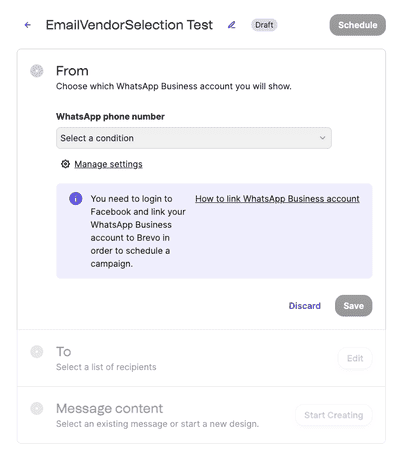
WhatsApp works very much like SMS. The main difference is you have to register a WhatsApp Business account. To do this, you need:
- A Facebook account linked to the company email you registered your Brevo account with.
- A dedicated phone number to connect Brevo’s WhatsApp Business Platform API.
Connect Brevo with your Meta for Business account and manage Meta Ads through Brevo. Target Facebook users, schedule ads, and set a budget. Designing ads can also be done with Brevo’s drag-and-drop editing tools.
You can sync your Brevo contact segments directly to Google Ads audiences. Build the groups in Brevo (e.g. loyal customers, lapsed users, people in a specific region), then push those to Google Ads. This lets you target ads more precisely based on the audiences you already know or care about. You can also use lookalike audiences to extend your reach to people who resemble your best contacts.
Brevo CRM
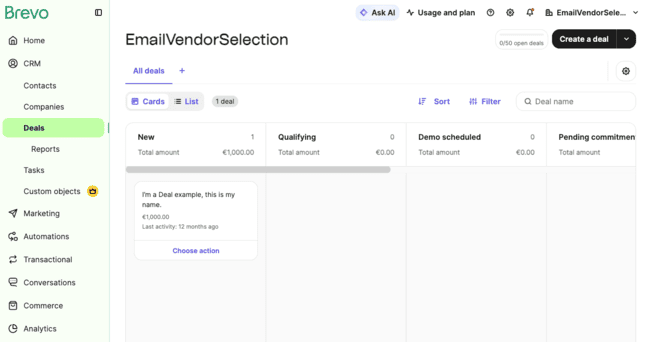
Brevo’s Sales CRM is designed to handle customer relationships from the sales side. It’s great for small sales teams, especially as it’s free. It keeps track of all your data and customer engagement. And helps you manage tasks for speed and convenience.
Brevo Sales CRM has:
- Pipelines: Set different stages and then track how deals progress. You can set tasks to help deals progress. And track how good pipelines are at turning prospects into customers.
- Deals: Deals are individual sales opportunities. Each deal will belong to a pipeline, where you can track its progress compared to other deals.
- Tasks: Tasks are actions you need to take to move deals from one stage of a pipeline to the next. You can hand tasks to specific team members and automate them.
- Meetings: Meetings let prospects book time with you directly without back-and-forth emails.
- Phone: Phone connects call logs right into the CRM so every conversation is tracked alongside deals.
You can segment contacts by associated objects like Companies and Deals. That means you can slice and dice your CRM not just by contact info, but by the deals they’re linked to or the company they belong to. It’s an easier way to spot opportunities and keep your lists in sync with real sales activity.
For larger sales teams, Brevo’s Teams feature adds organization and access control. It lets you group users by department, region, role, or any structure that makes sense for your business. This helps team members see the contacts, deals, and information relevant to their work. And makes the CRM easier to manage.
And if you like to see things your way, the new Custom Views let you organize deals however you want, by owner, priority, region, or any field that matters to your team.
Brevo’s Sales CRM now also includes AI features. Aura summarizes conversations, suggests follow-ups, and generates quick reply drafts for emails or chats. It can also enrich contact data and automatically keep records up to date to reduce manual admin work.
After a sales call, Aura analyzes the transcript and drafts a follow-up email with key points and next steps.
The AI Chatbot is one of Brevo’s more interesting recent additions. It can answer frequently asked questions and qualify leads. The chatbot works in website chat, email, WhatsApp, Facebook, and Instagram. You can customize its personality, response style, and knowledge base. Then train it using your website content, uploaded documents, or custom text sources. When a conversation becomes too complex, the chatbot can hand things over to a human.
Because these AI tools are integrated directly into the CRM, they support your pipelines, deals, and tasks. That means smarter prioritization, faster responses, and more personalized communication without adding extra tools to your workflow.
Getting new leads with Brevo Landing Pages and Forms
Brevo forms are under Contacts in the main menu. When you create a new form, Brevo takes you through a step-by-step process.
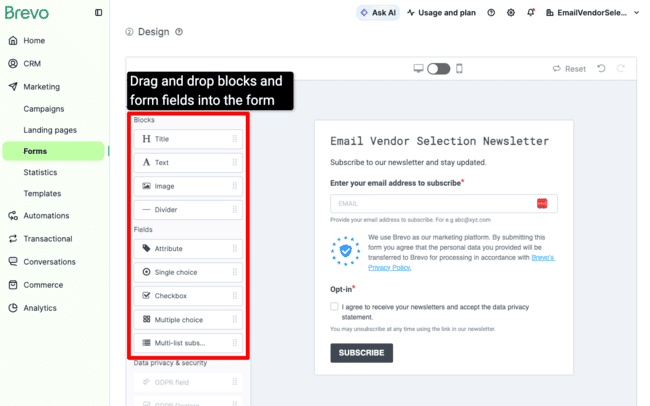
In the second step, you design your form. You see a simple outline template in the main window. It’s easy to customise using the design tools. Under the Build tab, there are content blocks and fields you just drag and drop into position.
Content blocks let you add information and design to your forms. Fields are where you gather your data. You can choose pre-formatted attributes for things like email addresses. Or customise your own. Or add multiple-choice lists and yes/no options.
Styling options are under the Form Design tab. You can add colour and background images. Or change the size and font of the text. You can also play with layouts using content container settings and spacing to create custom forms.
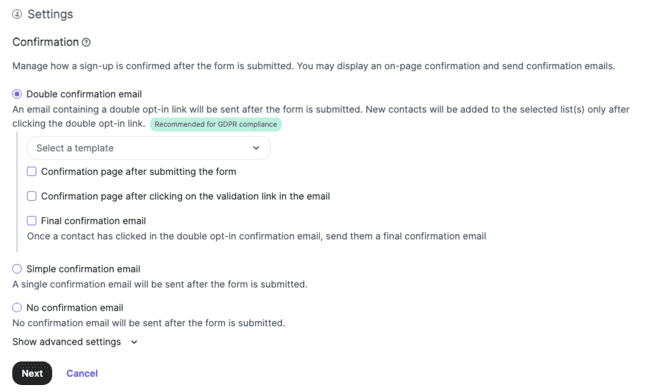
Brevo recommends double opt-in, or as they say a ‘double confirmation email’.
Brevo’s new pop-ups make it easier to grow your email list. Customize the design to match your brand, and connect them to your existing contact lists and automations. You can display pop-ups after a visitor has spent a certain amount of time on a page, trigger them on exit-intent, or show only on specific pages.
Setup is pretty straightforward. After installing the Brevo Pop-ups script, you simply customize the content and fields, define your display rules, and publish. You can add new subscribers to your lists and workflows.
The landing page editing experience is:
- Text editing is in-line. As you type, the page changes and you see exactly how it will turn out later. What You See is What You Get.
- When you hover over a section, the editing options for that section appear. You can add, copy, and delete sections, insert new content, add text and images, etc.
- When you click inside a block, the options for that block appear on the left. For instance, the colors and size of buttons.
- You can edit pictures with Brevo’s built-in image editor. You can resize, crop, add text in your images, and use (color and effects) filters.
To build landing pages in Brevo, you need the Standard plan. Landing pages are also used for lead capture. Rather than wondering where to put a form, it’s easy just to build a dedicated page.
Deliverability in Brevo
Brevo includes deliverability tools that help make sure your emails reach the inbox and follow sender requirements from major mailbox providers. Much of the technical work is handled automatically, so you can focus on campaigns instead of deliverability setup.
Brevo guides you through setting up your sending domain with SPF, DKIM, and DMARC. It also adds important technical elements behind the scenes. For example, Brevo automatically includes one-click unsubscribe headers in your emails and processes bounces and spam complaints through mailbox provider feedback loops.
The Deliverability Center gives you a clear overview of your sending setup and flags anything that could hurt deliverability. It highlights missing authentication records or configuration issues and shows you how to fix them. This makes it easier to confirm your technical setup is ready before you start sending campaigns.
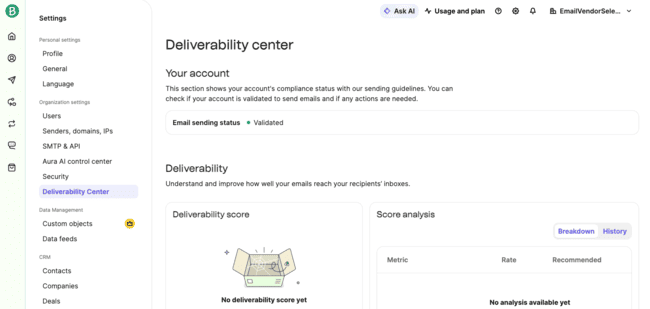
Brevo also encourages good sending practices. If you are sending from a new domain, it recommends gradually increasing your sending volume to warm up your reputation with inbox providers. Businesses sending high volumes can also get a dedicated IP.
Brevo’s reporting tools also support deliverability by helping you track engagement signals like opens, clicks, bounces, and unsubscribes. Keeping an eye on these metrics helps you catch potential issues early and maintain a healthy email list.
Reporting and Analytics in Brevo
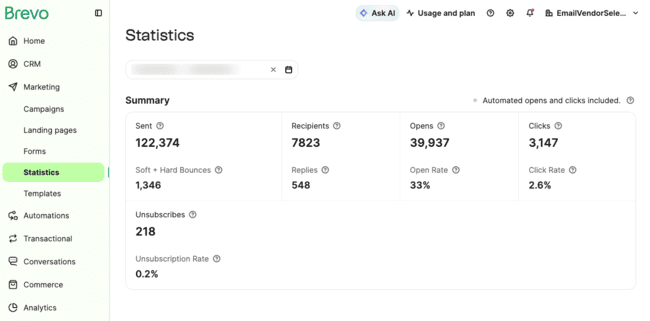
Brevo’s reporting and analytics options are straightforward. Above you see the Campaign Statistics page. The calendars let you pick a date range to see data for. In the summary you see the totals for sent, recipients, opens, clicks, unsubscribers, replies, and bounces. Below you get a breakdown of the open, click, and unsubscribe rate. Further down the page, this is broken down into email and SMS stats.
Brevo has added AI-powered insights to its analytics tools. These help interpret campaign results by highlighting trends and summarizing performance in plain language. You don’t need to write prompts or ask the AI questions. You just get simple explanations next to the metrics. This makes it easier to understand results quickly and decide what to improve for future campaigns.
And here’s how Brevo displays analytics for individual campaigns:
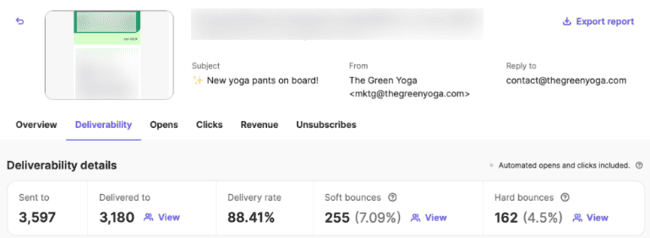
After A/B testing a campaign, you get opens, clicks, and unsubscribes as percentages or numbers for all versions. And you’ll also see the subject lines and the test duration.

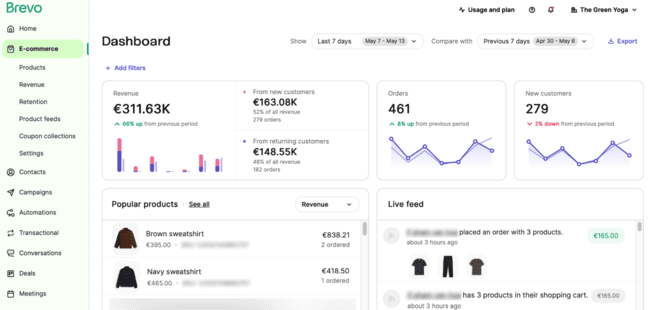
Brevo’s ecommerce dashboard gives you a clear view of what’s happening beyond email metrics. It pulls together customer, order, revenue, product, and retention data into a single dashboard. This makes it easy to track sales performance over time, compare different periods, and identify your best-selling products. I particularly like the retention analysis, which helps you understand how often customers buy again.
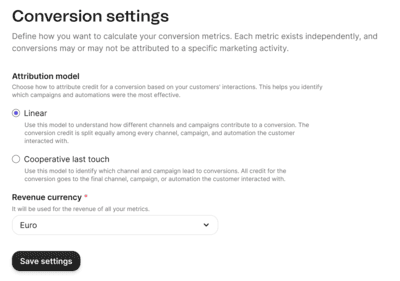
The updated conversion tracking answers the question: “Is this campaign actually making money?” You can define custom conversion goals based on actions that matter to your business, such as purchases, booked meetings, signups, or any custom event on your website. Brevo attributes conversions back to your marketing activities across channels, helping you measure ROI.
The analytics platform is one of the more powerful additions available on Brevo’s higher-tier plans. It includes pre-built dashboards for marketing, sales, customer, revenue, email, SMS, and transactional messaging data. You can compare how different channels are contributing to revenue. See how engagement changes over time or identify which customer segments convert the best.
You unlock more advanced reporting features on the Standard plan. These include heat maps that show you where contacts are clicking links on your emails.
Brevo Integrations and API
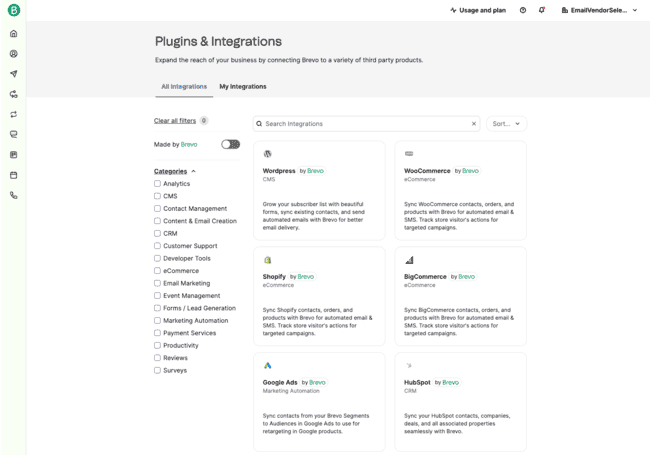
Brevo offers direct integrations with 143 third-party apps. These include:
The Brevo WordPress plugin is very popular. It simplifies on-site tracking and embedding forms. You need to set an API key and install the plugin in WordPress. Luckily, Brevo has an installation guide that takes you through the steps. There are 4 native integrations with Google apps. This makes Brevo one of the best CRMs to use with Google Workspace.
Brevo’s MCP server connects your Brevo account directly to AI assistants like Claude Desktop, Cursor, VS Code, and other MCP-compatible tools. You can use natural language to create campaigns, manage contacts, check CRM deals, or retrieve marketing data. For teams already experimenting with AI workflows, the MCP server can automate repetitive tasks, generate reports, and interact with Brevo data.
You can use Zapier to integrate Brevo with 5,000+ apps or the API for custom integrations.
Try Brevo for free
Brevo Pricing Plans and Discount
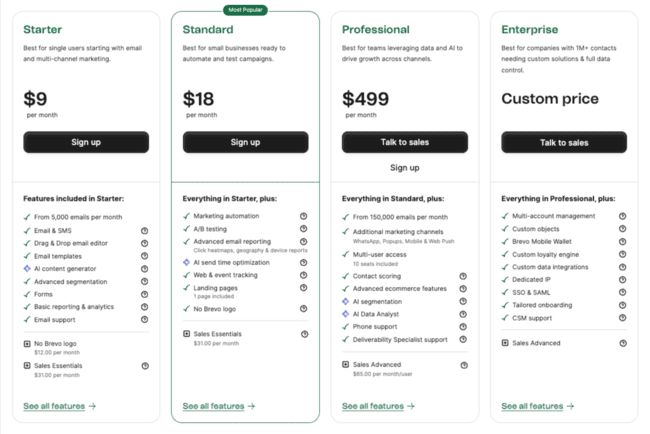
Brevo pricing starts at $9 a month on its Starter plan. This gives you 500 contacts and you can send 5k emails every month. The email campaigns in the Starter plan have Brevo branding below the footer. You can remove the Brevo logo with an add-on for $12/month.
| Free | – 300 emails per day (≈9000/month) – 100K contacts |
| $9 | – 5,000 emails – 500 contacts – Starter plan |
| $17 | – 10,000 emails – 1,500 contacts – Starter plan |
| $29 | – 20,000 emails – Unlimited contacts – Starter plan |
| $39 | – 40,000 emails – Unlimited contacts – Starter plan |
| $55 | – 60,000 emails – Unlimited contacts – Starter plan |
To unlock certain features, you have to upgrade to the Standard plan, starting at $18/month. This includes landing pages, A/B testing, more advanced reporting tools, and automation workflows. Brevo paid plans also have various add-ons for multi-user access, SMS, WhatsApp campaigns, and push notifications. Read our in-depth pricing guide to get a full breakdown of all the details.
About the Forever Free Brevo Plan
Brevo has a generous free plan. The free account remains one of the best options for no-cost email marketing out there.
Just how good is the Brevo free plan? Even on a free account, Brevo offers all the features you need. More or less the same ones you get on the Starter plan.
Best of all, you can add up to 100,000 contacts. The main limit on a free account is that you can only send 300 emails a day.

Brevo Customer Support
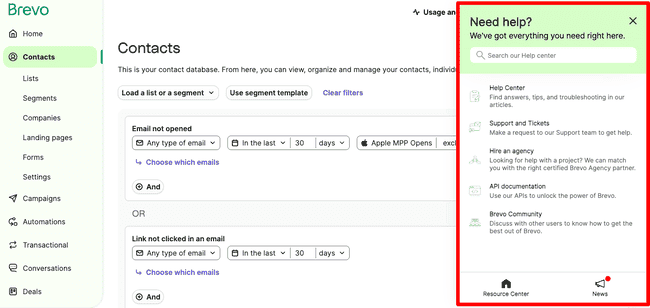
Brevo has a Help link at the top right of every page. You can quickly find answers through the Help Center. Or contact the Brevo support team directly.
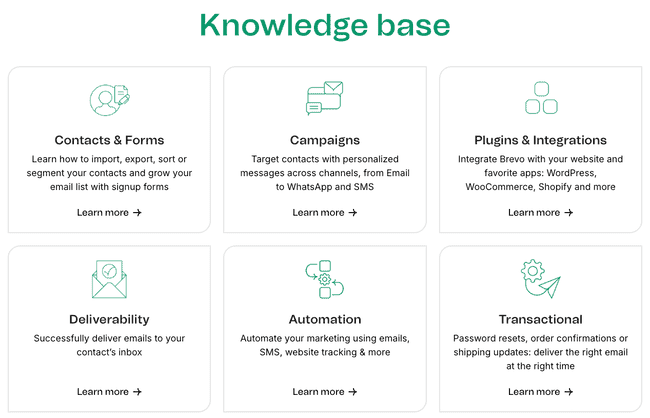
The help center is filled with articles covering all aspects of using the platform. Access to the knowledge base and email support is available on all plans. Phone support is available on Professional plans.
Final Conclusion: Is Brevo worth it?
Brevo has grown well beyond its email marketing roots with recent updates. It has new tools aimed at both ecommerce brands and B2B companies.
For online stores, Brevo introduced pop-up forms, enhanced SMS personalization, improved conversion tracking, and the ecommerce dashboard. The addition of two-way SMS and better attribution also helps merchants create better multichannel customer journeys.
For B2B companies, Brevo invested heavily in sales and AI. New AI features for the chatbot, automation workflows, and call follow-up emails save time for busy sales teams. The custom sales analytics and team management make the platform more appealing to growing businesses.
And with such a generous free plan, Brevo is a great value. Small businesses won’t find a better way to start email marketing for free.
Brevo Frequently Asked Questions (FAQ)
Is Brevo free?
You get the same features on a free account you get on the cheapest Starter paid plan. That includes Marketing automation, contact segmentation, forms, transactional emails and sales CRM. Plus all the tools you need to create and send email, SMS and WhatsApp campaigns.
Try Brevo for free
What does Brevo do?
Use Brevo for free
Is Brevo better than Mailchimp?
Brevo is often seen as a better choice for small businesses. For example, you can add up to 100K contacts on the free tier. You can also segment these contacts in as many ways as you want to create different lists. In Mailchimp, you can only create three lists or ‘Audiences’ on the cheapest plan. This keeps contacts siloed from on another. And contact numbers are limited by what you pay. This puts a ceiling on growth. And gets in the way of staying in touch with the same people in different ways, like marketing campaigns, sales, transactional emails etc.
Does Brevo have an app?
Is automation free in Brevo?
Try Brevo with a free account
How do I run an email campaign on Brevo?
Next, you create an email using the drag-and-drop editor. You can choose a pre-made template to start with. Or customise your own templates by choosing your brand library. When you have designed your email, you schedule it to send. If you are building automations, you can use contact actions to trigger sending.
Run email campaigns in Brevo
Is Brevo a CRM?
Try the Brevo CRM
How many emails can I send per day with Brevo?
Is Brevo GDPR compliant?
Another feature is the option to add GDPR checkboxes on forms. This ensures the text and opt-in options are fully compliant. Brevo also recommends double opt-in follow-up, or sending new subscribers two emails. One to ask them to confirm the subscription, one to confirm the confirmation. This isn’t required by the GDPR. But it shows how seriously Brevo takes privacy.
Brevo Alternatives
So how does Brevo compare to other providers?
Brevo vs. MailChimp
The main differences between Brevo and Mailchimp are cost and features. Brevo works out as a better value for scaling your marketing. You get unlimited contacts on every plan and its email send limits are more generous. You can also do much more on Brevo’s free version.
The Brevo platform is also easier to navigate and use. Mailchimp has an impressive range of features. But that also means it’s not always that easy to find what you are looking for. Especially with its new navigation, Brevo is very straightforward to move around. There’s great onboarding and support for newcomers, too. A lot of its tools, like its automation workflow editor, have great, user-friendly design. You can build advanced automations with it, but it’s still easy to do.
Mailchimp is more of a full-feature marketing platform that appeals to larger businesses. But for SMEs, Brevo is better value and easier to use.
Read our full Mailchimp review or find the best Mailchimp alternatives.
Brevo vs. Constant Contact
A big difference between Brevo and Constant Contact is how pricing works. Constant Contact bumps up pricing as you grow your contact list. Brevo doesn’t charge per contact, it charges based on the emails you send. Once you get over 5000 contacts, Constant Contact gets much more expensive.
In terms of features, both are very similar. Constant Contact offers more pre-designed email templates.
Learn more in our full Constant Contact review or find the best Constant Contact alternatives.
Brevo vs. SendGrid
Brevo wins out over SendGrid if your main focus is email marketing. Both offer email marketing software alongside transactional emails. But Brevo is far better for building automated campaigns. In SendGrid, you don’t get automations until the most expensive plan. With Brevo, you can build automated workflows on the free version. You can also send more marketing and transactional emails for free. Brevo’s free plan has a 300-email daily sending limit. SendGrid’s is 100.
Check out the best SendGrid alternatives and the best free SMTP servers to compare more similar services.
Brevo vs. MailerLite
The main reason to choose MailerLite over Brevo is cost. Brevo is good value. But MailerLite is one of the cheapest email marketing services out there. Pricing starts at $9 a month. That gives you 1,000 contacts. But you can send as many emails as you want. MailerLite’s free plan is generous, too.
Brevo has better automation features. You can build more sophisticated workflows than you can in MailerLite. You can also create and automate multi-channel campaigns. MailerLite is better for forms and landing pages. You can create different form types, like pop-ups and floating forms. And you can build landing pages on all plans. MailerLite is also popular with first-time email marketers for how easy it is to use. Both fulfill the email marketing needs of a small business.
Get all the details with our full MailerLite review or the MailerLite pricing guide.
Brevo vs. ActiveCampaign
The main difference between Brevo and ActiveCampaign is the level of automation and the number of integrations.
Automation is a strength of Brevo’s. ActiveCampaign takes it to another level. You get advanced personalization with conditional content. This displays different content in your campaigns to different people. ActiveCampaign also offers complete professional CRM and ecommerce marketing features. Its transactional email platform achieves outstanding deliverability rates. And you get great customer support, with 24/7 live chat on all paid plans.
On the flip side, ActiveCampaign costs more than Brevo. If you’re a small to mid-sized business that doesn’t need such advanced features, Brevo is the better option. It will give you the tools you need at a better price. ActiveCampaign is better for larger businesses that need more advanced features and don’t mind paying for them. Learn more about ActiveCampaign pricing here.
Find out if it is worth it for your business with our full ActiveCampaign review.
