Schedule social media posts with an API
Ten client calendars. Ten sets of social accounts. The same weekly content copied and published by hand.
API-based social media scheduling replaces that repetitive work with one centralized process. You connect each authorized account, send the post content and publication instructions to a scheduling system, and monitor the results from one place.
For agencies, the benefit is not simply faster publishing. It is the ability to manage more client content without multiplying account switching, manual uploads, and missed publishing slots.
How do you schedule social media posts with an API?
You schedule social media posts with an API by authorizing the relevant social accounts, creating the content, assigning a publication time, and sending those instructions to either the social network or a social media management platform.
An API, or application programming interface, allows one application to communicate with another. In this context, it lets an approved publishing tool like Planable create or publish content on behalf of an authorized person, Page, profile, or organization.
How API-based social media scheduling works
- Authorize the social account. The account owner grants the scheduling application permission to access the relevant profile, Page, or organization.
- Create the post. Add the caption, links, images, videos, tags, and other supported content.
- Set the publication instructions. Choose a date, time, time zone, destination account, and any platform-specific settings.
- Store or submit the post. Depending on the platform, the scheduling tool either sends a future-publication instruction immediately or holds the post in its own queue.
- Publish through the platform API. At the appropriate time, the post is published through the authorized connection.
- Record the result. The scheduling system stores the platform response and identifies successful, delayed, or failed posts.
This workflow allows an agency to prepare content in batches while preserving a record of what is scheduled, approved, published, or awaiting attention.
Do social networks schedule API posts themselves?
Some do, but the scheduling model varies by platform and content type.
Meta provides native scheduling for Facebook Page posts through Meta Business Suite. The platform can retain the post and publish it at the selected time.
LinkedIn’s Posts API works differently. Its documentation requires the PUBLISHED lifecycle state when a post is created and does not document a future-publication time field. A third-party scheduler like Planable therefore generally stores the LinkedIn post and sends the publishing request when the scheduled time arrives.
TikTok’s Content Posting API supports direct posting of videos and photos to authorized profiles. Apps require the appropriate permissions, and content posted by an unaudited API client is restricted to private visibility until the client passes TikTok’s audit.
X provides an endpoint for creating posts, but access levels, endpoint rate limits, and posting caps still apply.
The practical takeaway is simple: scheduling tools must account for different authentication rules, media specifications, permissions, rate limits, review processes, and publishing models on every network.
Native social media APIs vs a unified API
A native social media API connects your system directly to one network. A unified API or social media management API gives you one integration through which you can manage several networks.
Native platform API
Your system connects separately to Meta, LinkedIn, TikTok, X, and other networks
Products built deeply around one or two platforms
Every integration has different permissions, endpoints, reviews, and maintenance requirements
Unified social media API
Your system sends content to one provider, which manages the underlying network connections
Agencies and teams publishing across several platforms
You depend on the unified provider’s supported features and account plan
No-code automation
A trigger in another application creates or updates social content
Simple, repeatable workflows with limited custom logic
Less control than a custom API integration
Native scheduler
A user schedules content directly inside the social network
Individuals and small teams managing few accounts
Limited cross-client visibility, approvals, and workflow automation
How scheduling works
Your system connects separately to Meta, LinkedIn, TikTok, X, and other networks
Best fit
Products built deeply around one or two platforms
Main trade-off
Every integration has different permissions, endpoints, reviews, and maintenance requirements
How scheduling works
Your system sends content to one provider, which manages the underlying network connections
Best fit
Agencies and teams publishing across several platforms
Main trade-off
You depend on the unified provider’s supported features and account plan
How scheduling works
A trigger in another application creates or updates social content
Best fit
Simple, repeatable workflows with limited custom logic
Main trade-off
Less control than a custom API integration
How scheduling works
A user schedules content directly inside the social network
Best fit
Individuals and small teams managing few accounts
Main trade-off
Limited cross-client visibility, approvals, and workflow automation
What native platform APIs provide
Native APIs give developers the most direct access to a platform’s supported publishing capabilities. They can be useful when one network is central to the product or when the integration needs platform-specific functionality.
The cost is ongoing maintenance. Each network has its own:
- authorization and app-review process;
- supported content types;
- media and caption requirements;
- publishing permissions;
- rate limits and usage caps;
- error responses and status checks;
- API versions and deprecation schedules.
Connecting five networks means maintaining five distinct integrations.
What a unified social media API adds
A unified API creates one integration layer across several social networks. Your system sends the post, destination, media, and timing instructions to the unified provider rather than implementing each platform separately.
For an agency, this creates a more manageable operating model:
- one integration instead of one per network;
- one queue for multiple client workspaces;
- consistent post and error statuses;
- centralized permissions and monitoring;
- a shared social media calendar for drafts, scheduled posts, and approvals.
The underlying platform restrictions still apply, but the unified provider handles much of the translation between your workflow and each network’s requirements.
How to schedule posts with the Planable Public API
The Planable Public API is a REST API that gives external tools and custom scripts programmatic access to Planable workspaces, pages, posts, media, labels, comments, and analytics.
The API can create and update draft posts, upload media, create Instagram Stories, and retrieve publishing or performance information. Posts created through the API initially enter the normal Planable workflow rather than bypassing it.
What you need before starting
Before using the Public API, confirm that you have:
- a Planable Pro or Enterprise plan;
- Company Owner or Administrator access;
- the client workspaces set up in Planable;
- the relevant social pages connected to each workspace;
- a developer, script, or external system that will send the requests;
- an approval and scheduling workflow defined for each workspace.
The Public API is currently included with Pro and Enterprise plans. Only Company Owners and Administrators can create and manage API tokens.
Step 1: Create a scoped API token
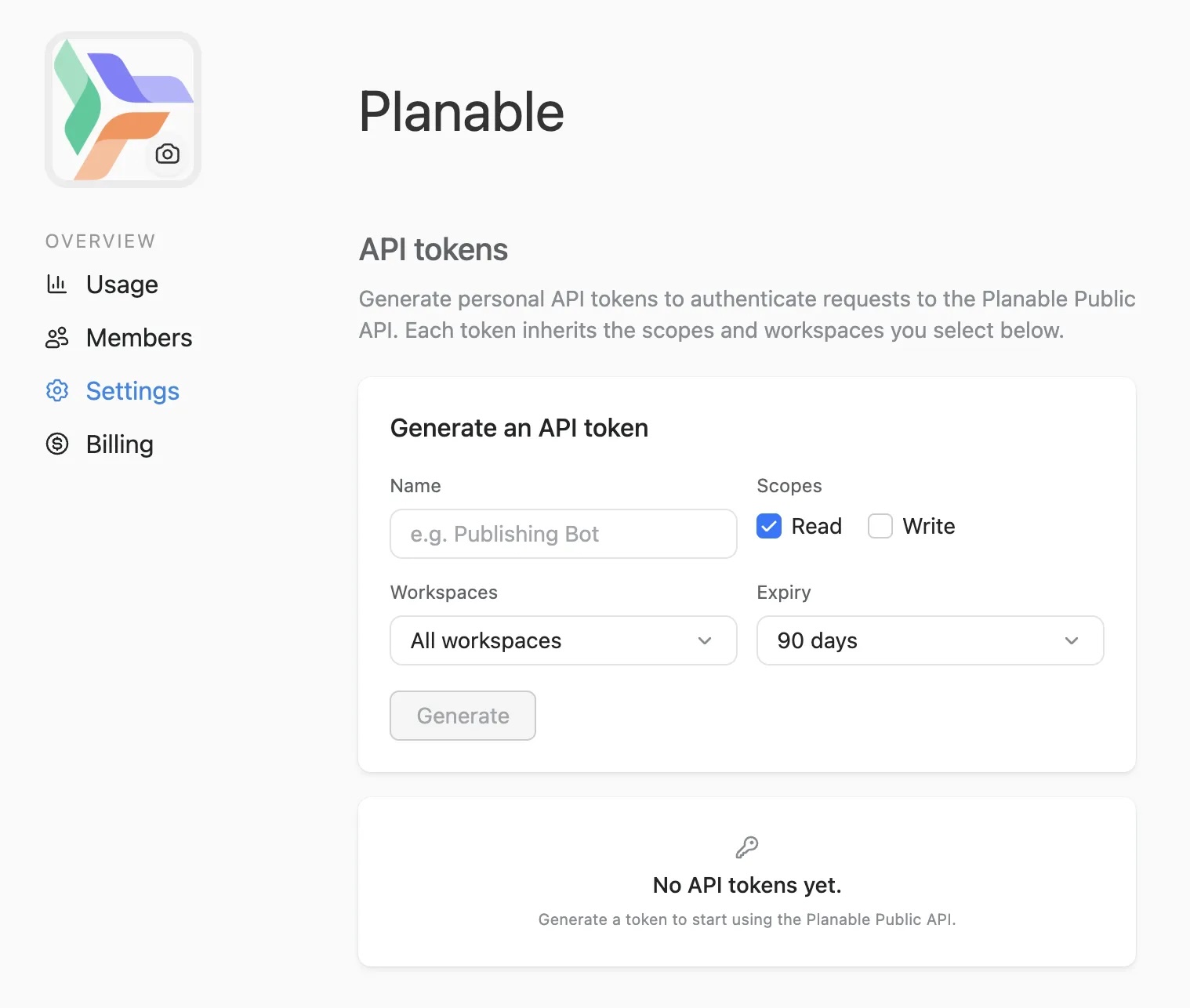
Open Company Settings and create a Public API token.
Choose the minimum access the integration requires. A read-only token can retrieve information but cannot create or update content. A write token can read and modify supported resources.
You can also limit a token to specific workspaces and set an expiration date. Restricting access is particularly useful when an integration only manages one client or a small group of workspaces.
Treat the token like a password. Anyone who has it may be able to perform actions within its approved scope.
Step 2: Connect each client’s social pages
The API creates content inside a Planable workspace. Before sending posts, connect the client’s Facebook, Instagram, LinkedIn, TikTok, X, or other supported pages to the correct workspace.
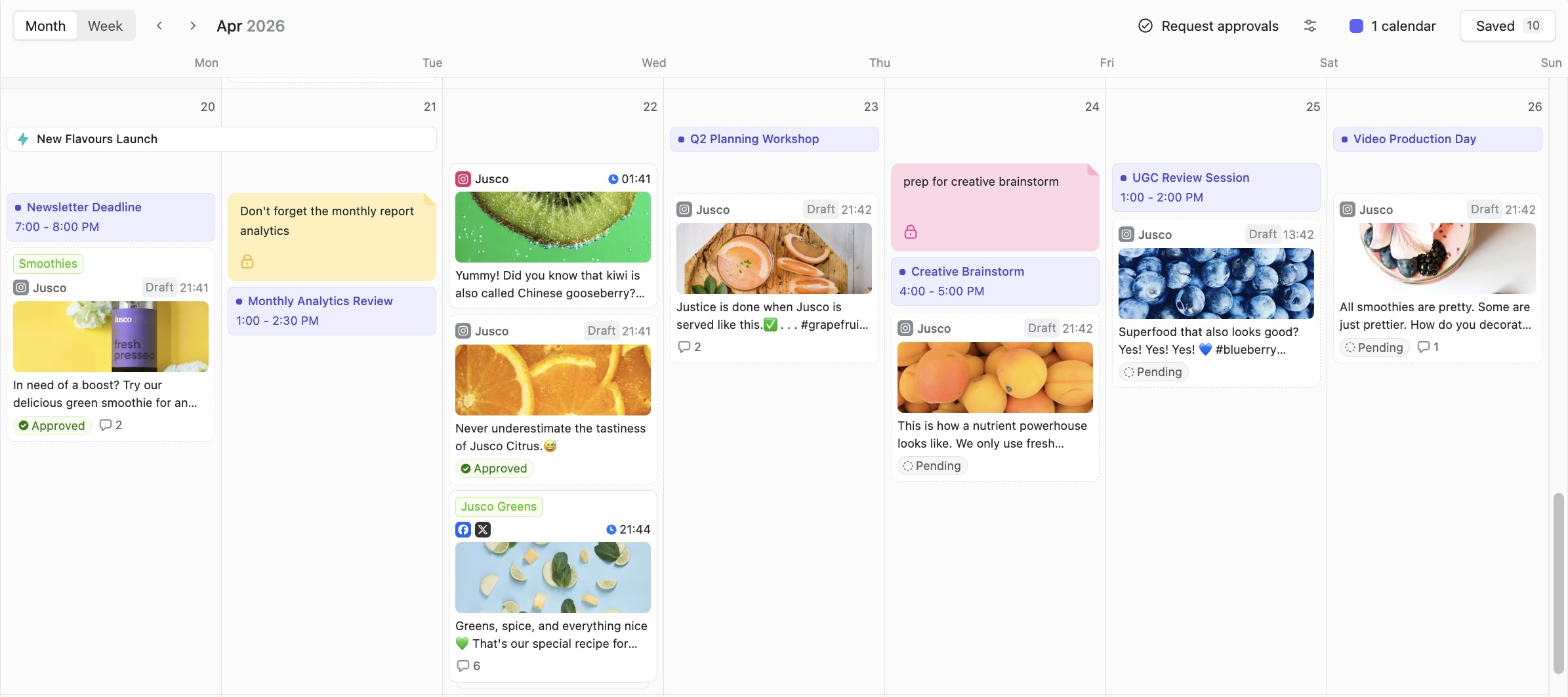
Using a separate workspace for each client keeps account access, collaborators, content, approvals, and calendars distinct.
Step 3: Create the post and assign its timing
Send the post content, media, workspace, destination pages, and scheduling information through the API.
Planable can create grouped posts for several connected pages in one request. API-created content enters Planable as a draft, where it can be reviewed and moved through the workspace’s normal scheduling and approval process.
A draft may have a date and time attached without being fully scheduled. In Planable, adding a publishing time and scheduling a post are separate actions unless an automation such as auto-schedule on approval is enabled.
Step 4: Review and approve the post
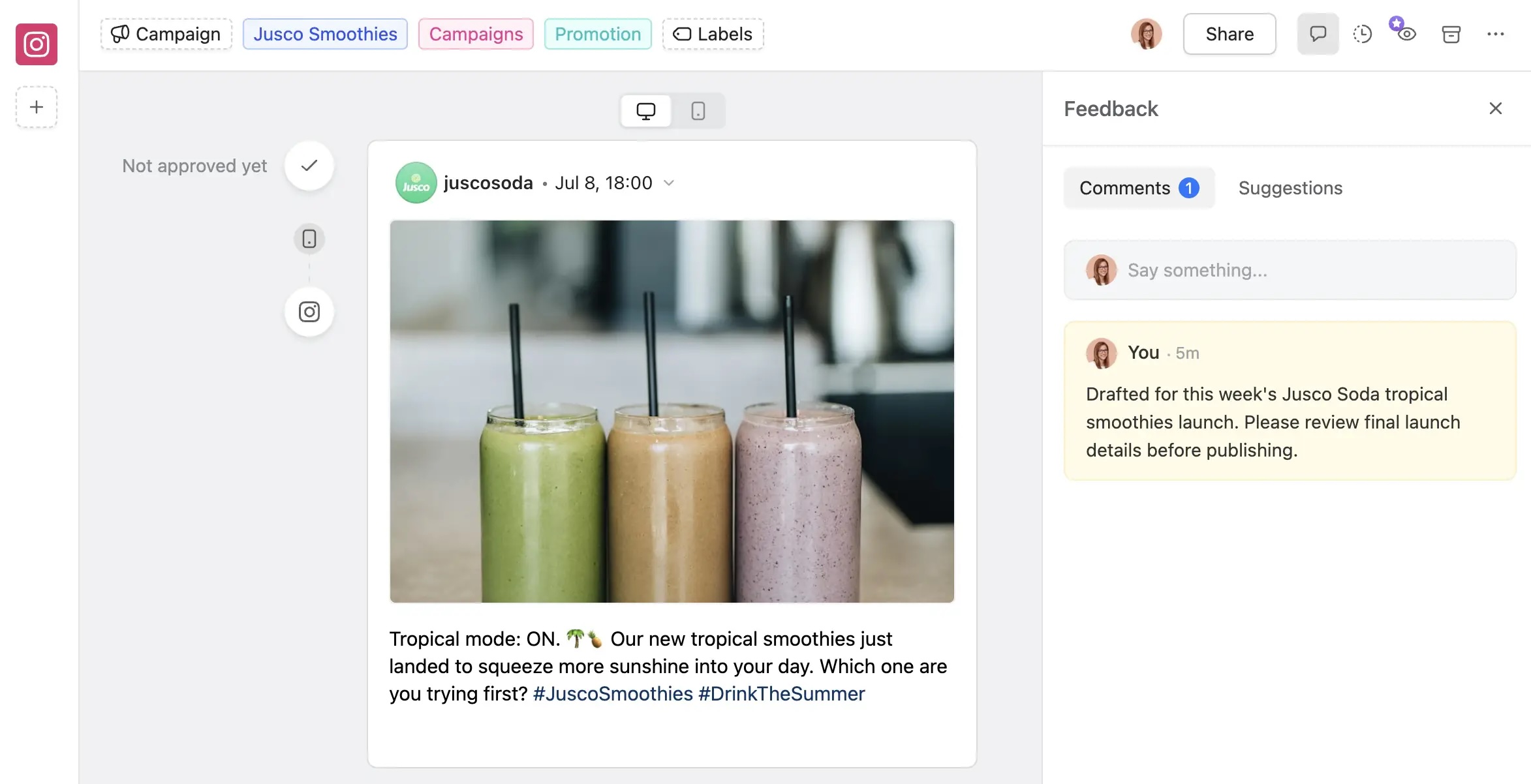
Open the post in the shared calendar or feed view. Team members and clients can review the content, leave comments, request changes, and approve it according to the workspace’s configured workflow.
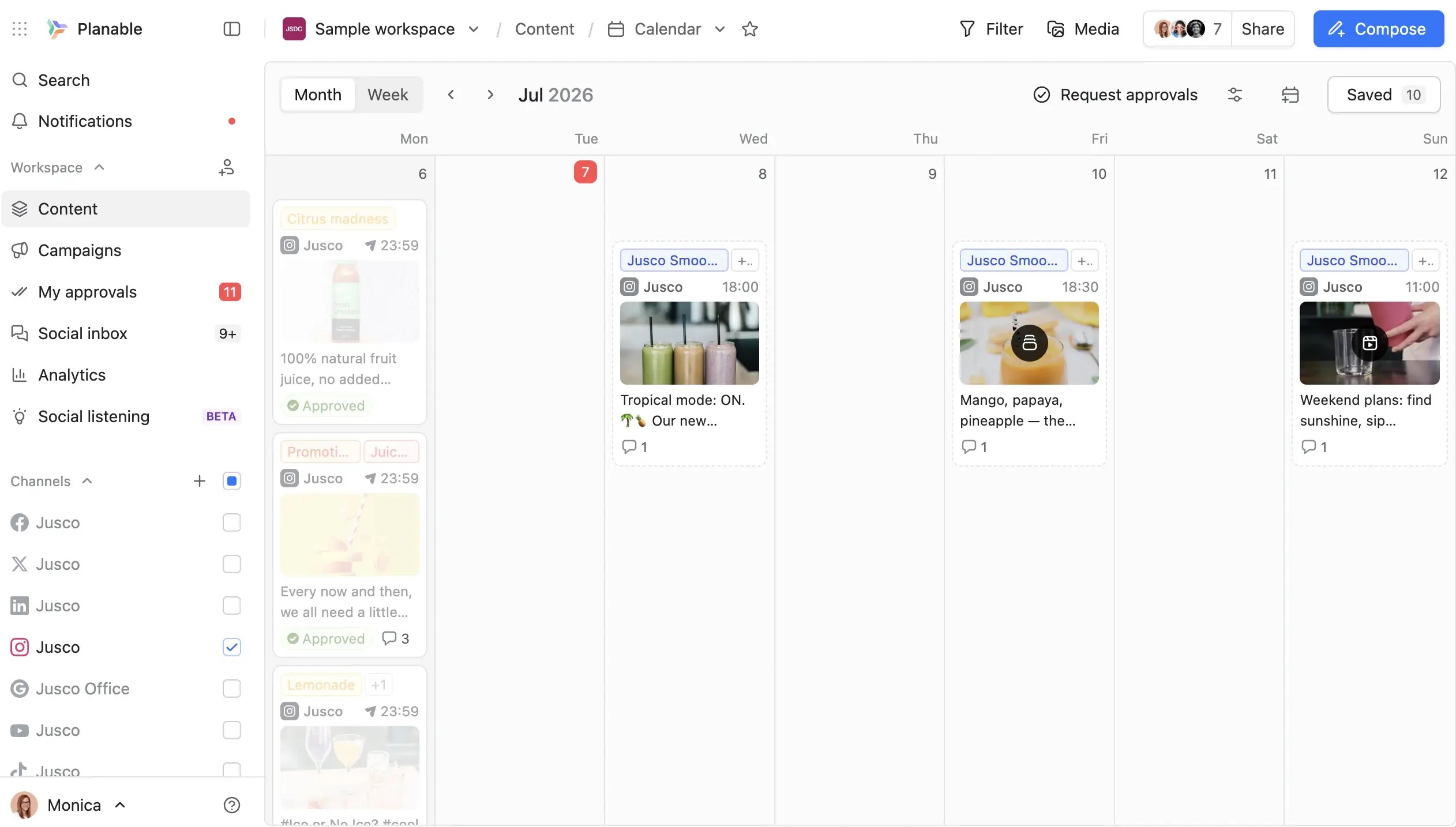
The effect of approval depends on the plan and workspace settings:
- No approval: the post does not require approval.
- Optional approval: approval can be requested, but it does not block scheduling or publishing.
- Required approval: at least one authorized approver must approve the post before it can be scheduled or published. This workflow is available on Pro and Enterprise.
- Multi-level approval: the post moves through several approval stages, such as internal review, legal review, and client approval. This workflow is available on Enterprise.
When auto-schedule on approval is enabled, a dated post can be scheduled automatically after it receives the required approval.
Step 5: Monitor publishing results
Use Planable’s calendar, post statuses, and API responses to monitor what happened after scheduling.
A post may be:
- a draft with no date;
- a draft with a date and time;
- scheduled;
- published;
- unable to schedule;
- awaiting approval;
- returned with a publishing error.
Keeping these states visible in one workspace makes it easier to identify a disconnected account, invalid media file, missing approval, or failed publishing request before it disrupts the wider client calendar.
Can you schedule posts through an API without writing code?
Yes. An AI assistant or a no-code automation platform can create social media drafts without requiring an account manager to write an integration.
The right choice depends on whether the workflow is conversational, trigger-based, or highly customized.
Use Planable with ChatGPT or an MCP-compatible assistant
Planable provides an MCP connector for compatible AI tools such as ChatGPT, Claude, and Gemini.
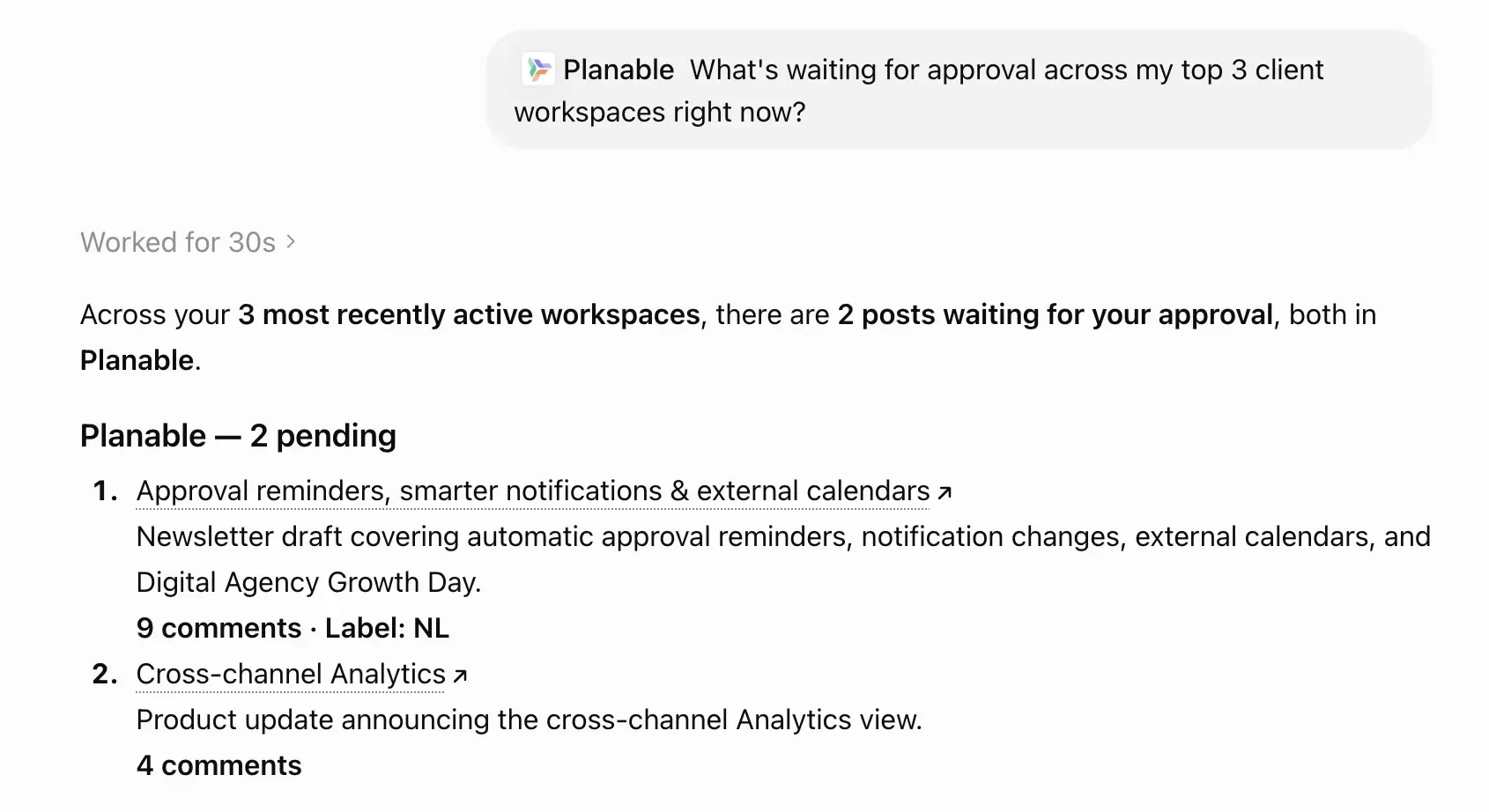
An authorized assistant can work with live Planable information, create drafts in the correct workspace, review approval statuses, organize posts, and retrieve supported analytics. The assistant inherits the user’s existing role and workspace permissions.
Content created through the AI connection enters Planable as a draft. Publishing and approval still take place through the normal Planable workflow.
This option is a good fit when an account manager wants to use plain-language instructions such as:
- “Create five LinkedIn drafts for Client A.”
- “Show me posts still awaiting approval this week.”
- “Add these captions to the August campaign.”
- “Summarize last month’s available post performance.”
Human review remains important. The assistant can prepare and organize the content, but an authorized person should still check brand voice, factual accuracy, media, destinations, and timing.
Use Zapier for event-based workflows
Planable’s Zapier integration can create posts, upload media, synchronize information, and trigger workflows when content is approved, scheduled, or published.
Zapier is well suited to workflows such as:
- create a Planable draft when a new row is added to a content spreadsheet;
- create a post when a brief reaches an approved status;
- notify a project channel when a post is published;
- pass approved content into another reporting or project-management tool.
Use Zapier when the workflow follows a clear “when this happens, do that” pattern. Use the Public API when you need custom business logic, larger batch operations, deeper data synchronization, or direct integration with an internal system.
Do API-created posts publish automatically?
No. By default, in Planable, content created through the Public API or an AI assistant begins as a draft. What happens next depends on the workspace settings.
A draft can still be scheduled or published without approval when the workspace uses no approval or optional approval. Required approval prevents scheduling and publishing until at least one approver has signed off. Multi-level approval requires the post to clear each configured approval stage.
This distinction matters because “created as a draft” and “blocked until approved” are not the same thing.
One nuance for API-created posts: if you mark a post as approved when creating or updating it via the API, that satisfies the approval gate. Otherwise the same rules apply: an unapproved scheduled post will fail at publish time even if scheduling succeeded.
For the strongest control:
- Use Required Approval or Multi-level Approval.
- Assign approval permission only to the appropriate people.
- Restrict API tokens to the necessary workspaces.
- Review destination accounts and publishing times.
- Enable auto-schedule on approval only when it matches the team’s process.
When is programmatic scheduling worth using?
Programmatic scheduling becomes useful when the cost of repetitive publishing exceeds the cost of setting up and maintaining the workflow.
Use native schedulers when:
- you manage one or two accounts;
- publishing volume is low;
- no client approval process is required;
- content does not need to move between other systems.
Use Zapier when:
- content begins in a spreadsheet, form, CMS, or project tool;
- the workflow has predictable triggers;
- only light transformation or routing is required;
- a developer is not available.
Use an AI assistant or MCP connector when:
- account managers prefer plain-language instructions;
- drafting and workflow checks take more time than the actual publishing;
- teams need to work across several client workspaces;
- every generated post will still receive human review.
Use the Public API when:
- you need to create or update posts in batches;
- content originates in an internal CMS or proprietary tool;
- you need custom routing, validation, or reporting;
- you manage a large number of client workspaces;
- your technical team needs direct control over the integration.
The Public API offers the greatest flexibility, but it also requires technical ownership. For a small, predictable workflow, MCP or Zapier may produce value faster.
Why agencies use API-based social media scheduling
Agencies schedule programmatically because it hands back the hours account managers lose to posting across every client by hand, and it keeps output steady as client counts climb.
The whole category is moving this way. The global social media management market sat at $29.9 billion in 2025 and is projected to reach $171.6 billion by 2033, a 24.8% compound annual growth rate, with programmatic scheduling and publishing named among the growth drivers, according to Grand View Research. The manual posting habits that got you here won’t hold as your client roster grows.
So, the primary advantage of programmatic social media scheduling is operational consistency.
Without a centralized workflow, every additional client introduces more account switching, media uploads, publishing checks, and opportunities for error. A programmatic workflow allows the team to prepare content in batches and monitor it from a shared calendar.
The most useful benefits are:
- less repetitive publishing work;
- clearer separation between client accounts;
- more consistent publication timing;
- centralized review and approval;
- faster identification of failed posts;
- easier connection between the content calendar and other agency systems.
The API does not replace strategy, editing, or client judgment. It removes repeatable transfer and publishing tasks so the team can spend more time on those higher-value activities.
FAQs
How do you schedule social media posts?
Choose a native scheduler or social media management platform like Planable, connect the relevant account, create the post, and select its publication date and time. Agencies usually benefit from a unified calendar because it brings multiple client accounts, approvals, and publishing statuses into one workflow.
How do you schedule social media posts for free?
Native platform schedulers are generally the simplest free option for a small number of accounts.
Planable also currently offers a no-time-limit free trial with a lifetime allowance of 50 created posts. The allowance does not reset, and a paid plan is required after those posts are used.
What’s the best tool or app to schedule social media posts?
For an agency running many clients, Planable is a strong pick. It schedules across every major platform from one shared calendar, and each post routes through client or team approval before anything publishes. If you post to a single account, a platform’s native scheduler may be enough on its own.
How do you schedule Instagram Stories?
You can’t schedule Instagram Stories from the native Instagram app; it doesn’t support them. You need a tool that does, like Meta Business Suite or Planable. In Planable, you draft the Story, set its go-live time, and it lands on the shared calendar as a draft, publishing after approval.
Can an API publish to every social network in exactly the same way?
No. Each network supports different content types, authentication methods, fields, limits, and publishing processes.
A unified API reduces the amount of integration work, but it cannot remove restrictions imposed by the underlying social network.
Does API scheduling eliminate the need for human review?
No. API scheduling automates content transfer, timing, and publishing operations. A person should still verify the post’s claims, brand voice, media, destination account, timing, and approval status.
Choose the scheduling method that matches your workflow
Running two or three accounts by hand? Keep doing it. The math only tips once you’re posting the same week of content across eight or ten clients, one login at a time. That’s when a programmatic path earns its place, and you’ve got three to weigh:
- an AI assistant through MCP, if you’d rather ask for posts in plain language
- Zapier, for lighter triggers off tools you already run
- the Public API, when you want direct control over a full client batch
Whichever you pick, approvals stay the safety net: nothing goes live until the right person signs off.
Spin up your API keys in Account Settings → Integrations and schedule a client’s first batch of posts through the Planable Public API. Every one lands as a draft your client still approves.
Horea is a B2B SaaS Content Strategist and MarTech researcher who specializes in software reviews, tool comparisons, and social media management. His work is research-first and fluff-free. He tests the tools, does the digging, and writes the kind of content that helps marketers make confident decisions.