Is it the most user-friendly email API?

MailerSend is a transactional email service. It connects its own email infrastructure to apps and websites with an API or SMTP relay.
A lot of email APIs are developer-focused and heavily technical. I read lots of MailerSend reviews saying it’s easier to integrate and use than most. To the point where non-developers and mixed teams get along with it just fine.
If you’re reading this review, you want to know if MailerSend is a good transactional email service for your business. I tested and reviewed it like a real user. I signed up for an account, set up a sending domain, checked the API and SMTP, explored templates, and analytics.
So just how user-friendly is MailerSend? And who is it for? This review answers your questions. So you can easily decide if MailerSend is the right transactional email service for you.
MailerSend Review Overview
Here’s the tl:dr version of my MailerSend review:
- MailerSend is a transactional email and messaging platform. It adds email sending to other apps via an Email API or SMTP relay.
- Deliverability is the most important thing for an SMTP relay. MailerSend includes built-in email verification, blocklist monitoring, and DMARC monitoring on all plans. The DMARC monitoring gives you in-depth details on email authentication.
- Its biggest USP is how user-friendly it is. Email APIs generally target a developer audience. MailerSend gives non-technical users control to manage templates, domains, analytics, and settings without always relying on developers.
- MailerSend is popular with SaaS and ecommerce businesses. And marketing agencies that want to handle emails for multiple clients. Its biggest customer segment is startups and SMBs with 10-200 employees.
- There’s an excellent drag-and-drop HTML email editor. It’s the same as the editor in MailerLite with 59 pre-built and fully customizable templates.
- MailerSend also supports transactional SMS in the US and Canada. It plans to introduce SMS in Europe and WhatsApp globally soon.
- MailerSend pricing starts at $6.30/month for 5,000 emails. There’s a free plan with 500 emails a month.
👉 Looking for a transactional email platform that developers can trust? But the rest of your team can get on with it, too? Try MailerSend for free.
Get started with MailerSend for free
MailerSend Core Features
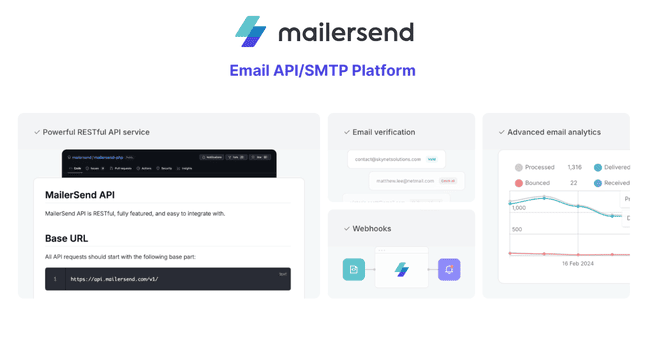
- Email API and SMTP. MailerSend adds email sending to your tools. You can choose either its email API or SMTP relay. The SMTP relay is quick and easy to use. The API can connect to any web app and supports HTML templates.
- Email verification. MailerSend verifies addresses in your list before you send emails. This helps reduce bounces and protects your sender reputation. Each verification costs a credit. Plans include free credits, starting at 100 credits in the Hobby plan.
- Drag-and-drop email builder. MailerSend has the same drag-and-drop HTML email editor as their sister platform, MailerLite. You get more design flexibility than most transactional email builders.
- DMARC and blocklist monitoring. DMARC monitoring helps you spot email authentication problems before they hurt deliverability. Blocklist monitoring checks whether your domains or IPs appear on known blocklists.
- Transactional SMS. Customers in the US and Canada can use MailerSend’s SMS API. This lets you send order updates, account alerts, and reminders.
- Activity tracking and analytics. MailerSend’s reports have basic metrics, like sends, open and click rates, and bounces. More detailed performance data is available from API logs.
- Team and agency features. Support for multiple domains means agencies can manage email for different clients. The sender identities feature even avoids the need to add another domain. It shortcuts DNS setup with a simple verification link.
Sign up to MailerSend for free
MailerSend Pros and Cons
MailerSend Pros
- User-friendly for developers and non-developers. Some transactional email services are rigidly developer-focused. Developers get the API, SDKs, webhooks and logs. Business owners and non-specialists get an easy-to-use SMTP relay, drag-and-drop email builder, and simple analytics. Both benefit from a simple, intuitive interface and fast setup.
- Feature-rich drag-and-drop email editor. MailerSend shares its editor with email marketing sister platform MailerLite. You get much more control over email design than most transactional email editors. Pre-built content blocks and reusable styles make it easy to create eye-catching emails. And there are 59 templates to get started with.
- Strong deliverability features. MailerSend gives you all the tools to stay in control of your sender reputation. Automatic email authentication and suppressions protect email deliverability. Email verification strips out ‘bad’ email addresses to avoid bounces. And DMARC and blocklist monitoring give you advanced intel on deliverability risks.
- Multiple domains for agencies and multi-brand teams. MailerSend lets you run several email domains from the same account. This is ideal for marketing agencies. And let’s SaaS platforms offer email as a white-label service.
MailerSend Cons
- Only for transactional emails. You can’t run marketing campaigns from MailerSend. It’s for transactional emails only. For marketing emails and newsletters, check out MailerLite.
- Not as cost-effective at high send volumes. MailerSend pricing is very competitive. Sending 5K emails costs $6.30/month and 10K emails costs $13.80/month. Compared to rivals like SMTP.com and Mailtrap, it gets a bit more expensive to send over 50K emails a month.
Get started with MailerSend for free
Is MailerSend for you?
Recommended if:
- You want reliable transactional emails for your SMB, ecommerce or SaaS business. MailerSend lets you send transactional emails directly from your app or website. It’s flexible and user-friendly. And for small to medium send volumes, it’s good value.
- You want a tool your whole team can use. Email APIs require technical know-how to set up and manage. MailerSend is one of the most accessible on the market for non-developers. It simplifies the technical side as much as possible. Sales teams and marketers can build great-looking emails using the drag-and-drop editor. Or even manage email integrations themselves via the very straightforward SMTP relay.
- You manage email for multiple brands, clients, or domains. You can run multiple email domains on the same MailerSend account. And it provides a shortcut for sending emails from third-party domains. This is ideal for agencies, SaaS platforms, and service providers. It means you can manage email for multiple clients from a single account.
- You want control over deliverability. MailerSend has strong deliverability features that come as standard on every plan. It includes email verification that lets you clean your list before bounces happen. It automatically suppresses email addresses that bounce. It monitors blocklists to check if your domains and IP addresses appear on them. And it turns DMARC reports into detailed insights about authentication and spoofing attempts. Customers on the Professional plan can also get the dedicated IP add-on.
Not recommended if:
- You want to run email marketing campaigns. You can add product listings to emails or use welcome and abandoned cart templates. But you can’t build and automate sequences of emails. And there are no tools for segmenting and targeting contacts. Or send bulk email campaigns to lots of people at once. You need to get a MailerLite account for that. Some email marketing platforms, like Brevo or Mailjet, have transactional email sending.
- You need to send very high volumes of emails. Compared to other transactional email services, MailerSend gets more expensive at higher sending volumes. At 50K and 100K emails per month, Mailtrap is cheaper. And at 500K to 1M emails per month, SMTP.com and Mailtrap become stronger on price.
Sign up to MailerSend for free
MailerSend Review Rating Details
Email API & SMTP |
MailerSend makes API and SMTP setup straightforward. An API token generator and code snippets speed up configuration for developers. And the SMTP relay needs no technical skills to use. |
Ease of Use |
MailerSend is one of the most user-friendly email APIs on the market. It’s quick and easy to get started with. And it keeps technical complexity to a minimum. |
| Email Editor |
The drag-and-drop editor is easy to use and packed with content and design features. It helps you build more visually attractive emails than many transactional email services. |
Email Templates |
MailerSend has 59 templates for ecommerce, security, onboarding, and general notifications. The design quality is good, and they are fully customizable. |
Personalization |
You can personalize emails with attributes like names, order details, invoices, and account updates. You can set this up using API calls. Or add merge tags to email templates. |
Reporting & Analytics |
MailerSend’s main email analytics only cover basic metrics like open, click, and bounce rates. They are easy to read with some good visuals. You can get more in-depth performance insights via API logs and DMARC monitoring. |
| Customer Service |
24/7 chat support via an AI chatbot and a human technical team. The knowledge base is excellent. It covers both general use and developer resources in depth. |
| Deliverability |
MailerSend has a strong deliverability toolkit. It includes email verification, automated authentication and suppression management, DMARC and blocklist monitoring. All come as standard features, helping you manage your sender reputation. |
| Spam Check ❌ |
There are no native tools for testing individual emails for spam risks or for testing inbox placement. |
| Integrations & API ✔️ |
MailerSend connects to any platform via its API. It has SDKs for 6 programming languages. And pre-built integrations to 33 platforms. |
| User Permissions ✔️ |
There are 5 preset user roles, and you can define your own using custom permissions. |
| GDPR & Legal Compliance ✔️ |
MailerSend has a dedicated GDPR-compliant data policy built into its Terms of Service. |
| Interface Languages | The interface is only available in English. |
| Customer Satisfaction |
MailerSend scores an average of 4.4 stars in Capterra user reviews and 4.1 in G2. Customers love how user-friendly it is and its strong deliverability. |
Overall Score

MailerSend is an excellent transactional email service for SMBs. For an API-based service, it’s very user-friendly. It provides plenty of support for developers and non-developers. And it has great tools for managing your own deliverability.
Get started with MailerSend for free
Getting Started with MailerSend
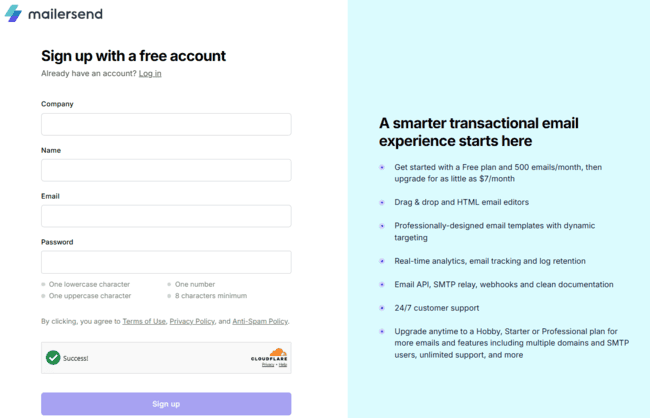
Signing up to MailerSend is fast. I used my Google account and set up my account in a minute. It’s a simple two-step process: add company details and verify your email to get your account approved. There’s no long onboarding quiz, as I’ve seen at many other providers. Developers get to the product quickly and efficiently. Non-specialists and first-timers don’t have to wrestle with setup. It feels user-friendly from the very start.
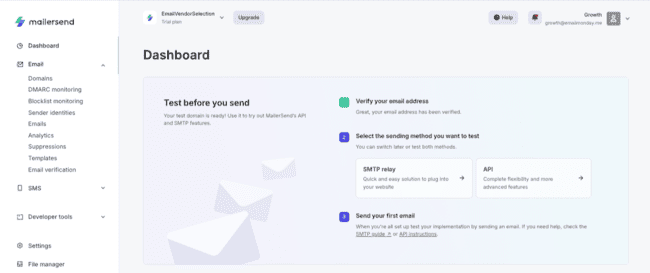
The onboarding dashboard jumps straight into setting up the SMTP relay and Email API. Further down, you get prompts for setting up transactional emails. Including creating a template and adding a domain.
I like how stripped back this is. MailerSend doesn’t try to teach you every feature at once. It focuses on the things that matter most first.
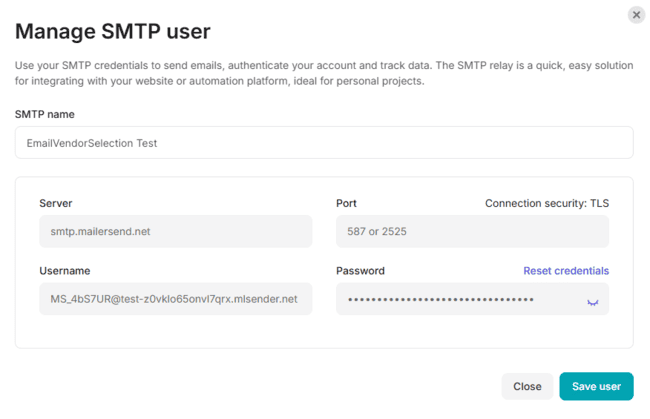
Clicking the SMTP relay link leads you to setting up a test domain. It’s a very useful feature for sending test emails before verifying your own email domain. MailerSend automatically configures the test domain for you. You can send 100 emails to two unique recipients immediately after signing up. This is great if you’re evaluating MailerSend or if you don’t have a domain ready. Developers can also create a test API token. This lets you send test emails to ‘blackhole’ email recipients. These are pseudo-inboxes that don’t really exist and are used purely for testing.
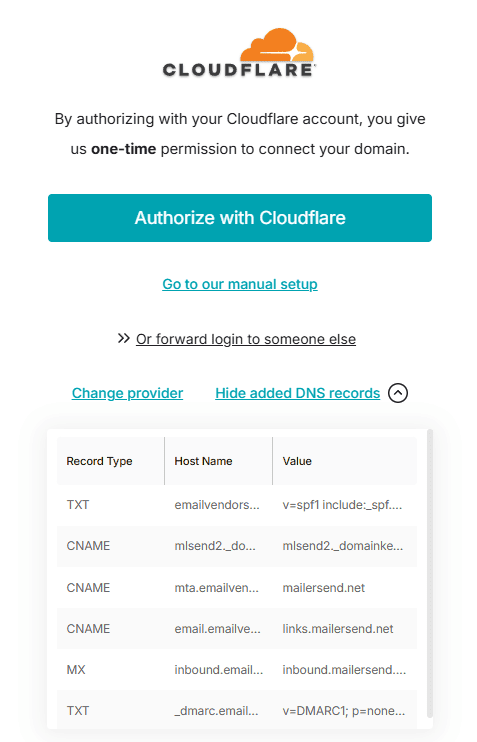
Adding your own sending domain in MailerSend is straightforward. From the onboarding dashboard, you click Add domain and enter your domain address. MailerSend then walks you through the full authentication process. If your DNS provider supports automatic setup, MailerSend will add the required records for you. This is available for 62 DNS providers, including widely used services such as Cloudflare, GoDaddy, AWS, Namecheap, and IONOS. MailerSend configures the necessary authentication records, such as SPF, DKIM, Return-Path/CNAME, and related DNS records. Your DNS provider adds them automatically once you authorize access. If your provider isn’t supported, you can still copy and paste the values manually, with clear instructions for each DNS record.
Overall, getting started with MailerSend is impressively simple and direct. You can get from signing up to testing an email or configuring a domain in about 5 minutes.
Get started with MailerSend for free
MailerSend Review: Email Delivery Platform
MailerSend SMTP and Email API
Like most email sending platforms, MailerSend has two ways to send emails. SMTP relay and an Email API. SMTP is the traditional client-server communication protocol for email. It’s easy to set up and doesn’t require coding skills. But it has limitations. You can’t use HTML templates with it.
Email APIs are more flexible and powerful. They use the HTTPS web protocol. So you can use them to add email to any online app. But you can send at higher volumes, use HTML templates, set triggers to automate sending, and personalize emails. You can also send scheduled messages via the API. This is useful for timed reminders, onboarding emails, and event notifications.
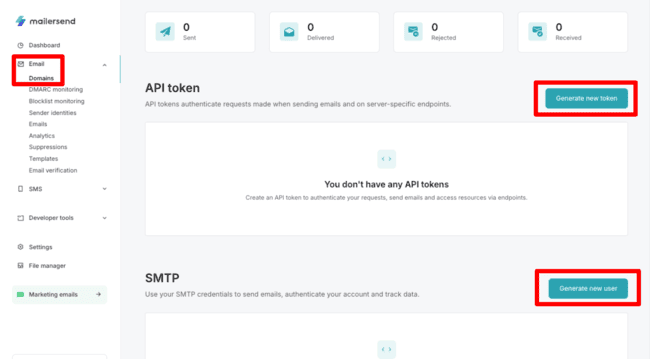
In MailerSend, API and SMTP are both under Email > Domains. I’d have preferred a more direct navigation. You have to go into your Domains list. Then click the domain you want to configure. But once you find them, both the API and SMTP tools are straightforward to set up and use.
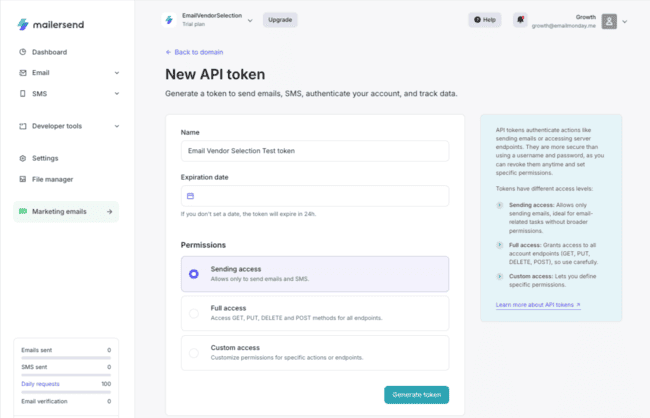
APIs take coding knowledge to set up if you’re not using an integration. MailerSend keeps things as simple as possible by auto-generating API tokens. API tokens are snippets of code that act as identification gateways for an API. So with MailerSend’s email API, you add your tokens to your chosen app. And that creates an authenticated link for that app to use MailerSend.
MailerSend’s token generator lets you set different access permissions. So you can create a token that only allows an app to send email and SMS. Full access that allows the app to send, retrieve, and delete mail data. Or you can customize your own.
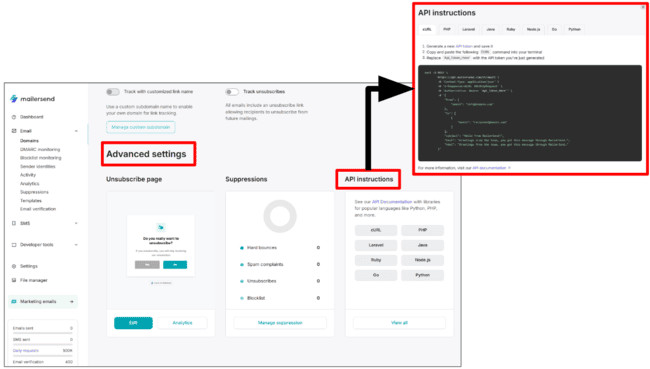
Further down the Domain page, under Advanced settings, you find API instructions. This lists code snippets to embed your tokens in 8 coding languages. Just replace the placeholders with your own key, domain, and user.
After authenticating your domain, you can add different users to it in the SMTP relay. This is one of MailerSend’s USPs. It allows you to send emails from multiple users, all in the same account. You can run as many domains as you like from the same account. This is ideal for agencies to handle client email in one place. Or for SaaS services. For example, one MailerSend customer, a real estate management app, lets property managers add their own domain. This means emails to customers come from them, not from the app’s domain.
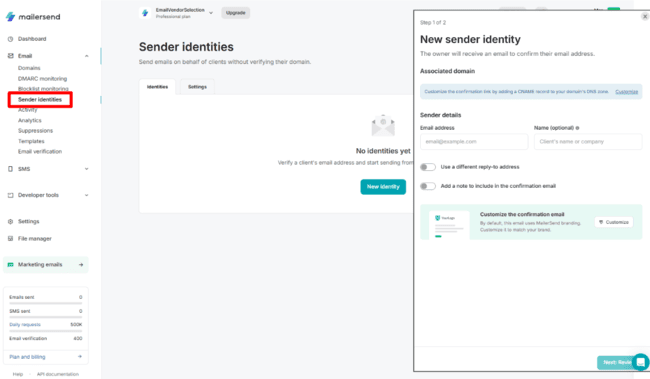
Another very cool feature is Sender Identities. This allows MailerSend users to send emails from other domains. But without having to go through domain authentication. Instead, you set up an associated domain with permission from that domain’s owner. Again, it for instance means app builders can use MailerSend’s email API as a white-label service. And let their own customers add domains without needing control over DNS setup. One accounting app uses this to let accountants send invoices from their own domains.
Drag and drop email builder and templates
MailerSend’s email builder and templates are big strengths. A lot of transactional email services stick to simple email templates. With MailerSend, you can create HTML emails with your custom design, too. But there’s more to MailerSend’s email design features than simple branding.
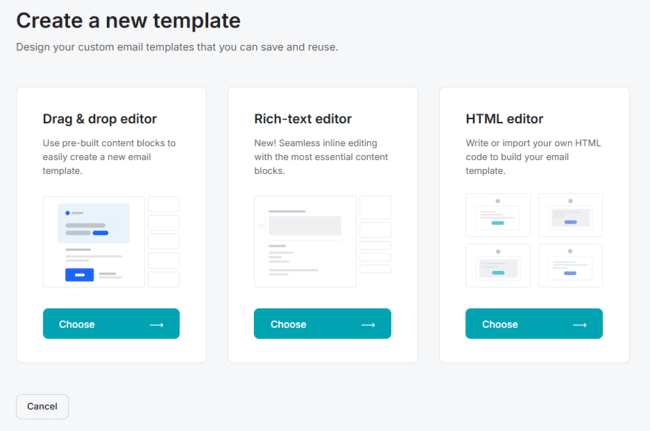
MailerSend gives you two ways to create HTML emails. You can add and edit your HTML email code, or you can use a drag-and-drop email editor. With the drag-and-drop editor, you also get MailerSend’s pre-made templates to speed up and simplify high-quality visual designs.
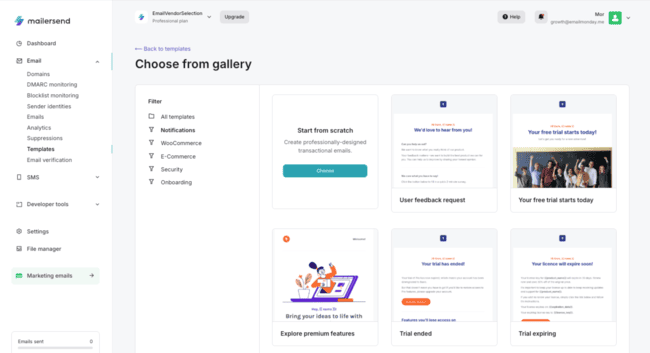
MailerSend has 59 templates. The designs are generally simple and functional. But a lot of them still have features I wouldn’t always associate with transactional emails. MailerSend sorts its templates into categories for ecommerce. This includes a small dedicated sample for WooCommerce users. Then there’s security, for things like password resets and account verification. Onboarding emails for welcoming new customers and miscellaneous notifications. With all these choices, there is a good chance of finding a template to match your needs.
All templates are customizable in MailerSend’s drag-and-drop editor. This is where the crossover with email marketing really becomes obvious. MailerSend is the sister app of email marketing service MailerLite. They share the same editor.
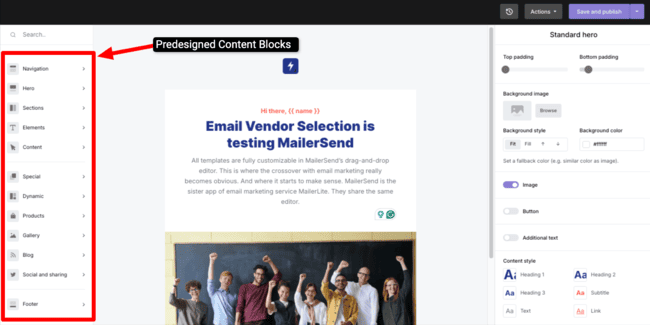
This editor ticks two boxes I always look for. It’s intuitive and has all the content types you want. There are 12 types of pre-made content blocks. Everything from empty column layouts, basic text, image, and button elements to various hero block combinations, dynamic content, signatures, accordions, and app store links. You can create and save your own layouts.
The big question is, do transactional emails need all of these content types? The honest answer is no. Transactional emails don’t need product carousels. Or embedded blog snippets. But they can have them. You can add product recommendations to order confirmations and receipts. Or embed surveys to ask for customer/user feedback. It means getting more from transactional emails. Not just sending functional messages. But using them to engage, promote, and learn about your customers.
Get started with MailerSend for free
MailerSend Deliverability
Strong deliverability is a must for all services sending transactional messages. You need a clean sender reputation to make sure your emails land in inboxes.
MailerSend is a reliable performer on deliverability. It’s always hard to test deliverability, but third-party tests showed 9 out of 10 emails land successfully in the primary inbox. A 89% primary inbox placement, which is a bit above industry numbers. It’s fast, with an average delivery speed of 2-5 seconds. The delivery rate is 98.9%. Only 1 in 100 emails sent via MailerSend in this test bounced.
The MailerSend team takes all the necessary steps to maintain a high deliverability rate. It has its own powerful sending infrastructure. So it can control its own traffic and reputation. It authenticates domains using SPF, DKIM, and DMARC. And it makes this easy for users by automating it. It monitors bounces, spam complaints, and unsubscribes. And automatically adds email addresses to a suppression list if these happen. Protecting both your own and MailerSend’s sender reputation.
All of these are important for good deliverability. But for me, MailerSend has 3 stand-out features that improve its deliverability credentials.
Email Verification
You don’t have to wait for emails to bounce before adding addresses to the suppression list. MailerSend has inbuilt email verification. This tests whether email addresses are valid or working before you try sending. Removing dodgy addresses means you avoid bounces and protect your sender reputation.
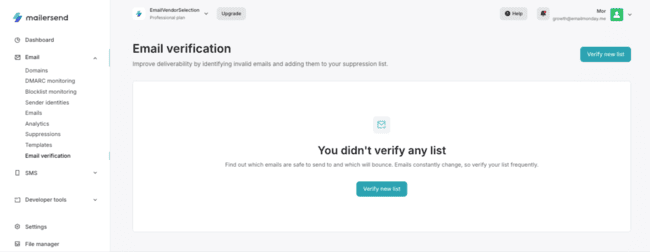
The Email verification link is nice and clear in the main menu. To get started, you click Verify new list. This prompts you to upload a file of your email list. It accepts .csv or plain text files.
Each email in your list costs you one credit to verify. You get some verification credits in your plan. But you can buy credits if you need more.
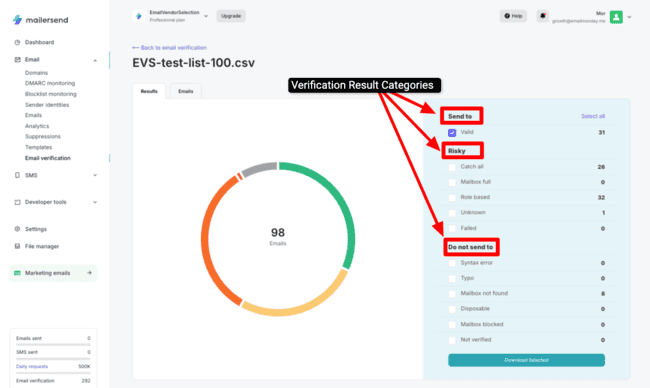
MailerSend keeps its verification results simple. You can view a list of how each address performs or a breakdown by categories. I like that MailerSend goes beyond rating addresses as valid, risky, and do-not-send. For risky and do-not-send, it breaks down why. It tells you if you’ve got a generic catch-all address or if a mailbox is full. For invalid addresses, it tells you which are due to syntax errors, mailboxes not existing, or being blocked.
This detail lets you make more informed decisions about which addresses to keep or suppress. I like that you can select addresses from any category to download, too. This makes it easy to build new, clean lists.
You can set up verification in your own platform via MailerSend’s API, too.
DMARC Monitoring
Most email delivery services use SPF, DKIM, and DMARC to authenticate emails. These protocols complement each other in various ways. DMARC’s role includes identifying which emails fail SPF and DKIM checks and why. And telling mailbox servers what to do with them.
Like SPF and DKIM, you add DMARC records to your domain’s DNS settings. Most ESPs leave it there. But one of the instructions DMARC can give to mail clients is to return DMARC reports. These include details of all email traffic sent from your domain. And any emails sent that fail authentication. Authentication failing, bad domain, and IP reputations are common causes of emails landing in spam.
MailerSend’s DMARC monitoring tool turns technical DMARC reports into actionable information. You can see details of every email sent from your domain that fails authentication. And work out if anyone is trying to spoof your domain. Or if you have problems with your DNS records you need to fix. Beyond that, you can track the IP address of every mail server involved in sending your emails.
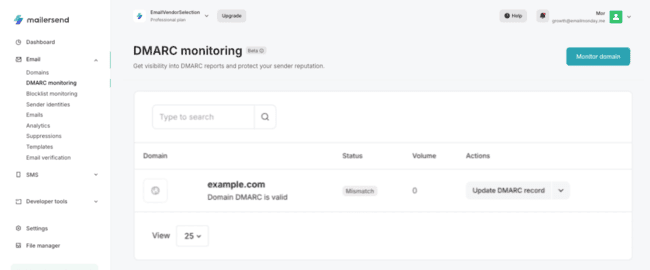
DMARC monitoring is easy to set up. It has its own section in the main menu. You simply go to Monitor domain and click on a domain. MailerSend then activates DMARC reports. It gives a Status update in the main DMARC monitoring page. If all is ok, this reads ‘valid’. If there’s an authentication issue, it says ‘mismatch’.
This is where MailerSend’s DMARC features stand out for me. If you see mismatch, you will naturally want to investigate further. Then you can click on the domain name and choose View reports.
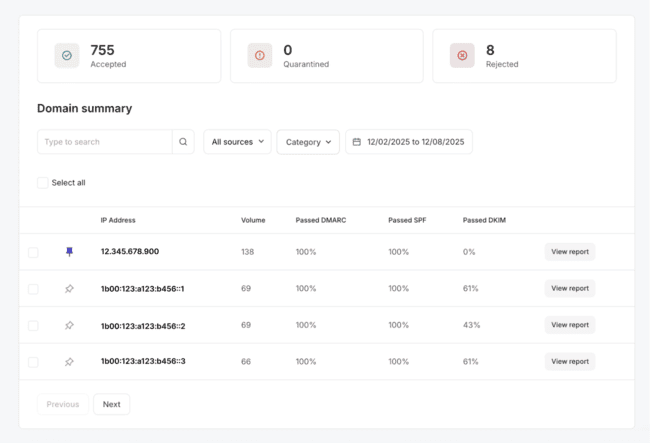
This opens up a staggering amount of detail about authentication. You can see how many emails passed authentication. And how many were quarantined or outright rejected. But you also get a breakdown of every IP address. Matching domains to authorised IP addresses is a key part of email authentication. Spoofing attacks will try to impersonate a domain, sending emails from a non-authorised IP address.
MailerSend doesn’t just list all the IP addresses that have sent emails using your domain. It gives you a breakdown of DKIM, SPF, and DMARC pass rates. And individual reports, so you can see which emails passed and failed, and when they were sent. That allows you to pinpoint where spoofed emails come from. Or where your own authentication records are incorrect.
If you’re looking for a dedicated tool for checking authentication issues, find the best DMARC monitoring tools here.
Blocklist Monitoring
Failing authentication is bad for deliverability. Appearing on a blocklist is even worse. Blocklists name-and-shame domains and IP addresses with really bad sender reputations. These are the known spammers and phishers. Mailbox providers use them to filter incoming emails. If they spot a domain or IP address on a blocklist, it’s an automatic block.
Sometimes genuine senders end up on blocklists. You can get unlucky with spam complaints or a bad run of bounces. This is obviously terrible for deliverability. So MailerSend includes a blocklist monitoring tool for senders. It tracks some of the best-known blocklists. And if it spots your domain or associated IP addresses on them, it tells you.
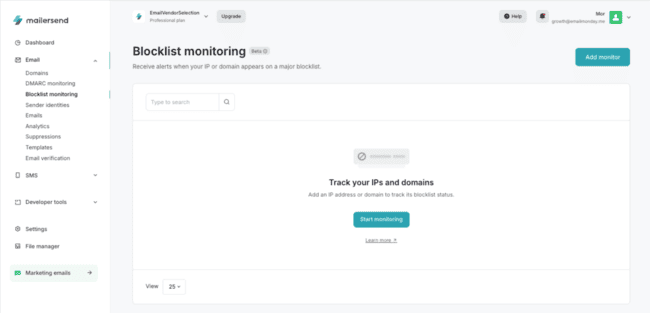
Like DMARC monitoring, MailerSend’s blocklist monitor is very easy to set up and use. It has its own dedicated section. You can choose any connected domain on your account to monitor. Or, if you want to be more specific, choose individual IP addresses. This is useful if you start seeing issues with certain IP addresses in other reports.
You can get email alerts when your IP or domain appears on a blocklist. Or get webhook alerts through your platform via the API. This seems like a given to me. You wouldn’t want to unknowingly keep sending from a blocklisted domain. These alerts help you rest easy knowing you’ll be warned if your sending reputation is at risk.
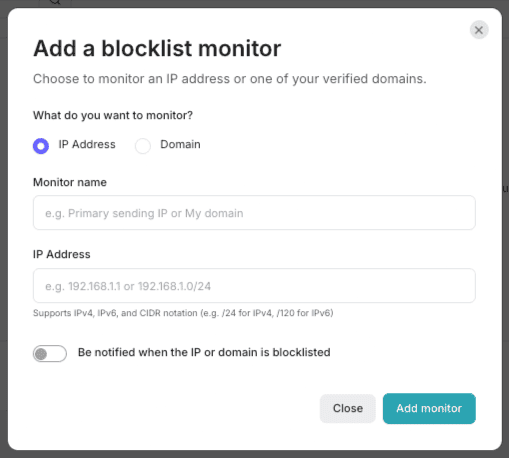
On the main Blocklist monitoring page, you get straightforward status updates. I like that it tells you in plain English: ‘this domain is safe to use’. Then there’s a summary of the blocklists checked. And the date of the last check. For a blocklist-by-clocklist breakdown, you can click view monitor.
Sign up to MailerSend for free
Sending SMS with MailerSend (US & Canada)
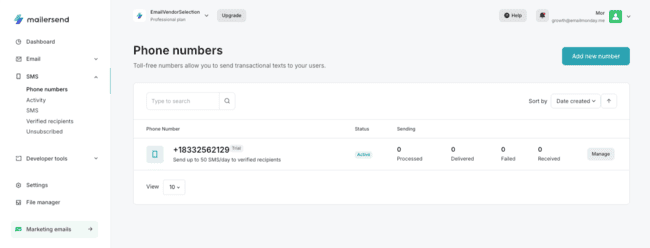
In the USA and Canada, MailerSend users can send transactional SMS messages. This works via a separate SMS API. Like email, you connect the API to your platform and set up receipts, order confirmations, and account reminders to send automatically.
To use the SMS API, you need your own toll-free number. And you pay for SMS messages separately in your MailerSend account. You add numbers via SMS > Phone numbers. This also serves as the main SMS dashboard. With topline message stats for each number.
When you first sign up, you get a number for testing purposes. You have to add your own verified recipients or phone numbers you own. You can send 50 test SMS messages a day. This is a nice touch. It means you can check the API configuration for free.
Another thing I like is the Unsubscribe list. This serves as a suppression list for SMS. MailerSend adds numbers to this automatically if someone replies STOP to a message.
MailerSend says it expects to roll out the SMS API in Europe soon. And it plans to introduce a transactional service for WhatsApp. If you’d like to send international SMS, check out our review of the best SMS marketing platforms.
Analytics in MailerSend
Like most of its tools, MailerSend keeps its analytics simple. In terms of what it measures and reports on, it has all the basics. You can check:
- Send volume
- Open rate
- Click rate
- Spam complaints
- Unsubscribes
- Bounces.
You pick a date range, choose whether you want to group the data by day, week, month, or year, and filter by tags if you use them. Tagging is useful for different email types, like password resets, order confirmations, invoices, and onboarding emails. You can quickly separate different email types and see if they’re causing more bounces, complaints, or unsubscribes.
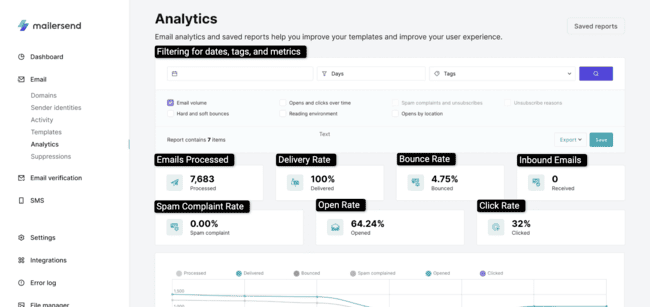
This is generally enough with transactional emails. You don’t need to work out engagement and conversion trends. You mainly want to know your messages are being read.
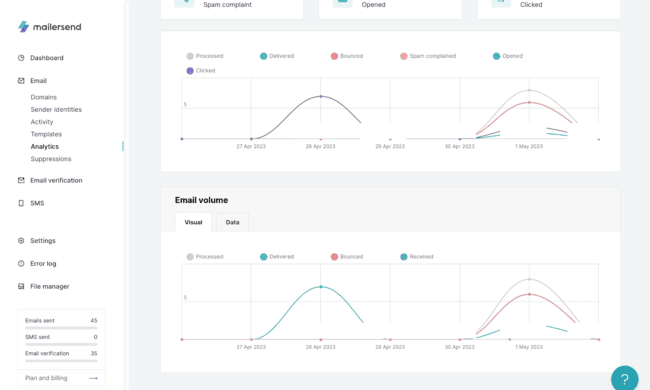
Like with its templates, MailerSend does have additional marketing-type analytics. It tracks opens by reading environment. Or the type of device and email client recipients use. And also by location. Complete with a handy map to illustrate. I’m not sure how useful measuring open rates in these ways is for transactional emails. I’d prefer to know if I have any delivery issues on particular devices or locations.
You can also track bounce, spam complaint, and unsubscribe rates through your suppression list, DMARC, and blocklist monitoring. And if you really want to dig into the technical details, API and SMTP logs.
Get started with MailerSend for free
MailerSend API and Integrations
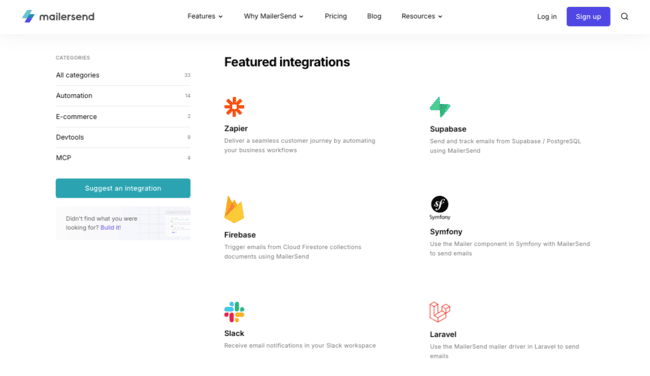
MailerSend’s whole purpose is to add email sending capabilities to other platforms. The email API and SMTP relay are the main ways to do that. But MailerSend also has 33 direct integrations that don’t need any API know-how.
MailerSend’s integrations include ecommerce platforms for Magento and WooCommerce. So you can set up transactional emails for a web store. Another is an SMTP plugin for WordPress. Again, this means you can send transactional emails from any WordPress site. Setup is simple. You install the plugin. Add your SMTP credentials. Test the connection and start sending. It has 2,000+ active installations.
Other integrations include connections for automation tools like Zapier and Make. These serve as a gateway to connecting to thousands of other apps.
There are developer integrations too. With plugins for development tools like Firebase, Laravel, and Rails. MailerSend also supports developers with an excellent documentation library for its API. It has SDKs for PHP, Node.js, Java, Python, Go, and Ruby.
An interesting developer tool is MailerSend’s new MCP server. MCP (Model Context Protocol) is an open-source integration standard for AI tools. The MCP server lets you connect to tools like Claude, VSCode, Cursor, ChatGPT, and Gemini CLI.
How Much Does MailerSend Cost? Pricing and Plans
MailerSend pricing starts at $6.30 per month if you pay annually. This is the Hobby plan for what MailerSend describes as ‘personal projects and side hustles’. It includes 5,000 emails a month and 100 verification credits.
It gets cheaper per email on larger plans. Paid plans come with all features. Including email templates and the drag-and-drop builder, analytics, suppression management, and email verification credits. You get more verification credits for higher plans. Same with daily API request limits, domains, templates, and user seats.
| Free | $0 | – 500 emails/month – 10 email verification credits – Drag-and-drop email builder – 1 user – 1 domain – 1 template – 100 daily API requests |
| Hobby | $6.30/month | – 5,000 emails/month – 100 email verification credits – Email API and SMTP relay – 5 users – 1 domain – 3 templates – 1,000 daily API requests |
| Starter | $31.50/month | – 50,000 emails/month – 100 SMS/month (US & Canada) – 100 email verification credits – 5 seats – 10 domains – 250 templates – 100,000 daily API requests |
| Professional | $99/month | – 50,000 emails/month – 150 SMS/month (US & Canada) – 400 email verification credits – Unlimited users, domains, and templates – 500,000 daily API requests – Priority support |
There is a free plan where you can add your own domain. This lets you send 500 emails a month. It includes 10 email verification credits and access to the drag-and-drop builder.
You can pay for extra emails, email verifications, and SMS messages month to month. This saves you from having to increase your contract price permanently or upgrade to a higher plan. Extra emails start at $1.50 per 1000 messages on the Hobby plan. SMS messages $1.40 per 100 messages on the Starter plan. Email verification credits cost $10 per 1,000 on all plans. There are bulk discounts the more you buy. It’s a bit more expensive compared to standalone email verification tools.
Paying annually for a paid plan saves 10% versus monthly billing. Nonprofits can get a 30% discount on monthly plan prices.
See full pricing
MailerSend Customer Support
MailerSend has 3 ways to get support. There’s a help widget on every page that opens up a chat. You can also email the support team. Or look for information yourself in MailerSend’s online knowledge base.
The chat opens to MailerSend’s support AI, Javi. This answers questions based on MailerSend’s online knowledge base. You can ask to switch to a human agent any time. MailerSend has a 24/7 technical support desk. That’s excellent support coverage. When I tried it out, I got prompt, helpful answers. That added to the overall great experience I had testing MailerSend. It’s no surprise that user reviews often rave about MailerSend’s support.
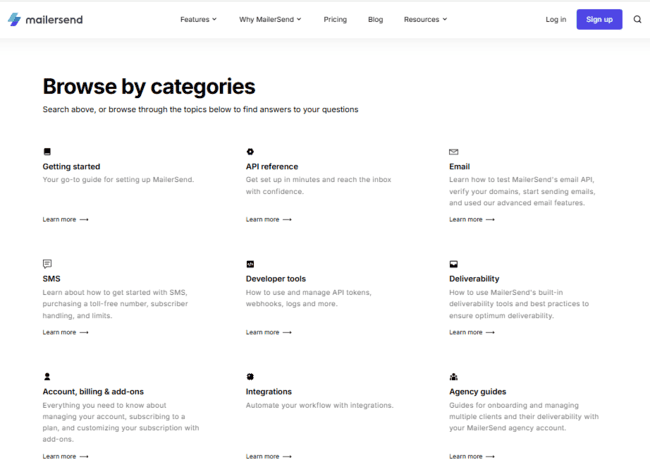
I found the knowledge base very useful, too. It has 70+ articles. All are in a practical, how-to format, walking you through all the tools and features. The balance between help for general users and developers is very good. There’s an excellent library of API docs and other developer resources. Plus guides aimed at agencies wanting to run multiple domains on behalf of clients.
Final Conclusion: Is MailerSend the right email delivery platform for you?
Time to get to the crunch of my MailerSend review. Is this the right transactional email service for you?
MailerSend is certainly more approachable than many email API services I’ve used. It’s a transactional email platform that developers can build with. But it’s still accessible enough for the rest of the team to use.
The main reason for choosing MailerSend is that it makes transactional email easier for mixed teams. There’s an easy tradeoff between the technical side and general email use. It also works for developers seeking a lightweight, intuitive API for email. The API documentation explains each endpoint clearly, with practical examples. And support for multiple domains is ideal for agencies or SaaS companies that want to white-label email through their app.
Get started with MailerSend for free
MailerSend Frequently Asked Questions (FAQ)
Is MailerSend reliable?
How many emails can I send for free with MailerSend?
What is the trial domain in MailerSend?
MailerSend Alternatives
Here’s how MailerSend compares with some top alternatives.
MailerSend vs. Mailtrap
The main difference between MailerSend and Mailtrap is the choice of features. MailerSend specializes in transactional emails. It focuses on making it easy to connect its email infrastructure to your chosen app or website. And building attractive transactional emails.
Mailtrap is an all-purpose email sending platform. You can use it for transactional emails. But it also comes with email marketing features. Not just the ability to create promotional emails, as you can in MailerSend. But to build and manage entire campaigns. This includes a workflow builder for automating drip campaigns. Mailtrap has a separate sandbox testing environment, too. This is a great resource for dev teams that want to build email into new apps. As it lets them test and debug before going live.
Check out our full Mailtrap review to compare the platforms.
MailerSend vs. SendGrid
The main difference between MailerSend and SendGrid is target audience. MailerSend is great for smaller businesses with moderate email requirements. SendGrid is for high-volume senders.
MailerSend is a more user-friendly platform. It simplifies email integration for developers and non-developers. And automates domain authentication and email suppression to help with deliverability. It also includes email verification as a core feature. In SendGrid, it’s a paid-for add-on. But SendGrid can handle much higher send volumes. It goes much deeper with its deliverability analytics. And it can be used for many email types. MailerSend only supports transactional emails.
Read our review of the best SendGrid alternatives and free SMTP servers to find similar platforms.
MailerSend vs. Mailgun
The main difference between MailerSend and Mailgun is developer focus. MailerSend caters for technical and non-technical users. The whole platform prioritises ease of use, speed, and convenience. Highlights for developers include auto-generated tokens. Ready-made and structured code snippets.
Mailgun is much more of a heavyweight developer platform. It breaks out different functions into separate, modular APIs. This gives a lot more depth and control. Especially in analytics and event tracking, which have their own APIs. There’s also an entire standalone deliverability suite with email validation and inbox placement testing.
MailerSend suits smaller, cross-functional teams seeking a simple transactional email system. Mailgun suits specialist IT teams at larger organisations. It gives them much more control over email infrastructure.
Compare the platforms by checking out our full Mailgun review.
MailerSend vs. Amazon SES
The main difference between MailerSend and Amazon SES is the interface. MailerSend channels complex email infrastructure into a very user-friendly UI. Its main purpose is sending emails via an API or SMTP relay. But it layers on tools for creating emails and managing deliverability.
Amazon SES gives you access to the raw email infrastructure. Built on the huge AWS cloud, it provides scalability. And it’s great value for money, with very flexible pay-as-you-go pricing. But you need a lot of programming expertise to use it. There are no tools for creating emails. So you have to connect it to another platform.
Compare similar platforms with our review of the best Amazon SES alternatives and email API services.