How to use ChatGPT for social media (+ prompts)
Using ChatGPT for social media can take you from a blank caption to a working draft in the time it would normally take to open your notes app.
The real bottleneck shows up next: prompts without enough context return output that could belong to any brand or campaign. Better prompts, built with the right platform and audience detail, change the output quality significantly.
This guide walks through seven ChatGPT use cases spanning the full social media workflow, with a copy-paste prompt for each one you can adapt on the spot.
ChatGPT can handle nearly every text-based social media task, from writing platform-specific posts to planning content calendars, as long as your prompts give it enough context about your brand and audience.
ChatGPT is OpenAI’s AI assistant that handles nearly any text-based social media task like content drafting, calendar planning, repurposing, community replies, and strategy, across all major platforms.
Available free, ChatGPT covers the full text-generation layer of a social media workflow. The paid Plus plan upgrades to GPT-4o and adds DALL-E image generation, useful when you need visuals to pair with your captions. Plus also includes optional web browsing, which helps when you’re writing about live events or trending topics.
The main use cases:
- Caption writing for Instagram, LinkedIn, X, and TikTok
- Content calendar planning: monthly breakdowns organized by campaign theme
- Content repurposing from blog posts or video transcripts
- Community management: drafting replies to comments and DMs
- Hashtag research: tiered lists with per-tag rationale
- Strategy: 90-day frameworks and content pillar mapping
Custom Instructions is a ChatGPT setting that stores your brand context across sessions. It’s covered in the brand voice section below.
According to HubSpot’s 2026 State of Generative AI Report, 94% of marketers plan to use AI in their content creation processes this year, which makes having a deliberate AI content strategy matter more than having a prompt library alone.
How to use ChatGPT for social media content creation
ChatGPT writes captions for any platform, builds content calendars on demand, and can repurpose a blog post into a week of social content, with the right prompt structure.
Writing captions for Instagram, LinkedIn, and X
Caption quality varies by platform because the audiences and content formats are different. Give ChatGPT the platform context upfront and it’ll match the format.
You are a social media copywriter for [Brand Name], a [product/service category] targeting [audience description]. Write an Instagram caption for [topic/campaign].

Tone: [e.g., friendly and energetic / authoritative and calm]
Format:
- Hook (max 150 characters)
- 3 supporting lines (benefit or context)
- Call to action (link-in-bio or action verb)
- 5 relevant hashtags

Do not use generic phrases like "game-changer" or "take your [X] to the next level."
If the hook falls flat, ask ChatGPT to rewrite it as a question or a surprising stat instead.
LinkedIn is where most teams write the weakest prompts. This one generates a post rooted in a real professional decision, which the LinkedIn algorithm rewards over generic thought leadership.
You are writing on behalf of [Name], [Title] at [Company]. Write a LinkedIn post about [topic], tied to a real professional experience or decision.

Audience: [e.g., marketing directors at B2B SaaS companies]
Tone: direct, opinionated, not self-promotional
Format:
- Hook sentence (contrarian or surprising observation)
- 3 short paragraphs (150–250 words total)
- One practical takeaway
- No hashtags

Avoid: buzzwords, starting with "I", hollow affirmations.
The hook ChatGPT gives you will often feel safe and polished. Swap it out for the observation that actually surprised you in real life.
X/Twitter
X threads reward punchy, self-contained posts over polished prose. Specify the audience and format constraints upfront so ChatGPT writes for the medium rather than defaulting to caption length.
Write a [5]-tweet thread about [topic] for [Brand/Person].

Audience: [e.g., indie founders / marketing professionals]
Tone: confident, informal, punchy
Format:
- Tweet 1: hook, max 200 characters, no hashtags
- Tweets 2–4: one insight each, max 280 characters
- Tweet 5: CTA or question to drive replies, include [URL placeholder]

Keep each tweet self-contained — it should make sense if read alone.
Ask ChatGPT to write Tweet 1 three different ways before you pick. The first draft usually plays it too safe.
Planable also has built-in AI caption generation if you want to generate and schedule in the same tool.
Planning your content calendar with ChatGPT
Content planning with ChatGPT works best when the prompt has real structure. At minimum, give it:
- A time frame (month or quarter)
- A platform mix
- At least one campaign theme to organize around
Without those inputs, you’ll get 20 generic ideas that feel interchangeable.
Rival IQ’s 2025 benchmark of 4 million+ posts found that posting around twice a week is the sweet spot for engagement on both Instagram and LinkedIn. A content plan built around that cadence gives you enough to work with without overloading your approval queue.
Act as a social media strategist for [Client Name], a [industry] brand targeting [audience description].

Generate 20 content ideas for [Month/Quarter] across [Platform 1], [Platform 2], and [Platform 3]. Organize by campaign theme: [Theme 1], [Theme 2], [Theme 3].

For each idea include:
- Platform
- Content format (carousel, single image, short video, text post)
- One-line content brief
- Suggested day of week

Avoid product-only posts — balance educational, entertaining, and promotional content in a 60/30/10 ratio.
The output organizes as a table. Each row includes the platform, content format, a one-line brief, and a suggested posting day.
Without MCP: copy the table into your content calendar and assign drafts.
With Planable’s MCP connector: skip the copy step. Connect Claude or ChatGPT to Planable (Account Settings → Integrations). The AI creates draft posts directly in your workspace, groups them into Campaigns by theme, and builds Custom Views per client. Every post starts as a draft; your existing approval workflow applies unchanged.
Repurposing blog posts and videos for social
A 1,500-word blog post contains enough material for 10 or more social posts across platforms. Most of that material goes unused because repurposing it manually takes time. This prompt does the extraction in one shot: paste the blog text and fill in the brand voice guidelines, and you’ll have 10 ready-to-edit posts across three platforms.
Here is a blog post: [paste full text]

Repurpose this into social content for three platforms:
1. LinkedIn: 3 posts (200–300 words each, thought leadership tone, no hashtags)
2. X/Twitter: 5 posts (under 280 characters each, direct and punchy)
3. Instagram: 2 captions (150–200 words each, conversational, with 5 hashtags each)

Brand voice guidelines: [paste 2–3 example posts or describe tone in 2 sentences]
Do not repeat the same statistic or insight across posts.
The most important field is the brand voice guidelines placeholder. ChatGPT learns from examples better than from adjectives alone.
Pro tip: Paste in two or three real posts from the brand rather than describing the tone with vague adjectives. Real examples give ChatGPT something to pattern-match against; vague descriptors give it permission to guess.
If you’re repurposing a video, add the transcript in place of the blog post. The output quality is comparable as long as the transcript is accurate.
How to set up ChatGPT to write in your brand voice
ChatGPT’s Custom Instructions let you store your brand voice, audience profile, and content rules once, so every prompt in that session starts on-brand without re-explaining.
Custom Instructions (available on free and paid plans, under Settings → Personalization) store context about you and your preferences. ChatGPT applies them automatically to every conversation. Before filling them in, run the brand voice analysis prompt below: paste your best-performing posts and you’ll get a structured voice guide ready to drop directly into step 2 below.
Here are 5 examples of our best-performing social media posts: [paste examples]

Analyze the tone, vocabulary, sentence length, and structural patterns across these posts. Then describe our brand voice in:
- 3 adjectives
- 3 phrases we commonly use
- 3 phrases or patterns we avoid
- A one-paragraph "write in this voice" guide

After the analysis, rewrite this draft post in our brand voice: [paste draft]
With that output ready, set up Custom Instructions in three steps:
- Go to Settings → Personalization → Custom Instructions in ChatGPT.
- In “What would you like ChatGPT to know about you?”, paste your brand context: company overview, target audience, content goals, and 2–3 example posts.
- In “How would you like ChatGPT to respond?”, paste the voice guide from the prompt above, your format rules, and a short list of phrases to avoid.
Planable’s Brand Context feature serves the same purpose at the platform level. If your team uses Planable, you can store brand voice rules there so they’re visible to everyone during the review step.
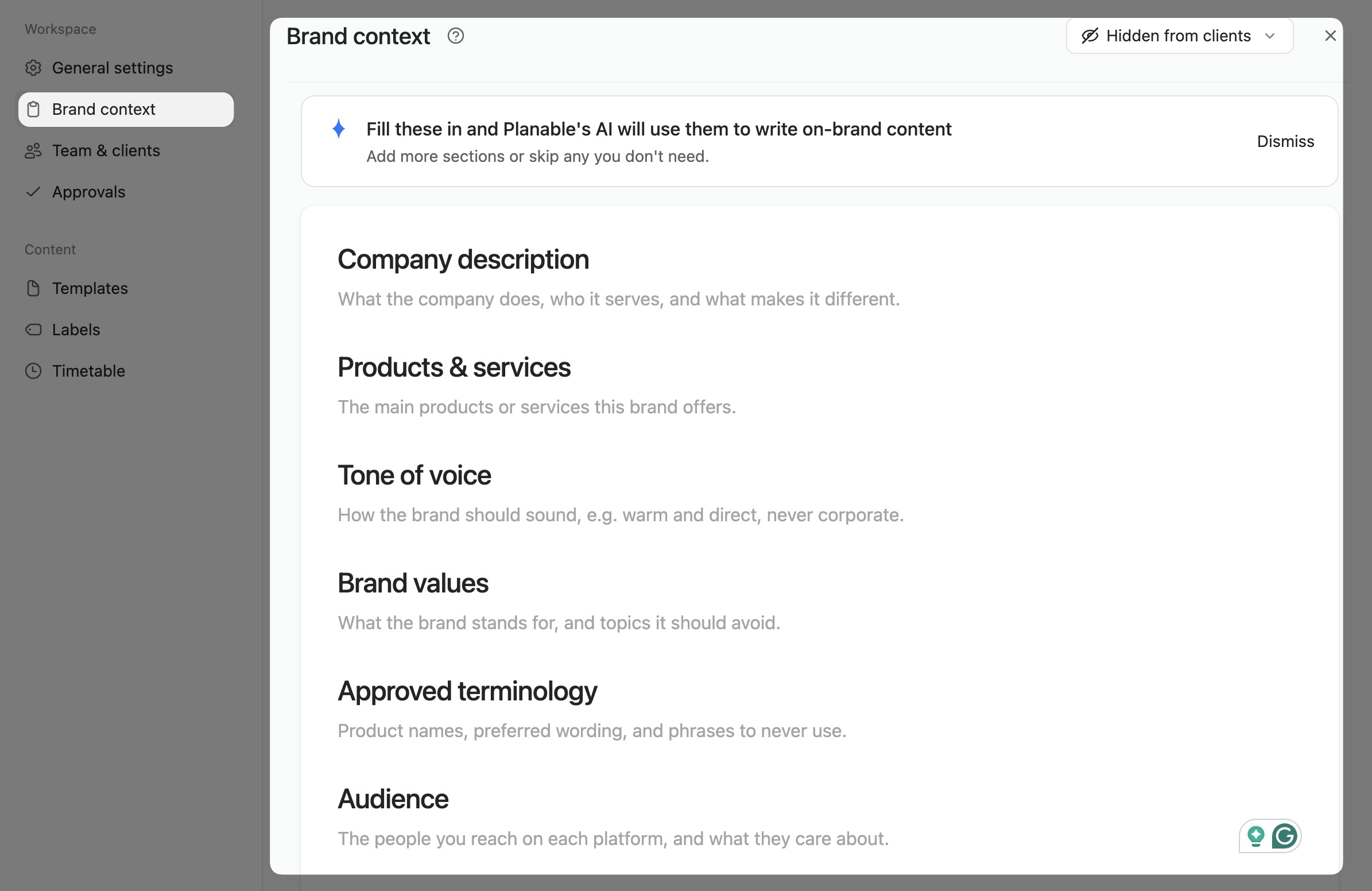
Define your brand information and writing guidelines so Planable’s AI can create consistent, on-brand content.
Beyond writing posts, ChatGPT handles the repetitive management layer: drafting replies to comments, researching hashtags, and building a strategy framework your team can actually use.
Drafting replies to comments and DMs
ChatGPT gives you five reply options per comment, each with a slightly different tone, so you’re choosing rather than writing from scratch.
I manage the social media account for [Brand Name]. Write 5 different reply options to this comment: "[paste comment]"

Brand voice: [e.g., warm and helpful / confident and witty]
Goal: [e.g., move the conversation to DMs / encourage more engagement / address a concern]

Each reply should be under 280 characters. Vary the tone slightly across the 5 options so I can choose the best fit.
Add the commenter’s name before posting; the template becomes a real reply.
According to HubSpot’s State of Marketing 2026, about one-third of marketers say AI saves their team 10 to 14 hours per week, and another third save over 15 hours.
Planable’s Social Inbox keeps all incoming comments and DMs in one view, useful when you’ve pre-drafted reply templates. It has built-in AI reply suggestions: hit the sparkle icon in the reply box to generate a suggested response without leaving Planable.
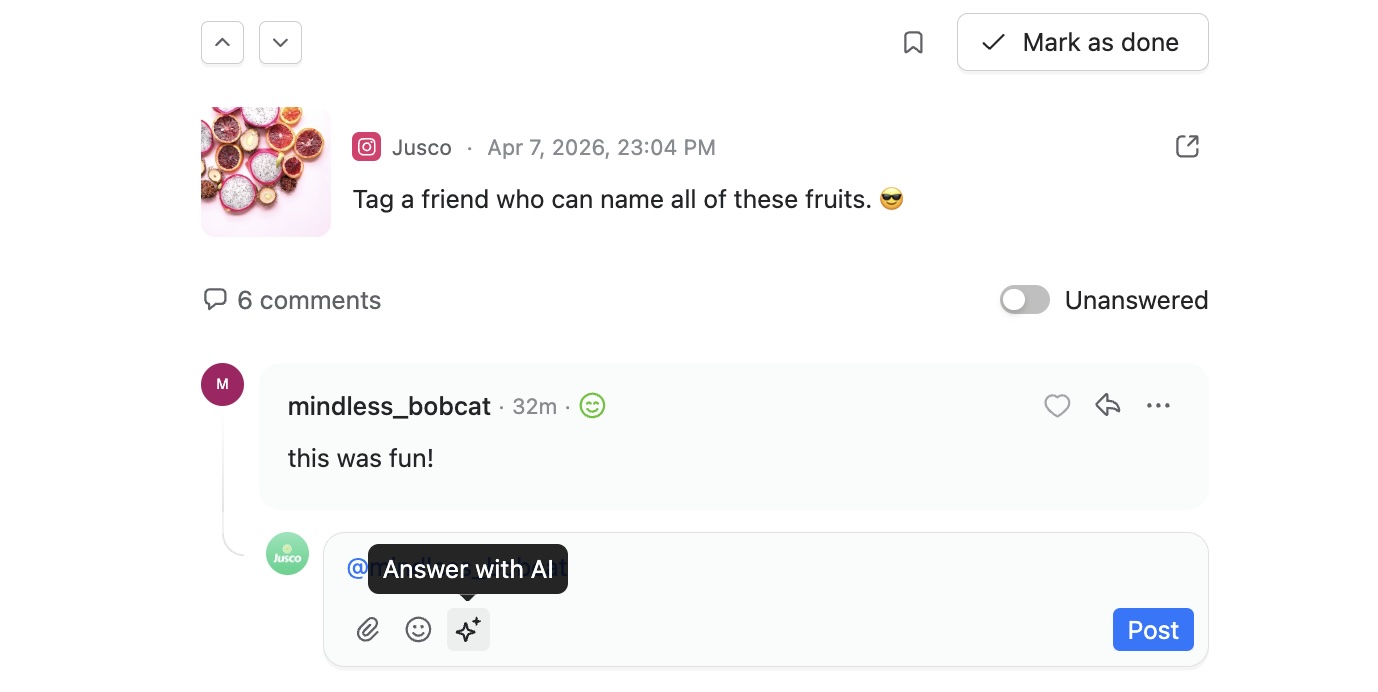
Review audience comments and use Planable’s AI reply tool to draft responses directly in the social inbox.
Comments are also AI-categorized into Questions and Positive tabs, so you can filter to unanswered questions first. The ChatGPT prompt above is useful when you want more options or tighter control over tone before committing to a reply.
Researching hashtags for any platform
Hashtag research takes longer than it should across multiple client accounts. This prompt returns 20 hashtags in volume tiers, with a one-sentence rationale per tag.
I'm creating content about [topic] for [platform — Instagram / LinkedIn / TikTok].

Suggest 20 relevant hashtags organized into three tiers:
- Tier 1: High-volume tags (1M+ posts) — 5 tags
- Tier 2: Mid-volume niche tags (100K–1M posts) — 10 tags
- Tier 3: Low-volume, highly specific tags (under 100K posts) — 5 tags

For each tag, explain in one sentence why it fits this content. Target audience: [audience description].
ChatGPT’s hashtag knowledge reflects its training cutoff, not live platform data. Cross-check any suggested tags with the platform’s native search before finalizing. Volumes shift quickly, especially on TikTok and Instagram.
Building a 90-day social media strategy with ChatGPT
A 90-day strategy document takes hours to draft from scratch. This prompt produces the full structure in a single output.
Act as a senior social media strategist. Build a 90-day social media strategy for [Brand Name], a AI automation company targeting [audience].

Include:
1. Primary goal and 2 supporting KPIs
2. Platform selection with rationale (choose 2–3 platforms max)
3. Content pillars (3–4 recurring themes)
4. Posting frequency per platform
5. One campaign idea per month
6. Key risks and how to mitigate them

Do not assume unlimited budget or headcount. This brand has a team of [size] managing social.
The output is a working skeleton. Your team brings in the client knowledge and real-world context ChatGPT doesn’t have.
How to schedule ChatGPT-generated content
ChatGPT generates content but can’t schedule or publish. A social media management tool is the next step: paste the draft, set the time, and let auto-publishing handle the rest.
Once you have a draft, moving it to published is a five-step process:
- Paste the ChatGPT draft into your scheduling tool
- Open the feed preview to see how the post will look before it goes live
- Set the publish time
- Select auto-publish or push notification
- The post goes live across your connected channels, no manual publishing step required
Planable’s calendar view shows all your ChatGPT-generated drafts across every connected channel in one place.
The feed preview in Planable renders the post exactly as it will appear on each platform, so you catch character limit issues or image crop problems before anything goes out. Set the publish time, select auto-publish, and the post goes live without switching tabs.
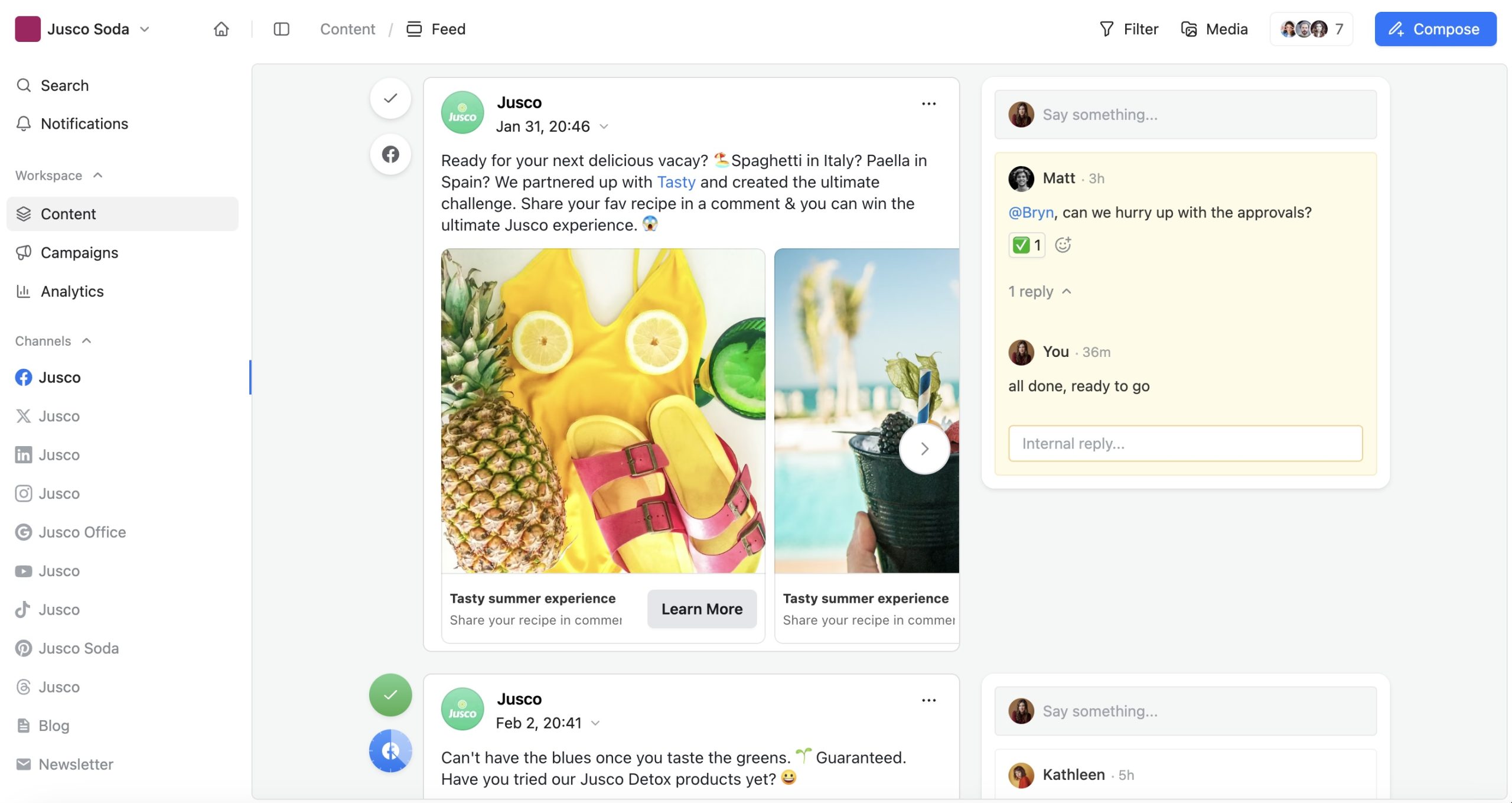
Preview social media posts by channel, collaborate through internal comments, and manage approvals in Planable’s feed view.
For agencies managing multiple clients, the calendar view makes status visible across all accounts at once. You can see which drafts are ready and which still need a final review, without clicking through each account separately.
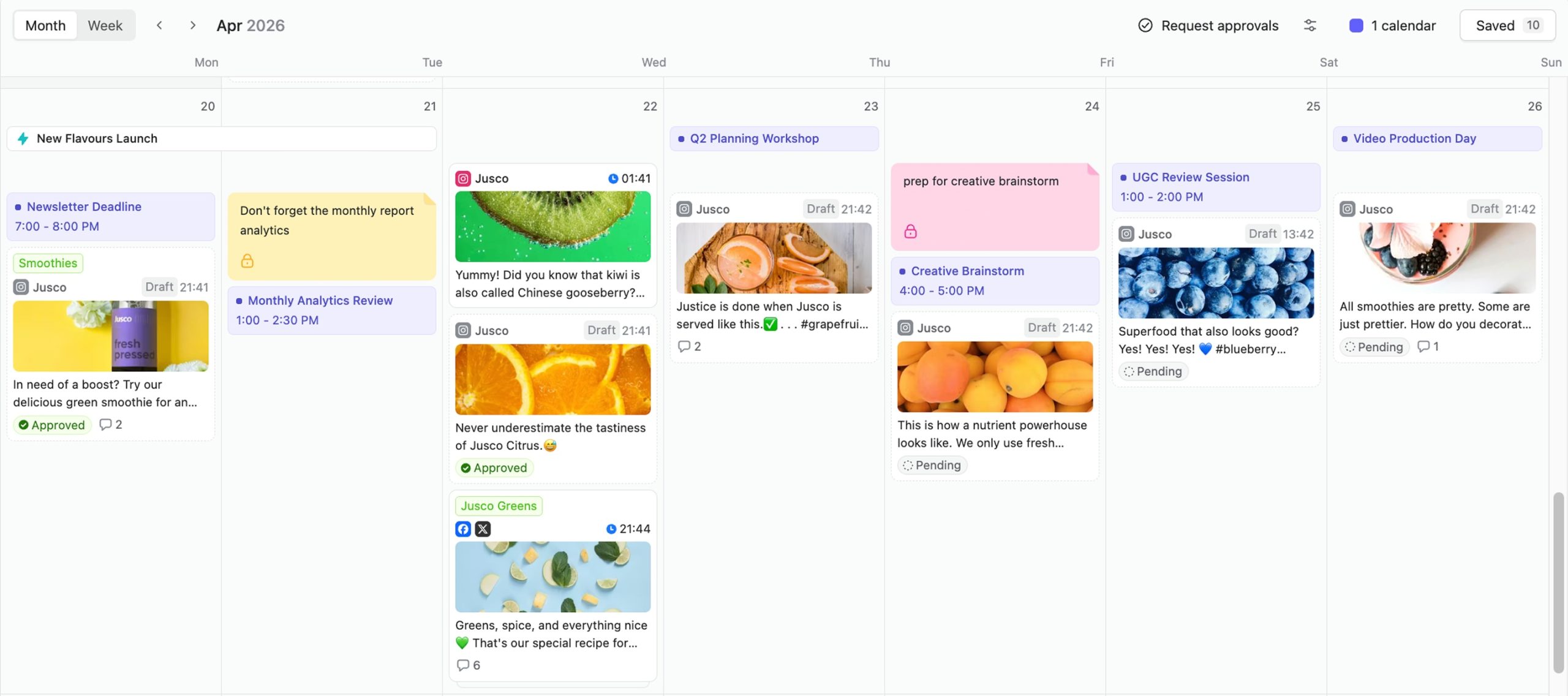
Organize social posts, campaign tasks, deadlines, and approval stages in Planable’s visual content calendar.
Once ChatGPT hands you a draft, Planable takes it from there: schedule it, review it with your team, and publish across every channel from one place. Try it yourself.
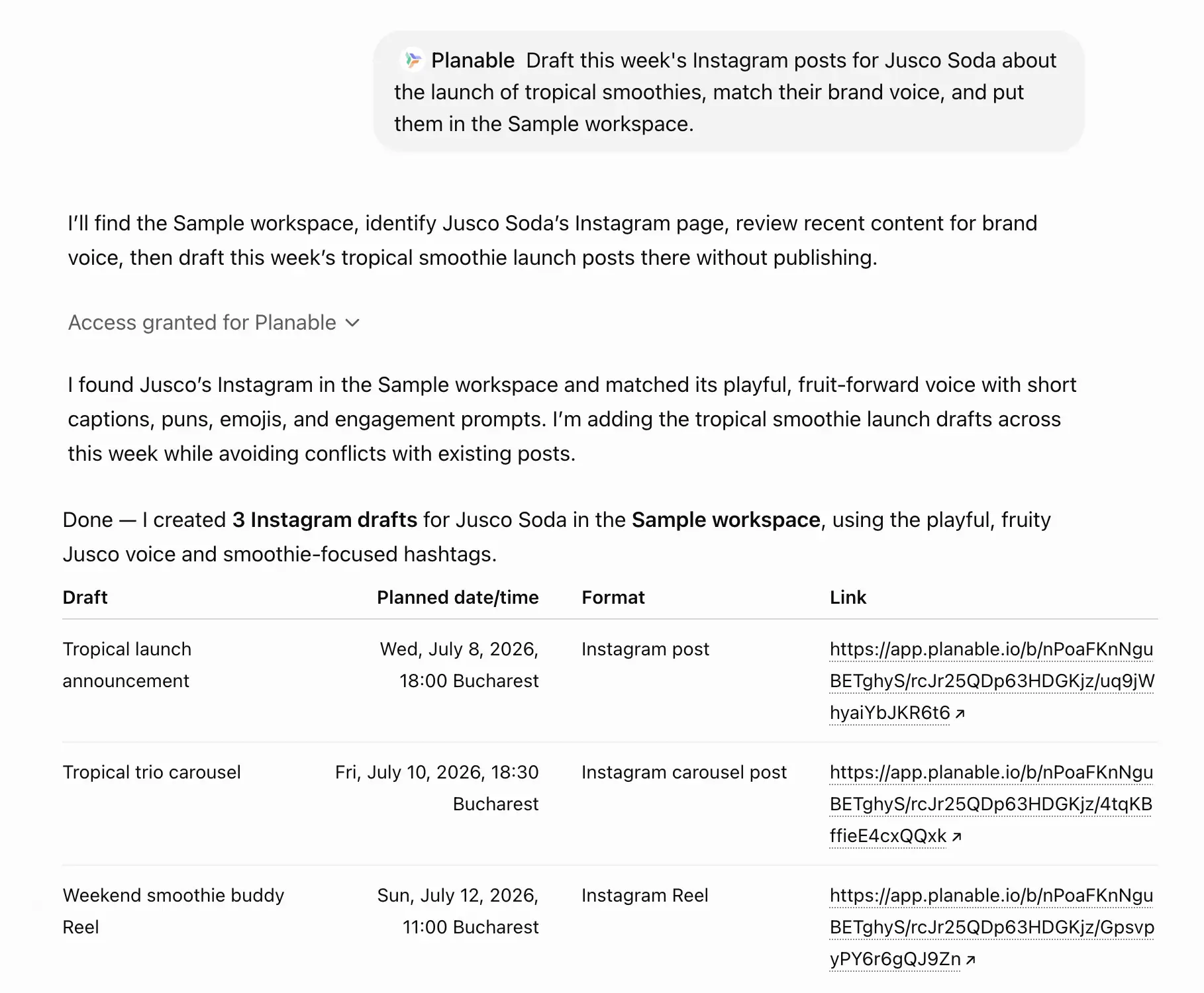
Planable drafts and schedules three Instagram posts for a tropical smoothie campaign while matching the brand’s voice.
How to get ChatGPT drafts approved before they go live
Every ChatGPT draft should go through a human review before publishing. Brand fit and context require human judgment that the AI doesn’t have.
Nine in 10 marketing professionals view human oversight as essential for safeguarding brand identity and compliance, according to the Bynder State of DAM Report 2025. AI has no context on whether a product claim is current or a campaign was paused since the last post went live.
International SEO consultant Aleyda Solis argues that AI content needs a careful editorial and validation workflow to ensure quality. A review step converts a capable draft into a publishable post.
A working review workflow needs answers to three questions before a post can move forward:
- Who reviews the draft?
- In what order do reviews happen?
- What does approved actually mean for this account?
Without those answers, sign-off defaults to whoever has time.
Planable’s approval workflow routes every draft through the right reviewers (teammates, managers, clients) before anything publishes. Set it to Optional, Required, or Multi-level depending on the account’s risk level.
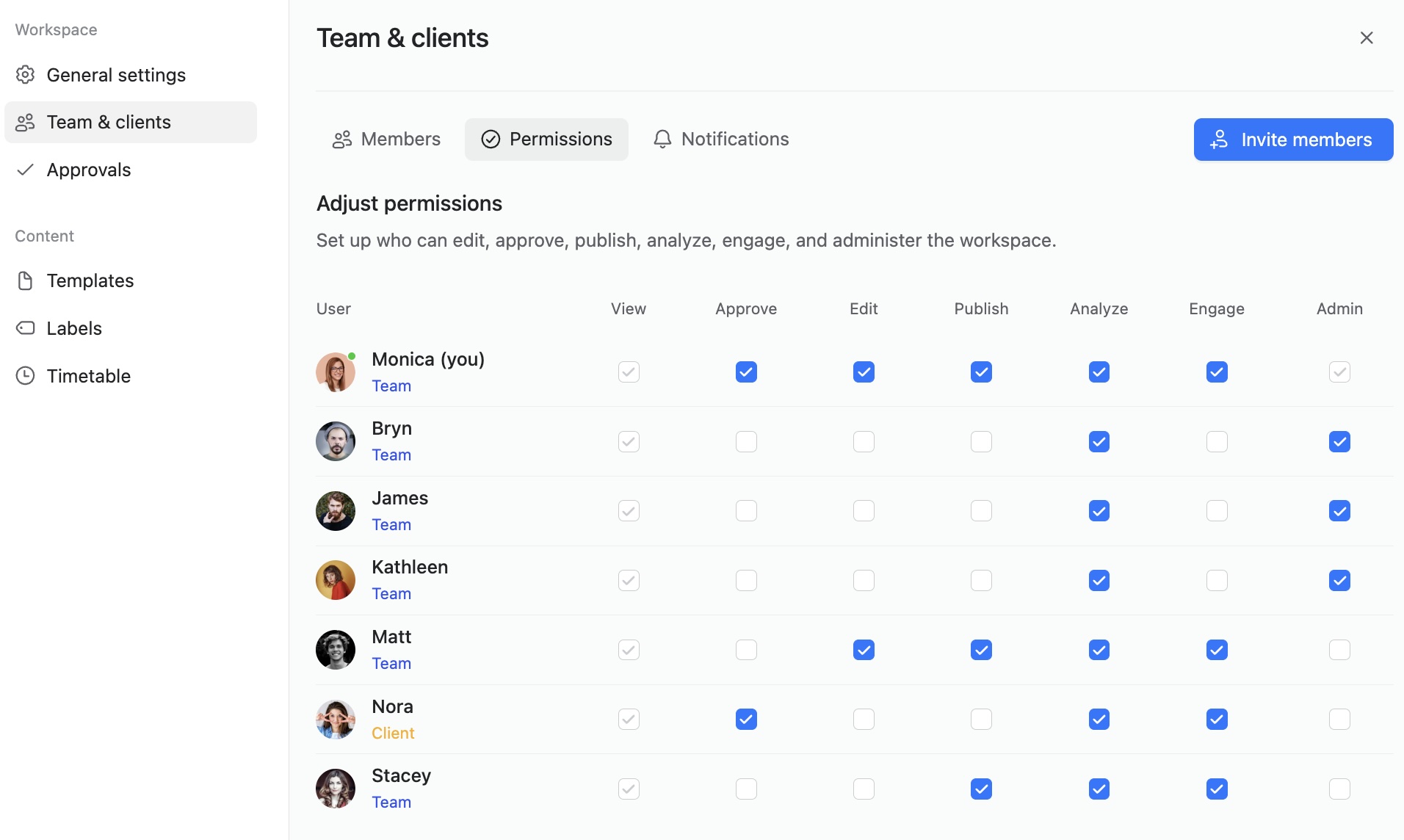
Assign workspace permissions to control who can view, approve, edit, publish, analyze, engage, and manage content.
Before any ChatGPT draft goes live, run it through Planable: your team reviews it, leaves feedback, and approves it in one place. Try it free.
ChatGPT can’t schedule posts, access live social data, or maintain brand voice between sessions without setup. Knowing these limits is what separates effective AI use from generic output.
Most social media professionals treat AI-generated captions as first drafts. The voice, references, and details need editing before anything goes live. That’s not a knock on the tool. It’s just where human judgment still belongs.
- No real-time data by default: ChatGPT’s training data has a cutoff, so it can’t pull live trending hashtags or breaking news. Paste current trending data directly into your prompt, or switch to browsing mode if you’re on ChatGPT Plus.
- No direct publishing or scheduling: ChatGPT outputs text with no connection to your social accounts yet. Copy drafts into a scheduling tool like Planable to review, collect approvals, and push posts live.
- Brand voice drift: Without setup, ChatGPT defaults to generic phrasing. Custom Instructions (set up earlier in this article) store your tone and formatting preferences so output lands closer to your brand on the first pass.
- Hallucinated statistics and misattributed quotes: ChatGPT can generate plausible-sounding numbers that don’t exist. Fact-check every stat and quote before publishing. If you can’t verify it, cut it.
- No persistent memory by default: Each new session starts fresh unless you configure it. Custom Instructions solve this too; ChatGPT remembers your brand, audience, and posting style across sessions.
If you want to go further than copy-paste prompts, here’s how to build a full social media AI agent.
FAQs
Is ChatGPT good for social media marketing?
Yes, for writing-heavy tasks. ChatGPT can draft captions and generate content ideas faster than most people type. Where it falls short: it has no access to live platform data or your account’s analytics. Use it as a writing assistant, then move the output to a tool that handles scheduling and approvals.
Do influencers use ChatGPT?
Yes, many do. It’s common for influencers to use ChatGPT for first-draft captions and idea generation. The ones who get results pair AI output with heavy editing, injecting audience-specific voice and references. That’s what separates content that sounds like someone from content that sounds like a template.
Which AI tool is best for social media?
The combination that works for most teams is ChatGPT for content generation and Planable for scheduling and approval. ChatGPT handles the writing work; Planable manages the review-to-publish side, including client approvals. Each tool covers a distinct stage. The right pick depends on what your workflow is missing.
What is the 5-3-2 rule on Instagram?
The 5-3-2 rule is a content mix framework: 5 posts shared from others in your niche, 3 original pieces, and 2 personal posts per publishing cycle. ChatGPT can help you plan what fits each bucket. Share your audience profile and niche with it, and ask for content ideas by category.
What is the 5-5-5 rule for social media?
The 5-5-5 rule is a daily engagement framework: 5 posts published, 5 comments left on others’ content, and 5 minutes spent engaging with your community. Use ChatGPT to draft all five posts in a single session. That frees up your active time for the engagement side, which needs a human behind it.
Ready to put ChatGPT to work?
You’ve got prompts for every stage of the social media workflow, from audience research through to publish-ready captions. The parts of the job that used to eat up a morning now take minutes. That’s the easy gain. The harder problem: a strong ChatGPT draft still needs to make it through review and approval before it’s safe to schedule.
For most teams, that still means tracking down approvals in Slack while drafts sit in a shared doc with three different versions. Posts go live before everyone agrees on the final copy.
ChatGPT gives you the content and Planable gets it published. Connect your social channels, invite your team, and move from ChatGPT draft to approved, scheduled post without switching tools. Try Planable free.
Horea is a B2B SaaS Content Strategist and MarTech researcher who specializes in software reviews, tool comparisons, and social media management. His work is research-first and fluff-free. He tests the tools, does the digging, and writes the kind of content that helps marketers make confident decisions.