Automation, Tools & 2026 Trends
For your ecommerce email marketing to really be successful, you need three things: a good-quality email list, behavior-based automated flows, and revenue metrics to track. Get these elements right, and you’ll have a predictable sales channel that’s not affected by ad cost spikes.
That’s the edge over paid ads. You’re not paying every time you want to reach shoppers. You own the list, so you decide who hears from you, when, and what they hear.
The gap between stores that grow and stores that plateau is behavioral triggers. One sends the same newsletter to everyone. The other triggers emails based on actions such as browsing a product, abandoning a cart, or making a purchase. Each message is relevant to where the shopper is in their journey.
This guide walks through all of it. Best ecommerce email marketing strategies, automation, trends, and mistakes to avoid, backed by 2025 data from our merchants.
Jump to: Strategy · Automation · Campaigns · Metrics · Trends · Software · FAQs
Turn one-time buyers into repeat customers with automated email & SMS flows
Quick sign up | No credit card required
What is ecommerce email marketing?
Ecommerce email marketing uses targeted emails to promote products, build customer relationships, and drive repeat purchases. It combines customer data and behavioral triggers to send relevant messages at key shopping stages.
That’s the real difference. Generic email marketing blasts the same message to everyone on the list. Ecommerce email marketing reacts to what shoppers are actually doing: a product view, an abandoned cart, a purchase, a restock, and it sends accordingly.
Automation works because it listens first. When brands respond to what shoppers are already doing, results follow.
— Marty Bauer, Director of Sales & Partnerships at Omnisend
These behavioral triggers respond to specific shopper actions. For example, three views of one product can trigger a product recommendation email.
Two mechanisms drive ecommerce email marketing, and they work differently.
- Automated flows run 24/7 and trigger from behavior, dates, or inventory changes without manual sends
- Scheduled campaigns target a chosen segment with one-off sends at a planned time
Ecommerce marketing automation and scheduled campaigns fit into different stages of the customer journey, as seen below:
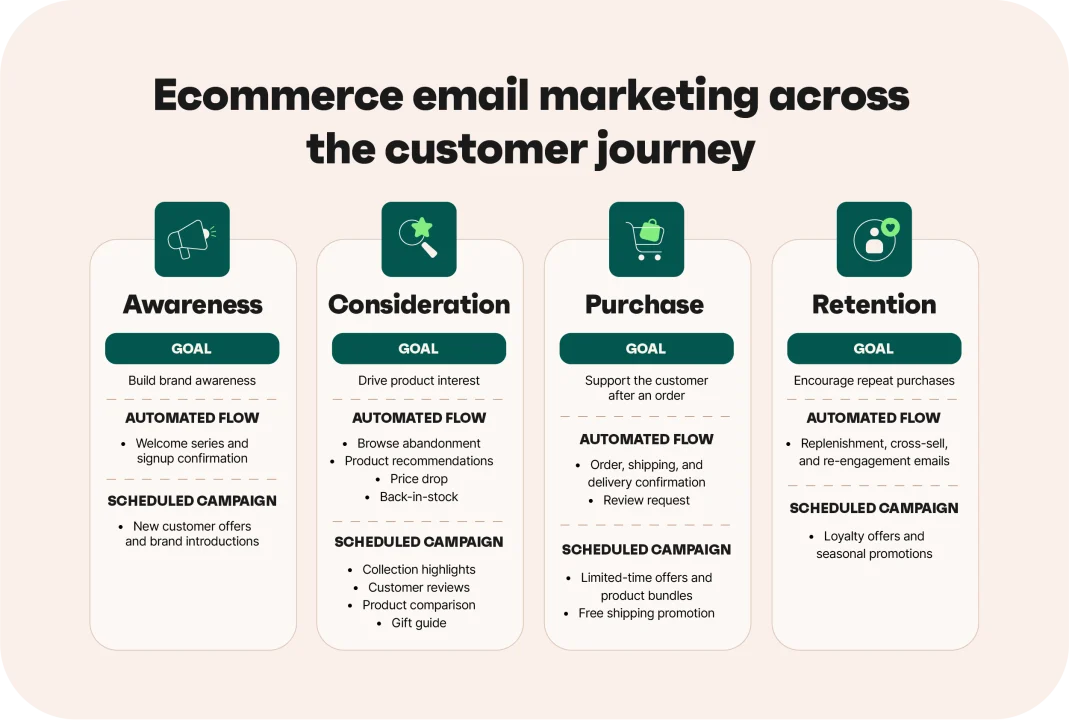
Awareness, consideration, purchase, and retention each need their own mix.
What ROI can ecommerce brands expect from email marketing?
Ecommerce email marketing can deliver strong returns for online stores. Omnisend merchants generate $79 for every $1 spent across email, SMS, and push notifications, per internal analysis of paid-plan merchants in 2025. Email alone generates $76 for every $1 spent.
Omnisend’s 2026 Ecommerce Marketing Report shows click-to-conversion rates reached 9% from 5.9% year-over-year across all emails.
Automated emails perform even better than standard campaigns. One in three clicks on automated emails led to a purchase, compared to one in 18 clicks on standard campaigns.
Salomon Japan used Omnisend to launch localized email campaigns for 130,000 customers, segmented by sport category and loyalty tier. Its campaigns achieve a 45% open rate and generate ¥1.9 million per campaign.
“These automations have been really effective, especially for growing our membership base. One of our main goals beyond sales is to build loyalty — and Omnisend helps us do that.”
— Maria Nakazono, CRM and Digital Marketing Specialist, Salomon Japan
Salomon Japan email marketing case study
Compared with other channels, email marketing for ecommerce still delivers strong returns. Email, SMS, and push figures come from our 2026 report.
| Marketing channel | ROI/conversion benchmark | Strategic context and behavioral intent |
|---|---|---|
| $76 per $1 spent | High-ROI owned channel driven by purchase behavior | |
| Push notifications | 22.9% click-to-conversion for automated sends | Instant device reach for time-sensitive messages |
| Search ads | 6.64% click-through rate | Paid third-party reach with ongoing acquisition costs |
| SMS | 0.97% global click-to-conversion | High-open channel for high-intent messages that complement emails |
Ecommerce email automation flows that drive revenue
Ecommerce email marketing automation handles customer acquisition, conversion, and retention without manual scheduling.
Our 2026 report showed that automations generated 30% of email revenue from just 2% of sends. Automated emails earned 16x more per send than scheduled campaigns.
Here’s a rundown of the key automations, including their triggers, timing, goals, and target KPIs.
| Workflow name | Trigger event | Optimal timing/delay | Primary goal | Target KPI |
|---|---|---|---|---|
| Welcome series | Sign-up submitted | Immediately, then 1–3 days later | Convert a new subscriber | 2.0% conversion, $6.30/email |
| Browse and cart abandonment | Product viewed, cart left | 1-3 hours after activity | Recover the lost sale | 1.51% conversion, $2.54/email |
| Post-purchase and thank-you | Order placed, then delivered | Immediately, then 3-7 days after delivery | Earn the second order | 53.99% open rate for order confirmation |
| Product recommendation | Browse or purchase history | Within 24-48 hours | Lift average order value | 0.75% conversion for cross-sells, $0.79/email |
| Winback | No purchase in 60–90 days | Day 60, then day 90 | Reactivate a lapsed buyer | 33.11% open, 0.54% conversion |
| Back-in-stock alert | Sold-out item restocked | The moment stock updates | Capture proven demand | 6.46% conversion, top of this set |
| Loyalty and VIP rewards | Milestone, tier, or birthday | On the milestone date | Grow lifetime value | Birthday sends average $744.37 order value |
1. The welcome series
A welcome series triggers when someone joins your email list. Welcome emails convert at 2% and return $6.30 per email.
Send the first welcome email within 30 minutes of sign-up. Then, follow it up with two more emails in the same week. Introduce your brand and top products first, then share the offer in the second or third email. Set a clear 7-14 day deadline to encourage faster action.
Templates
Subject line suggestions:
“Welcome — here’s 15% off”
“Start here: Our five best sellers”
Framework: Who you are → a seven-day expiry → shop-the-best-sellers link.
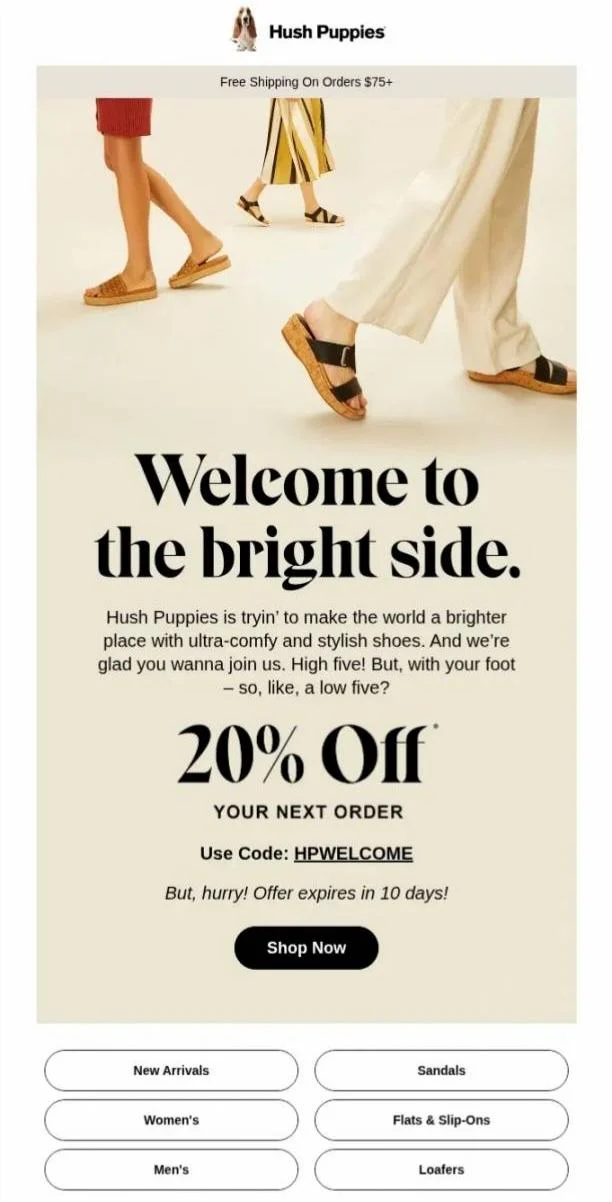
Welcome email example:
Hush Puppies combines a welcoming brand message with a time-limited discount to encourage a first purchase:
2. The browse and cart abandonment series
Abandoned carts hold the highest-intent revenue in your store. SInce the shoppers already chose the product, a well-timed reminder recovers the order at 1.51% conversion and $2.54 per email.
Send the first abandoned cart email one to three hours after a product view without a purchase, then follow up at 24 and 72 hours. Show cart contents full size, with a one-click return link.
Start without a discount and focus on why the product is worth buying. Introduce an incentive in email 3 if the shopper still doesn’t convert.
Templates
Subject line suggestions:
“You left something behind”
“Still thinking about [Product] ?”
Framework: The product image → the low-stock or expiry line → return-to-checkout link.
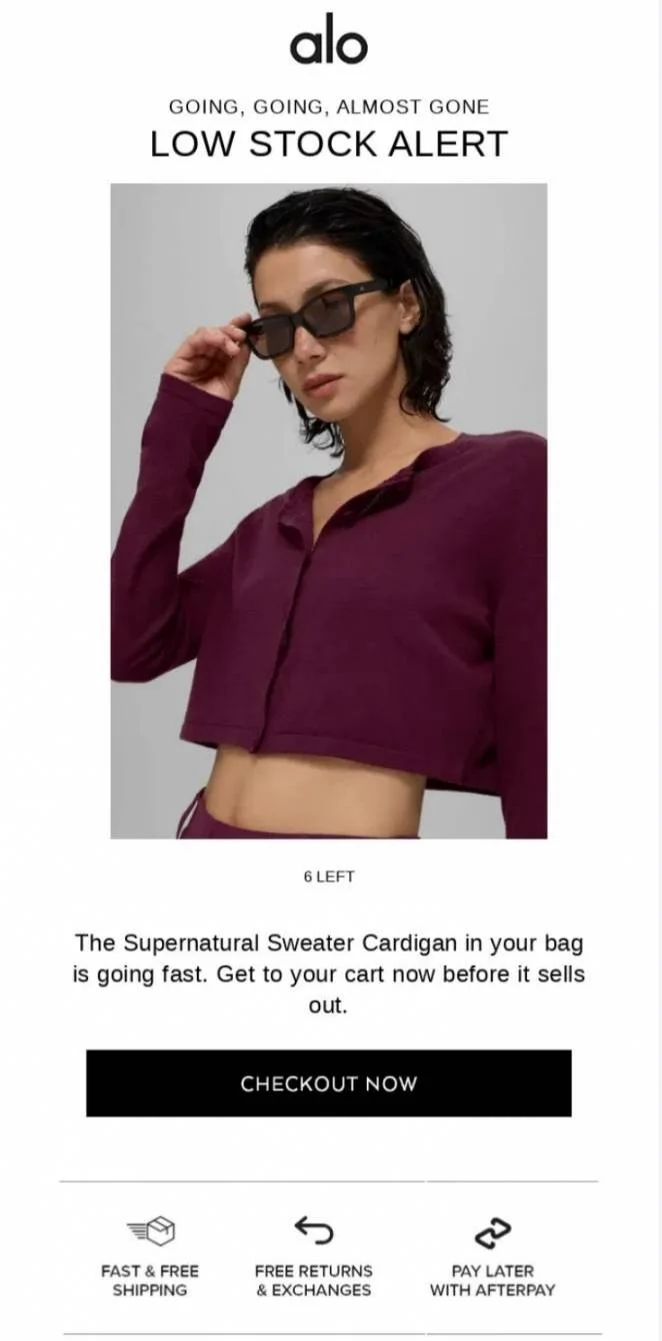
Cart abandonment email example:
Alo uses low-stock urgency to push shoppers back to their carts before the product sells out:
We’ve seen customers consistently increase revenue by starting small. They prioritize abandoned-cart and welcome flows and then let the data dictate where to optimize next.
— Marty Bauer, Director of Sales & Partnerships at Omnisend
3. The post-purchase and thank-you series
Post-purchase flows start immediately after purchase. Order and shipping confirmation emails have conversion rates of 1.10% and 2.28%, respectively.
Send order confirmation email within minutes of purchase, then send shipping updates when status changes. Follow up 7-14 days after product delivery.
Add three complementary products under the order details, because relevance to the last purchase drives the second order. Cross-sell recommendations should follow the customer’s actual purchase.
Subject line suggestions:
“Your order is confirmed”
“Goes well with your [product]”
Framework: Order status → the review window → rate-it or add-the-pairing link.
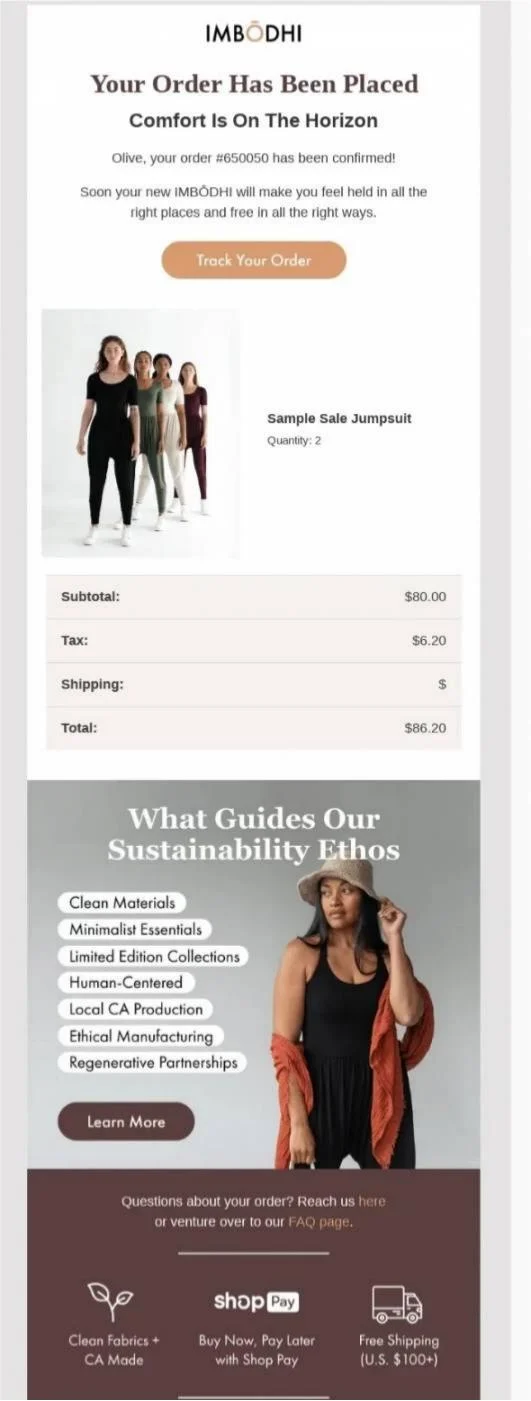
Post-purchase email example:
IMBODHI uses its order confirmation email to reinforce its sustainability values and brand positioning:
4. The product recommendation series
Trigger product recommendation emails from shopper’s browsing behavior, purchase history, or product interactions. Send them while the shopper’s product interest is active. Cross-sell emails convert at 0.75% and return $0.79 per email.
Send emails three to seven days after a customer’s last order or after a second product view. Use two or three recommendation emails with different product logic. Combine related products with bestsellers and recently viewed items.
Exclude the products customers already purchased and prioritize items that complement their interests.
Subject line suggestions:
“Picked for you”
“New in your size”
Framework: The personalized pick → the stock line → see-the-match link.
Product recommendation email example:
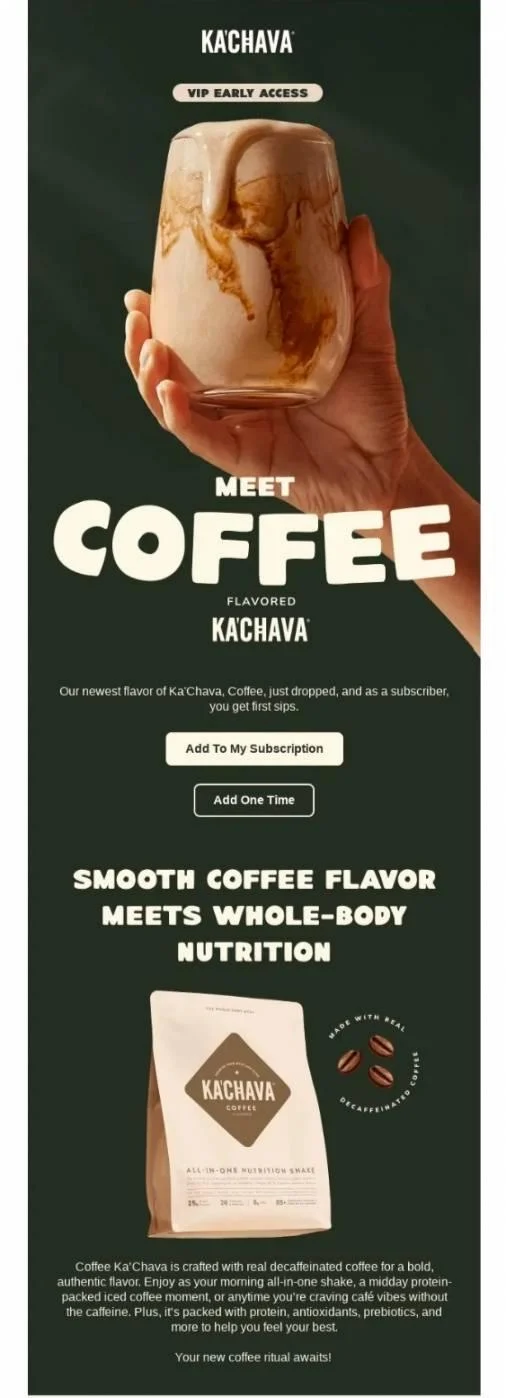
Ka’Chava uses early access to introduce a new product while giving existing subscribers a reason to buy first:
5. The customer winback series
Start winback flows after 60-90 days without any purchase. Adjust the timing to match how often customers usually buy. Omnisend 2026 email marketing benchmark shows a 33.11% open rate and 0.54% conversion rate for reactivation emails.
Begin with new products, useful recommendations, or a simple brand reminder. Save discounts or other incentives for later emails.
Use purchase history and inactivity periods to choose the right offer. If customers ignore all three emails, survey them and then remove them from your active list.
Subject line suggestions:
“We miss you”
“Last chance before we stop emailing”
Framework: What changed → the expiring offer → see-what’s-new link.
Winback email example:
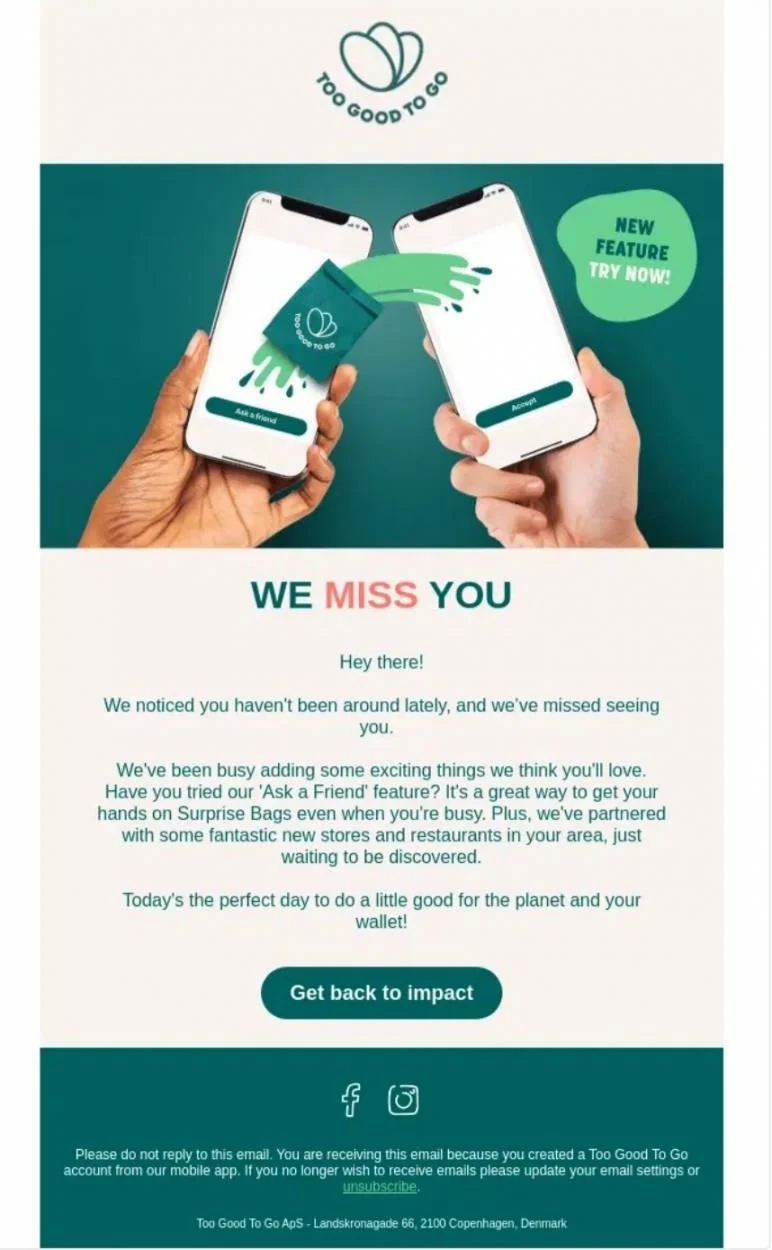
Too Good To Go uses new features and recent partnerships to give inactive users a reason to return:
6. The back-in-stock alert
Trigger back-in-stock alerts when a requested product returns to inventory. Send the alert immediately because the shopper has already expressed interest. These flows convert at 6.46%, the strongest rate in this set.
Start with the restock message and the product the shopper requested. Use urgency only when stock is truly limited. A one-click sign-up on the product page can also grow your list.
Include the stock level and two similar products, so if it sells out again, they’ve still got somewhere to land. The sign-up data doubles as demand forecasting, showing you which products to reorder.
Subject line suggestions:
“It’s back”
“The [product] you wanted just returned”
Framework: Availability → the limited-units line → buy-it-now link.
Back-in-stock email example:
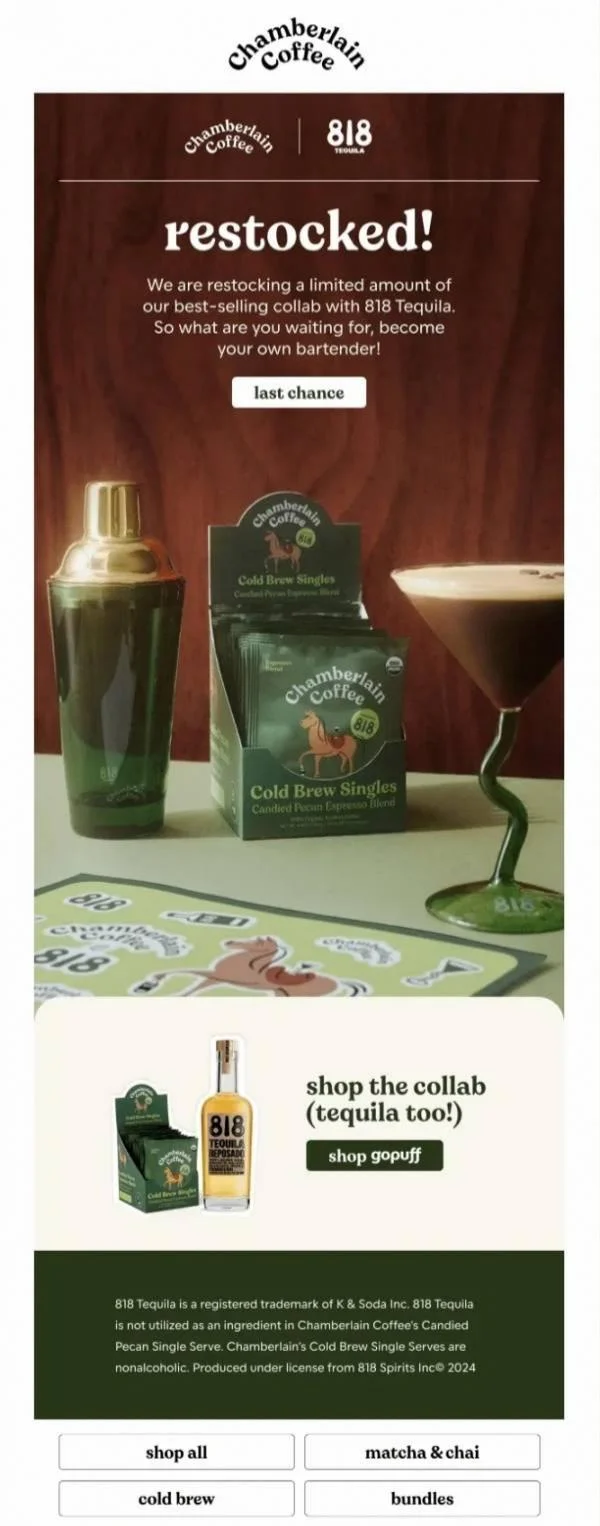
Chamberlain Coffee uses restock messages to create new demand as the popular product becomes available again:
7. The loyalty and VIP reward email
Loyalty email help increase customer lifetime value by recognizing your best customers. They trigger on milestones such as a spending tier, anniversary, or birthday rather than a campaign schedule.
Send loyalty emails on the specific milestone date with an exclusive offer. Reward reviews, referrals, and repeat purchases, not just total spending.
Birthday emails recorded an average of $744.37 order value in our 2026 report, which makes this flow worth building. Show the customer’s VIP status clearly to encourage repeat purchases beyond points alone.
Templates
Subject line suggestions:
“Your VIP early access is open”
“You’ve reached Gold”
Framework: The status earned → the early-access window → shop-first link.
Loyalty email example:
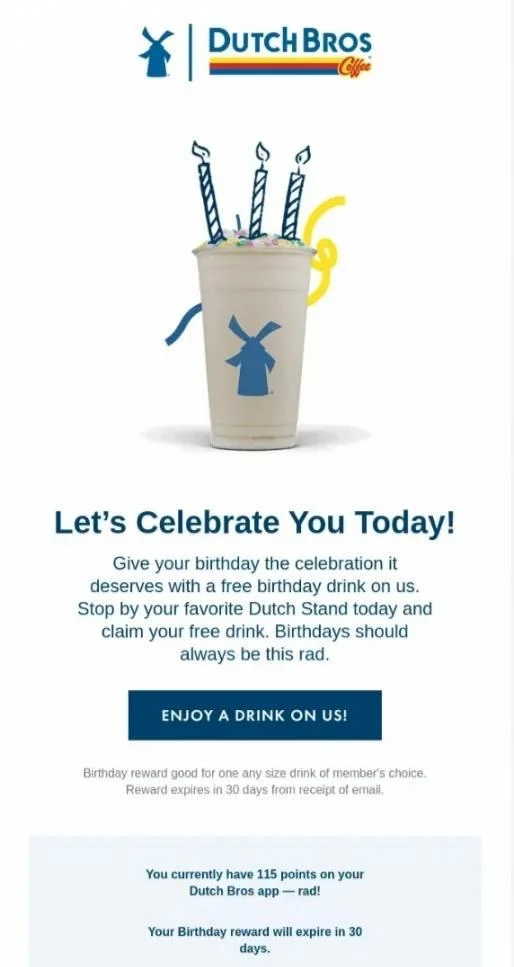
Dutch Bros uses a birthday reward and loyalty points to make loyal customers feel recognized and valued:
Ecommerce email marketing campaigns
An ecommerce email marketing campaign is a message you send to a chosen audience at a time you pick, like a sale announcement or a new arrivals email. That’s what differentiates them from automations, which are triggered automatically when a shopper does something, like abandoning a cart.
So campaigns work best for moments you want to control, while automated flows work quietly in the background, all the time. You need both, since they serve different jobs.
For ecommerce email campaigns specifically, track revenue per recipient, click-to-conversion, conversion rate, and unsubscribe rate. Compare results across segments rather than judging every campaign against one blended average.
Four types make up most retail ecommerce email marketing campaigns:
- Promotional and flash sales move inventory on a deadline, and scarcity does the work
- Product launches build anticipation, then convert on release day
- Educational and brand content earn attention between offers
- Seasonal and holiday sends ride on demand you don’t have to create
Subject line suggestions:
“48 hours only: 20% off sitewide”
“New arrivals just dropped”
“Our Black Friday starts now”
Framework: The offer → the deadline → shop-the-sale link.
Seasonal sales email example:
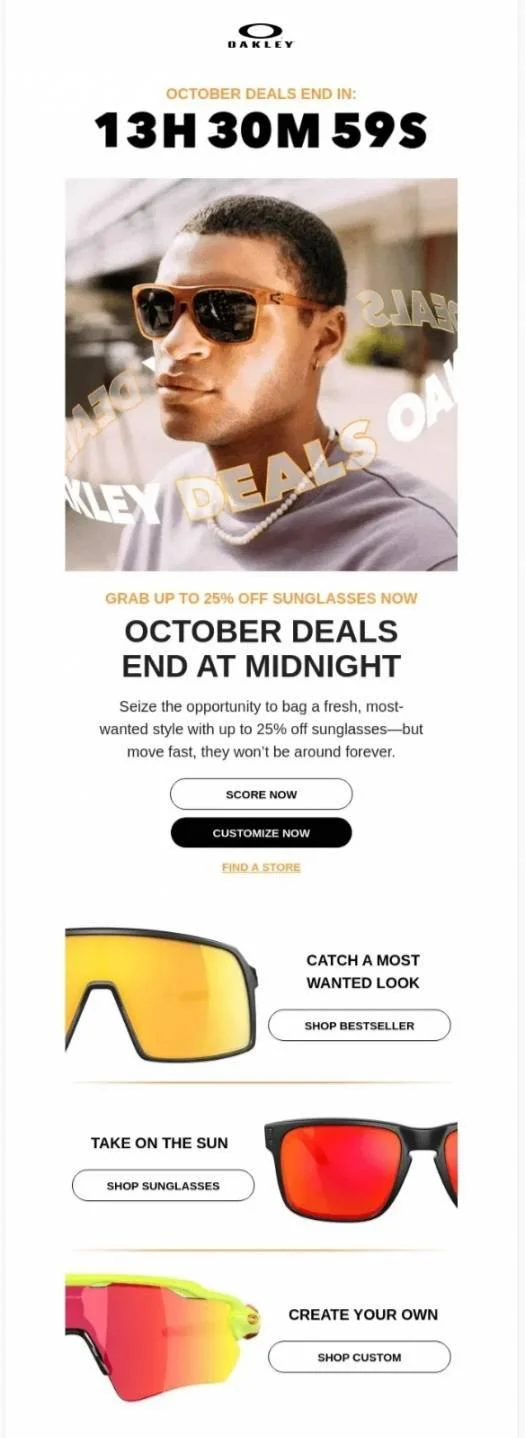
Oakley promotes a seasonal October deal with up to 25% off selected sunglasses. The offer is clear, with product images and a direct CTA:
How to build an effective ecommerce email marketing strategy in 7 steps
An ecommerce email marketing strategy sets revenue goals, collects useful customer data, segments on behavior, and automates the journey from sign-up to winback. These steps run in order, because each supplies what the next needs. Work through them once, then revisit quarterly.
Step 1: Set clear business and financial goals
Set goals that involve measuring email performance through revenue and customer value. For example, aim to generate 30% of store revenue or increase customer lifetime value by 25%.
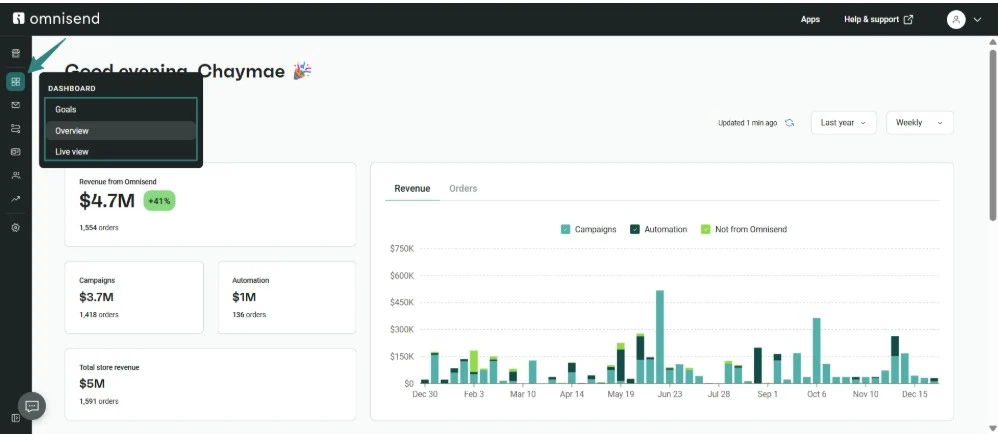
Track your progress through metrics like revenue per recipient, conversion rate, and average order value. Omnisend’s analytics dashboard lets you see how much revenue your email marketing generates:
Step 2: Understand your audience and collect data
Your ecommerce email marketing strategy needs two kinds of data for personalization — zero-party and first-party data.
Zero-party data comes from customers through quizzes, surveys, and preference centers. First-party data comes from customer activity.
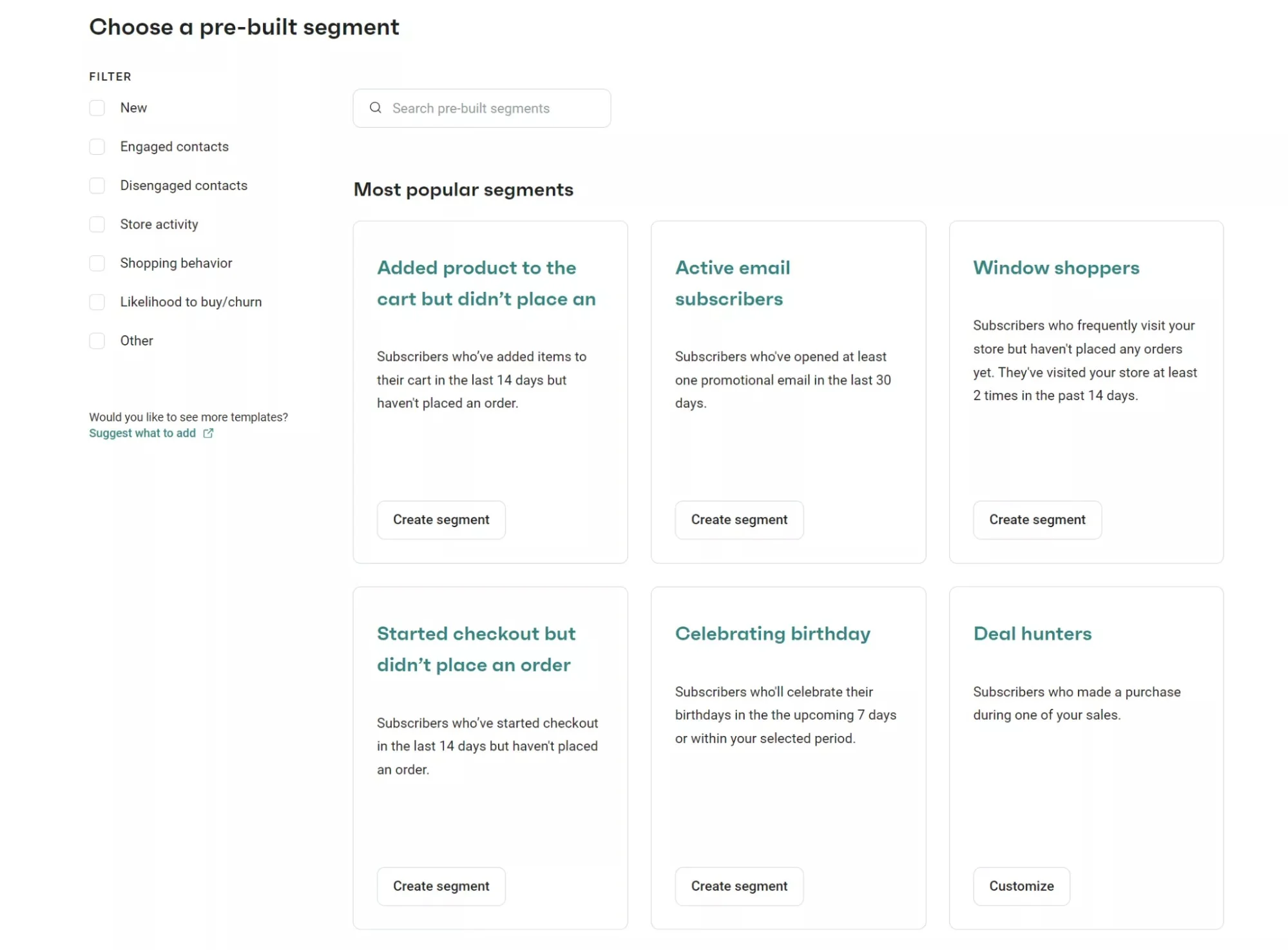
Collect preferences during signup or after purchases when customers already engage with your brand for your segments. Omnisend’s pre-built segments give you ready-made customer groups based on shopping behavior and engagement:
Step 3: Choose the right email marketing platform
Choose ecommerce email marketing software that connects with your store and can keep your customer data current. Prioritize native ecommerce sync, dynamic product blocks, and pre-built automation workflows.
Omnisend connects with 280+ integrations including Shopify, WooCommerce, and BigCommerce:

Step 4: Build and grow your email list organically
Grow your list through sign-up pop-ups, multi-step forms, embedded forms, and relevant lead magnets. Keep the first form step simple, then collect preferences or additional details later.
Omnisend reports sign-up rates across form types so you can compare performance:
| Sign-up form type | Average sign-up rate | Best placement and execution |
|---|---|---|
| Landing page | 6.47% | Distraction-free page for high-intent traffic |
| Pop-up | 3.77% | Entry trigger after 5–10 seconds, or 50% scroll |
| Fly-out / slide-in | 3.24% | Bottom corner, non-intrusive on mobile |
| Embedded form | 1.28% | Blog posts, product pages, and footer |
| Gamified wheel on a landing page | 11.02% | Full-page attention, plus a prize |
The General Data Protection Regulation (GDPR) and the Telephone Consumer Protection Act (TCPA) both expect explicit opt-in. Double opt-in protects deliverability too.
The best brands treat subscriber growth as its own skill, not an afterthought. Brands that collect more subscribers with more opt-in methods consistently outperform on sales and retention. The bigger your audience dataset gets over time, the better you understand what actually converts.
— Marty Bauer, Director of Sales and Agency Partnerships at Omnisend
Create and customize multi-step signup forms for list growth using Omnisend’s forms and pop-up builder:

Step 5: Segment your audience for personalization
Segment your email list by lifecycle stage, purchase behavior, and customer value.
| Segment | Message | Goal |
|---|---|---|
| New subscribers | Welcome sequence | First purchase |
| First-time buyers | Product onboarding | A second order |
| Repeat customers | Dynamic cross-sells | Higher order value |
| VIP high spenders | Early access and rewards | Retention |
| Inactive contacts, 60–90 days | Winback sequence | Reactivation or list cleanup |
Step 6: Map your customer journey emails
Map emails to key stages such as signup, consideration, purchase, and retention. Use email automation to respond to shopper actions as they happen. Use scheduled campaigns to promote launches, offers, and seasonal events at planned times.
The seven flows ship as templates you can switch on inside Omnisend email automation builder:

Step 7: Design your emails and plan your calendar
Use a single-column layout, 16px+ body text, and 44px CTA buttons for mobile to design your email. Preview every email in dark mode before sending. Plan one to three promotional campaigns each week and maintain a consistent cadence.
Omnisend now integrates with Figma, a design platform for creating email banners and other marketing visuals. You can create email visuals that sync automatically as ready-to-use PNG files to your Omnisend Image Library.
Watch the video below for practical tips on faster email design, smarter targeting, and AI-powered duplication:
Key metrics and best practices for ecommerce email marketing
Focus on metrics tied to revenue like Revenue Per Recipient (RPR), Placed Order Rate, and conversion rate.
Engagement metrics like open rates and click-through rate (CTR) no longer provide a complete picture of email performance. Apple Mail Privacy Protection can load email content before recipients engage, but still count as an open. As a result, open rates will be higher than they really are. Plus, security scanners can generate clicks without human engagement, which can inflate CTR.
Treat open rate as a diagnostic metric, not a measure of email campaign success. In contrast, revenue metrics show whether your emails generate actual business results rather than surface-level engagement.
| Metric | Formula/example | Benchmark |
|---|---|---|
| Revenue per recipient (also known as revenue per email) | Total revenue ÷ total delivered emails Example: $1,000 revenue ÷ 2,000 delivered = $0.50 |
$0.18 campaigns, $2.87 automations |
| Placed order rate | Total conversions ÷ total delivered emails Example: 20 orders ÷ 2,000 delivered emails = 1% |
0.27% campaigns, 1.90% automations |
| Conversion rate | Conversions ÷ delivered emails × 100 Example: 30 orders ÷ 2,000 delivered emails x 100 = 1.5% |
2-21% industry range |
| Open rate (diagnostic only) | Opens ÷ delivered emails × 100 Example: 600 opens ÷ 2,000 delivered emails x 100 = 30% |
39.5% industry range |
| Click-through rate (diagnostic only) | Clicks ÷ delivered emails × 100 Example: 60 clicks ÷ 2,000 delivered emails x 100 = 3% |
2-5% industry range |
To improve these metrics over time, use a structured A/B testing process:
- Test one variable at a time: Check subject lines, send delays, CTAs, or offers separately
- Keep a control group: Use a significant sample before rolling out the winning variation
- Optimize for revenue: Measure variations by conversion rate and revenue, not clicks alone
- Repeat consistently: Record results and test new changes with similar audiences
Omnisend’s report shows the results of different campaign variations. You can use these results to see which version performed best:

Review results after each test to identify patterns that can guide future campaigns. Once testing identifies what drives revenue, protect those gains with strong technical deliverability practices.
Gmail and Yahoo both set sender requirements before they’ll trust your mail. Use the checklist below to keep your sending setup secure and your list healthy.
- Send from a dedicated branded domain rather than a generic shared address
- Implement SPF, DKIM, and DMARC records to authenticate your messages and meet inbox provider requirements
- Suppress or unsubscribe contacts after 60–90 days without engagement to improve list quality
2026 trends shaping ecommerce email marketing
Ecommerce email marketing is moving toward more predictive targeting and coordinated customer journeys.
The biggest shift is from sending more messages to making each interaction more relevant. Here’s a closer look at the key trends shaping email marketing for ecommerce.
- AI and predictive personalization: AI marketing statistics show growing use of AI for predictive targeting. Send-time optimization, RFM, and lifetime-value forecasting help better target customers. Omnisend AI combines all three in one platform.
“Openness to AI is clearly on the rise, and businesses can no longer ignore it. But there’s a big difference between offering suggestions and inserting AI into every interaction in a way that feels intrusive. As privacy remains a major concern, ecommerce businesses must be crystal clear about where, why, and how they use AI“
— Marty Bauer, Director of Sales and Agency Partnerships at Omnisend
- Interactive email content: Countdown timers, inline review forms, and short surveys move the action into the inbox. These elements can shorten the path from email engagement to action.
- Zero-party data collection: Multi-step sign-up forms collect preferences directly from subscribers. Brands can build and style ecommerce forms and pop-ups with Omnisend Form AI.
- Omnichannel orchestration: Email, SMS, and web push in one workflow means a shopper gets the channel that suits the moment. Our Model Context Protocol (MCP) integration lets you query store data in ChatGPT or Claude.
- Social proof and UGC: Reviews and ratings are moving into email campaigns. Shoppers can see real customer experiences before deciding whether to buy. User-generated content adds another layer of trust with photos and posts from real customers.
Omnisend, MailerLite, Brevo, Drip, Klaviyo, and ActiveCampaign are top tools for ecommerce email marketing. They can support cart recovery, product recommendations, and other automated customer journeys.
Ecommerce email marketing software tools connect customer data with campaigns and sales, unlike generic newsletter platforms that send email blasts to subscribers.
The table below compares the top options by ecommerce capabilities, channels, and pricing profile.
| Platform | Best for | Standout ecommerce feature | Channels | Pricing profile* | G2 rating* |
|---|---|---|---|---|---|
| MailerLite | Small content-led stores | Shopify and WooCommerce integrations with ecommerce tracking | Free for up to 250 subscribers, paid plan starts at $12/month | 4.6/5 | |
| Brevo | Send-volume billing | Store sync, product recommendations, and abandoned-cart automation | Email, SMS, WhatsApp, push, chat | Free to 300 daily sends, paid starts at $9/month | 4.5/5 |
| Omnisend | Ecommerce stores of any size | One-click ecommerce integrations, pre-built workflows, dynamic product blocks, prompt-built forms with Forms AI, and shopper-specific product recommendations | Email, SMS, web push | Free to 250 contacts, Standard at $16/month | 4.6/5 |
| Drip | Behavioral automation | Ecommerce-focused segmentation and pre-built workflows | Email, onsite pop-ups | No free plan, $39/month for up to 2,500 contacts | 4.4/5 |
| Klaviyo | Data-heavy brands | Deep ecommerce data, segmentation, and predictive analytics | Email, SMS on separate credits | Free up to 250 profiles, paid starts at $20/month | 4.6/5 |
| ActiveCampaign | Teams wanting a CRM | Product recommendations, store data sync, and purchase-triggered automations | Email, SMS add-on, WhatsApp | No free plan, Starter at $19/month | 4.4/5 |
*Pricing and feature ratings as of Q3 2026. G2 scores retrieved August 2026.
Shortlist one or two tools, then run the same flow to test performance. Our email marketing software comparison has the feature and pricing details.
FAQs
What is the ROI of email marketing for ecommerce?
Omnisend’s 2025 internal analysis found that paid-plan merchants generated $79 for every $1 spent. That figure covers email, SMS, and web push notifications. Automated flows generated 30% of all email revenue from only 2% of sends.
What are the essential email automations every ecommerce store should have?
Seven automations cover the main stages of the customer journey. These include welcome emails, browse abandonment, cart abandonment, post-purchase emails, product recommendations, winback campaigns, and back-in-stock alerts. Back-in-stock emails have a conversion rate of 6.72%, while welcome and cart recovery drive most automation orders. Build those two first, then add the rest.
What is the best email marketing platform for ecommerce?
The best email marketing platform for ecommerce is one that connects directly with your store data. Omnisend suits stores that want email, SMS, and push in one workflow. Klaviyo can suit teams that need deeper customer data and analysis. Your store size, data needs, and channels should guide your choice.
How often should ecommerce brands send emails?
Ecommerce brands can start with one to three promotional emails each week. Automated flows can run at the same time as regular campaigns. Watch unsubscribe rates and engagement to adjust your sending frequency. If unsubscribes rise, reduce your campaign frequency and review your content.
What is the 80/20 rule in email marketing?
The 80/20 rule means that 80% of emails should provide value. The remaining 20% can focus on sales, offers, as well as promotions. Value-based emails can include education, product guidance, stories, or useful tips. Treat the rule simply as a campaign guide, rather than a strict email marketing for ecommerce formula.
How is AI changing ecommerce email marketing in 2026?
Ecommerce teams automate more marketing decisions with AI. They build segments, score customers, forecast lifetime value, and select send times. The focus is moving beyond content creation towards automated customer decisions. This shift reduces manual work for marketing teams.
How do ecommerce brands prevent marketing emails from going to spam?
Authenticate sending domain first. Set up SPF, DKIM, and DMARC on your sending domain. Use one-click unsubscribe and send from a branded domain. Remove contacts who stay inactive after a re-engagement attempt.