Best social media MCP connectors in 2026
AI agents can already draft social media copy for agency clients. The harder problem is connecting that draft to the social media management platform where teams review, approve, and schedule posts.
Without that connection, the workflow is still manual. A strategist, account manager, or social media lead has to copy the AI-generated content into the publishing tool, route it for approval, and schedule it by hand.
That is why social media MCP connectors matter. A good connector lets an AI agent move from content generation into the operational workflow: drafting posts, creating campaign assets, handing content to approval queues, and preparing posts for publishing across client accounts.
Best MCP connectors for social media management at a glance
The best social media MCP connector depends on whether your team needs approval control, publishing speed, analytics, or broad fallback coverage. This table summarizes the 7 options by agency fit before the detailed reviews below.
1. Planable
Agency approval workflows
Low
From $33/month
2. Hootsuite
Enterprise social intelligence
Medium
From $99/month
3. SocialPilot
Agency-scale draft approvals
Low
From $25.50/month
4. Vista Social
Managing 50+ client accounts
Low
From $120/month
5. Metricool
Analytics-led content decisions
Low
From €43/month
6. Postiz
Open-source and self-hosted workflows
Medium to high
From $29/month
7. Buffer
Solo creators and small teams
Low
From $5/month
Best for
Agency approval workflows
Starting price
From $33/month
Best for
Enterprise social intelligence
Starting price
From $99/month
Best for
Agency-scale draft approvals
Starting price
From $25.50/month
Best for
Managing 50+ client accounts
Starting price
From $120/month
Best for
Analytics-led content decisions
Starting price
From €43/month
Best for
Open-source and self-hosted workflows
Setup complexity
Medium to high
Starting price
From $29/month
Best for
Solo creators and small teams
Starting price
From $5/month
Use this table to shortlist connectors by use case, setup effort, and entry price. The detailed comparison later in the article covers official status, network coverage, approval workflows, and multi-client support.
How I evaluated these MCP connectors
I evaluated seven social media MCP connectors by connecting each tool’s MCP server to Claude Desktop and testing core agency workflows: creating posts in client workspaces, submitting drafts to approval queues, checking approval status, and managing content across multiple accounts.
Where a tool’s MCP server wasn’t yet available for direct testing, I supplemented with vendor documentation and published capability announcements.
The seven tools were selected because each has an official, vendor-published MCP server. Community-built or third-party connectors are excluded from this list.
I assessed each connector against five criteria:
- Official status: does it have an official MCP server?
- Approval workflow depth: does it expose approval state, not just scheduling?
- Multi-client compatibility: does it handle separate workspaces per client?
- Supported networks: does one connector cover your full channel roster?
- Setup complexity: can a non-technical social media manager get it running?
MCP capabilities are moving fast. Official pages update and new connectors launch regularly. Treat this comparison as a shortlist tool, not a final verdict, and verify each vendor’s documentation before deploying in a live client workflow.
The best connector depends on the agency workflow. Some options are better for lightweight publishing automation, while others are stronger for multi-step approvals, account separation, and client-facing review. The goal is not just to connect an AI agent to a social platform. The goal is to connect AI-generated content to the system where agency teams can safely approve and schedule it.
What is a social media MCP connector?
A social media MCP connector is software that lets an AI agent read, write, and trigger actions inside a social media platform using a standardized protocol.
MCP stands for Model Context Protocol, an open standard developed by Anthropic. It defines how AI assistants connect to external tools through a client-server architecture.
The MCP server is the software a vendor builds to expose its platform’s capabilities to AI agents: scheduling a post, retrieving analytics, or triggering an approval, for example. The MCP client is the AI tool connecting to those servers, such as Claude Desktop or another MCP-compatible agent runtime.
Adoption has moved faster than most infrastructure bets. MCP’s TypeScript and Python SDKs reached 97 million monthly downloads in March 2026, up from approximately 2 million at launch, according to an Anthropic ecosystem update published that month. For social media teams and agencies, that growth means more vendors are shipping connectors, with more variation in quality.
Best social media MCP connectors in 2026
1. Planable: best for agency approval workflows
Planable is a collaboration-first social media management platform for agencies and multi-location brands managing multiple client accounts. Its MCP connector is the only one in this list that exposes approval state as a callable tool, meaning your AI agent can route, approve, or reject content in the social media approval process, not just schedule posts.
That distinction matters most to mature agencies where publishing without sign-off is a client-relationship risk, not a minor inconvenience.
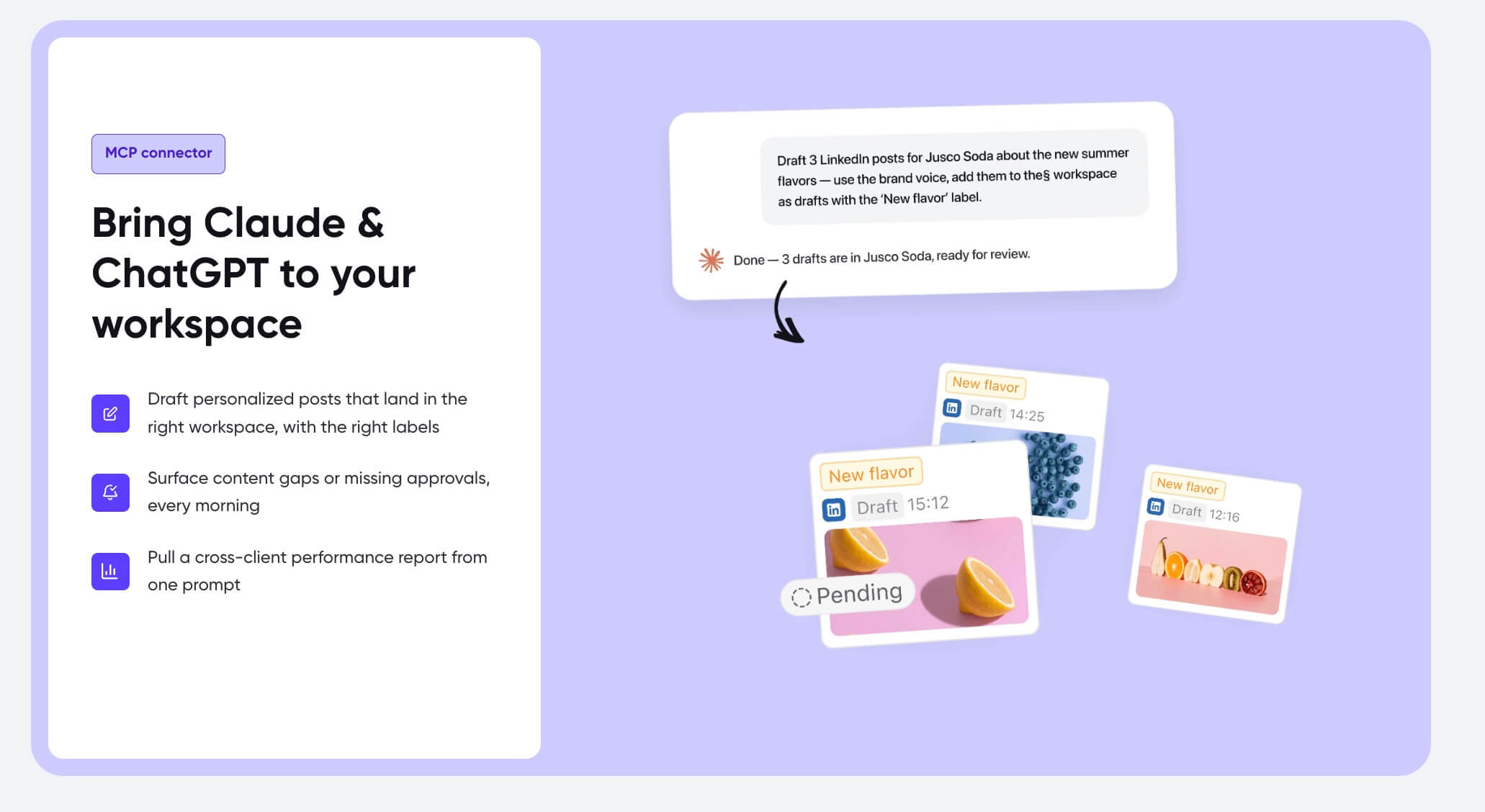
Planable’s MCP connector brings Claude and ChatGPT into your workspace
Key MCP capabilities
An AI agent connected to Planable’s MCP server can:
- Create social media posts directly in the correct client workspace
- Approve posts in the approval queue without opening the Planable UI
- Reject posts with revision notes, routing them back to the writer
- List posts by approval status across any connected workspace
- List all workspaces and select the right client context
- List workspace members and connected pages
- Upload media, create labels, and organize content into campaigns
Supported AI clients: Claude, ChatGPT, Cursor, Codex, Perplexity, n8n, ClickUp, VS Code, Hermes Agent, Runlayer, Odysseus and others.
Official status: Official vendor product.
Agency fit: Each client gets its own isolated workspace. Team roles and permissions, draft comments, and multi-step approval routing are all accessible via MCP without any manual UI interaction. When an AI agent needs to check whether a post is approved, rejected, or awaiting review, it calls the tool directly and gets a structured answer, with no screen scraping or workarounds.
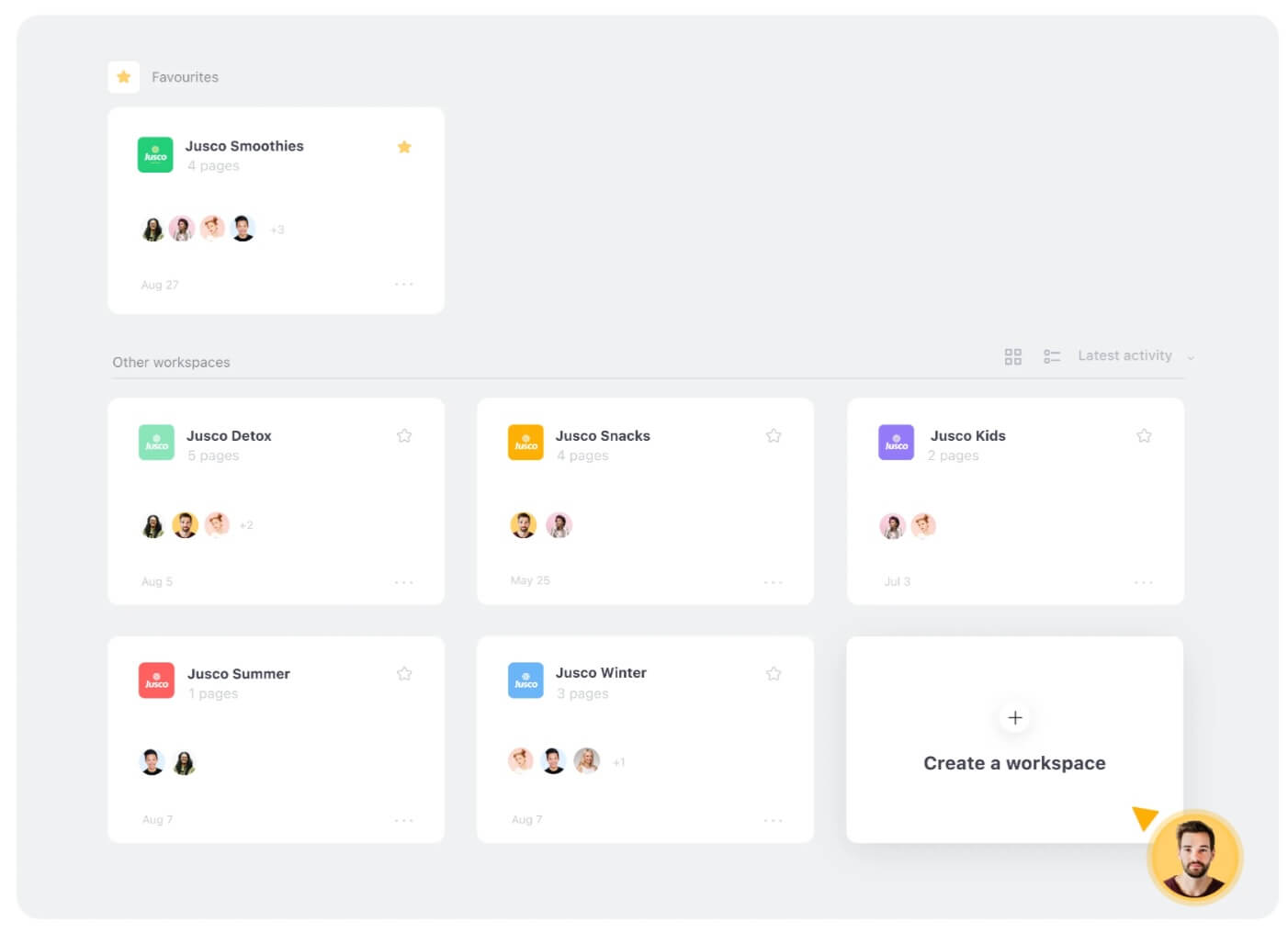
Planable MCP connector for managing multiple client workspaces
“This has completely changed how we operate. The ability to manage content programmatically through conversation is something we didn’t know we needed until we had it.” – Demme Durrett, Social Media Manager at Influx Marketing Agency
Setup complexity: Low. The connector works with Claude Desktop, VS Code Copilot, and other MCP clients. There are no API keys to rotate and no infrastructure to provision.

Setting up the Planable MCP connector in Claude Desktop
Pricing: Plans start from $33/month (billed annually). The MCP connector is available on all plans.
Planable MCP pros and cons
- Approval-state exposure via MCP: AI agents can route, approve, or reject content without touching the platform
- Not a fit for fully autonomous publishing where AI-generated drafts go live without human review
- Multi-workspace, multi-client isolation by design: each client workspace is a separate context the agent selects explicitly
- Planable AI is built into the composer, so the MCP connector extends an already AI-native product
- Approval-state exposure via MCP: AI agents can route, approve, or reject content without touching the platform
- Multi-workspace, multi-client isolation by design: each client workspace is a separate context the agent selects explicitly
- Planable AI is built into the composer, so the MCP connector extends an already AI-native product
- Not a fit for fully autonomous publishing where AI-generated drafts go live without human review
Takeaway: Planable is the connector for agencies where AI agents need to do more than publish posts. It routes drafts through approval, coordinates team feedback, and works across every client workspace from a single AI session.
Try Planable free and see how its MCP connector fits your team’s AI workflow.
2. Hootsuite: best for enterprise social intelligence
Hootsuite launched its official MCP server as part of its “Social OS” suite. The same release introduced Wisdom, Hootsuite’s social-first AI agent.
Wisdom is the social-first AI agent that transforms live social signals into contextual intelligence and coordinated action. It gives organizations a real-time window into the signals shaping their brand. That intelligence layer is what separates Hootsuite’s MCP connector from every other option in this list.
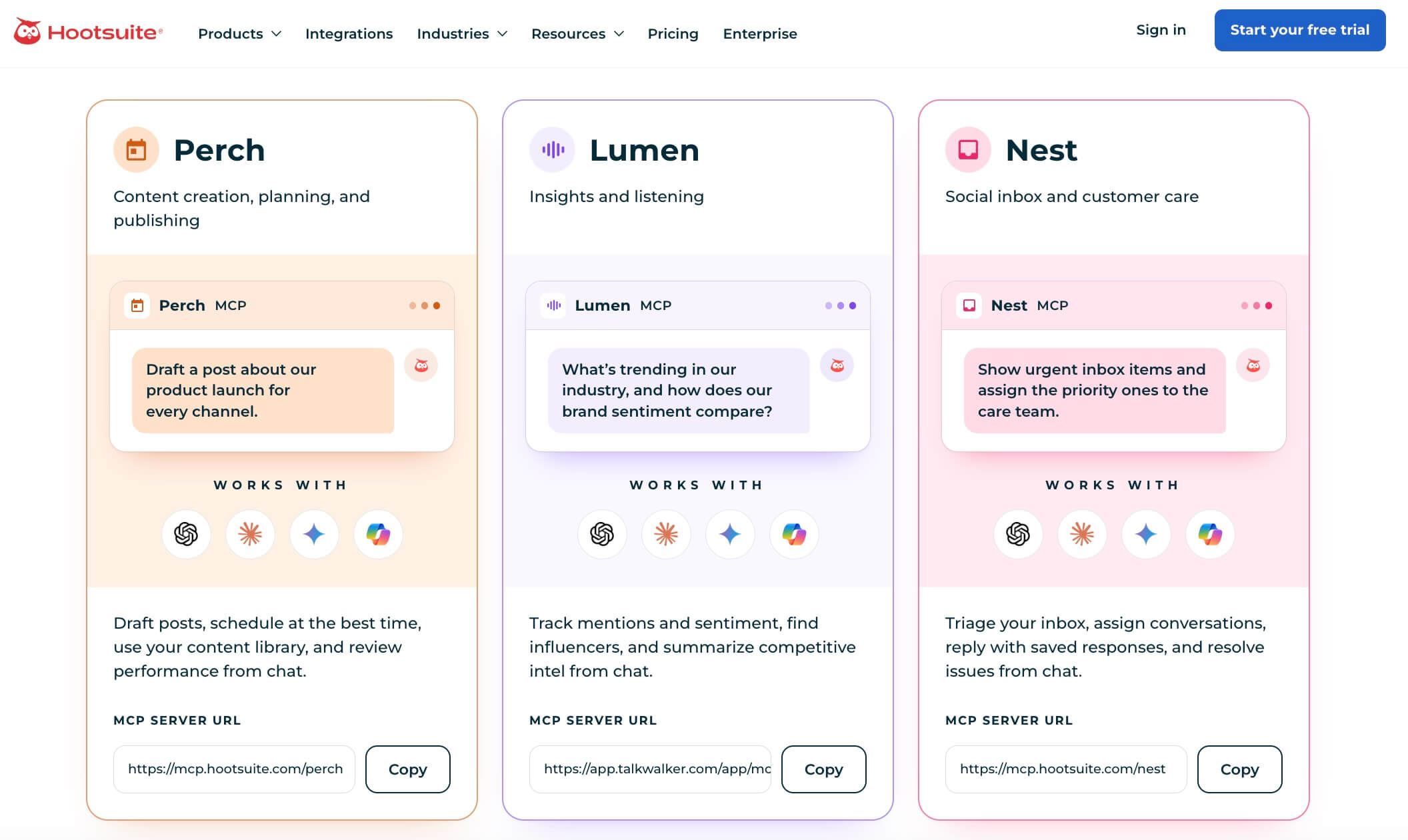
Key MCP capabilities:
- Create and schedule posts across networks
- Manage customer conversations via AI chat
- Access social insights, trends, and cross-network analytics
- Upload media and manage campaigns
- Natural language publishing and draft management
Supported AI clients: Claude, ChatGPT, Gemini, and Microsoft Copilot. Note that Gemini and Copilot integrations require IT administrator access to enable.
Official status: Official vendor product.
Pricing: Starting with $99 per user, per month, billed annually.
Hootsuite MCP pros and cons
- Official vendor product with enterprise-grade security
- Gemini and Copilot setup requires IT admin involvement
- Wisdom AI agent adds a social intelligence layer beyond scheduling
- Official vendor product with enterprise-grade security
- Wisdom AI agent adds a social intelligence layer beyond scheduling
- Gemini and Copilot setup requires IT admin involvement
Takeaway: Hootsuite is the enterprise play; best for agencies where social listening and competitor intelligence matter as much as scheduling.
3. SocialPilot: best for speeding up publishing time
SocialPilot‘s official MCP server covers 8+ networks: Facebook, X/Twitter, LinkedIn, Instagram, Pinterest, Threads, Bluesky, and others, with role-based access controls and draft approval routing aimed squarely at agency account teams.
SocialPilot MCP Server lets you connect Claude or any AI assistant directly to SocialPilot, giving it the skills to handle the full operation on its own.
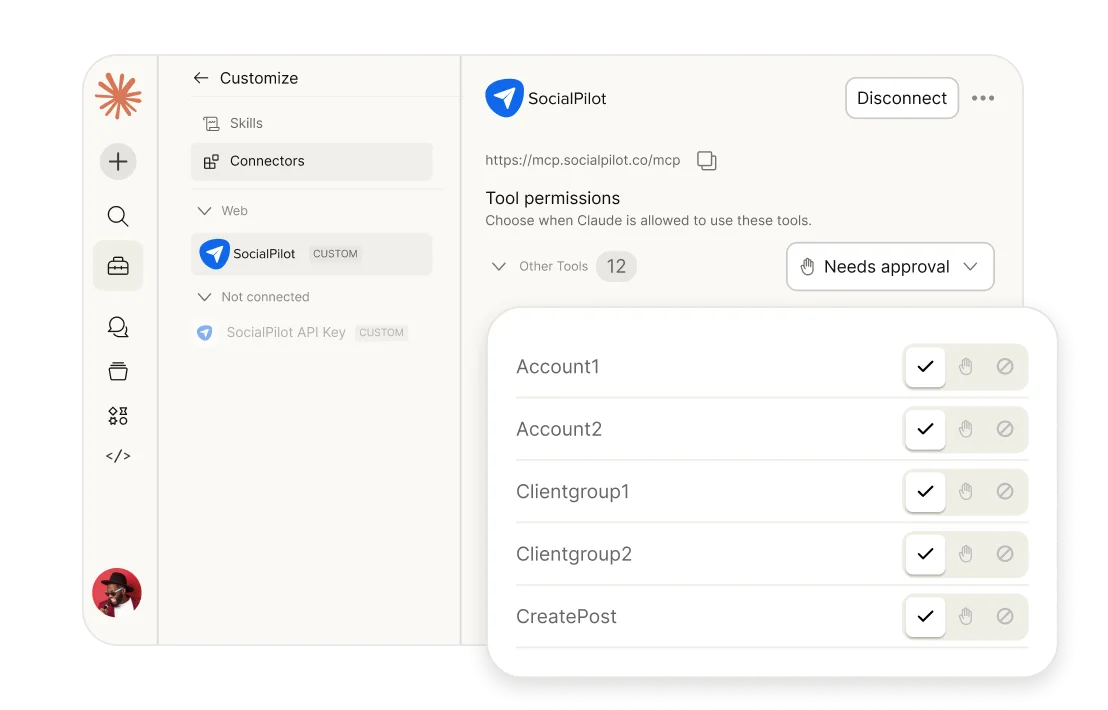
Key MCP capabilities:
- Create drafts routed to team or client approval before publishing
- Monitor scheduled, delivered, and failed posts without opening the dashboard
- AI-generated captions, hashtag suggestions, and brand voice adaptation
- Content variations via built-in AI Pilot
Supported AI clients: Claude, ChatGPT, Cursor, Windsurf, VS Code, Gemini.
Official status: Official vendor product.
Pricing: SocialPilot MCP is included in all paid plans, starting from $25.50/month.
SocialPilot MCP pros and cons
- Official vendor product with documented setup guides
- Fewer supported networks than Vista Social or Postiz
- Role-based access controls and draft approval routing for client-facing workflows
- Analytics depth is lighter than Metricool’s offering
- AI content creation built directly into the connector
- Official vendor product with documented setup guides
- Role-based access controls and draft approval routing for client-facing workflows
- AI content creation built directly into the connector
- Fewer supported networks than Vista Social or Postiz
- Analytics depth is lighter than Metricool’s offering
Takeaway: SocialPilot fits agencies that want official support, solid approval routing, and AI content creation in one connector, without enterprise pricing.
4. Vista Social: best for managing 50+ client accounts
Vista Social’s official MCP server is the most tool-dense option in this list, exposing 50+ tools covering scheduling, analytics, inbox, content, media, reporting, and team management.
Setup requires nothing beyond pasting a hosted MCP URL into your AI client.
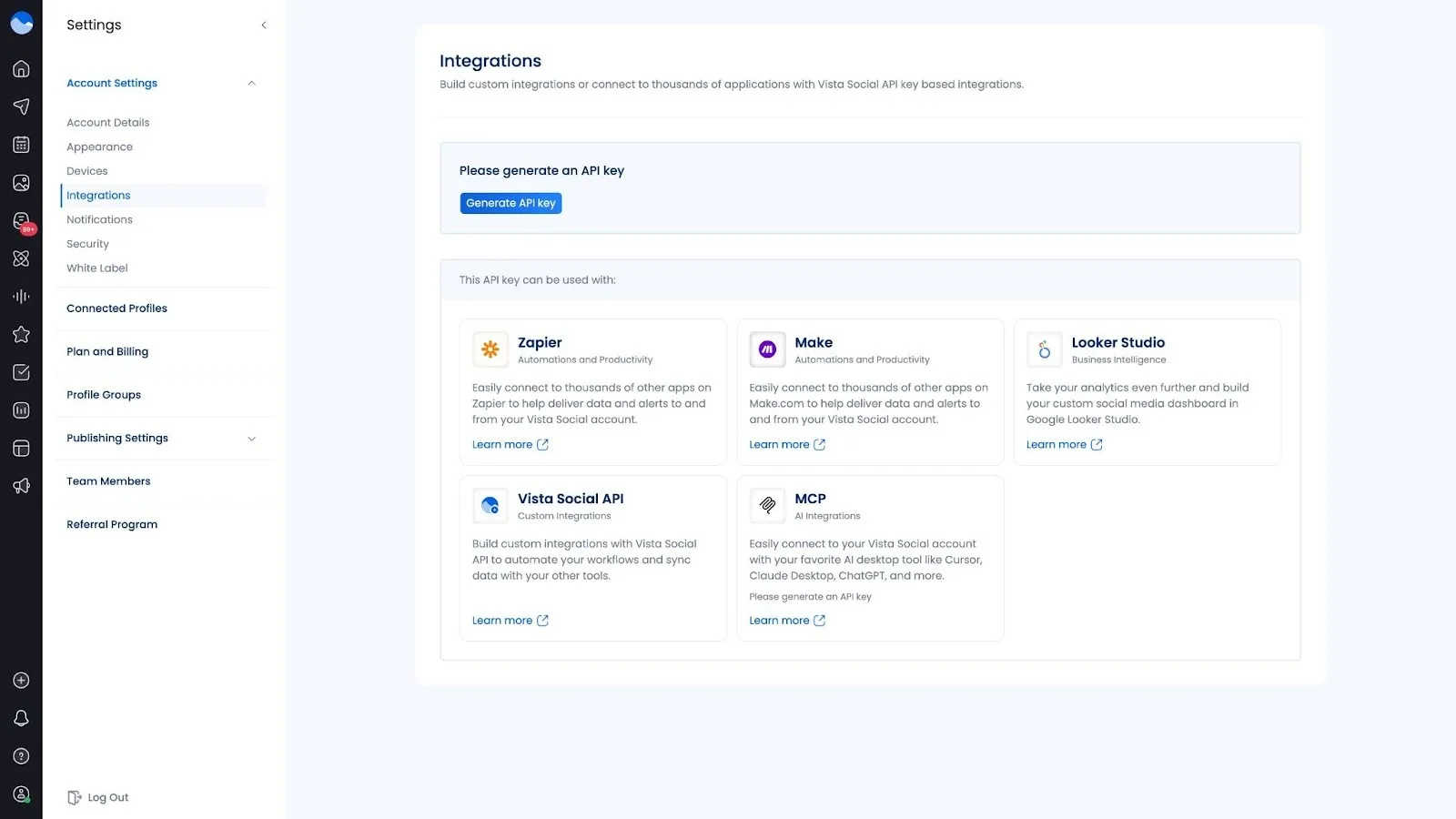
Key MCP capabilities:
- Query the approval queue by client name using plain language
- Pull best-performing content by profile group
- Manage inbox and comments without leaving your AI session
- Control team permissions across 5 to 500 profiles
Supported AI clients: Claude Desktop, Cursor, ChatGPT, and more.
Official status: Official vendor product.
Pricing: Available from the Advanced plan, which starts at $120/month for 6 users.
Vista Social MCP pros and cons
- Highest tool count (50+) in this list
- Analytics depth may require additional tooling for enterprise-level reporting
- No-code hosted setup: paste a hosted MCP URL and you’re ready
- Agency-scale permissions and white-label support
- Highest tool count (50+) in this list
- No-code hosted setup: paste a hosted MCP URL and you’re ready
- Agency-scale permissions and white-label support
- Analytics depth may require additional tooling for enterprise-level reporting
Takeaway: Vista Social is the pick for agencies managing dozens of client profiles. The 50+ tool count and natural language client roster query make it the most operationally complete option in this list.
5. Metricool: best for analytics-led content decisions
Metricool‘s official MCP server leads with performance data, not just publishing. The server supports 10+ networks: Instagram, TikTok, LinkedIn, Facebook, X, YouTube, Pinterest, Threads, Bluesky, and Twitch, and uses OAuth 2.1, an authentication standard where the AI client never handles your credentials directly.
The analytics layer is what separates it from the schedulers in this list.
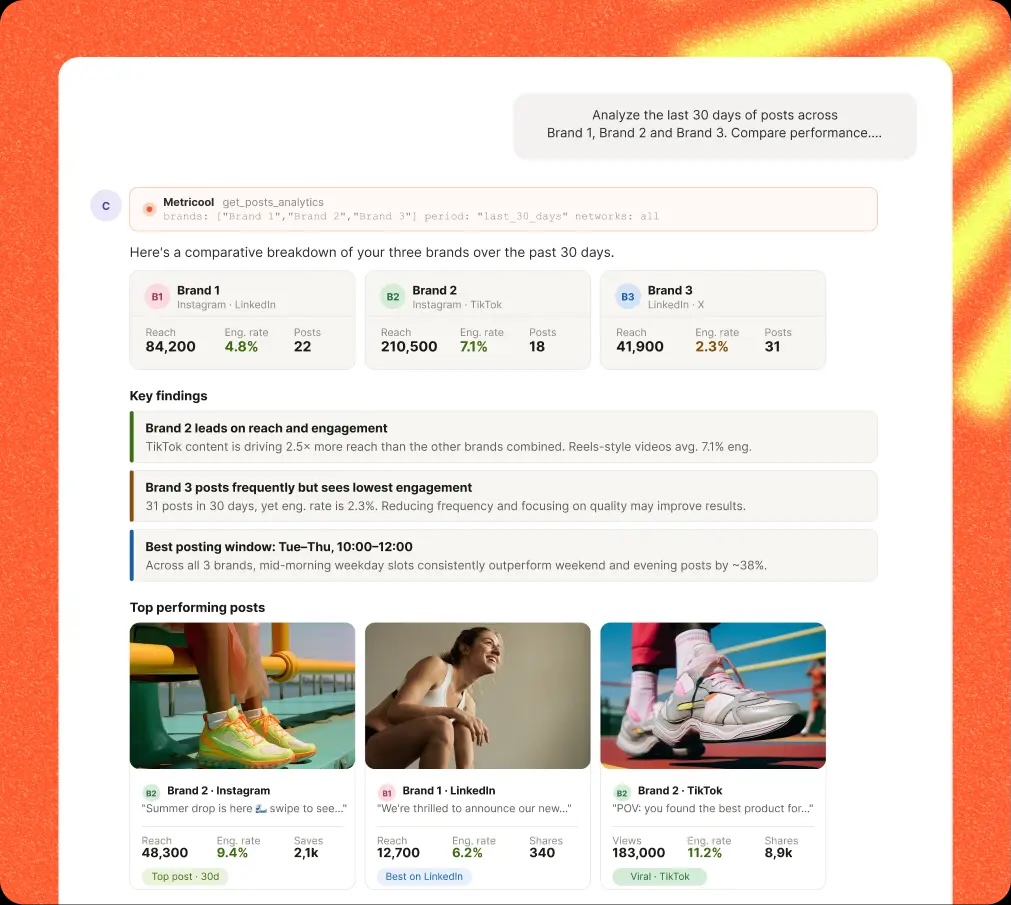
Key MCP capabilities:
- Surface best posting times derived from your actual account data
- Retrieve metrics from any connected network on demand
- Pull Instagram metrics for specific date ranges
- Run competitor analysis and access competitor performance data via MCP
Supported AI clients: Claude Code, Claude Desktop, Cursor, ChatGPT, Mistral Le Chat, Make, n8n, and Gemini CLI
Official status: Official vendor product.
Pricing: Available on all pricing plans, including the free plan, with usage limitations. Unlimited access starts at €43/month.
Metricool MCP pros and cons
- Strongest analytics layer among the connectors in this list
- Less focused on approval routing and client-facing workspace isolation
- Competitor monitoring accessible directly through the MCP interface
- Twitch network support is unlikely to be relevant for most social media agencies
- Broadest AI client support, including Make and n8n for workflow automation
- Strongest analytics layer among the connectors in this list
- Competitor monitoring accessible directly through the MCP interface
- Broadest AI client support, including Make and n8n for workflow automation
- Less focused on approval routing and client-facing workspace isolation
- Twitch network support is unlikely to be relevant for most social media agencies
Takeaway: Metricool is the right pick when analytics and competitor intelligence matter as much as scheduling, and when your team uses multiple AI tools including workflow platforms like n8n or Make.
6. Postiz: best open-source option
Postiz is the only fully open-source, self-hostable MCP connector in this list. Once connected, your AI agent can write, schedule, and publish posts across 30+ platforms without opening a dashboard or copying content between tools.
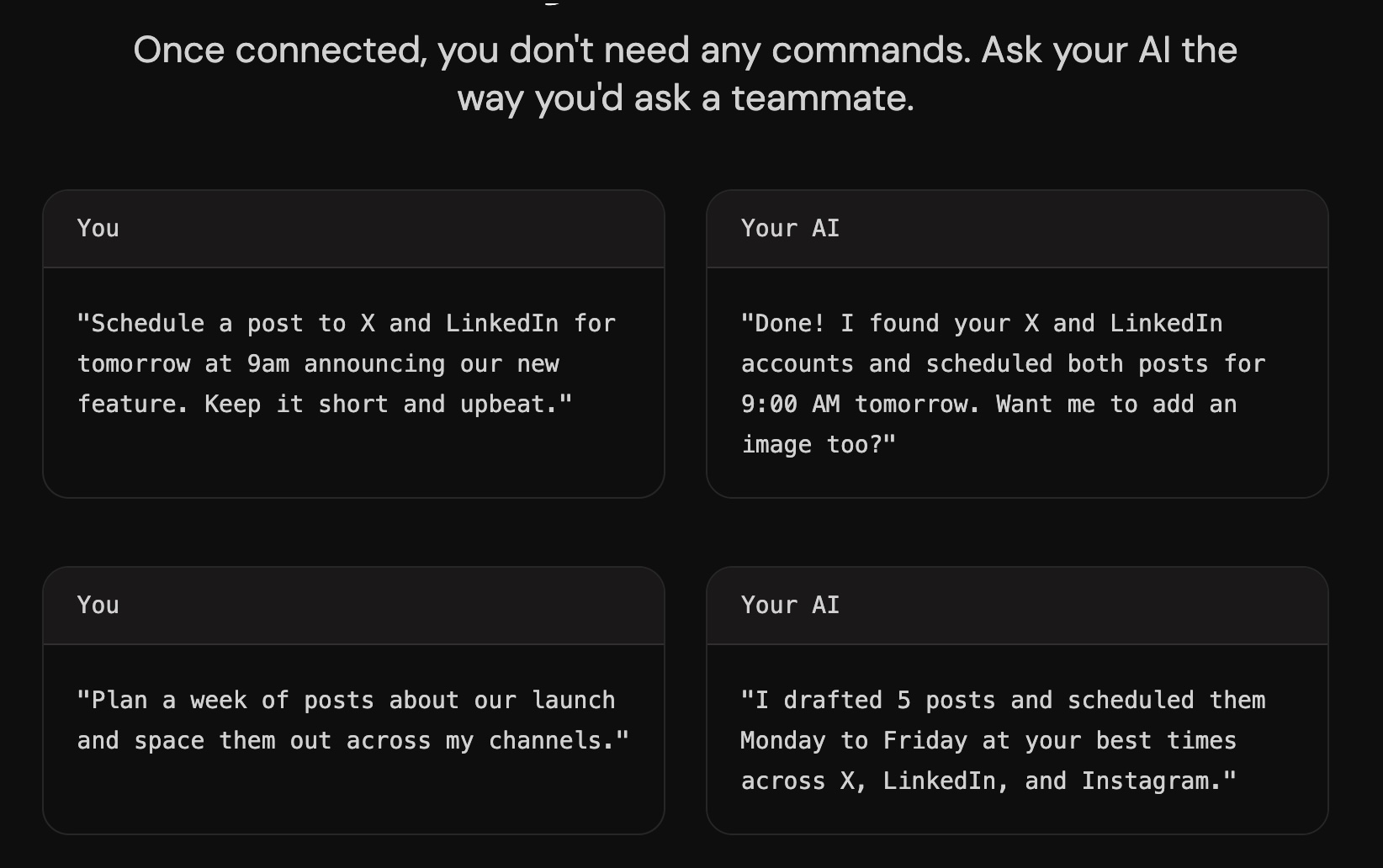
Key MCP capabilities:
- AI-generated content including images and videos
- Read connected channels and account data
- Team collaboration and analytics
- Public API and webhooks available on the same entry plan as MCP
Supported AI clients: ChatGPT, Claude, Claude Code, and Cursor.
Official status: Official vendor product.
Pricing: You can run it on your own infrastructure or use the managed SaaS option at $29/month (7-day free trial included).
Postiz MCP pros and cons
- Only self-hostable option in this list: your data stays on your infrastructure
- Self-hosting requires technical setup (Docker, infrastructure management) and ongoing operational overhead
- 30+ channel support is the widest among all reviewed connectors
- Weekly release cadence signals active, ongoing development
- Only self-hostable option in this list: your data stays on your infrastructure
- 30+ channel support is the widest among all reviewed connectors
- Weekly release cadence signals active, ongoing development
- Self-hosting requires technical setup (Docker, infrastructure management) and ongoing operational overhead
Takeaway: Postiz is the right choice for agencies or technical teams that need to control where client content lives.
7. Buffer: best for solo creators and small teams
Buffer‘s MCP server is an official product, listed alongside Claude, Cursor, Raycast, ChatGPT, and Perplexity as native connections. It exposes 18 operations built on Buffer’s GraphQL API and works across all Buffer plans, including the free tier.
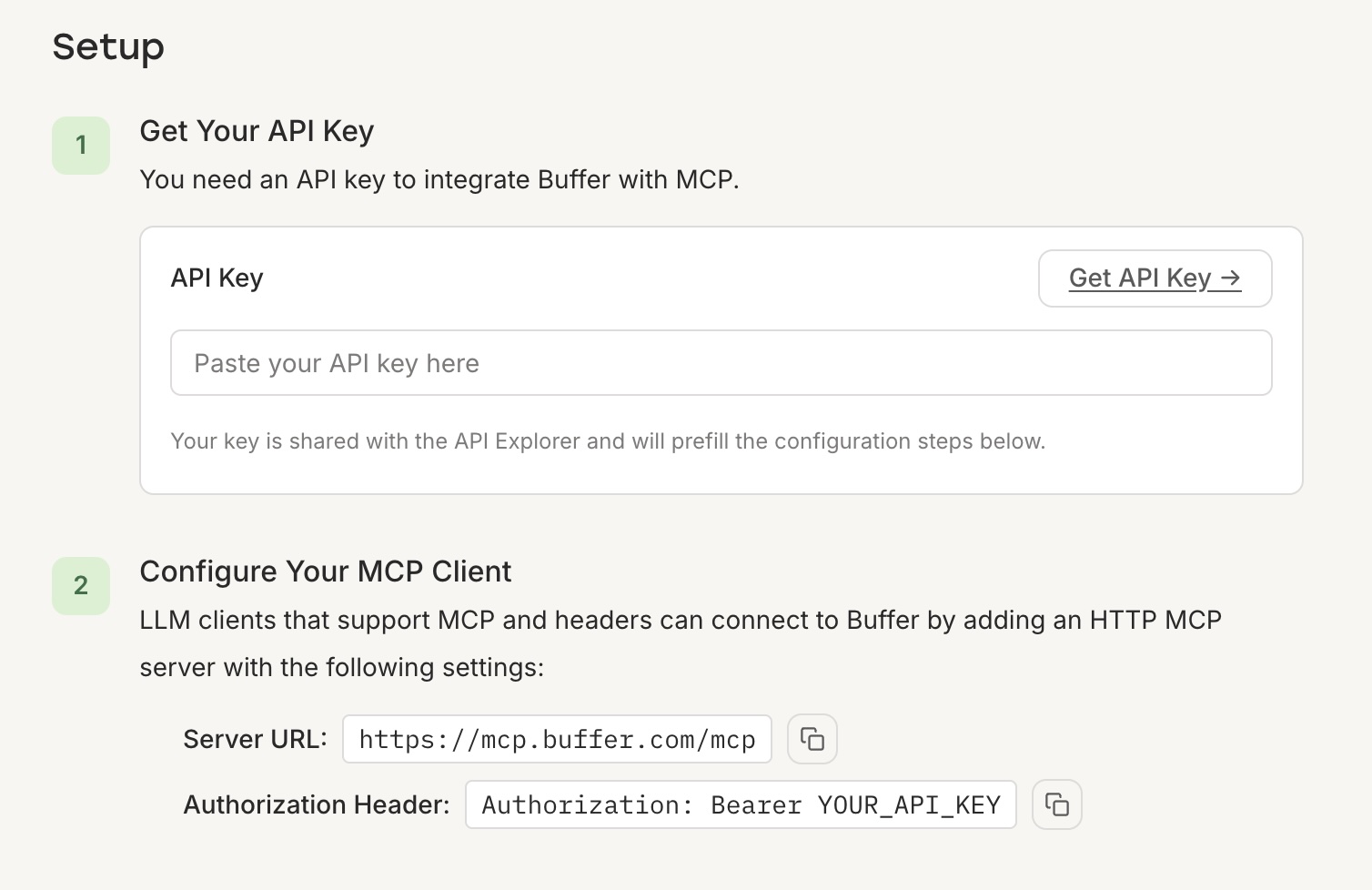
Key MCP capabilities:
- Create, schedule, and delete posts in queues
- Create ideas in the Ideas library
- Retrieve account, organization, and channel information
- Save content to Buffer’s Ideas board
Supported AI clients: Claude, ChatGPT, Cursor, Raycast, Perplexity, Zapier AI, viaSocket.
Official status: Official vendor product.
Pricing: Free plan (3 channels, 10 scheduled posts each). Essentials from $5/channel/month.
Buffer MCP pros and cons
- Official Buffer product with native AI client support
- No approval workflows or multi-client workspace isolation
- Lowest cost entry in this list, with a free plan available
- Official Buffer product with native AI client support
- Lowest cost entry in this list, with a free plan available
- No approval workflows or multi-client workspace isolation
Takeaway: Buffer’s official MCP is the most affordable option in this list, but best suited for solo creators or small teams managing their own channels.
Social media MCP connector comparison
Official vendor product
Strong: approve, reject, route, and check approval status via MCP
Yes
9
Official vendor product
Strong: approval workflows plus social intelligence features
Yes
10+
Official vendor product
Strong: draft routing and client approval workflows
Yes
8+
Official vendor product
Strong: approval queue access through natural language queries
Yes
10+
Official vendor product
Limited: scheduling and analytics, not deep approval routing
Limited
10+
Official vendor product
Limited: team collaboration, but no dedicated approval flow
Limited
30+
Official vendor product
None
No
11
Official status
Official vendor product
Approval workflows
Strong: approve, reject, route, and check approval status via MCP
Multi-client workspaces
Yes
Supported social platforms
9
Official status
Official vendor product
Approval workflows
Strong: approval workflows plus social intelligence features
Multi-client workspaces
Yes
Supported social platforms
10+
Official status
Official vendor product
Approval workflows
Strong: draft routing and client approval workflows
Multi-client workspaces
Yes
Supported social platforms
8+
Official status
Official vendor product
Approval workflows
Strong: approval queue access through natural language queries
Multi-client workspaces
Yes
Supported social platforms
10+
Official status
Official vendor product
Approval workflows
Limited: scheduling and analytics, not deep approval routing
Multi-client workspaces
Limited
Supported social platforms
10+
Official status
Official vendor product
Approval workflows
Limited: team collaboration, but no dedicated approval flow
Multi-client workspaces
Limited
Supported social platforms
30+
Official status
Official vendor product
Multi-client workspaces
No
Supported social platforms
11
What makes a good social media MCP connector?
The five criteria that separate a reliable connector from a risky one are: official vs. community-built status, approval workflow depth, supported social platforms, multi-workspace support, and setup complexity for non-technical marketers.
- Official vs. community-built status. Official connectors are maintained by the vendor and updated when the underlying API changes. Community-built ones can go unmaintained overnight.
- Approval workflow depth. A connector that only schedules posts misses the point for teams with multi-stakeholder approval requirements. Does it expose approval state? Can it trigger a review request?
- Supported social platforms. Network breadth determines whether one connector covers your full client roster or you’re managing five.
- Multi-client and multi-workspace support. Managing 10 clients through a single-workspace connector creates friction that compounds with every new account.
- Setup complexity. A connector that requires Docker configuration and local server management excludes most social media managers.
Can AI agents like Claude manage social media using MCP?
Yes. AI agents like Claude can draft, route for approval, and schedule social media posts using MCP connectors. The specific capabilities depend on which connector the agent calls.
Here’s what that looks like in a real agency workflow with Planable. The agent calls the list workspaces tool and gets back every client workspace by name. It selects the right one, calls list pages to confirm the connected accounts, then drafts a post against the brief you gave it.
With a single tool call it submits that draft to Planable’s approval queue, where it sits with status pending_approval. The human reviewer opens Planable, reads the draft in context alongside the other scheduled content, and clicks approve. The post schedules automatically. The agent handled everything before that click; the client-facing decision stayed with a person.
That’s what “approval-state exposure” means in practice: the MCP connector makes the approval queue visible and writable to an AI agent, so the handoff between machine work and human judgment happens inside the tool you already use.
What AI agents can do now via MCP:
- Draft and submit content directly to the approval queue
- Check and update approval status without touching the platform UI
- Schedule posts, create labels, and upload media
What they can’t yet do, depending on the connector:
- Direct Instagram publishing may require content review permissions in some configurations.
- Reading live engagement metrics and comments is limited for most connectors.
- Cross-platform A/B testing isn’t natively supported in any connector covered here.
As Alex Albert, Research and Product Manager at Anthropic, noted when MCP launched:
“MCP handles both local resources (your databases, files, services) and remote ones (APIs like Slack or GitHub’s) through the same protocol.”
The social media connectors in this list are a direct expression of that. The protocol is the same whether the agent is reading a database or submitting a post for client approval.
The approval step is what keeps AI-assisted social media viable for client-facing work. The agent handles the mechanical steps; the human makes the call that matters to the client relationship.
FAQs
What social media platforms support MCP?
The platforms themselves don’t need to support MCP. The social media management tools (Planable, Hootsuite, SocialPilot, and others) build MCP servers that expose access to the networks they already connect to.
Is Planable an MCP server?
Yes. Planable has an official MCP server that exposes 10 tools spanning content calendar, scheduling, and approval workflows. It’s available across all Planable plans and works with Claude, ChatGPT, VS Code Copilot, and other MCP-compatible clients.
What are MCP connectors vs. traditional social media APIs?
Traditional APIs require custom code for every integration: your developer writes the logic to connect each AI tool to each social platform. MCP connectors standardize that interface. Any MCP-compatible AI agent can call any MCP server using the same protocol, without bespoke development work for each pair.
How do I connect Claude or ChatGPT to my social media accounts?
Pick a connector that supports your AI client, then follow the vendor’s setup guide. Official connectors including Planable, Hootsuite, SocialPilot, Vista Social, and Metricool all publish documented setup pages. Most require pasting a server URL into Claude Desktop settings or finding the connectors in their library. No code required for any of those five.
Do I need coding skills to use a social media MCP connector?
Most official connectors require no coding at all. Planable, Vista Social, and Hootsuite (for Claude and ChatGPT) all use a URL paste or OAuth flow for setup. Buffer’s official MCP and Postiz’s self-hosted option involve light technical steps, like cloning a repo or configuring a server, so they’re better suited to teams with a developer on hand.
How does the Model Context Protocol help social media managers?
MCP lets AI assistants read your drafts, check approval status, and schedule posts directly inside your social media tool. The connector handles the data layer: fetching workspace info, submitting posts for review, and returning approval state, so you’re not manually copying content between apps. You stay in charge of the decisions; the AI handles the mechanical steps.
The right connector depends on your agency’s workflow
- Approval workflows and client account isolation: Planable
- Enterprise social intelligence and listening: Hootsuite
- Publishing velocity across 30+ channels: Postiz
These are moving targets. Official pages update, new tools launch, and capabilities expand between now and when you deploy. Check each vendor’s MCP documentation before putting any connector into a live client workflow.
If your team runs AI-assisted social workflows, Planable’s MCP connector and built-in approvals give you the integration depth the others don’t. Try it free.
As a senior product marketer, Monica leads product marketing campaigns, drives competitive intelligence initiatives, and contributes to Planable’s growth strategy through extensive user research and data analysis.