Rules, Examples, and Best Practices

Quick Takeaway
Email address format simply means the standard structure of an email address. Every valid email address follows the same simple recipe. A username (your chosen account name) + the @ symbol + a domain name (where the email is hosted). For example, in [[email protected]], “john.doe” is the username and “example.com” is the domain. This format is universal. If any part is missing or wrong, your email won’t reach its destination.
The email address format looks straightforward, but there are specific rules behind what counts as valid and what doesn’t.
I saw this regularly while managing newsletters and email campaigns. Some addresses were obvious errors, such as a missing @ symbol, while others had subtle typos in the domain name. Cleaning up these issues before sending protects your sender reputation.
In this guide, you’ll learn the valid email address format and what each part means. We’ll cover the key rules to follow and how to spot and remove invalid email addresses.
What are the Parts of a Valid Email Address Format?
A valid email address format isn’t a random string with an @ in the middle. It has specific components, each serving a purpose. Recognizing these parts helps you spot a proper address format at a glance.
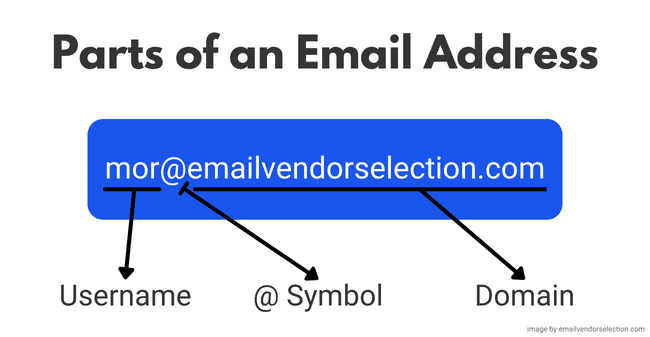
An email address has 3 main parts:
- the username (or local part),
- the @ symbol,
- and the domain.
The username identifies the inbox. The domain tells the internet where that inbox lives. Meaning, which email server should receive the message so it reaches the intended recipients.
Sample email address formats
The most basic structure for a professional email address is [email protected].
It’s simple, memorable, and acts as a form of online identity. For example, if your name is John Williams Smith, a standard professional email is [email protected]. But that’s not the only approach. Other acceptable business email address formats include:
Sometimes an underscore is used instead of a period (like [email protected]), although dots are more common. If your perfect username is taken, consider adding a middle initial, a role, or a number, but keep it as simple and professional as possible.
Email address examples
Here are a few examples of the recommended form that follow the standard pattern:
Notice that none of these have spaces or odd symbols. They all include a username, an “@” connector, and a domain with a dot and extension (like .com or .org). That’s exactly what you need for a valid email address.
Rules of the Standard Email Address Format
Even though a valid email address looks like a simple string of text, a fixed set of rules defines what’s allowed. These rules come from internet standards (so all email providers play by the same playbook).
If you break them, even by accident, you create invalid email addresses. Below are the key rules for the username part, the domain part, and some quirks about dots and capitalization.
The valid username syntax
The username (the part before the @) identifies the mailbox. It includes letters, numbers, and a few special characters (such as a dot, plus sign, underscore, or hyphen). However, there are some syntax rules you must stick to:
- No leading, trailing, or consecutive dots: You can’t use a period as the first or last character in your username. And you can’t put two periods in a row. For example, john.doe is okay, but .johndoe or john..doe breaks the rules.
- Stick to allowed valid characters only: Don’t use spaces, commas, slashes, or other non-approved symbols in the username. Basically, use the standard alphabet, digits, and the few special characters that email supports. Any special characters like “/” or a space will make an address invalid.
Periods and capitalization in emails
Good news: email addresses don’t follow any case-sensitivity rules. [email protected] works the same as [email protected]. Many email providers (like Gmail) even ignore periods in the username. However, not all services do, so use dots only for clarity. And regardless of dots or caps, sticking to all-lowercase letters is a smart way to keep things consistent.
The correct email domain syntax
After the @ comes the domain, essentially the mail server’s address. The domain must be a real, valid domain name (like a company or provider’s site). It can have subdomains and a top-level domain (TLD). For example, in [email protected], “dept” is a subdomain, “company” is the main domain, and “.com” is the top-level domain.
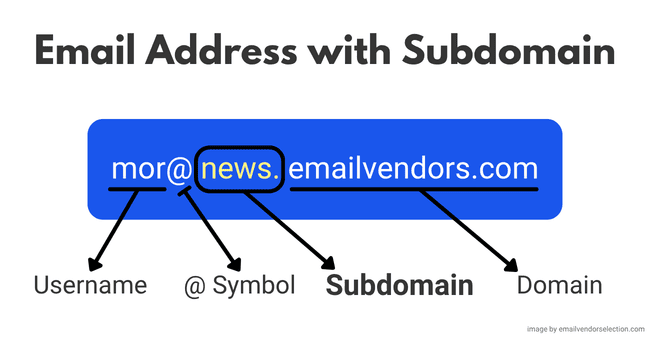
The domain part uses letters, numbers, and hyphens. No underscores, spaces, or other special characters are allowed in domain names. This domain points your email to the right mail server (via DNS, which links domains to an IP address). If there are multiple parts (like mail.yahoo.co.uk), none of those parts should start or end with a hyphen. And of course, the domain needs a proper extension (like .com or .org) at the end.
The maximum total length of an email address
Yes, there’s a maximum length. By standard rules, an email address should not exceed 254 characters in total. That’s the absolute maximum length, which includes everything from the first letter of the username to the last letter of the domain.
The username is capped at 64 characters, but the domain part can be quite long. But, together, they must stay under 254 characters.
You’ll rarely see an address anywhere near that length. Shorter is better because a concise address is easier to remember.
What Makes an Email Address Invalid?
Now that we know what should be in a valid email format, let’s talk about what makes one invalid. An invalid email address is one that either breaks the format rules or simply can’t receive mail. These addresses create delivery failures and often cause hard bounces. If you’re not sure you have invalid emails on your list, you should clean it with an email verification tool, like Bouncer.
Here are common reasons an email address ends up invalid:
- Typos and human error: Mistakes happen. Someone types gmall.com instead of gmail.com, or leaves out a letter in their username. A simple misspelling can turn valid addresses into completely invalid email addresses.
- Missing parts: Every email needs all its components. A username, the @, a domain name, and a domain extension. If any part is missing (like @gmail.com with no name before it, or john.doe@ with no domain after), the address is broken.
- Invalid email prefixes: Some addresses fail because the part before the @ is incomplete. Think of prefixes like test@, admin@, no-reply@, or even info@ submitted in a lead form. These aren’t always “invalid” by syntax, but they often don’t belong to a real person, and they lower the quality of your list. On the other hand, valid email prefixes like firstname@ or firstname.lastname@ usually signals a real person.
- Invalid characters: Using characters that aren’t allowed (such as spaces, commas, or slashes) will count as invalid entries. For example, john/[email protected] or john [email protected] won’t work because / and spaces aren’t permitted in email addresses.
- Non-existent domain: An email address can be perfectly formatted and still be invalid if the domain doesn’t exist or isn’t set up for email. If the domain doesn’t resolve in DNS to an IP address (or doesn’t have the right mail records), the email message has nowhere to go and will bounce.
- No mailbox or inactive email accounts: The domain is real, but that specific address isn’t in use. It either never existed, got deleted, or was simply abandoned by the user. Either way, any email sent to it will bounce.
The quicker you can spot and remove these invalid addresses, the better. They cause bounce-backs, skew your email stats, and can also hurt your sender reputation. Find out more about email validation and how to keep your list clean with our guide to email scrubbing.
How to Remove Invalid Emails From Your List
High bounce rates hurt your email campaigns. The best fix is to clean your list and validate email addresses at least every 6 to 12 months.
Email list cleaning services check each address and flag emails that are bad or risky. That way, you only send to real, active users.
Using a verifier is simple. Upload your list. It will identify undeliverable or problematic addresses (bad format, non-existent domains, disposable emails, etc.). Remove them, and your email deliverability improves.
Doing this directly impacts the performance of any future email campaigns. A cleaner list also reduces spam complaints, because you’re less likely to email people who never meant to sign up. This matters even more if you’re considering email list rental. And you shouldn’t send to purchased lists at all.
Bouncer is a reliable email verification tool with 99%+ accuracy. It weeds out invalid emails fast. It also verifies new sign-ups in real time using an email verification API, so you validate email addresses at the point of entry. That keeps your mailing list clean from day 1 and reduces bounce-related issues down the line.
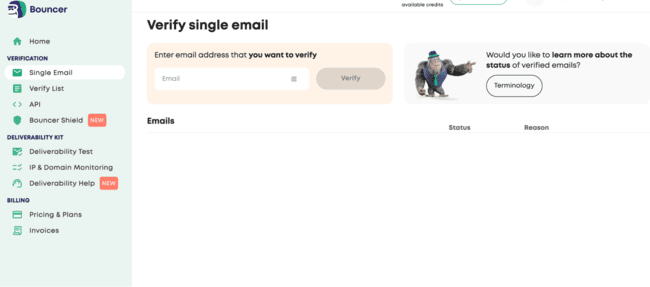
Verify 100 emails for free with Bouncer
5 Quick Tips to Create a Professional Email Address
When it’s time to create a new email address for work or personal branding, a little planning goes a long way. You want something that looks professional, is easy to remember, and reflects well on you or your business. This matters even more if your email ends up on your website, in outreach, or printed on a business card.
Here are 5 quick tips to create a professional email address:
- Keep it simple and clear: Use your real name or a very close variant. Avoid nicknames, random numbers, or quirky spellings. An address like jane.smith@ looks far more professional (and memorable) than cooljane123@. Simplicity makes it easy for others to recall and less likely to mistype.
- Make it easy to type: People will type your email on mobile devices. If your address has too many dots, hyphens, or long words, it’s easier to mistype. Keep it short and clean so it’s easy to share and easy to enter correctly.
- Use a custom domain for business: If you want this to be a professional email address, don’t stick to free email addresses. Using your own domain (e.g., @yourcompany.com) instantly boosts credibility. Not sure how to set that up? See our guide on how to make your own email. It’s one of the simplest signals of a successful business.
- Avoid punctuation overload: While periods and underscores are allowed, don’t overdo it. john.doe@ is fine, but john.doe.smith_account@ or john_doe.something@ looks messy and is hard to tell someone aloud. One or two separators are enough for clarity; any more can become a typing trap.
- Test for tone and typos: Before you finalize an address, write it out and say it aloud. Make sure it doesn’t sound unprofessional or accidentally spell something weird when the letters run together. A quick gut-check can save you from an unintentionally awkward email handle.
Crafting a professional email address is a small detail that makes a big difference. A clean address format shows attention to detail and gives a positive impression before someone even opens your email.
FAQs About Valid Email Address Formats
What is the correct format for an email address?
What is the +1 email trick?
[email protected] …you can also receive emails sent to:
The messages still arrive in the same inbox, but the tag helps you identify where the email was used. Most major email service providers support this, including Gmail and Outlook.
Is @gmail an email address?
An email address needs a username before the @ symbol for it to point to a specific mailbox. Think of it like sending a letter with just “Street Name” but no house number. It doesn’t know who to reach. If someone just says, “Reach me at @gmail,” you’d be left asking, “At Gmail, what?”
A valid Gmail address looks like [email protected]. Here, “john.doe” is the username and “gmail.com” is the domain. Both parts are required. Simply having @gmail.com with nothing in front won’t work, since it doesn’t point to any user. Always include both a username and a domain to have a functional email address.
