14 best social media scheduling tools for 2026
Most social media schedulers work well for solo marketers, but agencies and marketing teams have more complex requirements. As teams add clients, locations, users, and social accounts, approvals can become harder to manage, account connections can interrupt campaigns, and per-user or per-location pricing can increase costs quickly.
For these teams, social media management goes beyond scheduling posts. The workflow also includes drafting content, collecting client and stakeholder feedback, managing approvals, and getting final sign-off across multiple accounts at the same time. A scheduling tool that cannot support these steps can create more coordination work instead of reducing it.
This guide compares the top tools for social media scheduling to help you choose the right fit for your team size, publishing workflow, and budget. Before comparing the tools, I’ll cover native vs. third-party social media scheduling and the key features agencies and multi-location teams should look for.
What a social media scheduling tool is?
A social media scheduling tool lets teams create content in advance and publish it across multiple social platforms from one place. Instead of logging into each network and posting manually, teams can prepare posts ahead of time, choose when they should go live, and let the tool handle publishing. More advanced scheduling tools may also include review and approval steps before content is published.
Native vs. third-party social media schedulers
Third-party social media scheduling tools, such as Planable, typically offer broader workflow capabilities than native schedulers built into platforms such as Meta Business Suite or LinkedIn. The main differences include:
- Multi-channel publishing: manage and publish content across multiple social networks from one workspace instead of scheduling separately in each platform.
- Approval workflows: let team members, clients, or stakeholders review drafts, leave feedback, and approve content before publication.
- Cross-channel analytics: bring performance data from connected social networks into one place instead of reviewing results platform by platform.
The tools below range from straightforward scheduling and queuing apps to full publishing workflow platforms. The right choice depends on how your team creates, reviews, approves, and publishes content, as well as how many accounts and stakeholders you need to manage.
My top 5 scheduling tools
1. Planable
Agencies and teams managing many social accounts
2. Hootsuite
Enterprise-level management and analytics
3. Sprout Social
Big teams that need social listening
4. Buffer
eCommerce brands and simple scheduling
5. CoSchedule
Small projects and solo marketers
Best for
Agencies and teams managing many social accounts
Best for
Enterprise-level management and analytics
Best for
Big teams that need social listening
Best for
eCommerce brands and simple scheduling
Best for
Small projects and solo marketers
Over the past six years, I’ve tested and written about social media management tools hands-on.
For this list, I tested each platform by signing up, connecting multiple accounts, and running the same workflow: content calendar, drafting and collaboration, approvals, and publishing. I scored the platforms based on how well that workflow holds up as you add accounts, teammates, and clients.
Must-have features in any social media scheduler
Want to go beyond a functional scheduler to one that scales, especially when handling multiple brands? Here are the must-have features I evaluated.
1. Visual content calendar that handles volume
A drag-and-drop social media content calendar does the essential work: spotting gaps, avoiding overlap, and keeping hundreds of posts organized without opening spreadsheets.
The best scheduling tools let you view content across multiple accounts simultaneously, use labels to differentiate campaign types or client brands, and reorganize schedules in bulk when priorities shift.
If the calendar becomes unusable when you’re planning more than 20 posts a week, it’s not built for your workflow.
2. Client friendly collaboration tools for any type of feedback
Every extra step in your feedback loop (think downloading posts to share via email, chasing approvals in separate threads or losing version control across tools) adds friction.
Your content scheduler should centralize creation, review, and edits in one place. For marketing agencies and multi-location teams, external sharing (where clients or stakeholders can review and approve without logging in) is non-negotiable.
3. Approval workflow with automatic posting to social media
Multi-layered approval flows handle compliance, brand control, and keep you from becoming the bottleneck.
Look for schedulers that let you configure tiered approvals (creative → brand → legal, or franchise → regional → corporate) and auto-publish once the final sign-off clears.
If you find yourself manually hitting “publish” after approvals, you’re not automating, you’re just organizing chaos in a different tool.
4. Platform integration variety
Starting with Facebook, Instagram, and LinkedIn is fine. Scaling to several accounts across TikTok, Pinterest, Threads, and Google Business Profile is where tools collapse.
Platform count matters, but integration depth matters just as much. Look for tools that connect natively to at least Instagram, LinkedIn, Facebook, TikTok, and YouTube. Then check how the integration is built: native API connections are more stable than third-party bridges, which can break when platforms update their APIs without warning.
5. Bulk scheduling and import
For teams managing high-volume content calendars, scheduling posts one at a time doesn’t hold up. Bulk scheduling lets you import multiple posts via CSV, duplicate existing drafts across campaigns, or fill a week’s worth of content in a single session. Look for support for bulk time-slot selection and template reuse. Both become significant time-savers when you’re managing 10+ accounts. Planable supports CSV import and post duplication across campaigns.
6. Mobile app availability
Remote and distributed teams need to review and approve content outside the office. A mobile app for iOS and Android keeps the approval process moving even when team members aren’t at their desks.
14 best social media scheduling tools for 2026
Managing social media without a dedicated scheduling tool is messy and unsustainable.
While some platforms offer native schedulers, they’re no match for the flexibility and efficiency of these specialized social media scheduling tools I handpicked for you.
94% of social media marketers now use AI in their workflows according to HubSpot. The tools below reflect that shift, with AI-assisted scheduling, caption generation, and timing optimization becoming table-stakes rather than premium differentiators.
1. Planable: for bulk scheduling and content automation
Best for: agencies and multi-client teams
Planable is a social media management tool centered on the planning-to-approval workflow: teams draft, comment, and approve posts in one view, without switching to email threads or separate feedback tools.
Its social content calendar offers four view modes: grid, feed, calendar, and list. Teams can switch between high-level planning in the calendar view and granular post detail in the feed view.
The Universal Content feature supports written content like blogs, newsletters, and press releases, managed alongside social posts in the same workspace.
Labels and filters let you organize content by campaign, client, brand, or content type, making it useful when tracking dozens of posts across multiple accounts at once.
Planable standout features
- Visual content calendar with drag-and-drop for easily rescheduling and reordering across platforms
- Custom approval workflows, configure multi-tier approvals (creative → brand → client), with required sign-offs before any post publishes
- AI-assisted writing and reusable templates to reduce time spent on first drafts and repetitive content types
- Bulk scheduling: import or duplicate multiple posts simultaneously across campaigns
- Media Library v2, organizes all creative assets in folders with real-time search, usage filters to find assets by where they’ve been published, bulk ZIP download, and native Canva integration for direct design imports.
- Cross-channel analytics: Track performance, growth metrics, and campaign results across platforms without logging into native analytics for each channel. Clean and customizable reporting views make it faster to pull insights and share results with stakeholders.
- Competitive intelligence: The Competitor Analytics tab lets teams track up to five rival brand profiles, benchmarking post frequency, engagement, and growth directly against their own pages.
- You can also manage Planable posts through its MCP connector. Connect Planable to a compatible AI assistant to create or update drafts, set scheduling details, add labels, and manage content without working entirely inside the Planable interface. Posts created through MCP still follow your existing approval and publishing workflow.
Integrations: Planable integrates with 9 social media platforms: Instagram, Facebook, LinkedIn, Youtube, X, Google Business Profile, Threads, and Pinterest.
Pricing: Planable offers a free trial for the first 50 scheduled posts and three paid plans: Basic $33/workspace/month for unlimited users and 60 posts, Pro $49/workspace/month for unlimited users and 150 posts and Enterprise. Pricing scales by workspace, not by seat count, which keeps costs predictable as you add clients.
Drawback: Less suitable for solo creators who only need basic scheduling. Analytics are sold as a separate add-on for $12 per workspace per month.
Takeaway: Planable is a solid option for team approval workflows and automation, especially for social media planning + content collaboration. It’s particularly well-suited for agencies, marketing teams with external stakeholders, or any team that wants a clean, very visual way to manage post approvals. Give it a try for free.
What are users saying about Planable
- I like the way the page is laid out. We can see the posts as they will actually look on the platforms. Being able to set up schedules and to push to multiple channels, it really saves us time” – Victoria B., Principal Marketing Specialist.
- “Scheduling content and not having to post manually… the scheduling saves me SO much time from having to manually post on each platform. I also love how Planable gives me the best times.” – Aaron F., Creative Director.
- “I’ve been searching for a scheduler app for a long time… It helps me maximize efficiency in terms of bulk scheduling, especially since I record my episodes ahead of time.” – Justin L., Small Business Owner.
- “I use Planable for scheduling posts for Instagram and Facebook. It helps me plan ahead and maintain a presence without taking up much of my daily time. I like that I can see the grid ahead of time and rearrange posts easily.” – Taylor K., Small Business Owner.
How to schedule posts with Planable step by step
1. Create a post in your workspace in Planable: add text, videos, pictures, gifs, or anything else you’d like to share with the audience.
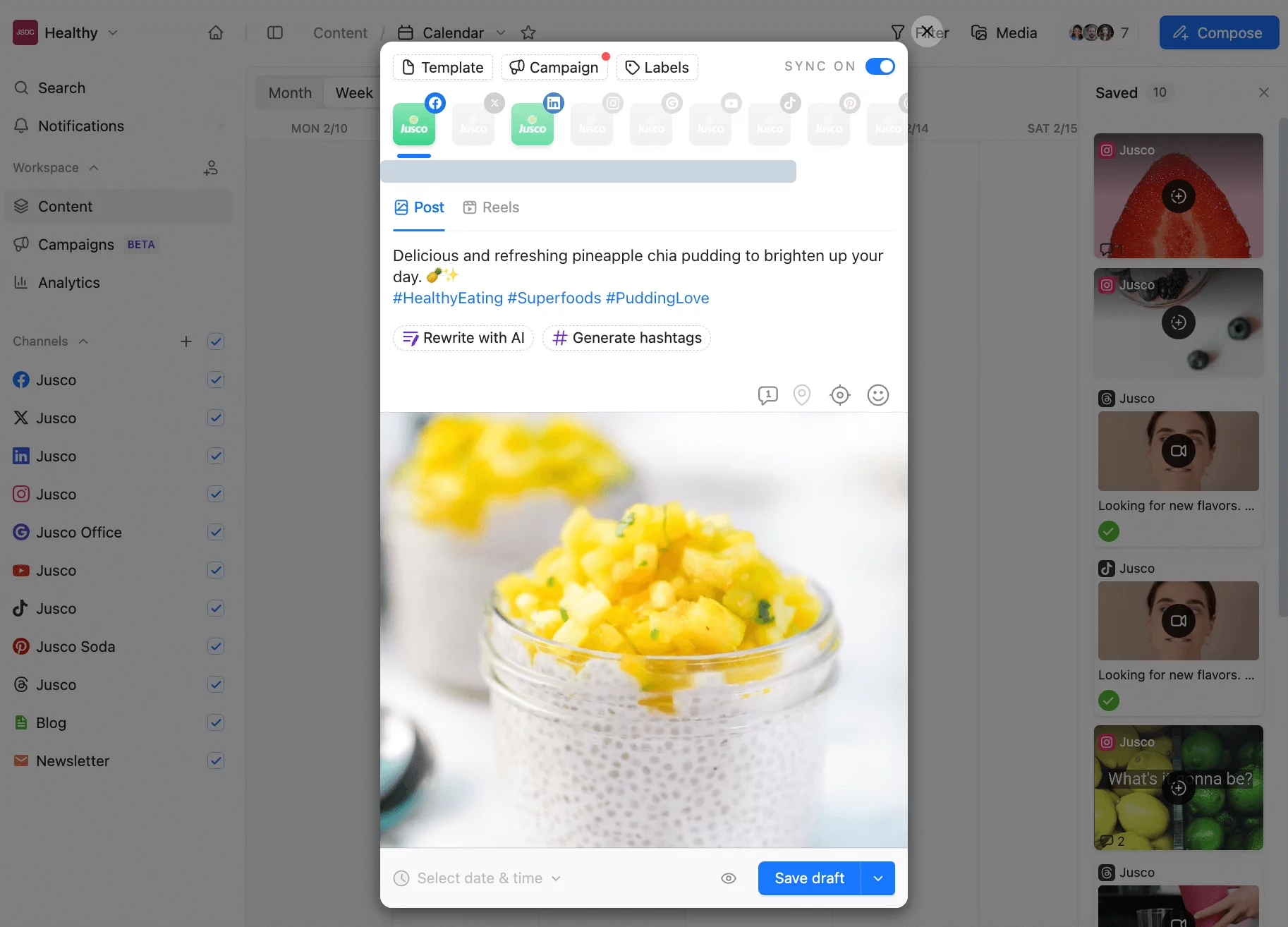
Scheduling a social media post to Facebook and LinkedIn from the Planable app
2. Turn on the Sync on toggle to publish the post across several social media platforms.
3. Ask Planable’s AI to make your post punchier or rephrase the message for another platform.
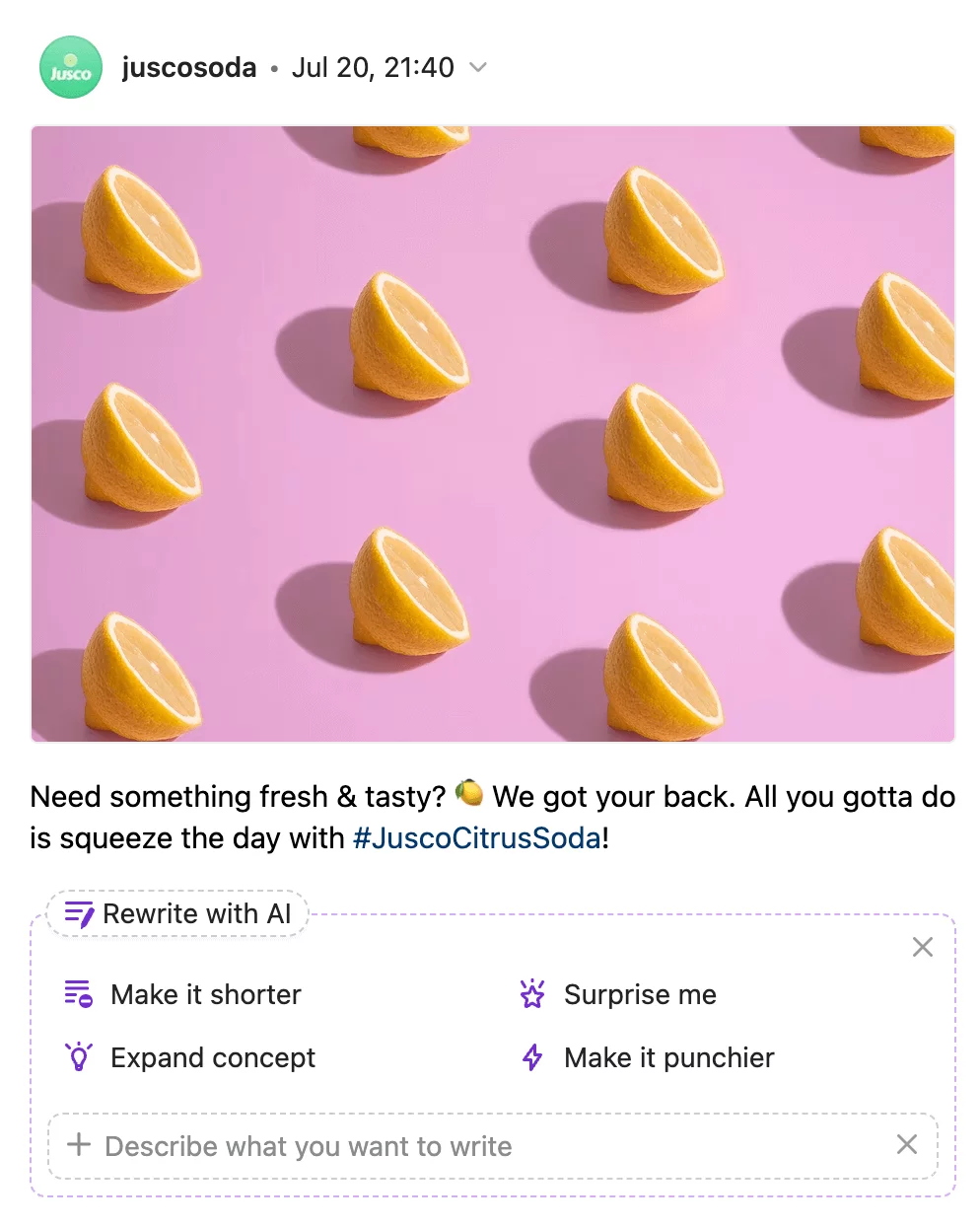
Using Planable AI when scheduling a social media post to rewrite the caption
4. Add labels to easily filter your posts later.
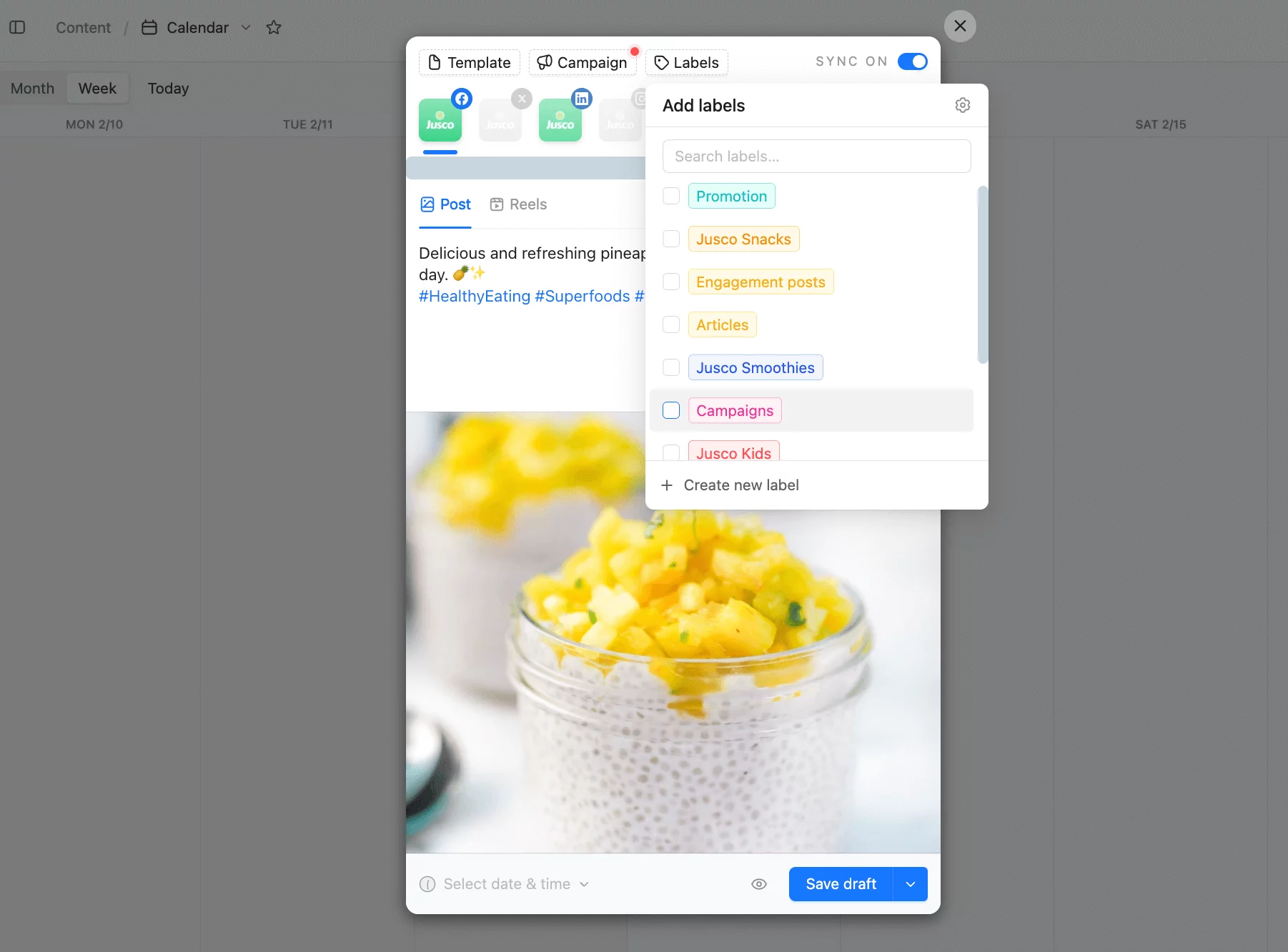
Creating and adding labels for scheduled posts in Planable
5. Add a date and time for your post to go live or use Planable’s Best Time to Post feature to choose a recommended publishing time.
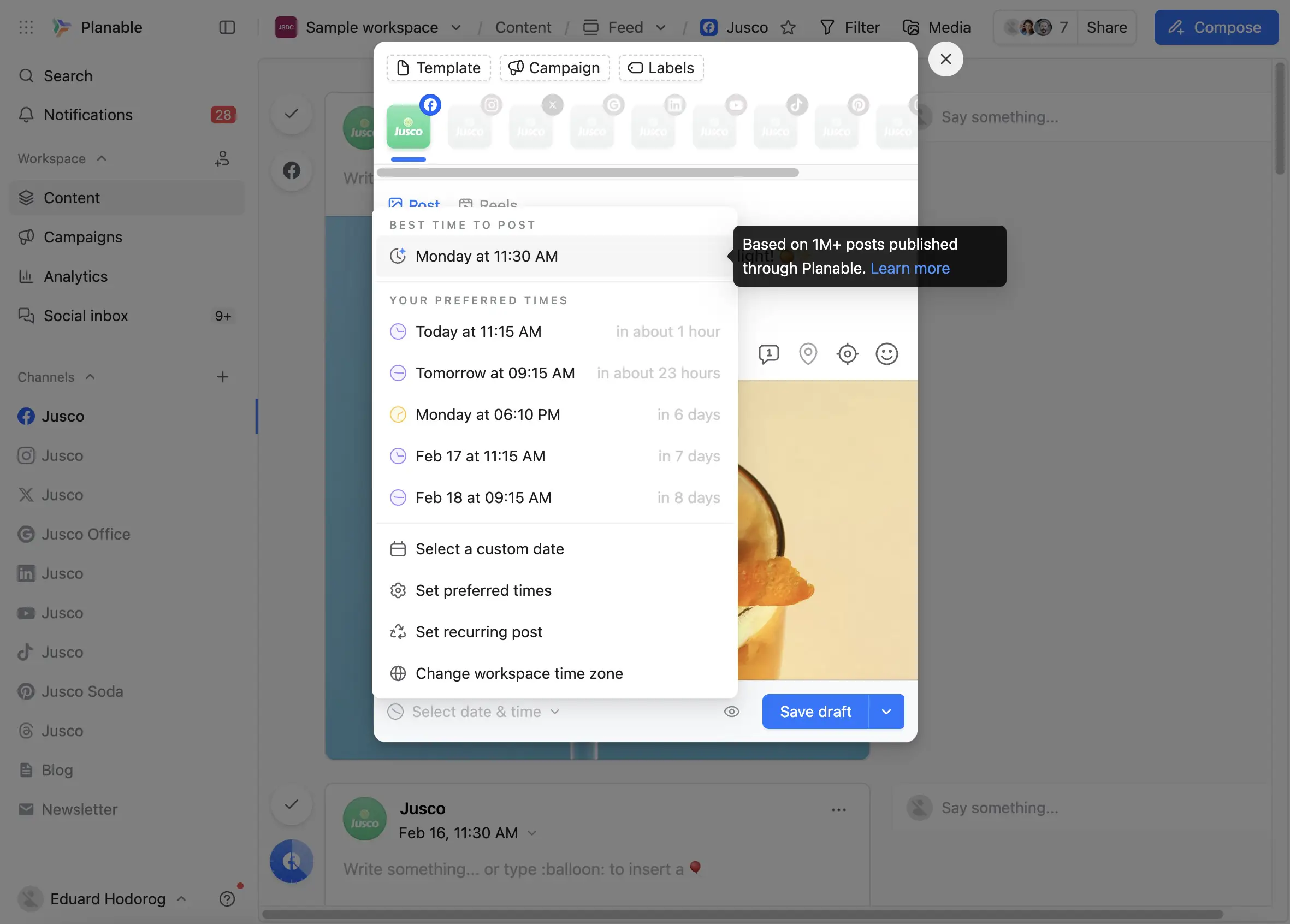
Planable suggests the best time to publish a post
6. Press Schedule and pour yourself a cup of coffee. Well done!
2. Hootsuite: for enterprise dashboards and social inbox management
Best for: enterprise brand teams
Hootsuite is a market pioneer in social media management and it allows users to manage their online presence from a single dashboard.
The interface provides an in-depth breakdown of marketing activities. It enables you to respond quickly to mentions with the help of a social inbox feature.
Its social media calendar is not the most modern-looking, but it gives teams a comprehensive overview of posts planned across multiple platforms.
Hootsuite’s newest update, OwlyAI, helps avoid writer’s block and generate new relevant ideas for social media posts to fill in the gaps in the social media calendar.
Hootsuite standout features
- Recommendations on hashtags and the best time to publish posts for peak engagement.
- Batch scheduling across all your accounts and direct publishing.
- Streams let you monitor real-time social activity, messages, mentions, and conversations across platforms.
Integrations: Instagram, Facebook, Twitter, LinkedIn, Pinterest, Threads, TikTok, BlueSky and YouTube.
Pricing: Hootsuite has a free trial period and three paid plans starting from $99/user/month.
Drawback: Pricey, occasional reliability issues, complex UI, limited mobile features.
Takeaway: If you’re looking for a time-proven solution to maintain your social media posting schedule and manage your social media accounts, Hootsuite will do just fine.
3. Sprout Social: for enterprise teams consolidating listening and publishing
Best for: enterprise brands with research teams
Sprout Social is an enterprise social media management platform that consolidates scheduling, listening, analytics, inbox management, and employee advocacy into one system.
Their scheduler handles bulk planning across multiple accounts with a visual calendar designed for high-volume workflows. Batch scheduling, cross-platform campaign management, and centralized publishing controls reduce the tool-switching that fragments workflows at scale.
Sprout Social standout features
- Interactive content calendar where teams can draft posts, access the media asset library, and organize posts across profiles and campaigns.
- In-depth social analytics on campaigns, content performance, and competitor analysis.
- Social listening to monitor brand mentions and create relevant content.
Integrations: Instagram, Facebook, Twitter, LinkedIn, Pinterest, TikTok, YouTube, WhatsApp, Facebook Messenger, and Google Business Profile.
Pricing: The platform has a free 30-day trial period, and its paid plans start at $199/seat/month, with five social profiles included.
Drawback: Premium pricing; scheduler sometimes feels less intuitive vs visual-first tools like Planable.
Takeaway: Sprout Social is a good choice for enterprise companies that want to keep a close eye on their social media performance and have the budget to do so.
4. Buffer: for simple queue-based scheduling and audience growth
Best for: eCommerce brands with simple scheduling needs
Buffer is designed to optimize social media publishing and scheduling. The platform strongly emphasizes building an organic audience, with its key features like social inbox and comments sentiment analysis reflecting this approach.
Its microsite builder also makes it a solid choice for eCommerce businesses looking to showcase their products.
The post planner allows tailoring content for each social media platform, so your Instagram posts can have different captions than Facebook ones. You can schedule content automatically or choose your own custom time for posting.
Buffer standout features
- Buffer AI assistant to help generate ideas, repurpose social media posts, and source inspiration.
- Collaboration tools, including different roles and permissions, approvals, and team drafting to stay on the same page.
- Account management for handling multiple brands from one platform.
Integrations: Instagram, Facebook, LinkedIn, TikTok, Google Business, Pinterest, Twitter, and Mastodon.
Pricing: Buffer offers a free plan with up to 30 monthly scheduled posts per channel. To upgrade, there are two paid plans starting from $5/month per channel.
Drawback: Pricing can get confusing because users pay per channel. If you add another social platform, you’ll need to pay extra.
Takeaway: Buffer is one of the simple yet effective social media management tools that ticks all of the boxes for small teams focusing on particular channels. It’s a neat platform for content curation to ensure you execute your social strategy at its best.
5. CoSchedule: for marketing calendar planning and evergreen re-queuing
Best for: solo marketers
CoSchedule is a project management tool that prioritizes efficient workflows for all marketing activities, including the brand’s social media schedule.
It offers a marketing calendar to help social media professionals streamline content curation across social channels and save time scheduling content.
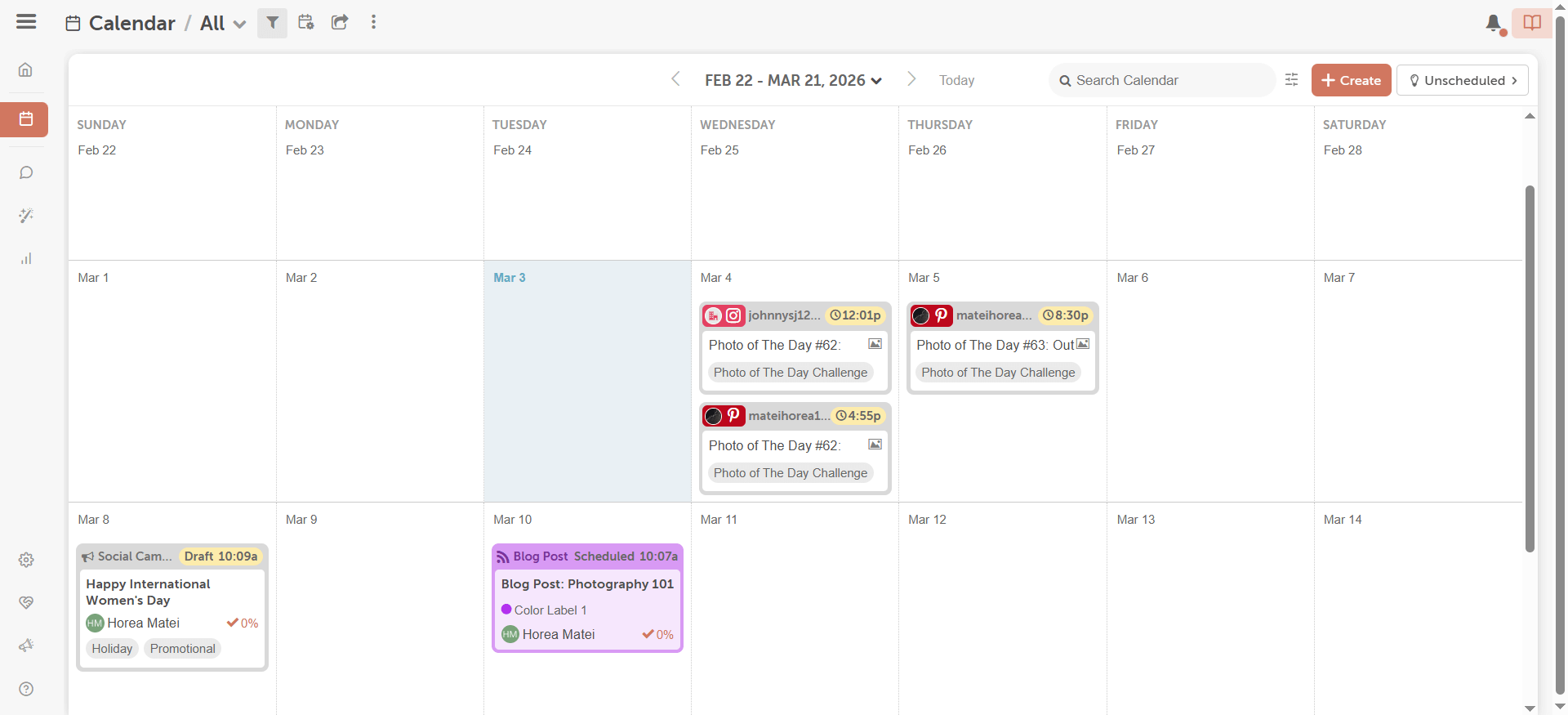
CoSchedule marketing calendar dashboard
CoSchedule’s marketing calendar is more of a post planner than a full-scale social media tool. Users can schedule one-time social media posts or create a social campaign consisting of several messages.
It also has analytical tools to track social media campaigns, like the Top Content report. This report gathers content that gained the most engagement on one page, making it easy for social marketers to identify the top-performing formats.
CoSchedule standout features
- Best Time Scheduling tool to schedule posts with confidence for maximum reach.
- ReQueue Bucket automatically reshares your evergreen content across platforms when there’s a gap in the social media schedule.
- Social media optimizer to adapt your caption to different social platforms.
Integrations: Facebook, Instagram, LinkedIn, Twitter, WordPress, MailChimp, and other marketing platforms.
Pricing: CoSchedule has a free version of the marketing calendar and a pro version for $19/month per user.
Drawback: The publishing tool only allows Business profiles to publish directly on Instagram. Features like collaboration and content templates are only available in the pro version.
Takeaway: CoSchedule is a simple publishing tool for teams that want to streamline their content process and make work more transparent.
6. Later: for visual planning
Best for: creators and visual-first brands
Later started as an Instagram-only social media scheduling tool. In the meantime, it expanded to other networks, including Facebook, TikTok, LinkedIn, Pinterest, and YouTube.
It has a visual content calendar that allows marketers to manage multiple social media accounts across different channels.
Being somewhat Instagram and TikTok-oriented, Later has joined forces with Mavrck, an influencer marketing platform. This partnership complements Later’s collab features, allowing social marketers to collaborate with creators and influencers through one social media management tool.
Later doesn’t have flashy content features but offers straightforward content creation and scheduling in just a few clicks. It has built-in content creation tools such as a media library, cropper, hashtag suggestions, and a UGC finder to source content generated by your target audience.
Later standout features
- Bulk scheduling across multiple channels and auto-publishing for all supported social media platforms.
- Visual drag-and-drop content calendar to plan and schedule posts.
- Social media analytics to track performance.
Pricing: Later has a free plan, and its paid plans begin at $18.75/month/user.
Drawback: Less rich feature set for non-visual platforms; limited analytics depth.
Takeaway: Later is a great tool to schedule your posts and stay on track for small teams and solo creators. If you prioritize Instagram or another platform for visual content like Pinterest or TikTok, consider giving Later a try.
7. Zoho Social: for data-driven reporting and multi-brand publishing
Best for: data-focused in-house teams
Zoho Social is a social media management platform built for businesses that need reliable scheduling, analytics, and team collaboration.
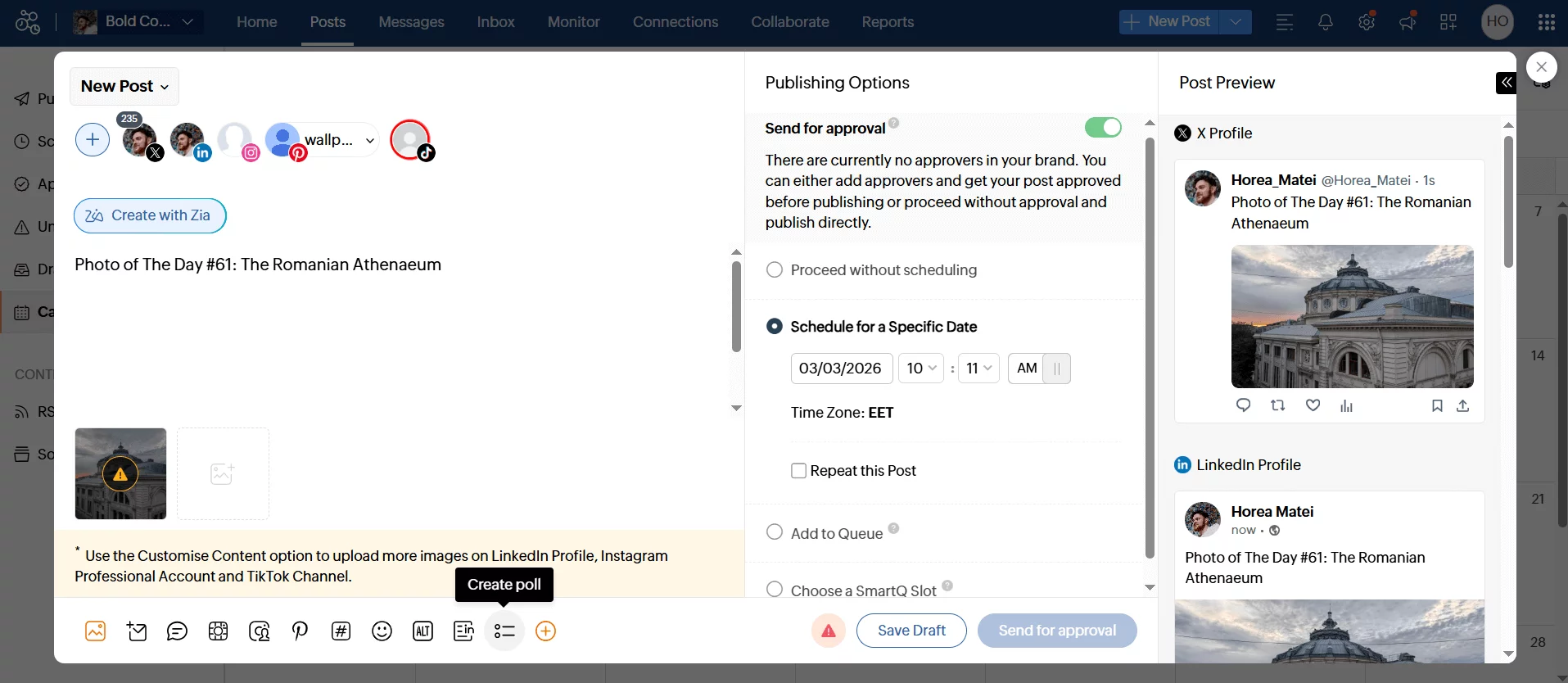
Zoho Social social media post composer
It handles multi-account management and reporting workflows with enough depth for professional teams, but stays streamlined enough to onboard quickly.
Users like Zoho for its data-based predictions on the best time to post and other optimization and its detailed reports.
Zoho standout features
- Bulk schedule to transfer posts from a spreadsheet to Zoho Social content calendar.
- Social analytics and a set of custom and pre-built reports to better understand our audience.
- Mobile app to schedule and track posts on the go.
Integrations: Instagram, Facebook, Twitter, LinkedIn, Pinterest, YouTube, TikTok, and Google Business Profile.
Pricing: Zoho Social starts at $15/month per brand for scheduling and basic analytics across 10 channels. Agency pricing available for managing multiple brands. 15-day free trial included.
Drawback: Although Zoho has collaboration features, roles, and approvals, they’re pretty simple and don’t fit more complicated workflows.
Takeaway: Zoho’s strong suit is analytical reports and many data-driven approaches to social media marketing.
8. Agorapulse: for brand monitoring and inbox-led engagement
Best for: community managers
Agorapulse is a social media management platform that ticks all the right boxes: schedule and publish content, engage with the audience through comments and direct messages, listen to brand mentions, and report on content performance.
Its multi-platform publishing option saves a lot of time regarding content planning and helps you stay consistent across all social channels.
Besides, Agorapulse works as a project management tool where teams can collaborate, assign posts to each other, and leave comments to tweak copy or visuals.
Agorapulse standout features
- Smart customizable social inbox to gather all the mentions, comments, and reviews and filter them with labels and tags.
- Integration with Google Analytics 4 to get a holistic overview of how social content performs in terms of ROI.
- Media library to organize and store all branding materials and quickly access them during content planning.
Integrations: Facebook, Twitter, Instagram, LinkedIn, Google Business Profile, YouTube, and TikTok.
Pricing: Agorapulse offers a 30-day free trial to get started. After that, there are four paid plans available, beginning at $79/user/month.
Drawback: UI isn’t the most intuitive; reporting/scheduling features not as deep as some competitors.
Takeaway: Agorapulse is a nice option for those who want to give social media scheduling tools a try in general: it has all the necessary features and suits smaller teams best.
9. Sendible: for agency client management and content queues
Best for: medium-sized marketing agencies
Sendible positions itself as the top social media management tool for agencies and offers a range of plans to cater to different organizations.
It supports social media scheduling, offers content recommendations, and provides reporting on campaigns and a social inbox.
Sendible standout features
- An integration with Canva allows marketers to tap into their design library when creating a new post.
- Queues of thematic content to keep your editorial calendar filled to the rim.
- Content social sharing feature to automatically post important updates and find relevant content to share on your accounts.
Integrations: Facebook, LinkedIn, Instagram, TikTok, Twitter, WordPress, Medium, and Tumblr.
Pricing: Sendible has a 14-day free trial period and three paid plans starting from $29/user/month.
Drawback: Occasional scheduling glitches, and, in some cases, a steep learning curve for advanced features.
Takeaway: Sendible is a steady option with enough functionality to cover the needs of a professional social media team. It is clumsy UX-wise but compensates with a nice list of features for a reasonable price.
10. Statusbrew: for comment moderation at scale
Best for: consumer brands with moderation needs
Statusbrew is one of the most affordable social listening tools. It enables users to create polished, customizable report templates for a deep dive into social media performance.
Its social media scheduler includes tools for benchmarking your performance against competitors, AI-powered sentiment analysis, and advanced comment moderation to refine and enhance your overall social media strategy.
Statusbrew standout features
- Schedule content for multiple social pages with channel-specific editing options.
- Automate responses and manage social media interactions through a unified inbox.
- Use an integrated CRM to track every contact received via social platforms.
- Protect your brand’s reputation by hiding or deleting comments on organic and dynamic posts, based on sentiment and keyword filters.
Integrations: Facebook, Instagram, LinkedIn, X, YouTube, TikTok, Pinterest, and Google Business Profile.
Pricing: Statusbrew provides a 14-day free trial so you can test the platform. Once the trial ends, users can choose from four paid plans starting at $69/month for one user and five social profiles.
Drawback: Statusbrew can feel overwhelming for first-time users due to its complex interface, and it offers limited social media scheduling customization options. Editing content already scheduled for multiple posts can be challenging, making adjustments less seamless.
Takeaway: Statusbrew is built for teams that need social listening, sentiment analysis, and advanced reporting alongside scheduling. Expect a learning curve but deep analytics capabilities.
11. Loomly: for post idea generation
Best for: small in-house teams
Loomly is a versatile social media scheduling tool designed for marketers wanting efficiency and organization in their workflows.
It offers scheduling to most social media platforms, planning, engagement tracking, advanced analytics, and social media reports, making it a well-rounded social scheduler.
Loomly simplifies the user journey with features like the Calendar Wizard, which guides users through connecting social media accounts, setting up preferences, and initiating scheduling workflows for multiple social accounts.
Built with collaboration in mind, the social media scheduling tool has team-based functionalities such as post approvals, commenting, and role assignments.
However, some advanced features, like custom workflows and roles, are limited to higher-priced plans, which might not suit smaller teams with tight budgets.
Loomly standout features
- Publish and schedule posts across popular platforms like Facebook, Instagram, TikTok, and LinkedIn.
- You can use the RSS feed integration and trending topic suggestions to generate post ideas.
- Assign roles, comment on posts, and manage approval workflows for all social media channels.
- Receive post scheduling updates through push notifications, Slack, or Microsoft Teams for enhanced productivity.
Integrations: Instagram, LinkedIn, X (Twitter), Pinterest, Facebook, Google Business Profile, TikTok, Threads, YouTube and Snapchat.
Pricing: Loomly offers two paid plans: Starter at $49/month, with 12 social accounts and 3 users, and Beyond at $249/month, with 60 social accounts and unlimited users. Enterprise supports 61+ social accounts with custom pricing.
Drawback: The platform lacks social listening capabilities and integrations with tools like Google Analytics. The learning curve for new users may also pose challenges, especially for those unfamiliar with its user interface.
Takeaway: Loomly handles scheduling, approvals, and content inspiration for small teams, but advanced workflow features are locked behind higher-tier plans and sales conversations.
12. HubSpot: for social inbox management tied to CRM data
Best for: HubSpot Marketing Hub users
HubSpot provides a dedicated social media management platform and includes all the features you need to schedule content at just the right time for maximum engagement.
Its AI uses social media performance data to provide ideal posting time suggestions, content, and campaign ideas for maximum results.
Plus, HubSpot includes a particularly social inbox management tool where you can set up keyword monitoring streams to monitor and respond to comments across social.
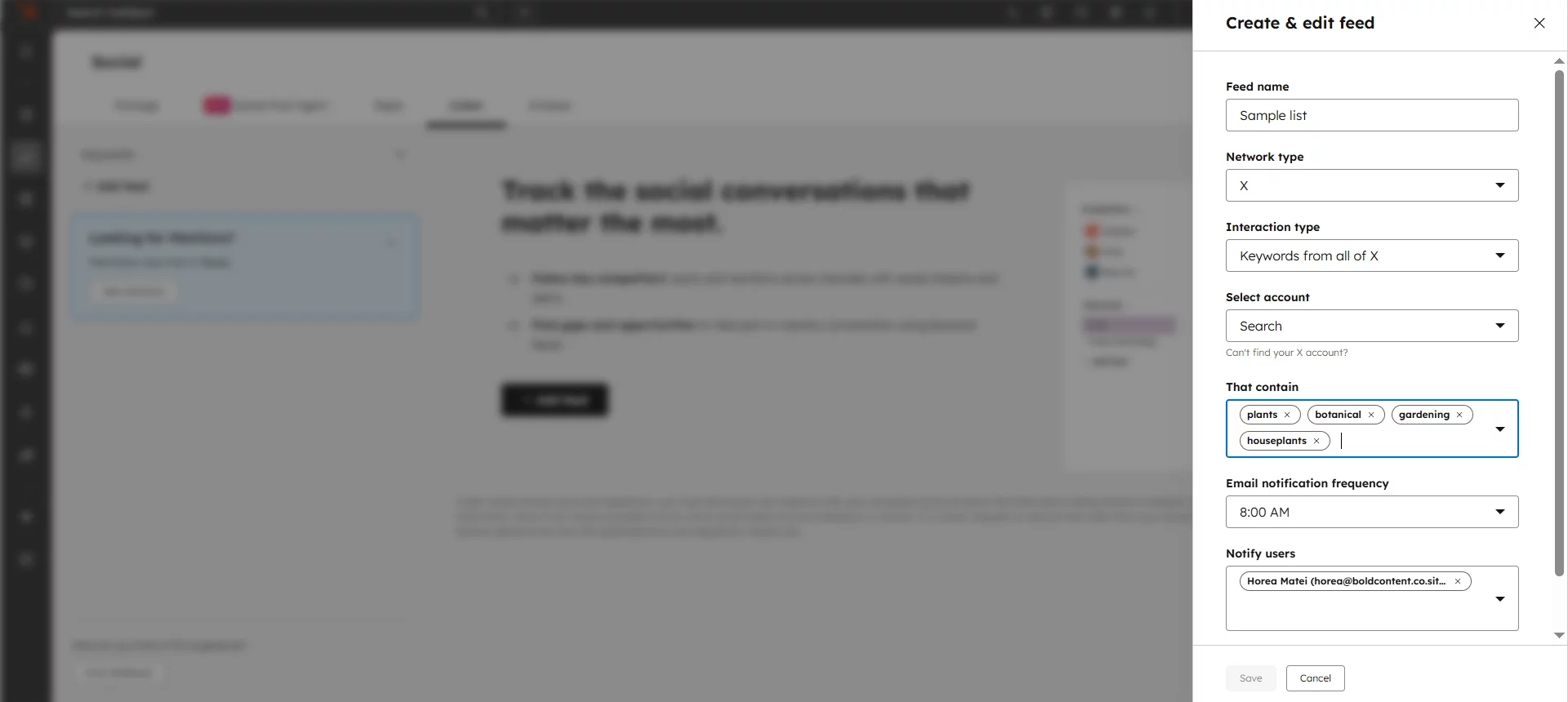
HubSpot keyword stream panel
Linking the social media management tools with HubSpot’s CRM also reveals extra details about your contacts and how they previously interacted with your company.
Hubspot standout features
- Suggests multi-channel campaign ideas and ideal posting time suggestions based on data like your social performance, company details, marketing best practices, and more.
- Sends email alerts whenever people mention specific keywords in comments.
- Measure cross-channel campaign performance with the platform’s built-in analytics, and gauge social media ROI with the platform’s CRM integration.
Pricing: The social media management platform is included in HubSpot’s Marketing Hub Professional Package, which costs €792/month that includes three core seats. Additional seats start at €45/month.
Drawback: You cannot use the social media management tool as a standalone product; it only comes bundled with other marketing automation tools.
13. SocialBee: for category-based queues and evergreen recycling
Best for: solopreneurs and personal brands
SocialBee is a social media scheduling tool for solopreneurs and small businesses that need structured content queues and evergreen recycling.
Its category-based queue system is the main differentiator: you create queues by content type (educational, promotional, curated) and SocialBee rotates through them automatically, keeping your calendar full without constant manual effort.
The evergreen recycling feature re-queues top-performing posts on a set schedule, which cuts the time you’d otherwise spend re-creating content for topics that stay relevant. An AI content assistant handles generation and repurposing inside the platform. Bulk import via CSV or RSS feed makes it practical for teams migrating large content libraries or setting up campaigns at scale.
SocialBee standout features
- Category-based content queues: organize posts by content type and let SocialBee rotate through them automatically
- Evergreen recycling: top-performing posts get re-queued after a set interval, without manual re-scheduling
- Canva integration: access and import Canva designs directly from the scheduler
Platforms: Facebook, Instagram, LinkedIn, Twitter/X, Pinterest, TikTok, Google Business Profile, YouTube, Threads (9 platforms)
Pricing: Starter $24/month, Accelerate $40/month, Pro $82/month. No free plan, but 4-day free trial.
Drawback: SocialBee’s workspace structure is simpler than agency-focused tools. If your workflow depends on multi-tier approval sign-offs or separate content environments per client, SocialBee suits individual creators and small teams better than multi-client agency operations.
14. Metricool: for organic and paid performance in one calendar
Best for: in-house marketers managing organic and paid social together
Metricool is a social media scheduling and analytics platform for marketing teams that want both functions in one tool. Its standout feature is the combination of social scheduling with paid ad analytics. Meta and Google Ads performance appears alongside organic post data in the same dashboard, which cuts the number of platforms a marketer needs to check daily.
The unified visual content calendar uses drag-and-drop scheduling. AI-powered best-time-to-post recommendations are based on per-channel engagement data, not generic benchmarks.
The competitor analytics feature tracks competitors’ public social performance directly from inside the platform, making it useful for benchmarking without switching tabs.
Metricool standout features
- Best time to post: AI recommendations based on your historical engagement data per channel
- Competitor analytics: track competitors’ public social performance inside the platform
- Paid ad analytics: Meta and Google Ads data sits alongside organic content metrics in one view
Platforms: Instagram, Facebook, LinkedIn, Twitter/X, Pinterest, TikTok, YouTube, Google Business Profile, Twitch, BlueSky, Mastodon, Threads (12 platforms)
Pricing: Free plan (1 brand, limited analytics/scheduling), Starter $20/month, Advanced $53/month, and Custom.
Drawback: Metricool’s approval workflow is limited compared to dedicated agency tools. For individual marketers or small teams who don’t need multi-tier sign-offs, that’s fine. For teams managing multiple clients with formal approval processes, the absence of a structured workflow layer is a meaningful gap.
Here’s how all 14 tools compare at a glance:
Planable
Agencies and teams
$33/month per workspace
No (14-day trial)
Yes
Hootsuite
Enterprise and social inbox management
$99/user/month
No
Yes
Sprout Social
Social listening
$199/seat/month
No (30-day trial)
Yes
Buffer
eCommerce and simple scheduling
$5/month per channel
Yes
Basic
CoSchedule
Small projects and solopreneurs
$19/month per user
Yes (calendar)
No
Later
Visual content for Instagram and TikTok
$18.75/month per user
Yes
No
Zoho Social
Complex analytics
$15/month per brand
Yes
Basic
Agorapulse
Brand monitoring
$79/user/month
No (30-day trial)
Yes
Sendible
Medium-sized agencies
$35/month
No (14-day trial)
Basic
Statusbrew
Social listening and reporting
$69/month
No (14-day trial)
Yes
Loomly
Small-team automation
$49/month
No (15-day trial)
Basic
HubSpot
Social inbox management
~$914/month
No
No
SocialBee
Evergreen content and solopreneurs
$24/month
No (14-day trial)
No
Metricool
Analytics and scheduling
$20/month
Yes
No
How do I choose a social media scheduler that scales with my team?
Look for tools that handle your current pain points without breaking when you grow. Answer these questions before committing to a platform:
Can the calendar stay functional when you’re managing 100+ posts?
Some tools become unusable once you exceed 20-30 scheduled posts. Test whether the interface slows down, whether you can still view multiple accounts simultaneously, and if drag-and-drop scheduling holds up under volume.
Do approval workflows support multi-tier sign-offs (internal + client)?
Single-level approvals work for small teams. At scale, you need configurable chains (creative → brand → legal, or franchisee → regional → corporate) with auto-publishing once final approval clears, not manual intervention after the workflow completes.
Will platform integrations hold when you add more accounts or channels?
Starting with three social profiles is different from managing ten accounts across emerging platforms. Look for tools with stable API connections that don’t require constant re-authentication and add new platform support as channels evolve.
Does pricing scale transparently, or will costs double unexpectedly?
Some schedulers look affordable until you add a fourth user or tenth location. Understand how pricing increases with users, workspaces, channels, and features before you’re locked into a workflow that becomes prohibitively expensive to maintain.
Does it handle multiple time zones for distributed or global teams?
For agencies or brands with team members or clients in different time zones, per-post time zone settings matter more than account-level defaults. A tool that only lets you set one timezone at the account level means someone on the team is always calculating the offset manually, which is where scheduling errors happen.
Look for schedulers that let you specify the target timezone per post. That way, content for a US client goes out at 9 AM EST and content for a UK client goes out at 9 AM GMT, without anyone converting in their head before hitting publish.
Pro tip: Most platforms offer free trials specifically so you can stress-test them before committing. If a platform struggles with your current operations, it won’t hold up when you scale.
Which social media automation features matter by team type
Solo creators
Scheduling, visual calendar
Approval layers, external client sharing, multi-workspace management
Small in-house teams
Scheduling, calendar, collaborative editing, approvals
External client sharing, complex multi-tier approvals
Agencies and multi-location teams
Calendar at scale, structured feedback, multi-tier approvals, external sharing
Few features can be omitted when workflows involve multiple brands or stakeholders
- Scheduling
- Visual calendar
- Approval layers
- External client sharing
- Multi-workspace management
- Scheduling
- Calendar
- Collaborative editing
- Approvals
- External client sharing
- Complex multi-tier approvals
- Calendar at scale
- Structured feedback
- Multi-tier approvals
- External sharing
Few features can be omitted when workflows involve multiple brands or stakeholders
Before shortlisting the social media schedulers, match the feature set to your actual workflow. The right requirements vary significantly between solo creators, in-house teams, and agencies.
- Solo creators generally need a reliable scheduler and a simple visual calendar to maintain a consistent publishing cadence. Approval workflows, external sharing, and multi-workspace management usually add unnecessary complexity for a one-person operation.
- Small in-house teams benefit more from collaborative editing and built-in approvals. These features help teammates review content before publishing without requiring the more complex client-sharing or multi-workspace capabilities that agencies often need.
- Agencies and multi-location teams typically need the most complete workflow: a visual calendar that can handle content at scale, structured feedback, multi-tier approval chains, and external sharing that lets clients or stakeholders review content without logging in.
FAQs
Can I schedule social media posts?
Yes. Social media scheduling tools let you plan, draft, and queue posts to publish automatically at a set date and time, across multiple platforms simultaneously. You create the post in advance, select a publishing date and time, and the tool publishes it without requiring you to be online. Planable supports scheduled publishing to Facebook, Instagram, LinkedIn, X (Twitter), TikTok, YouTube, Pinterest, Google My Business, and Threads, all from one composer.
Do scheduled posts get fewer views?
No. Scheduling posts does not reduce organic reach or engagement. Platform algorithms treat scheduled posts identically to manually published ones; reach is determined by content quality, relevance, and timing relative to your audience’s active hours, not by whether you used a scheduler.
What’s the difference between native platform schedulers and third-party scheduling tools?
Native schedulers publish inside a single platform and work best for one brand on one channel. Third-party social media schedulers like Planable centralize multi-channel publishing, collaboration, and approvals, especially useful for teams managing multiple brands, clients, or locations.
What is the best social media scheduling tool?
The best social media scheduling tool depends on your workflow priorities: Planable (collaboration & approvals), Sprout Social (enterprise analytics & listening), Buffer (simplicity & ease of use), Hootsuite (social inbox & listening), Later (visual planning for Instagram & TikTok), CoSchedule (content marketing integration), and Zoho Social (affordable multi-account management).
Can I schedule the same post to multiple social media platforms at once?
Yes, most third-party social media scheduling tools support cross-platform scheduling. In Planable, you can write one post and schedule it to Facebook, Instagram, LinkedIn, TikTok, and 5+ other platforms from a single calendar view. You can publish the same version to all channels, or customize the caption, hashtags, and image crops per platform before scheduling.
What is the best free social media scheduler?
The best free social media scheduler depends on your channel mix and posting volume. Planable offers a 14-day free trial to test the full approval and publishing workflow before committing to a paid plan. Buffer‘s free plan supports up to 30 scheduled posts per channel per month across 3 channels, a workable option for individuals or very small teams. Later’s free plan works well for visual content on Instagram and Pinterest. Metricool’s free plan covers 1 brand with basic analytics and scheduling across all its supported platforms. CoSchedule’s free marketing calendar helps with planning but limits auto-publishing.
Horea is a B2B SaaS Content Strategist and MarTech researcher who specializes in software reviews, tool comparisons, and social media management. His work is research-first and fluff-free. He tests the tools, does the digging, and writes the kind of content that helps marketers make confident decisions.