Which Is Better in 2026? [Comparison]
Drip is better value than Klaviyo at scale, coming in at $21/month less for 2,500 contacts, with savings at nearly every tier from there. The trade-off is that Klaviyo’s segments, flows, and reports are better suited to complex customer journeys when you need them to be.
The question is whether Klaviyo’s depth is worth the extra or if Drip does enough. To help you answer that, we spent several days comparing Klaviyo vs. Drip to uncover their strengths and any caveats that could give you pause.
Our comparison spans their pricing, segmentation, automation, SMS, reporting, integrations, support, email builder, and templates.
Klaviyo vs. Drip: Quick comparison
Choose Drip for lower costs at scale and faster setup of core ecommerce features; choose Klaviyo for outright depth and data-led multichannel marketing.
| Klaviyo | Drip | |
|---|---|---|
| Verdict | Better if you’ll act on predictions and attribution data, or need email alongside SMS. | Better fit for an email-led store seeking lower running costs at volumes above 2,500 contacts and less upkeep. |
| Ease of use | ★★★★ | ★★★★★ |
| Pricing model | Scales by active profiles; cheaper at the low end, from $20/month at 500 contacts. Caps sends at 10x profiles. | Scales by active people; flat $39/month up to 2,500 contacts with unlimited sends. |
| Free plan | Free up to 250 active profiles. | No free plan; 14-day free trial. |
| Segmentation | Dynamic segments plus a predictive layer: churn risk, predicted CLV, and expected next order date. | Dynamic segments, tags, and behavioral triggers, including an LTV threshold. |
| Automation | One trigger per flow, with conditional logic up to 20-way branching inside a journey. | Several triggers in one workflow, with Workflow Goals that exit on conversion. Less conditional depth. |
| Email builder | Drag-and-drop, 160+ templates, coupon and review blocks, an HTML block, and dynamic product blocks. | Point-and-click Visual Builder, 50+ templates, and dynamic product blocks. No coupon or review block, and no external fonts. |
| SMS | Available in 22 countries, with two-way conversational automations. | U.S.-only and in beta by request. Campaigns and triggered texts, but no two-way conversations. |
| Analytics | Per-campaign and per-flow attribution, custom dashboards, predictive analytics, a deliverability hub with reputation score, and peer benchmarks. | Revenue dashboard on last-touch attribution, email metrics with CSV export, and list-health reports. No predictive tools or reputation score. |
| Integrations | 350+ native integrations, plus Zapier. | 90+ native integrations, plus Zapier. |
| Support | Email for 60 days in the free plan; paid plans have email and live chat. | Email across all tiers; live chat available when spending $99/month+. |
Watch the video below for a comparison of Drip with two additional Klaviyo alternatives:
What do users say about Klaviyo and Drip?
| Klaviyo | Drip | |
|---|---|---|
| G2 rating | 4.6/5 (1,360 reviews) | 4.4/5 (480 reviews) |
| Shopify rating | 4.7/5 (2,965 reviews) | 4.6/5 (51 reviews) |
| Capterra rating | 4.6/5 (534 reviews) | 4.4/5 (188 reviews) |
Ratings as of August 2026
The overall picture for Klaviyo vs. Drip: Klaviyo has higher ratings across G2, the Shopify App Store, and Capterra. It also has more reviews in total.
G2 is the best platform for user sentiment, with 160 reviewers saying Klaviyo is easy to use versus 63 who say it has a steep learning curve. The biggest gripe among users is that it’s expensive with limited support, with 73 mentions.
One verified user in consumer goods left Klaviyo a 4/5 star review, saying “Klaviyo’s pricing gets expensive as contact lists grow, especially for small businesses or high-volume email senders.”
For Drip, efficiency of automation is the top positive, followed by ease of use. Four users find it expensive, and four are frustrated by its lack of integrations.
Some customers say that Drip also lacks advanced marketing features. For instance, it lags Klaviyo’s multichannel capabilities due to SMS only being available on a limited beta basis as of July 2026.
Integrations are another frequent complaint. “A major downside is the absence of native connections to our primary accounting platform, which means we have to input marketing expense data manually,” said G2 user Belcourt L.
Overall, Klaviyo’s complaints center on costs and limited customer support, whereas Drip’s complaints focus on missing capabilities.
Klaviyo vs. Drip pricing
Drip wins on price at scale, beating Klaviyo at nearly every tier from 2,500 contacts up. Klaviyo has a lower entry point for small contact lists.
Drip has no free plan, but offers a 14-day free trial for its paid plan. Klaviyo has a free plan suitable for up to 250 contacts. Neither asks for your credit card at sign-up.
Klaviyo has a lower cost of entry than Drip because its plans start at a contact threshold of 500, compared to 2,500. Those savings last until you need 2,500 contacts or more, at which point Drip is the more cost-effective tool at scale.
The table below compares their pricing up to 20,000 contacts:
| Contact count | Klaviyo | Drip |
|---|---|---|
| 500 | $20/month | N/A |
| 1,500 | $45/month | N/A |
| 2,500 | $60/month | $39/month (Drip’s contact threshold starts here) |
| 5,000 | $100/month | $89/month |
| 10,000 | $150/month | $154/month |
| 15,000 | $350/month | $209/month |
| 20,000 | $375/month | $289/month |
SMS costs
Klaviyo includes $5 of mobile messages in all plans. It sells credit bundles in paid plans only, from $15/month for 1,000 credits, at $0.011 per send plus provider fees where applicable.
Drip’s SMS is only available on a limited beta basis as of July 2026, as a paid add-on from $39/month in addition to the email plan.
How do Klaviyo and Drip count contacts?
Both Drip and Klaviyo use contact-based pricing with different approaches.
Klaviyo uses active profiles: subscribers plus general-engagement contacts who shared their email, such as at checkout. Your unsubscribes and suppressed profiles drop off, with no upkeep from you.
The flip side to active profiles is that non-subscribed contacts count, so if your list grows rapidly, such as from high order volumes, your bill will climb without ongoing suppression.
Drip bills for every Active person, and unsubscribes stay Active until you step in. Deactivate or delete them yourself, or you’ll keep paying for people you can no longer market to.
As for email send limits, Drip has unlimited email sends in plans up to 30,000 contacts; after that, it uses a multiplier tiered on list size. Klaviyo provides a 10x contact send limit across paid plans, regardless of how many contacts you have.
Klaviyo vs. Drip: Advanced segmentation comparison
Klaviyo wins on segmentation depth with a predictive layer that forecasts what a customer will do next.
Both capture dynamic, real-time segments and behavioral data, with segments updating as people meet or stop meeting your conditions, using data such as viewed products and placed orders.
Klaviyo goes further with predictive analytics, letting you segment on churn risk, expected next order date, and predicted customer lifetime value, drawn from each customer’s purchase history.
Drip handles dynamic segments, tags, and behavioral triggers, including a lifetime-value threshold that starts a workflow once someone crosses a spend milestone.
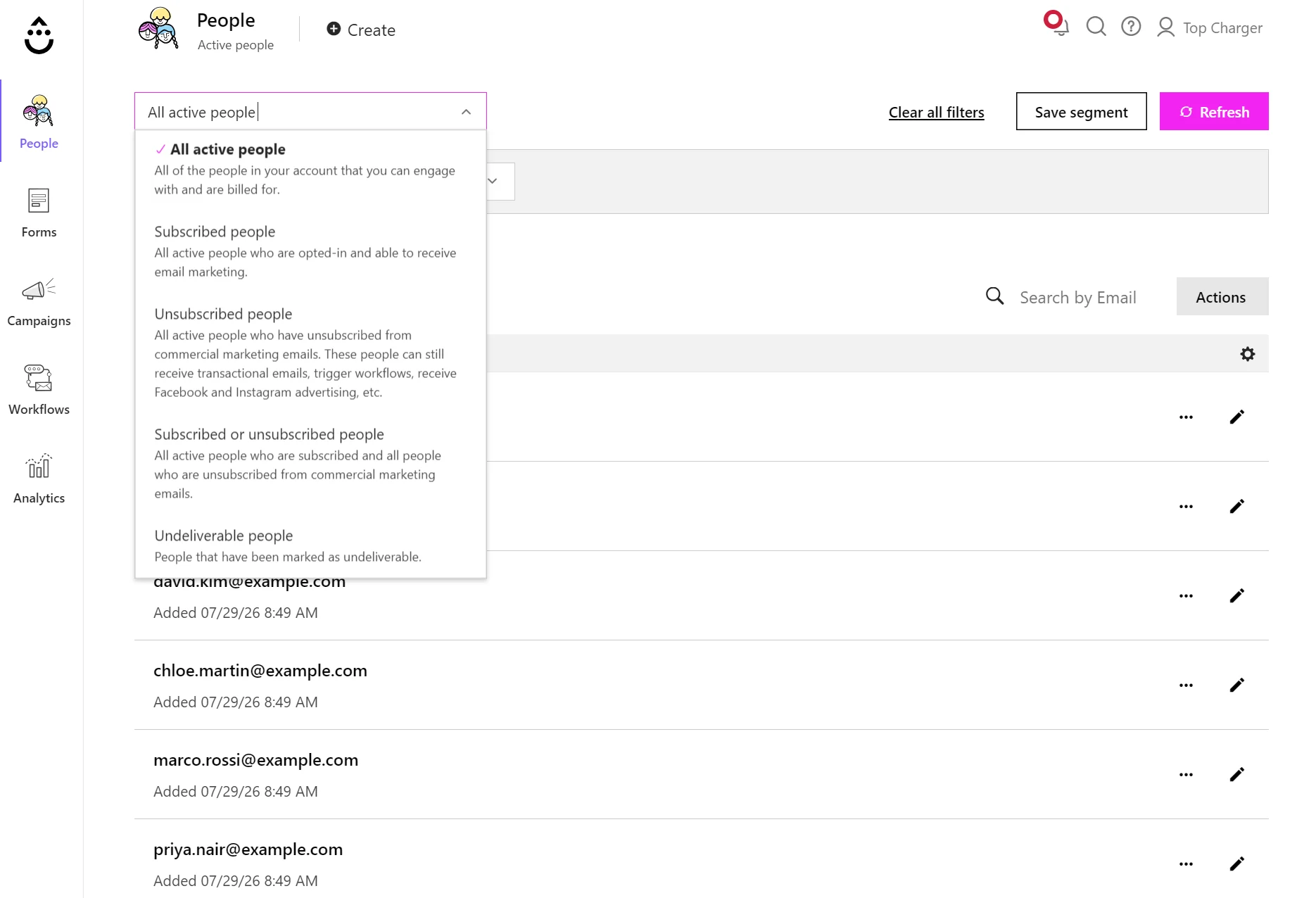
Use pre-built segments in Drip or start from scratch using filters. Pre-built segments become available when you connect your ecommerce store.
What Drip can’t do is forecast, so you segment on what a customer has done rather than what they will do next.
On Klaviyo, a replenishment flow can reach customers whose predicted next order date falls in the coming week, before they run out. A VIP segment can use predicted CLV to split big spenders from one-time buyers.
On Drip, you build those from past behavior instead, such as customers who placed three or more orders, which reacts to what already happened.
Klaviyo’s segments library contains multiple pre-built segments based on engagement, deliverability, targeting past purchasers, and more. You can create these based on the predictive data your account generates.
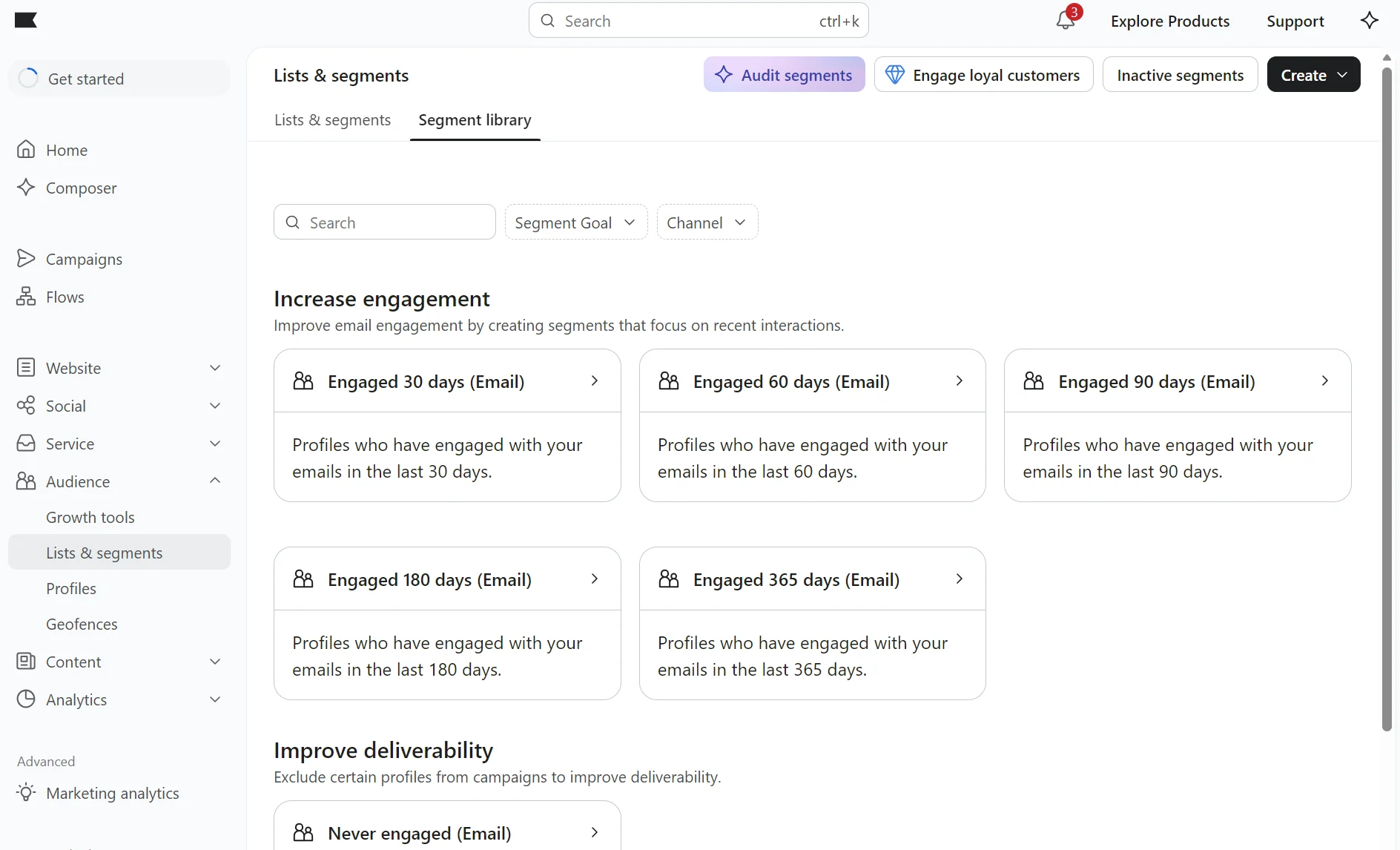
Klaviyo’s predictive features come with one condition to know upfront. They stay switched off until your store meets Klaviyo’s data thresholds for forecasting.
You need 500 customers who have placed an order, 180 days of order history, orders within the last 30 days, and some repeat buyers.
Until you hit those numbers, Klaviyo’s predictive segments won’t populate, so your store gets the behavioral segmentation Drip offers without the forecasting.
Klaviyo vs. Drip: Automation capabilities
Klaviyo wins on automation logic. Its branching splits a single flow into up to 20 paths and rechecks who qualifies at every step, going deeper than Drip’s setup.
Klaviyo offers more advanced conditional logic, but with Drip you can use multiple triggers in a single workflow, helping you catch customers at several points.
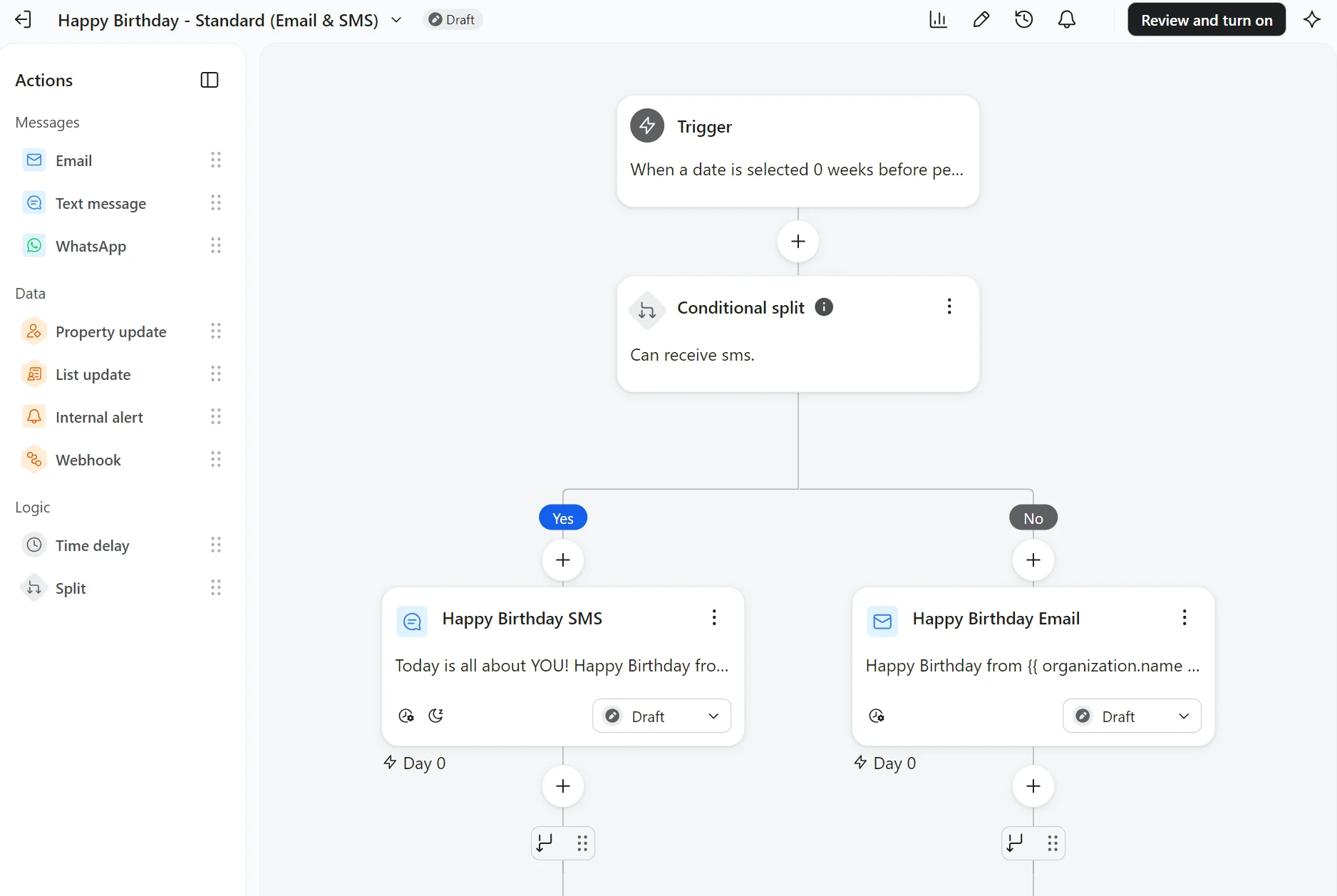
Each Klaviyo flow takes just one trigger, whether that’s a list, a segment, a placed order, a date, or a price drop. Want a second entry point? That’s a second flow.
Branching makes up for that: a single flow can split up to 20 ways and filter the event that triggered it. It then re-checks who still qualifies before every step.
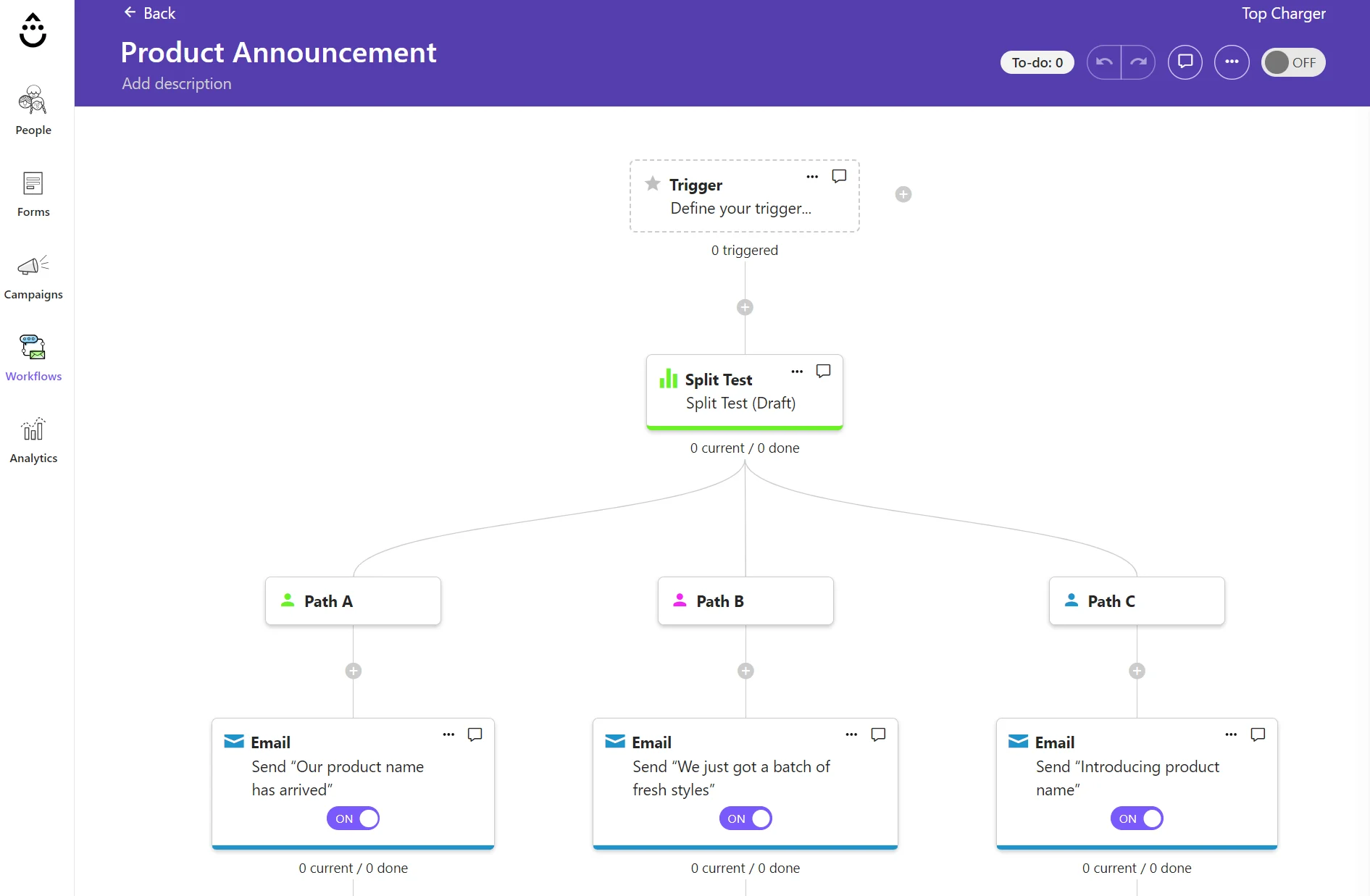
Drip’s ability to use several triggers in a single workflow is helpful when you don’t want a long list of automations. Your cart abandoners and spend-milestone crossers can enter the same automation, and Workflow Goals then pull a customer out when they convert.
Drip also has an LTV trigger that starts a workflow when someone crosses a lifetime-spend threshold you set, which Klaviyo can’t do from a segment alone.
Both ship pre-built template libraries covering welcome and abandoned cart emails, plus post-purchase and winback, so neither leaves you building core flows from scratch.
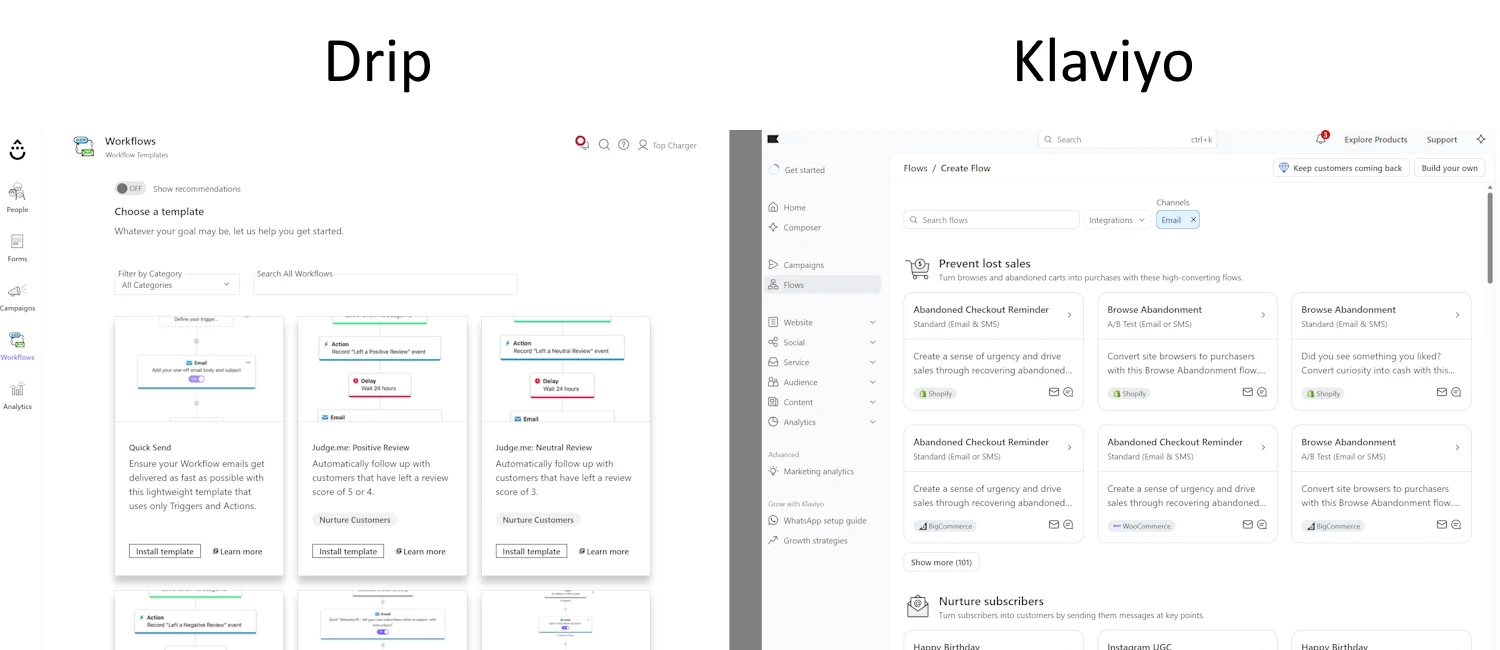
A/B or split tests inside automations are another shared feature, with slightly different approaches. Klaviyo tests messages within a flow. Drip splits whole workflow paths, then has you declare the winner manually.
Klaviyo vs. Drip: SMS marketing
Klaviyo wins on SMS. It’s available in 22 countries and provides two-way conversational capabilities. Drip’s SMS is U.S.-only, in beta, and available by request rather than self-serve.
Klaviyo SMS is available to all customers, with features for building standalone campaigns and multichannel flows that combine email and SMS.
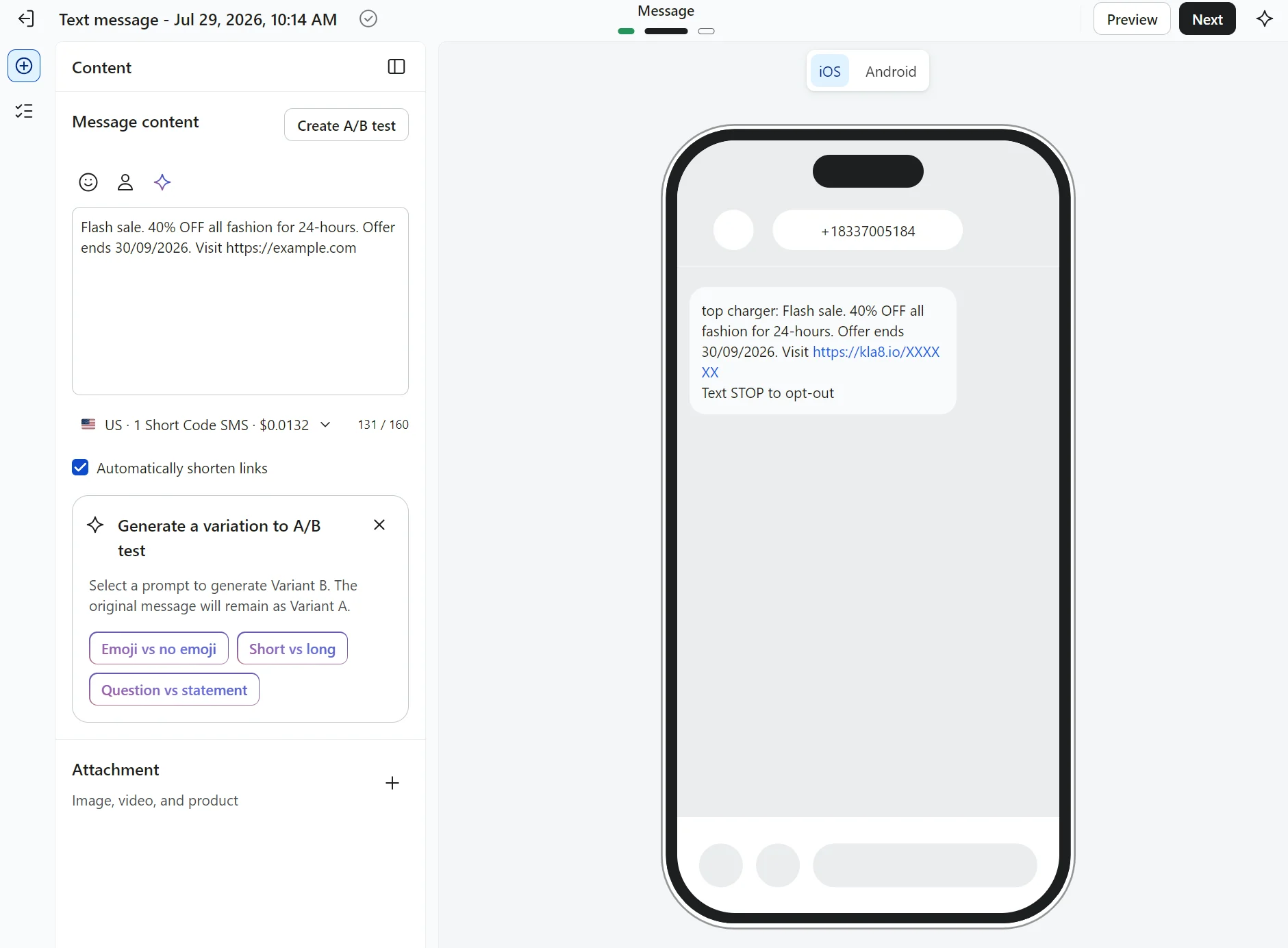
You can send SMS and MMS, trigger texts from customer actions, and build two-way conversational automations such as quizzes and surveys that store replies as profile data.
SMS in Klaviyo works in 22 countries, including the U.S., Canada, Australia, New Zealand, and 18 countries across Europe, with built-in compliance tools such as quiet hours and automatic opt-out handling.
Drip is rebuilding its SMS offering after retiring the older version. It’s for the U.S. only, limited to a beta group, and available by request rather than self-serve.
SMS and MMS sending is available in Drip when activated, along with texts triggered by customer actions like a welcome series. However, it stops short of the two-way, keyword-reply conversations Klaviyo supports for quizzes and surveys.
Reporting and analytics
Klaviyo wins on reporting depth with custom dashboards, predictive analytics, and peer benchmarks. Drip covers the basics, showing real-time attributed revenue, but lacks forecasting, benchmarks, or a sender-reputation score.
Drip’s reports suit stores wanting a readable dashboard with pre-built sections; Klaviyo’s are much more customizable with more data points.
Klaviyo attributes revenue per campaign and per flow, down to the individual sends and automations behind each order rather than a running total. Attribution runs last-touch by default, but the lookback windows are configurable per channel for email, SMS, and push.
Dashboards are yours to build, pulling cards for flows, deliverability, or channel performance into as many as 10 boards.
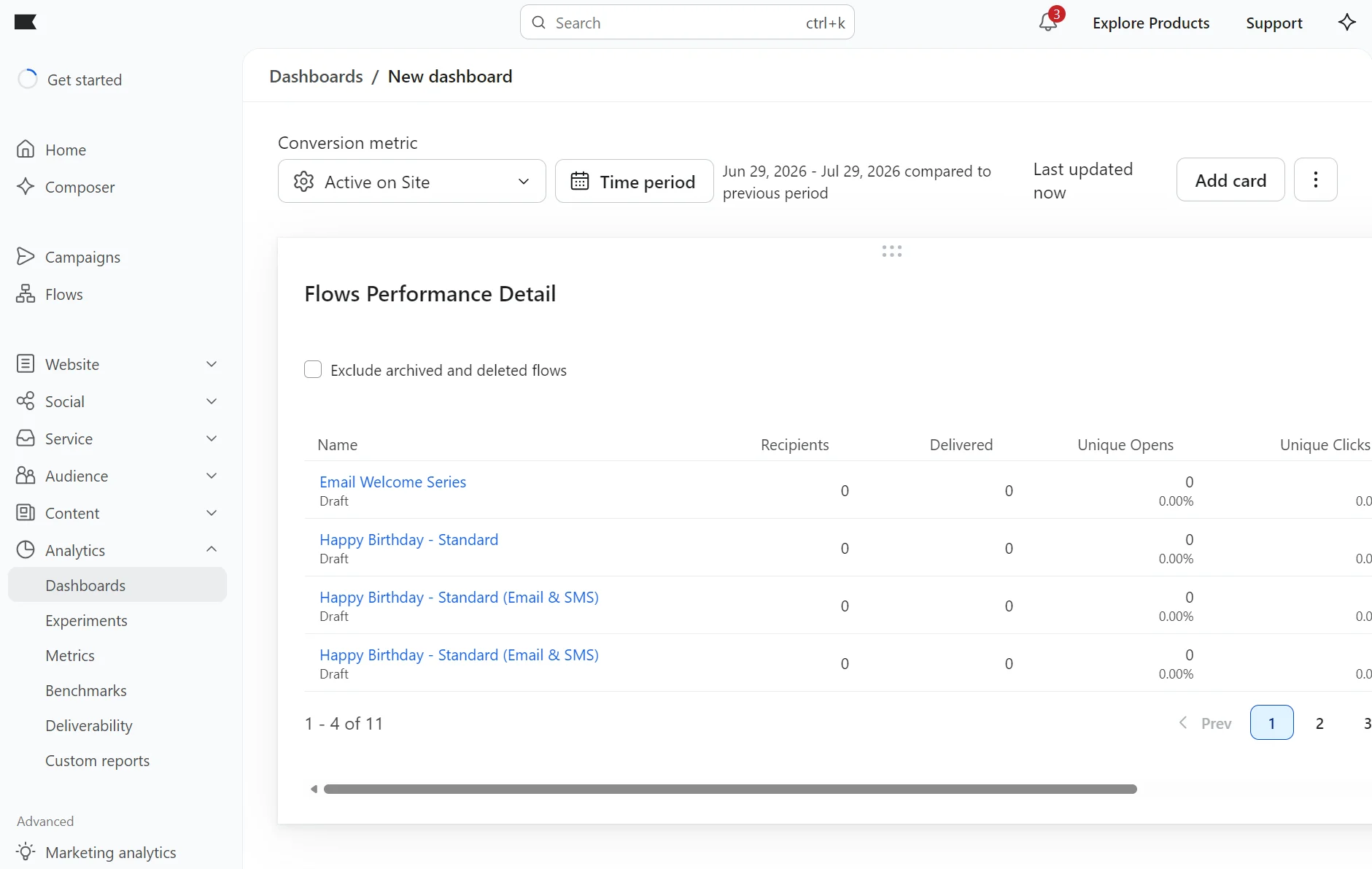
Predictive analytics forecast churn risk, predicted CLV, and expected next order date from each customer’s purchase history.
Klaviyo’s Deliverability hub shows bounces, spam, and unsubscribe rates across email and SMS. It also provides a sender-reputation score when you send at least 1,000 emails in 30 days.
A Benchmarks report sets your open, click, and conversion rates against peer groups, letting you compare across multiple date ranges.
Drip’s reports cover the basics for most ecommerce stores. Its revenue dashboard shows total and Drip-attributed revenue in real time on last-touch attribution, broken down by strategy, with up to three workflows, email series, or campaigns side by side.
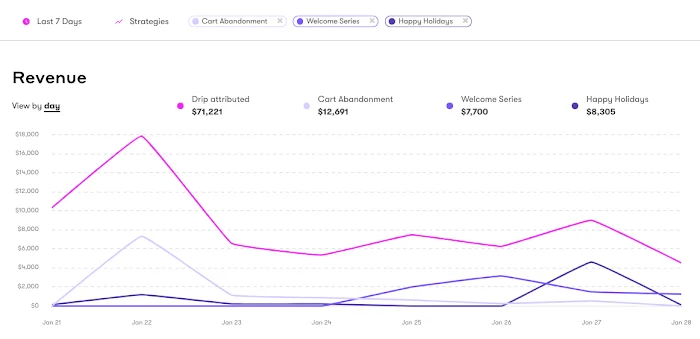
Drip’s revenue reports show revenue from your flows and campaigns. Image via Drip.
The Email Metrics report adds opens, clicks, orders, and revenue per send, and exports to CSV with conversion rate, average order value, and revenue per person.
Drip also reports on list health, showing new subscribers by day and total list size over a date range, and counts how often each event is recorded.
Our Drip vs. Klaviyo testing found that you won’t get forecasting or peer benchmarks from Drip, and its deliverability view stops at bounces and unsubscribes, with no sender-reputation score.
Integrations and support
Klaviyo wins on integration depth and support. All its paid plans include live chat, whereas Drip restricts you to email support below $99/month spend.
Klaviyo connects to more apps, offering 350+ pre-built integrations to Drip’s 90+.
Both tools connect to Shopify, BigCommerce, and WooCommerce natively, but only Klaviyo provides a native option for Wix.
The pool of ecommerce platform apps is more numerous on Klaviyo, and the same can be said for CDP, CRM, POS, and helpdesk apps. For instance, Drip doesn’t have a Salesforce or HubSpot app, but Klaviyo does.
For the connections that Drip doesn’t offer, it has Zapier support, a middleware that connects tools. Klaviyo also connects to Zapier. The capabilities depend on the connecting apps and don’t always match native counterparts.
As for support, Klaviyo’s free plan provides email support for 60 days only. All plans include Composer, an AI chatbot (currently in beta) that answers questions and can help you find information and build flows and segments.
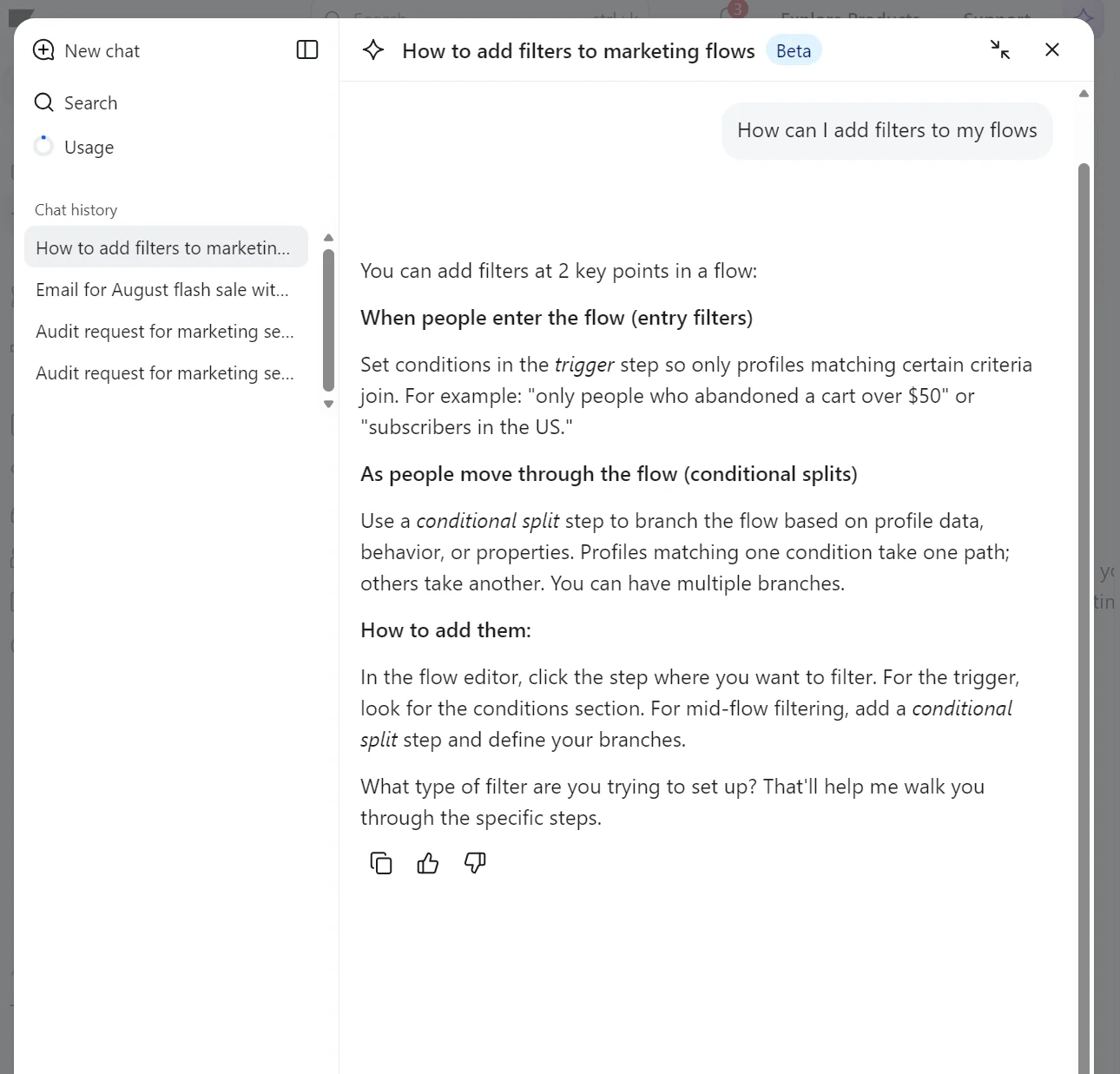
Paid Klaviyo plans include live chat and email support, with live chat available 24/5 without weekend coverage and email available 24/7. The quoted email response times are four hours for urgent issues and 12 hours for high-priority issues.
Additional coverage is available with add-ons. Professional plan reduces the response time to two hours for urgent issues and eight hours for high-priority issues. Enterprise cuts those by half and is the only plan to provide 24/7 live chat.
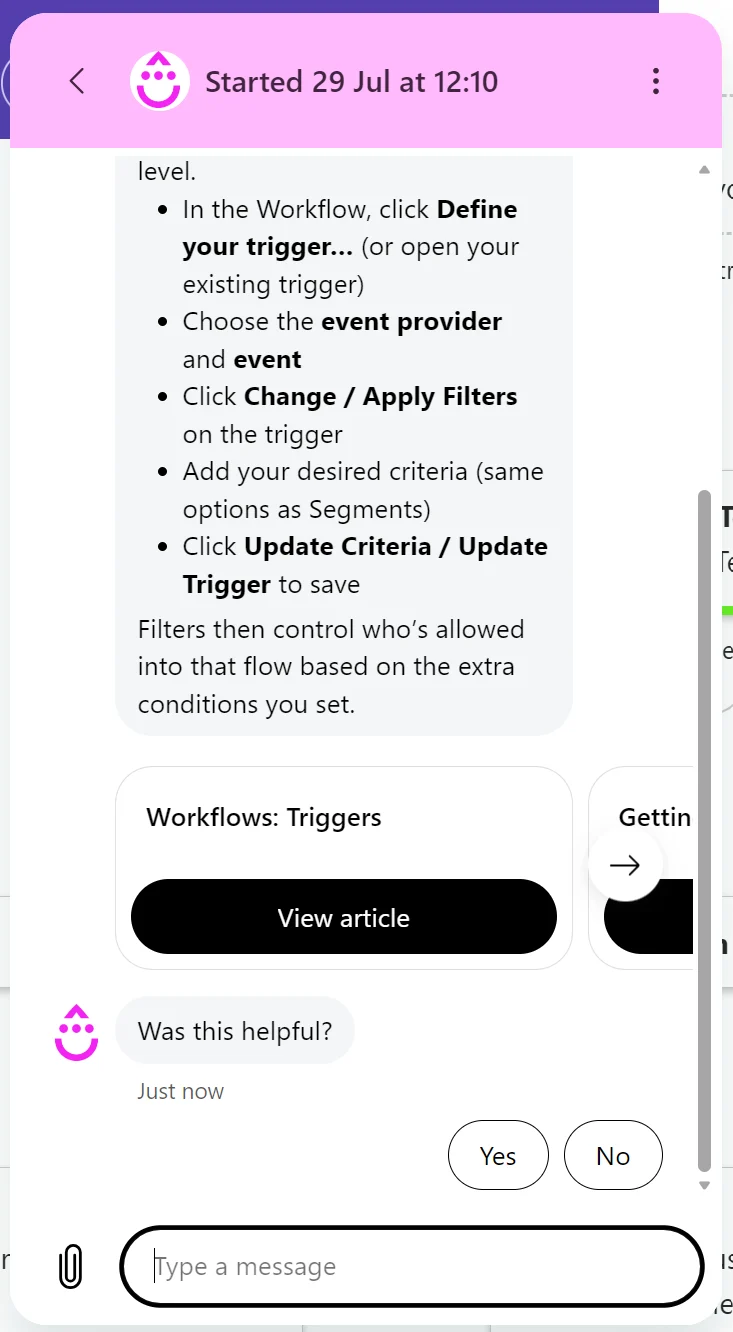
Drip has no paid customer support add-ons; everything is included in its base plan. You get email support regardless of spend, and live chat support when spending $99/month or more.
There’s also an AI chatbot in the Drip dashboard that answers questions and can hand you over to a human. Support is provided during standard business hours.
Email builder and templates
Klaviyo wins for building emails, with more customization scope in its email editor and a larger pool of pre-built templates.
Drip’s 50+ email templates are outnumbered by Klaviyo’s 160+. Drip’s builder also has fewer customization options.
Both builders handle everyday ecommerce emails well, so this comes down to how much design control you want.
Klaviyo’s email builder is drag-and-drop, with content blocks for text, images, buttons, products, coupons, and reviews. Product blocks are dynamic, pulling live catalog items and recommendations for each recipient.
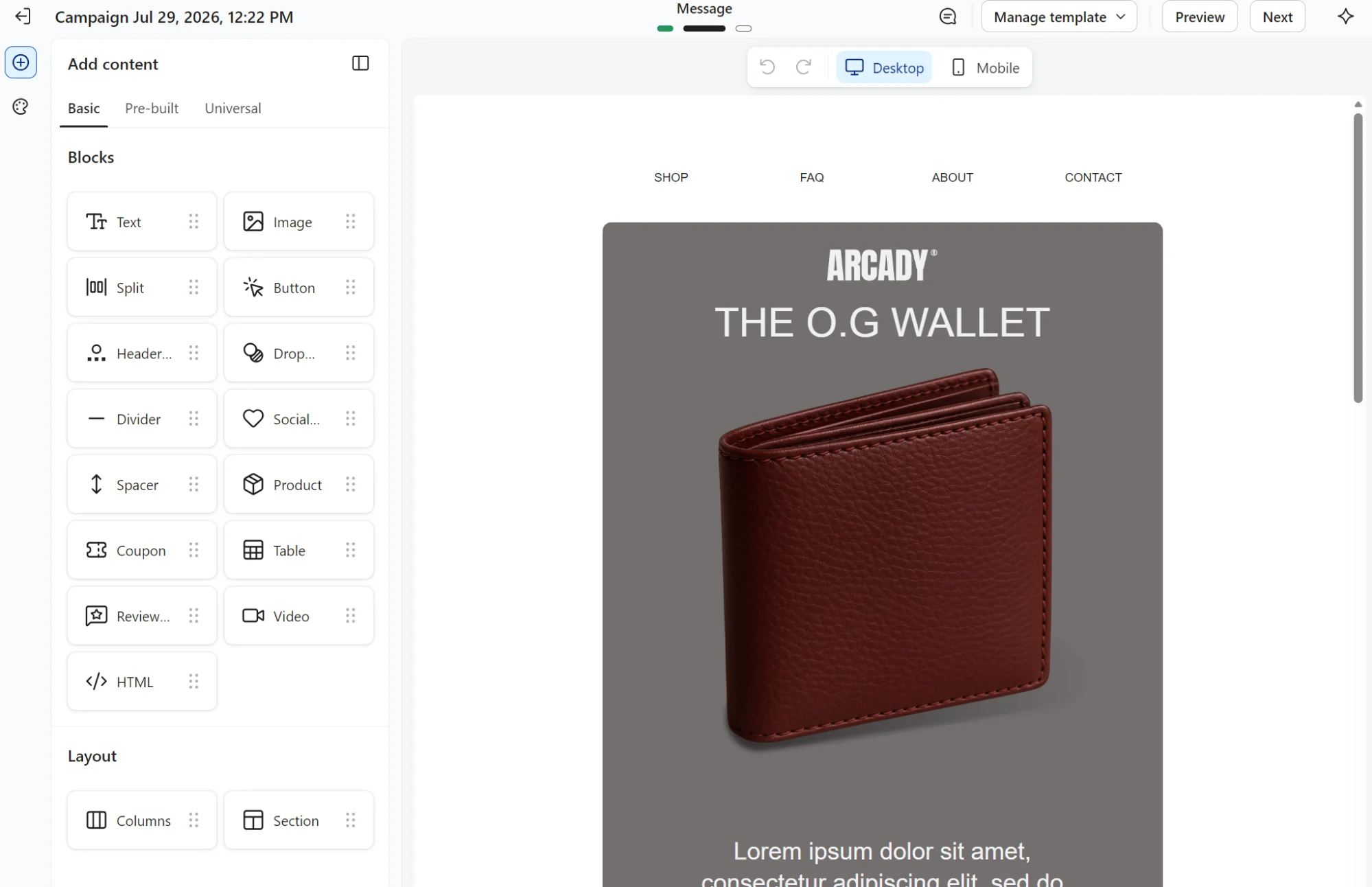
Most blocks carry display options that show or hide content by device or audience, and an HTML block takes custom code for anything the visual editor can’t do. Universal content lets you save a block once and reuse it across templates.
Drip’s Visual Builder is point-and-click, with blocks for text, images, buttons, navigation, product, and social links, plus pre-built templates to start from. There’s a top-selling-products block that dynamically pulls bestsellers straight from your store.
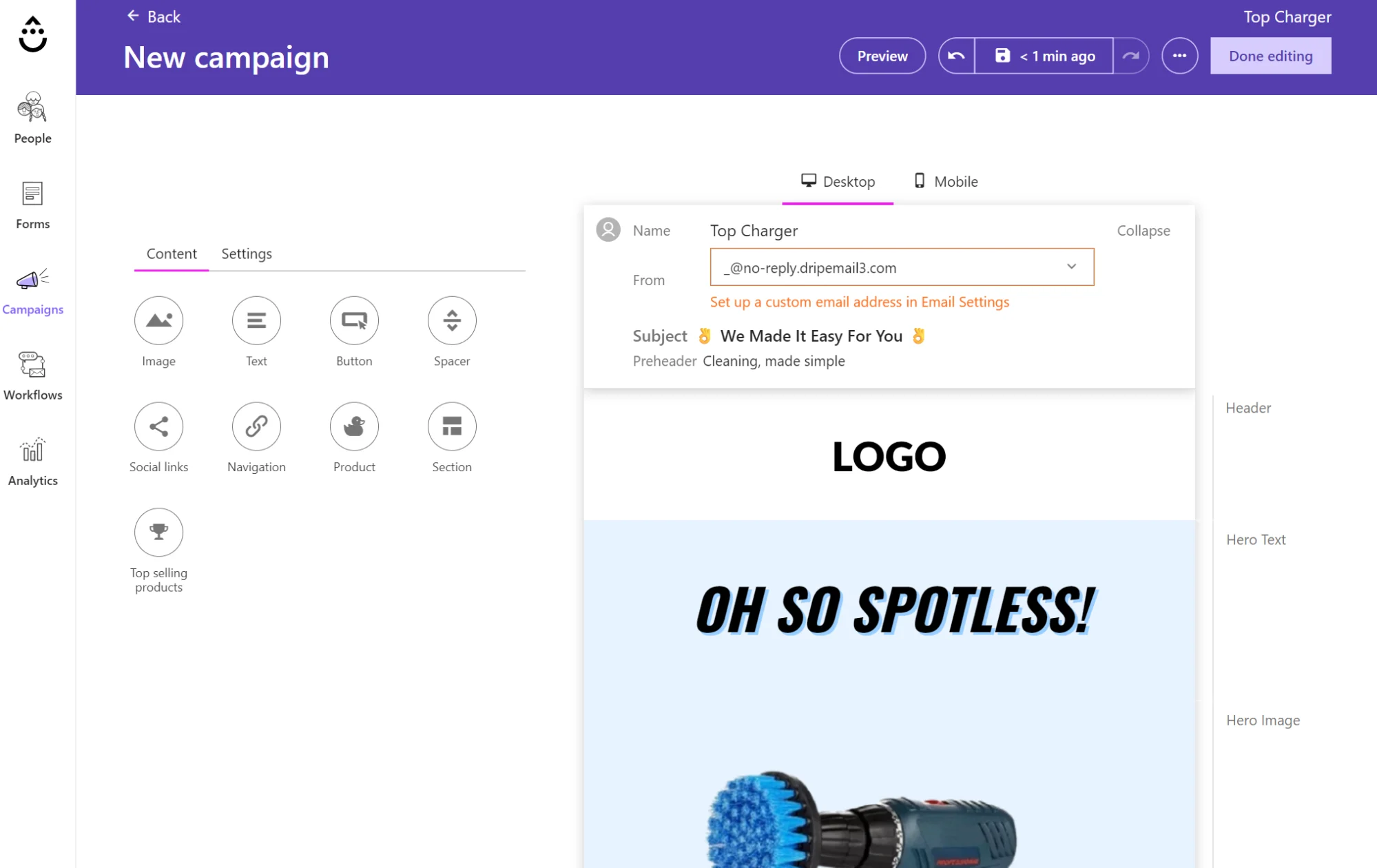
Conditional display rules can show and hide blocks by device, tag, or custom field using AND/OR logic. Saved email templates also follow you across every account, useful if you run multiple stores.
Klaviyo vs. Drip verdict: Which is better?
Klaviyo is better if you’ll act on its predictions and attribution data or when you need email alongside SMS. Drip is the better fit for an email-led store wanting lower running costs above 2,500 contacts and less upkeep.
When to pick Klaviyo?
Pick Klaviyo when multichannel marketing and integrations are important to your store, and you want more insights into your customer lifecycle.
When to pick Drip?
Pick Drip when you run a lean store and require standard flows, reports, and segments, with the scope for automation depth when necessary.
Of course, these use cases do not account for your own hands-on testing; it could be that you much prefer one user interface over another, and that’s the deciding factor. Sign up and try both before committing to paying for either.
What is the best Klaviyo and Drip alternative?
Omnisend is the best Klaviyo and Drip alternative. It closely matches Klaviyo’s flows and segments, and includes a Customer Breakdown with lifecycle stages based on AI RFM analysis in all plans. Omnisend is easier to master than Klaviyo and similar to Drip.
Multichannel is Omnisend’s core offering across email, SMS, and web push notifications.SMS is available in the Pro plan from $59/month for 2,500 contacts. SMS pricing starts at $0.007/SMS.
All of Omnisend’s plans have 24/7 customer support, including in the Free Forever plan, and unrestricted access to generative AI and the AI segment builder.
Drip works out cheaper than Omnisend at comparable contact tiers, but you miss out on SMS, RFM analysis, and a free plan. Klaviyo is more expensive than Omnisend. You can use Omnisend’s comparison tool to run the numbers.
Already a Klaviyo customer? Omnisend helps you make the switch if you have 250+ contacts.
Latvian wellness brand MUSS switched from Klaviyo to Omnisend for unified email, SMS, and improved deliverability. It increased open rates by 41% and revenue per recipient by 13%.
Read the Omnisend customer story: MUSS.
Automate your email and SMS marketing with Omnisend
Quick sign up | No credit card required
Drip vs. Klaviyo: FAQs
Is Drip cheaper than Klaviyo?
Yes, Drip costs less than Klaviyo at its starting point of 2,500 contacts, costing $39/month versus Klaviyo’s $60/month. Klaviyo then costs more at scale from there. However, only Klaviyo offers a free plan, and its starting point is $20/month for 500 contacts.
What’s cheaper than Klaviyo?
Omnisend, Drip, and Mailchimp are cheaper than Klaviyo at most contact tiers. Mailchimp suits small businesses, Drip suits stores wanting behavior-based automation, and Omnisend suits ecommerce stores that want email and SMS in one platform.
Which tools compete with Klaviyo?
Drip, ActiveCampaign, and Omnisend are Klaviyo’s competitors for ecommerce. Omnisend and ActiveCampaign also cover SMS and multichannel. Competitors with fewer enterprise features include Brevo and Campaign Monitor.
Can you migrate from Klaviyo to Drip?
Yes, you can migrate from Klaviyo to Drip via self-serve data imports or managed services. Drip’s managed service is included in your plan price, provided you have more than 17,500 contacts. The service includes data imports and rebuilding core workflows and email templates.