Social media agency workflow: manage 10+ clients
You’re managing eight clients. Each has three to five social channels. You post three times a week per channel. That’s between 72 and 120 pieces of content per month, just for one person to track, write, review, approve, and schedule.
Now add a second client. And a third. And the junior you just hired who’s great but still needs feedback on every caption.
The more people managing multiple social media accounts, the higher the risk of missed edits, wrong versions, delayed approvals, and posts going live on the wrong channel.
That’s the reality of running a social media agency. A solid workflow turns all those moving parts into a process your team can actually scale.
This article breaks down how to build a social media workflow that holds up to agency realities: multiple clients, lean teams, external stakeholders who ghost approval links, and AI workflows that can either save hours or add noise, depending on how you use them.
A social media agency workflow is the repeatable system an agency uses to plan, create, review, approve, schedule, publish, and report on social media content across multiple clients and channels.
For an agency, the key word is repeatable. A workflow should work the same way whether the team is managing 3 clients or 30. The people assigned to each role may change, but the steps should stay consistent.
A strong agency workflow answers five operational questions:
- Who creates the content?
- Who reviews it internally?
- Who approves it on the client side?
- When does approved content get scheduled?
- Where does reporting happen?
Without a repeatable workflow, social media management becomes harder with every new client. Feedback gets scattered, approvals slow down, and teams waste time tracking versions instead of improving content.
Most small agencies start with informal systems: a shared Google Drive, client Slack channels, spreadsheets, and approval by email. That can work for a small number of accounts. It usually breaks once the team reaches 5 or more active clients because the process depends too heavily on memory and manual follow-up.
The most common failure points are approval delays, scattered feedback, unclear ownership, and version confusion.
1. Feedback gets scattered across too many places
Client feedback often arrives through email, Slack, DMs, calls, voice notes, or comments inside separate documents. When feedback does not have one official place to live, the social media manager has to reconcile comments before doing actual creative work.
A better workflow gives every post one source of truth: the caption, visual, comments, approval status, and publish date should all be connected to the same item.
2. Approvals become hard to track
Client approval is one of the biggest bottlenecks in agency workflows. A post may need approval before a Monday publish window, but the client may not see the email, open the document, or understand what action is required.
A reliable approval workflow makes three things visible:
- What content is awaiting approval
- Who needs to approve it
- Whether the post is pending, approved, or needs changes
3. Version control becomes unreliable
Version chaos happens when a designer updates the visual, a copywriter updates the caption, and neither person is working from the same post record. This creates half-updated content and increases the risk of publishing the wrong version.
A scalable workflow keeps copy, creative, comments, and approvals attached to the same post.
4. New client onboarding takes too long
If every new client requires a custom folder structure, new approval rules, manual reminders, and repeated explanations, onboarding becomes a growth constraint.
A better agency workflow treats onboarding as a template. The workspace, roles, approval stages, brand context, and publishing cadence should be reusable from one client to the next.
5. The workflow lives inside one person’s head
If the process only works because one account manager remembers every step, the agency does not have a workflow. It has a dependency.
A documented workflow protects the agency when someone is sick, overloaded, or leaves the team. It also makes it easier to train juniors without creating constant interruptions for senior team members.
A scalable social media workflow separates strategic work from repeatable operational tasks.
Strategic work includes campaign planning, creative judgment, brand positioning, and final content decisions. Repeatable operational tasks include assigning roles, collecting feedback, routing approvals, scheduling posts, and generating reports.
The goal is not to remove people from the process. The goal is to make sure people spend their time on decisions, not on chasing links, copying updates, or rebuilding the same process for every client.
1. Create a separate workspace for each client
The first decision in a social media agency workflow is how to separate client work.
A folder-based system can work early on, but it becomes risky as client volume grows. If multiple clients live in one master calendar or one shared content document, one mistake can affect multiple accounts. A team member may approve the wrong post, update the wrong calendar, or publish content to the wrong client’s channel.
A workspace-per-client model is safer because each client has its own environment.
Each client workspace should include:
- A dedicated content calendar
- Connected social channels
- Client-specific approval settings
- Client-specific team access
- Brand voice and audience notes
- Internal comments and review history
- Reporting and analytics for that client
In Planable, each client can be managed in a separate workspace under one agency account. The agency can move between client workspaces from a central dashboard, while content, permissions, comments, and approval flows remain isolated by client.
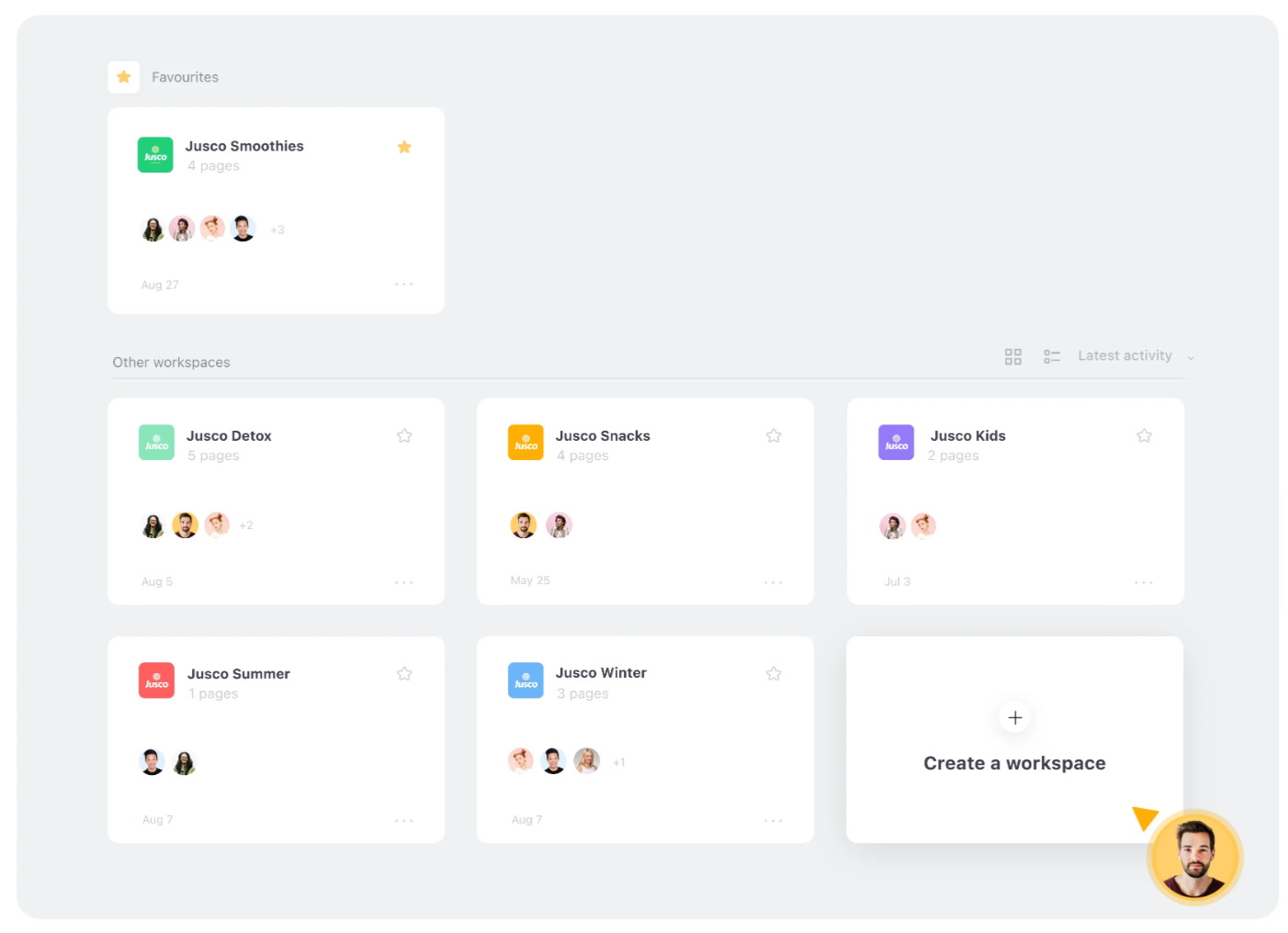
Planable dashboard organizing client workspaces.
Why client workspaces improve agency operations
Separate workspaces reduce operational risk because content, feedback, and approval settings do not bleed across accounts.
They also make onboarding faster. Once the agency has a proven workspace structure, it can reuse that setup for new clients instead of rebuilding the process from scratch.
A workspace template should include:
- Default roles
- Approval workflow
- Posting timetable
- Brand context fields
- Internal review rules
- Client approval process
- Reporting cadence
This turns onboarding into a repeatable setup process rather than a custom project.
2. Define workflow roles once
Every agency workflow needs clear ownership. Team members should know what they are responsible for regardless of which client they are working on.
The role structure can stay consistent even when different people fill those roles for different clients.
Copywriter or content creator
Drafts and edits captions
Owns written content
Designer
Creates and uploads visuals
Owns creative assets
Account manager
Reviews internally and coordinates feedback
Owns timeline and client communication
Client
Approves or requests changes
Owns final client-side approval
Agency lead
Reviews high-risk content
Owns brand, legal, or strategic sign-off
Main responsibility
Drafts and edits captions
Workflow ownership
Owns written content
Main responsibility
Creates and uploads visuals
Workflow ownership
Owns creative assets
Main responsibility
Reviews internally and coordinates feedback
Workflow ownership
Owns timeline and client communication
Main responsibility
Approves or requests changes
Workflow ownership
Owns final client-side approval
Main responsibility
Reviews high-risk content
Workflow ownership
Owns brand, legal, or strategic sign-off
A scalable workflow makes these roles explicit. No one should have to ask who approves a post, who sends it to the client, or who schedules it after approval.
In Planable, these responsibilities can map to workspace roles such as Writers, Contributors, Approvers, and Guests. When approval is required, the platform can prevent content from being published before the right person signs off.
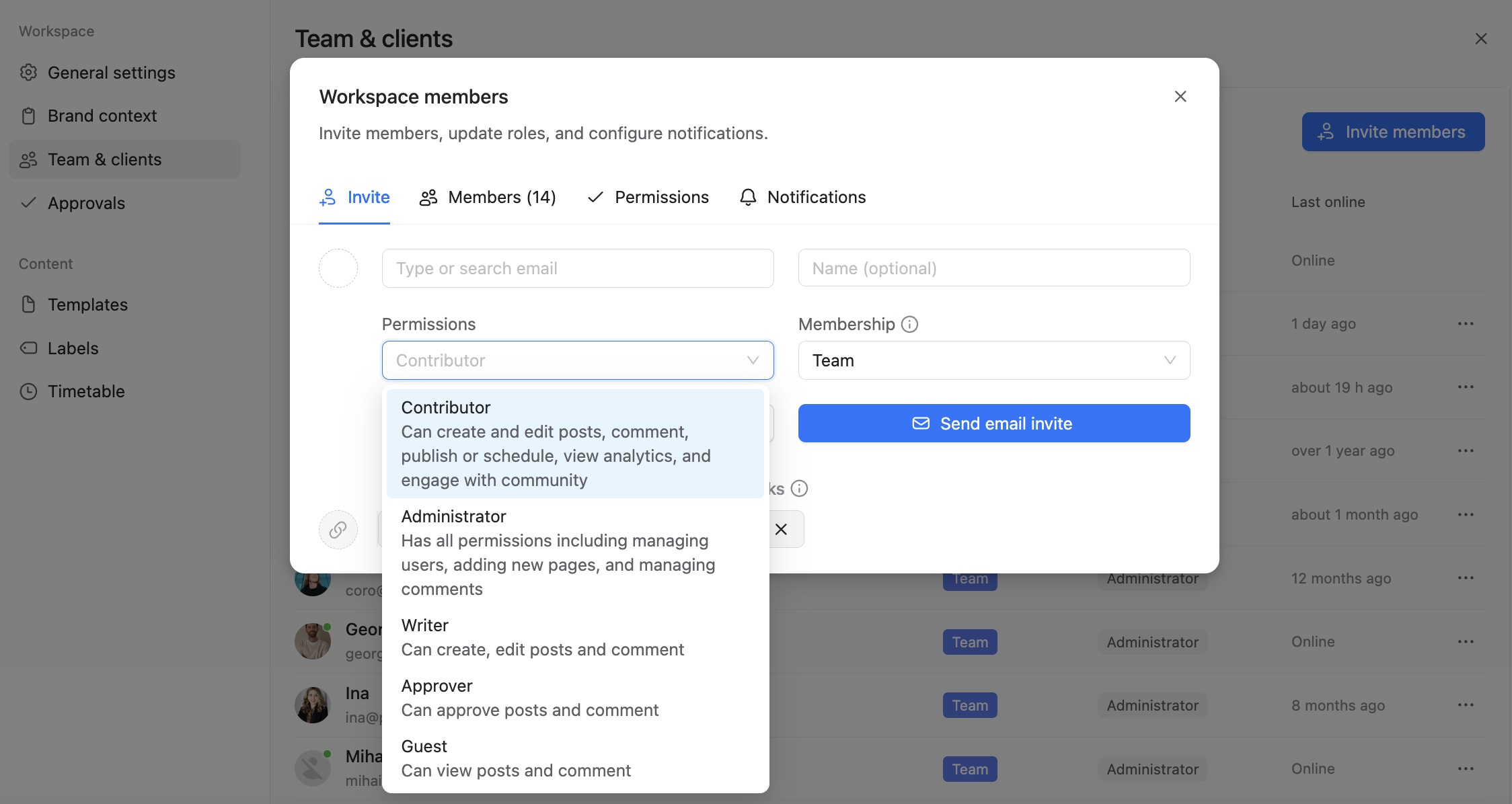
Planable workspace roles and member permissions.
3. Build a client approval process that does not require chasing
Client approval is where many agency workflows lose the most time.
The problem is not always that clients are slow. Often, the approval process is unclear. A client receives a document, PDF, spreadsheet, or email thread and has to figure out what they are reviewing, what action to take, and whether they are looking at the final version.
A strong approval workflow should make the next step obvious.
A good client approval workflow has three parts
First, the client should see the post in context. A realistic social media preview is easier to review than a caption inside a spreadsheet.
Second, the action should be simple. The client should approve, reject, or comment directly on the post.
Third, the status should be visible to the agency. The account manager should not need to send a follow-up message just to find out whether a post has been reviewed.
In Planable, clients can approve content through a shareable link without creating an account. They can view realistic post previews, approve content, or leave comments. Once a post is approved, the account manager can be notified, and approved posts can be scheduled automatically if auto-scheduling is enabled.
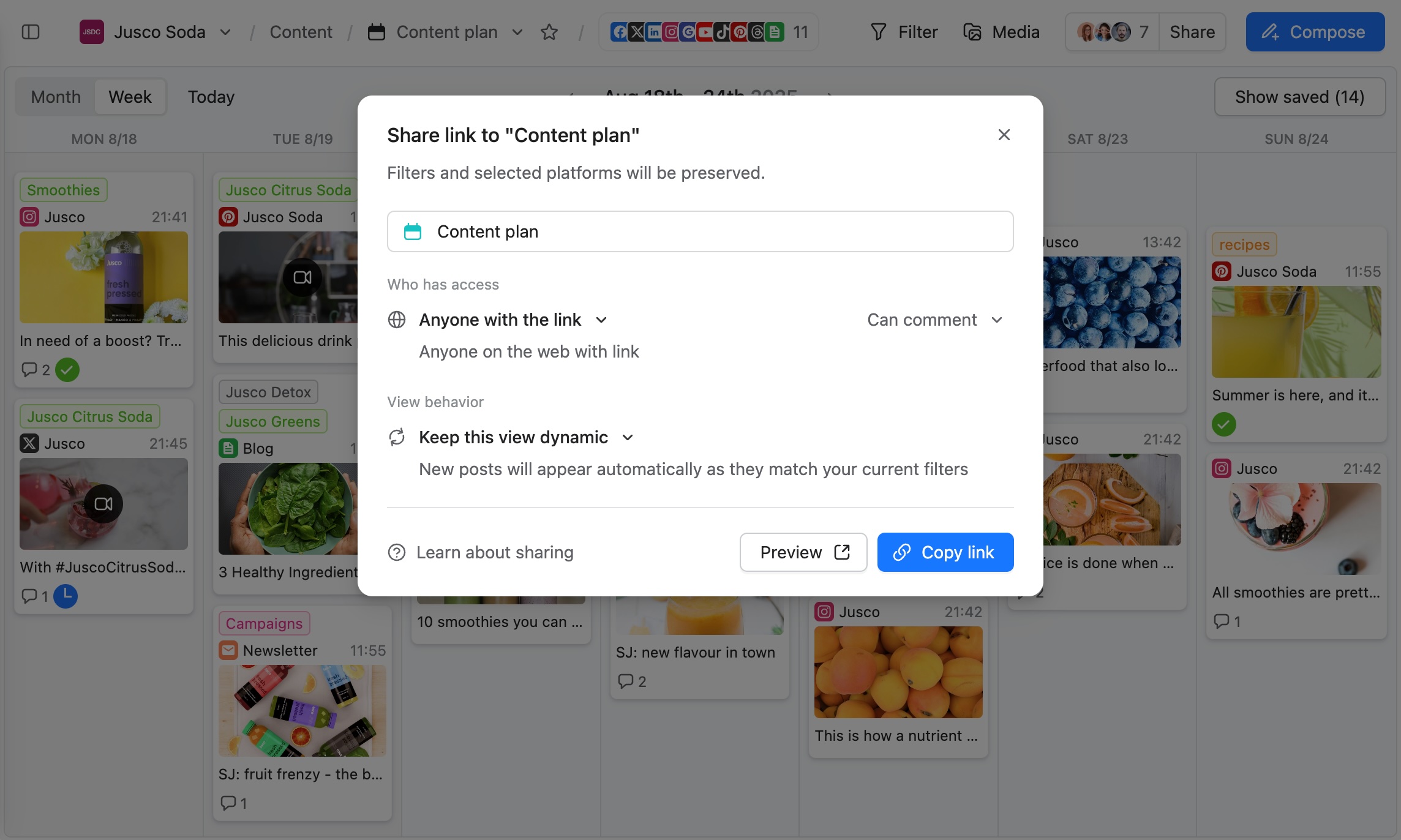
Planable share settings for a client content plan.
When to use multi-level approval
Some clients need a more complex approval process. For example, content may need to pass through an internal agency review, a legal check, and then client approval.
Multi-level approval works best when:
- The client is in a regulated industry
- Multiple stakeholders need to review content
- The agency wants internal review before the client sees anything
- Brand or legal risk is high
- The client has separate marketing, legal, and executive approvers
The key is to separate internal collaboration from external approval. Internal comments should stay internal until the post is ready for the client.
4. Use AI for drafting and adaptation, not final decisions
AI can improve a social media agency workflow when it is used for the right tasks.
The best use cases are drafting, platform adaptation, repurposing, and content variation. These are repetitive, time-consuming tasks where AI can help the team move faster.
AI should not replace strategy, judgment, or approval. It should not decide what is appropriate for a client’s brand, which campaign angle matters most, or whether a post should go live.
The practical rule is simple: AI drafts, humans decide.
Where AI fits in a social media workflow
Drafting
First caption drafts, hooks, variations
Brand fit, accuracy, final edits
Platform adaptation
Rewriting one idea for LinkedIn, Instagram, X, TikTok, or Threads
Channel strategy and message priority
Repurposing
Turning blogs, case studies, or webinars into post ideas
Selecting the strongest angle
Review support
Suggesting improvements or alternatives
Final approval and risk judgment
Calendar management
Pulling draft ideas or checking scheduled content
Publishing decisions
AI can help with
First caption drafts, hooks, variations
Human should own
Brand fit, accuracy, final edits
AI can help with
Rewriting one idea for LinkedIn, Instagram, X, TikTok, or Threads
Human should own
Channel strategy and message priority
AI can help with
Turning blogs, case studies, or webinars into post ideas
Human should own
Selecting the strongest angle
AI can help with
Suggesting improvements or alternatives
Human should own
Final approval and risk judgment
AI can help with
Pulling draft ideas or checking scheduled content
Human should own
Publishing decisions
Planable’s AI Brand Context can help AI-assisted drafts reflect each client’s tone, values, audience, and messaging. This makes AI more useful because the tool has client-specific context instead of generating generic captions.
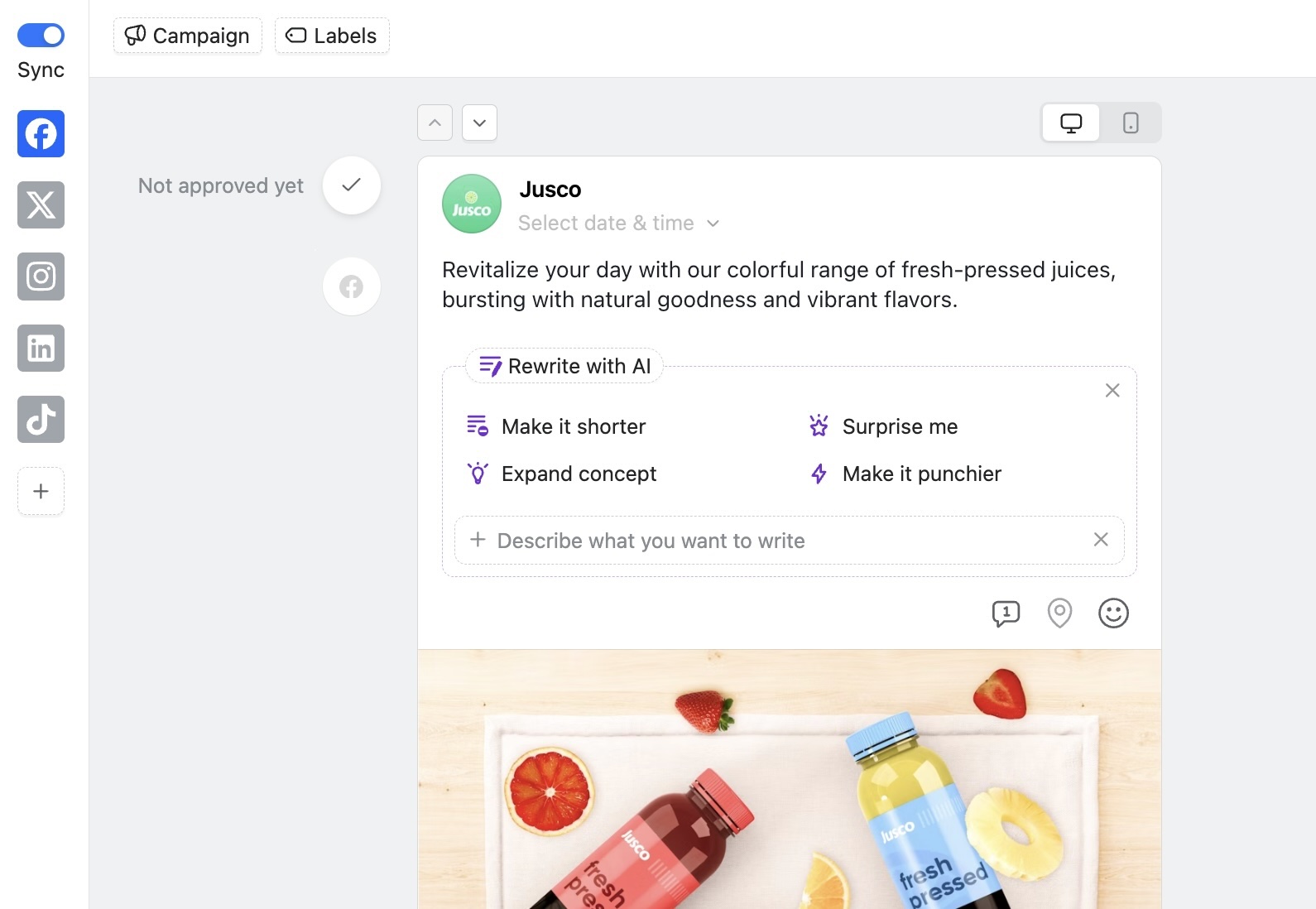
Planable AI tools rewriting a Facebook caption.
For teams using AI assistants such as Claude, Planable’s MCP integration can connect AI workflows to client workspaces. This allows teams to draft or manage content within the existing workflow while keeping permissions and approvals intact.
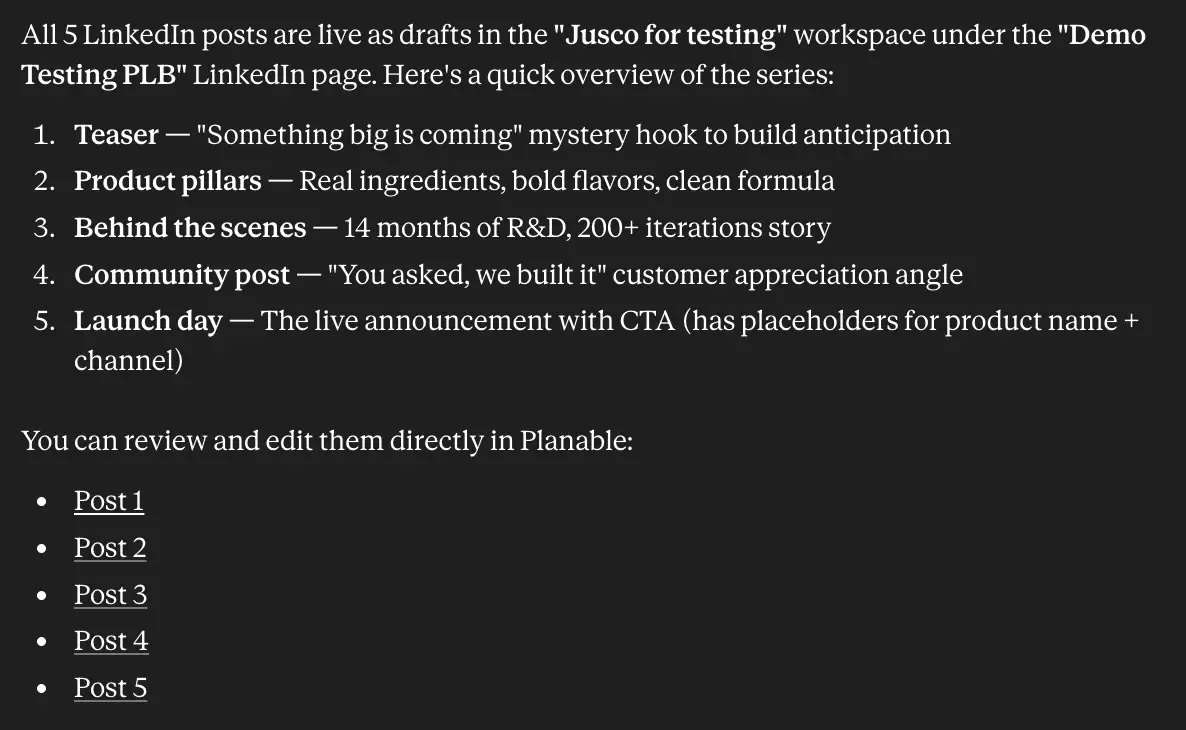
Claude lists five LinkedIn drafts created in Planable.
The AI guardrail agencies should keep
AI-generated content should always move through the same review and approval process as human-drafted content.
That means AI can speed up the first draft, but it should not bypass internal review, client approval, or publishing controls.
5. Create a publishing routine that runs without manual reminders
Once content is approved, scheduling should be as automatic as possible.
An account manager should not have to manually queue every approved post, especially when managing dozens of channels across multiple clients. Manual scheduling increases the chance of missed posts, duplicated work, and last-minute stress.
A better publishing routine combines three elements:
- A preset timetable for each client
- Auto-scheduling after approval
- A weekly calendar review
Set a posting timetable per client
Each client should have a defined posting cadence based on their channels, audience, and content strategy.
For example:
B2B SaaS client
LinkedIn 3x/week, X 2x/week
More thought leadership and repurposed content
Local business
Instagram 3x/week, Google Business Profile 1x/week
More visual and location-based content
Ecommerce brand
Instagram, TikTok, Pinterest, Facebook
More product visuals and campaign timing
Executive brand
LinkedIn 2–4x/week
More review time for voice and positioning
Example cadence
LinkedIn 3x/week, X 2x/week
Workflow implication
More thought leadership and repurposed content
Example cadence
Instagram 3x/week, Google Business Profile 1x/week
Workflow implication
More visual and location-based content
Example cadence
Instagram, TikTok, Pinterest, Facebook
Workflow implication
More product visuals and campaign timing
Example cadence
LinkedIn 2–4x/week
Workflow implication
More review time for voice and positioning
A posting timetable helps approved content move into the next available slot instead of waiting for manual scheduling.
Planable Best Time to Post feature recommends publishing times based on platform data and audience engagement patterns, helping increase the likelihood that posts are seen and interacted with.
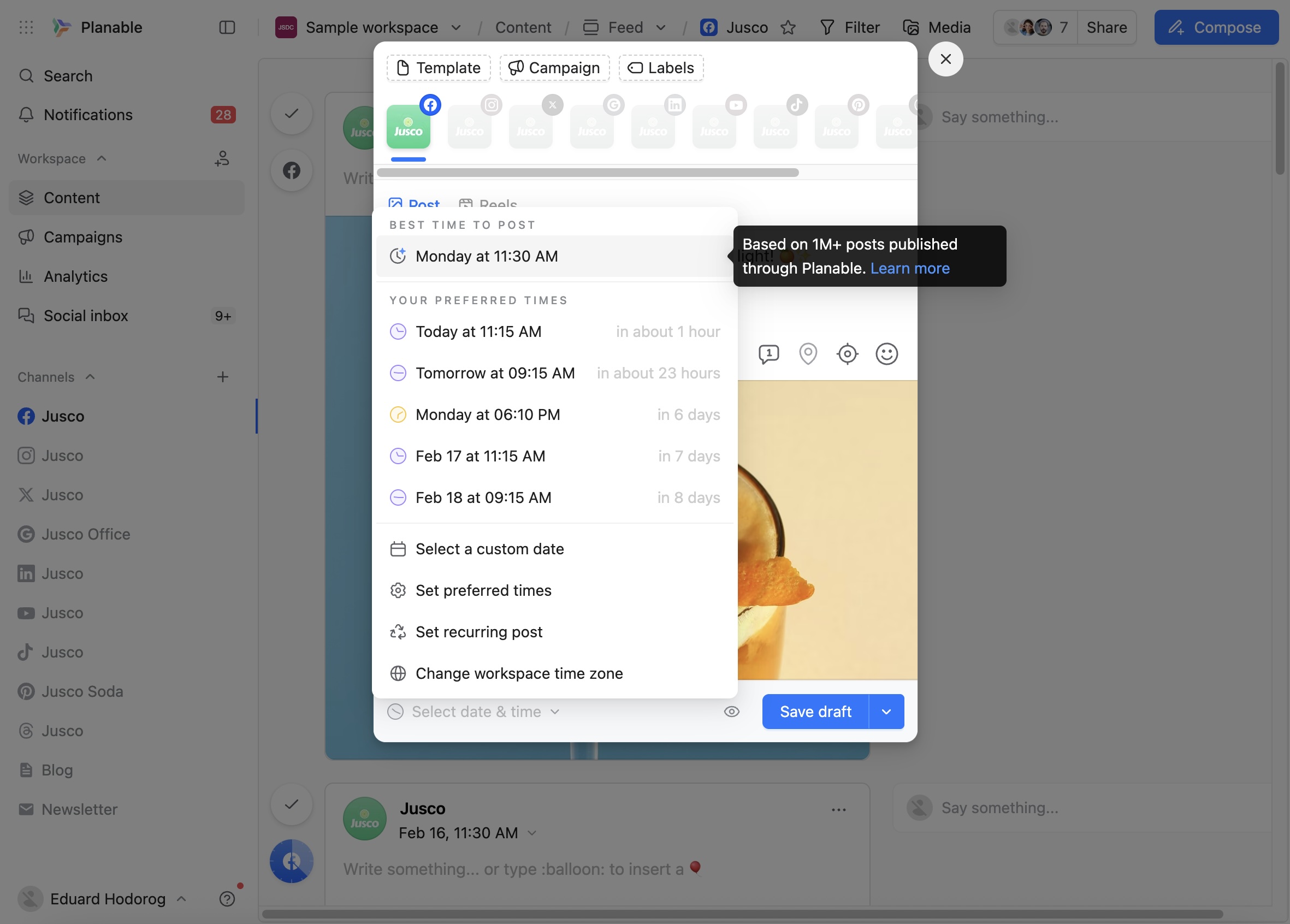
Planable suggests the best time to publish a post.
Use auto-scheduling after approval
Auto-scheduling is useful when the team has already agreed on the posting cadence and the post does not need a custom publishing time.
The workflow becomes:
- Content is drafted.
- Internal review is completed.
- Client approves the post.
- The post is automatically added to the next available publishing slot.
This reduces administrative work and keeps the calendar moving.
Review the calendar weekly
Even with automation, agencies should review each client calendar regularly.
A weekly review should confirm:
- The next two weeks have enough approved content
- There are no content gaps
- Campaign posts are scheduled on the right dates
- Last-minute client requests have room in the calendar
- No posts are stuck in review or approval
At higher client volumes, this routine is what separates proactive agencies from reactive ones.
6. Build reporting into the workflow from day one
Reporting should not be treated as a separate monthly scramble. It should be part of the workflow from the beginning.
Agencies lose client trust when clients cannot see what was done, what worked, and what should change next. A strong reporting process connects content execution to performance.
Each client should have a reporting setup that defines:
- Which metrics matter
- How often reporting happens
- Which channels are included
- What the report should explain
- Who receives the report
Match metrics to client goals
Different clients need different reporting priorities.
Brand awareness
Reach, impressions, engagement rate
Shows whether content is being seen and interacted with
Community building
Comments, replies, saves, shares
Shows whether the audience is responding meaningfully
Lead generation
Link clicks, conversions, landing page visits
Connects social activity to business outcomes
Executive visibility
LinkedIn engagement, profile growth, comments from target accounts
Shows whether the right audience is paying attention
Local presence
Google Business Profile activity, reviews, local engagement
Shows whether social supports discovery and trust
Useful metrics
Reach, impressions, engagement rate
Why they matter
Shows whether content is being seen and interacted with
Useful metrics
Comments, replies, saves, shares
Why they matter
Shows whether the audience is responding meaningfully
Useful metrics
Link clicks, conversions, landing page visits
Why they matter
Connects social activity to business outcomes
Useful metrics
LinkedIn engagement, profile growth, comments from target accounts
Why they matter
Shows whether the right audience is paying attention
Useful metrics
Google Business Profile activity, reviews, local engagement
Why they matter
Shows whether social supports discovery and trust
Planable’s cross-channel analytics can pull performance data across pages inside a client workspace. This helps agencies review what worked, create customizable reports, and avoid copying metrics from separate platform dashboards.
For clients interested in AI search visibility, Planable Analytics also includes an AI Visibility Snapshot that can show how a brand appears in AI-generated responses across tools such as ChatGPT, Gemini, and Perplexity.
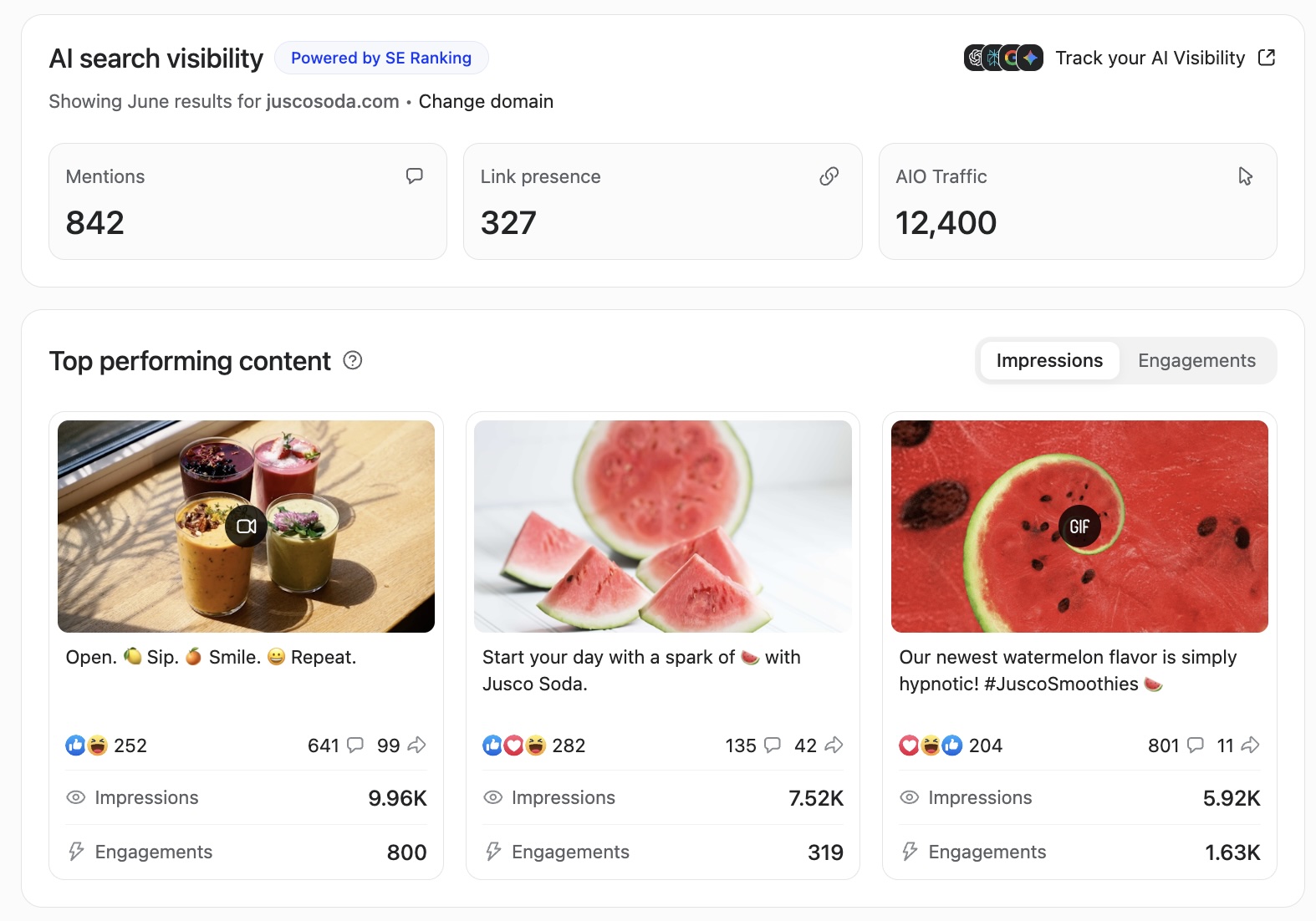
Planable AI visibility report with mentions, links, traffic, and top content.
Bonus: Connect Claude with Planable analytics or CSV exports to quickly generate client-ready reports with KPIs, top posts, and performance insights. The report is delivered in a client-ready format, eliminating the need for manual formatting or copying metrics into presentations.
To make this happen, install the monthly-performance-summary skill. You can download it for free here.
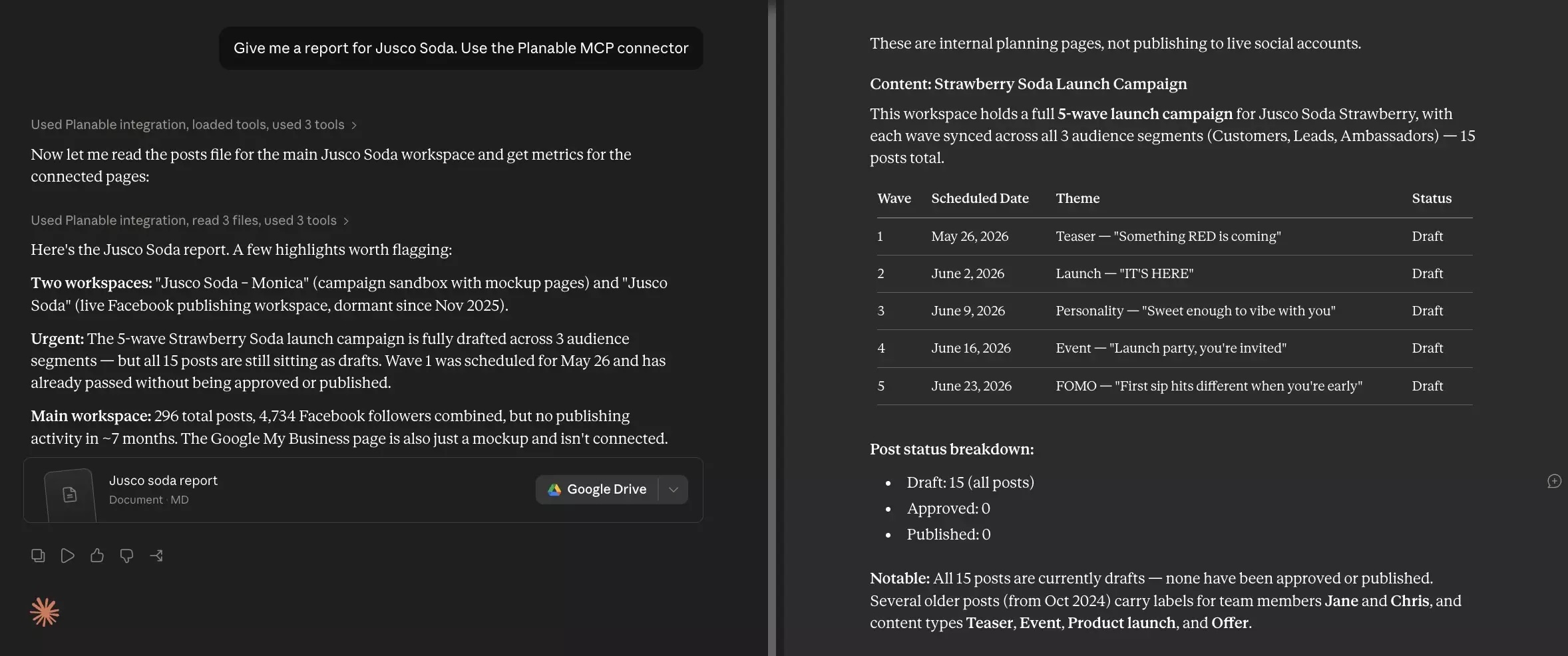
Claude report summarizing a Jusco campaign in Planable.
Planable supports the operational parts of a social media agency workflow: collaboration, approvals, scheduling, AI-assisted workflows, and reporting.
It is designed to help agencies manage multiple clients without mixing up content, feedback, permissions, or approval statuses.
Planable can help agencies:
- Separate clients into isolated workspaces under one agency account
- Create and preview posts for major social media channels
- Let external clients approve content without creating an account
- Collect comments and feedback on specific posts
- Keep internal comments separate from client-facing feedback
- Set up multi-level approval workflows
- Store client-specific Brand Context for AI-assisted drafting
- Connect AI assistants through MCP and public API for workflow-aware content management
- Schedule approved posts automatically
- Pull cross-channel analytics and create customizable reports
- Provides a focused competitive benchmarking layer built directly into the Analytics you already use
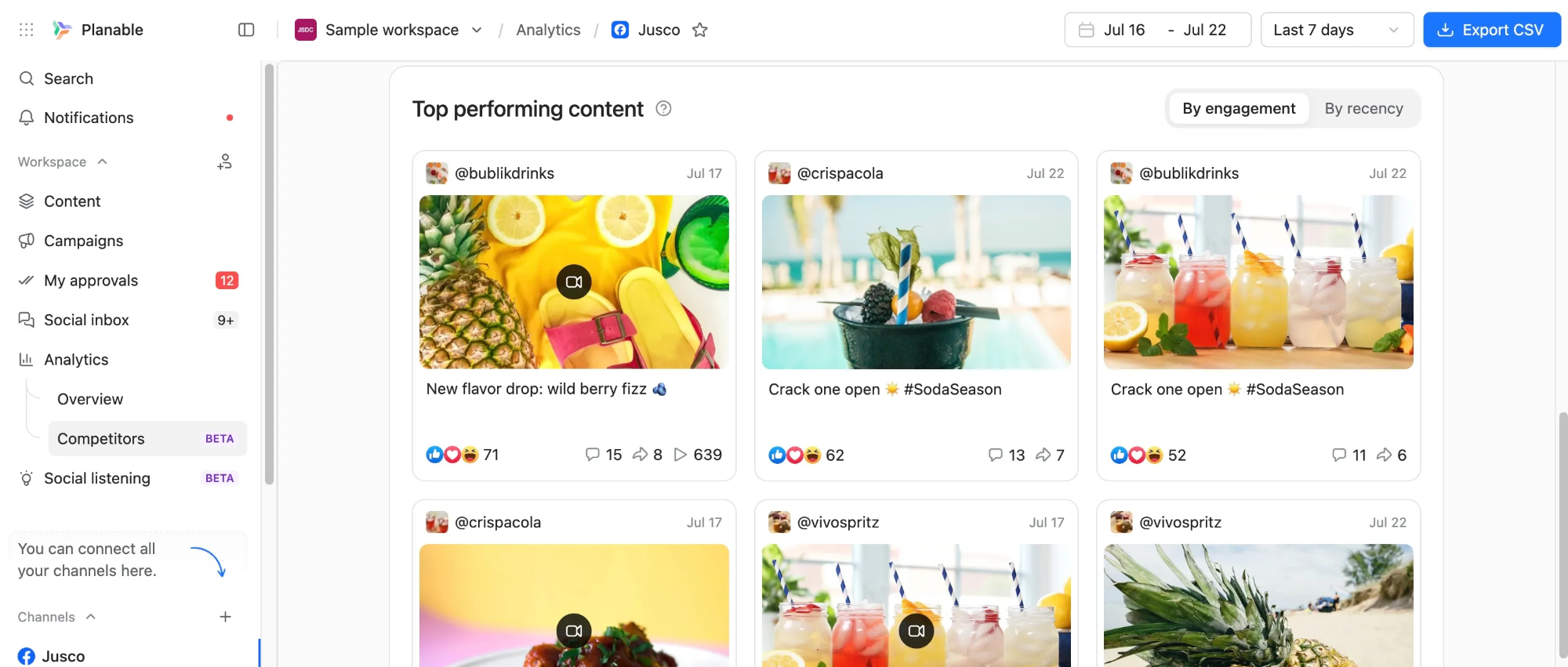
Planable competitor analytics showing top beverage posts.
What Planable does not replace
Planable helps agencies execute the workflow, but it does not replace the strategic judgment of the agency team.
It does not replace:
- Account manager judgment
- Brand strategy
- Campaign planning
- Final content decisions
- Legal or compliance review
- Human editing of AI-generated captions
- Human replies to comments and messages
Planable can support social inbox management for replies to DMs and comments on supported channels, but someone still needs to decide what to say and how to say it.
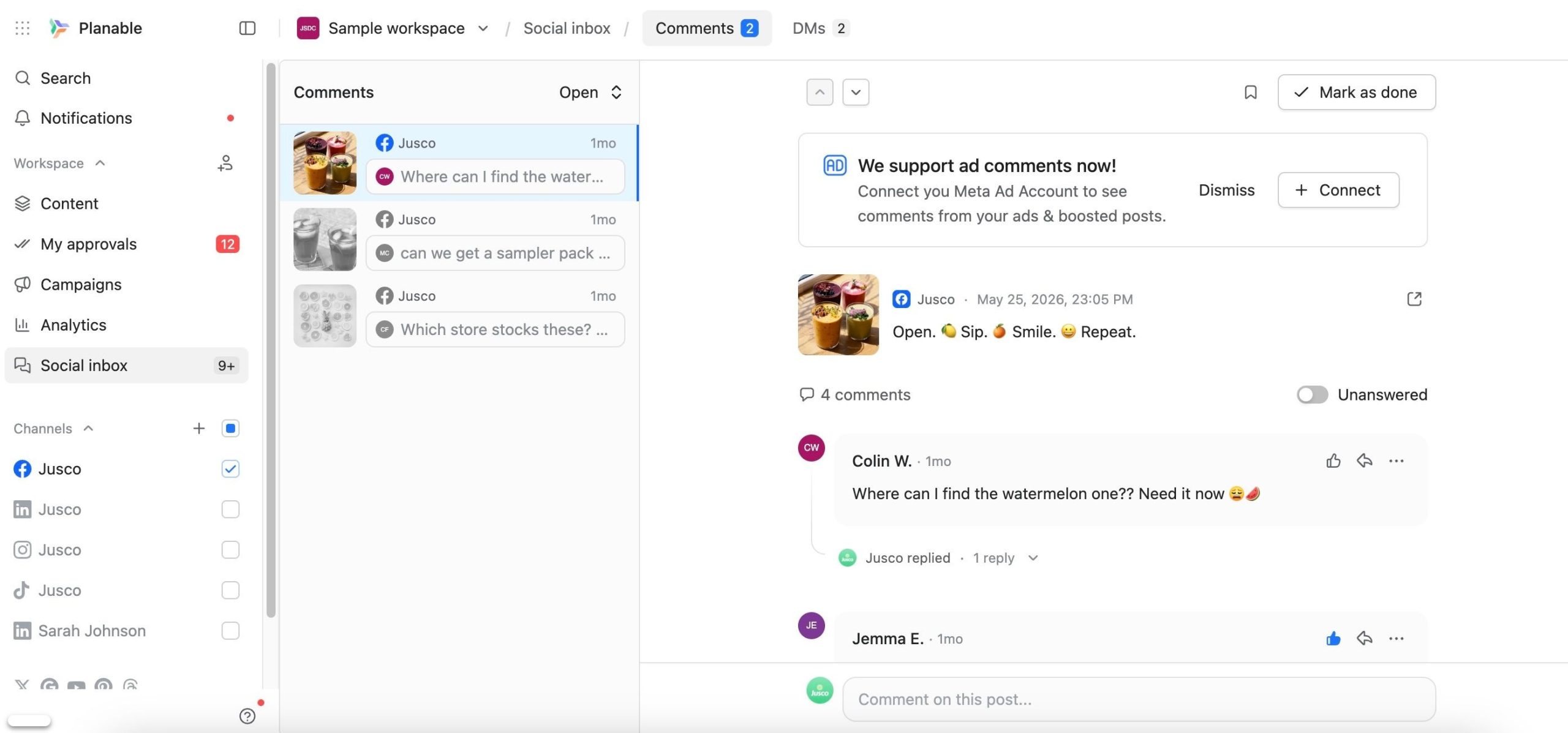
Planable social inbox managing comments and replies.
For agencies building deeper automation, Planable’s Public API can connect the platform to project management tools, CRMs, or AI systems. This can help teams create content, trigger approval flows, and pull analytics data without relying only on the Planable interface.
Common mistakes that break agency workflows
1. Combining internal collaboration and client approval
Internal review and client approval should be separate steps.
If a client sees a half-finished draft, they may treat it as final content. This creates confusion and can damage trust.
A better process keeps rough drafts, internal comments, and alternative copy options hidden until the agency is ready to present the post.
2. Letting one person own the whole process informally
If a workflow breaks when one account manager is unavailable, the process is not documented well enough.
Every repeatable step should be written down, including:
- Who creates the post
- Who reviews it
- Who sends it for approval
- How client comments are handled
- When posts are scheduled
- How reporting is prepared
Documentation reduces risk and makes it easier to train new team members.
3. Treating scheduling as strategy
A full content calendar is not the same as a content strategy.
A schedule shows when content will be published. A strategy explains why each post exists, who it is for, and what outcome it supports.
Agencies need both. The workflow should make publishing easier, but the team still needs to define campaign goals, messaging priorities, and audience needs.
4. Giving clients edit access instead of approval access
Clients should be able to review, comment, and approve. They should not have unrestricted editing access to live working documents unless the agency has a clear reason for it.
Approval access protects version control. It also makes responsibility clearer: the agency creates and manages the content, while the client approves or requests changes.
5. Rebuilding onboarding for every new client
Slow onboarding limits agency growth.
A better process uses a repeatable onboarding checklist:
- Create the client workspace.
- Connect social pages.
- Invite internal team members.
- Invite the client with approval access.
- Add brand context and voice guidelines.
- Set the posting timetable.
- Configure approval rules.
- Build the first two weeks of content.
- Send the approval link.
- Confirm reporting metrics.
If onboarding takes more than a few hours of account manager time, the workflow likely needs more standardization.
FAQs
What is the difference between a social media workflow and a content calendar?
A content calendar shows what will be published and when. A social media workflow shows how content moves from idea to published post, including creation, review, approval, scheduling, and reporting. The calendar is the output; the workflow is the system that produces it.
How many clients can one social media manager handle?
With a structured workflow, one social media manager can often handle 8 to 12 active clients producing 3 to 4 posts per week each. Beyond that, the agency usually needs more support, more automation, or a more disciplined publishing routine.
Should clients have access to the social media content calendar?
Yes, clients should usually have controlled access to the content calendar. They should be able to preview posts, leave comments, and approve content, but they should not be able to edit live working content in a way that creates version-control problems.
How should agencies handle last-minute client requests?
Agencies should build spare time into the publishing schedule. For example, if posts go live on Monday, Wednesday, and Friday, Wednesday and Friday posts should already be approved by Tuesday. This gives the team room to handle urgent Monday requests without breaking the rest of the calendar.
What is the best way to onboard a new social media client?
Use a repeatable setup process: create a workspace, connect social pages, invite the client with approval access, add brand voice guidelines, configure the approval workflow, build the first content batch, and send the approval link.
Can AI be used in a client approval workflow?
Yes. AI can be used to draft captions, adapt content for different platforms, and repurpose existing assets. However, AI-generated posts should still go through internal review and client approval before publishing.
What social media channels should an agency workflow support?
Most agency workflows need to support Instagram, LinkedIn, Facebook, and TikTok as core channels. Depending on the client, the workflow may also include X, YouTube, Google Business Profile, Pinterest, and Threads. The workflow steps stay mostly the same, but formats and posting cadence change by platform.
A scalable social media agency workflow has separate client workspaces, clearly defined roles, centralized feedback, simple client approval, AI-assisted drafting, automatic scheduling, and built-in reporting.
The workflow should be documented, repeatable, and easy to apply to every new client. Agencies that scale successfully do not rebuild the process for each account. They maintain one clear system and adapt the content strategy inside it.
Build the workflow before client volume forces you to. The best time to fix a broken process is before it affects publishing deadlines, client approvals, or team capacity.
George – Content Marketing Strategist, storyteller, and self-appointed cringe detector. 7 years in marketing, starting from graphic design to social, campaigns, and content. Writes, shoots, edits – if it’s creative, he’s on it. Knows what’s funny, what’s fresh, and what should never see the light of day. Always up to date, always cooking up something (and trying to hit his protein goal), all while pretending to get 8 hours of sleep.