5 SocialBee alternatives for agencies and teams
Socialbee is a pretty capable social media management tool with dozens of features to speed up social media scheduling, planning, and content creation. Still, I tested the platform and I found that its ample feature set comes with a learning curve, which can lead to prolonged setup times and extensive training.
Plus, its entry-level and mid-tier pricing plans cap at one workspace, one user, and up to 15 social media accounts (for the mid-tier plan). Extra workspaces and users cost an additional $10 per month each, while 5 extra social media accounts will set you back another $15 per month.
With default paid plans starting at $24 per month (annually), SocialBee is not exactly affordable for larger marketing teams and agencies managing multiple clients.
If these factors are deal-breakers for you, keep on reading because I’ll walk you through some of the best Socialbee alternatives I’ve tested throughout the years.
Quick summary: our top 5 Socialbee alternatives
Planable
Client and team collaboration & social media content approval workflows
Agorapulse
Social media community management
Loomly
Boosting social media presence across multiple channels
Sendible
Businesses managing multiple clients on a budget
Buffer
Solopreneurs and freelance social media managers
Best for
Client and team collaboration & social media content approval workflows
Best for
Social media community management
Best for
Boosting social media presence across multiple channels
Best for
Businesses managing multiple clients on a budget
Best for
Solopreneurs and freelance social media managers
1. Planable: the best alternative for agency-to-client social media workflows
Best for: Client and team collaboration & social media content approval workflows
Rating: 5/5 (excellent content collaboration and multi-account social media management features)
Why I picked Planable
Planable is a social media management tool specifically designed to make social media client work easy. The platform lets you set up multiple collaborative workspaces dedicated to a pecific brand, client, or project.
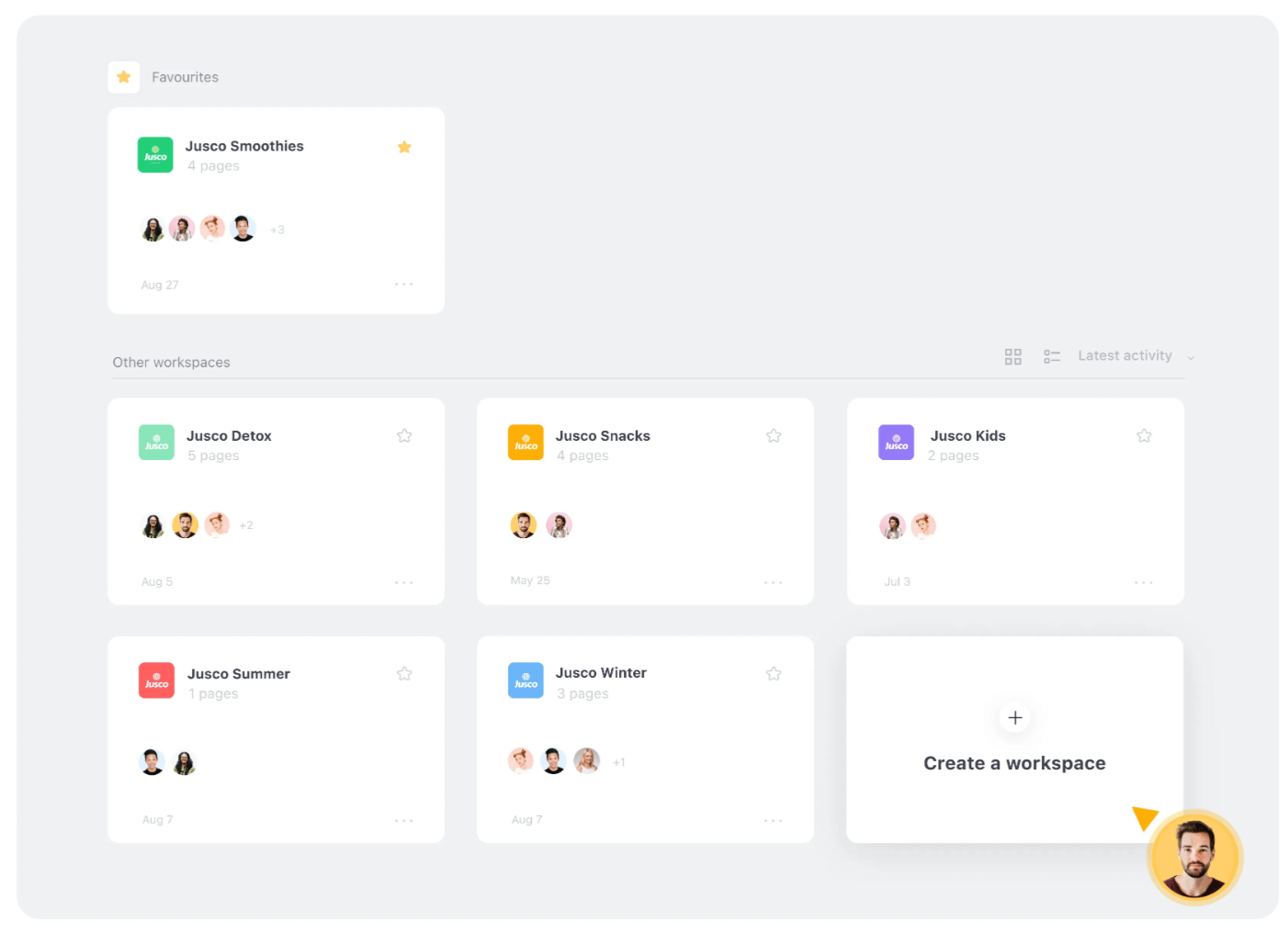
Planable organizes your content by brand or campaign with customizable workspaces.
Each workspace has its own calendar, social accounts, media asset library, and more. You can add team members to your workspace via custom user roles and permissions, and invite clients via guest view links (no account needed).
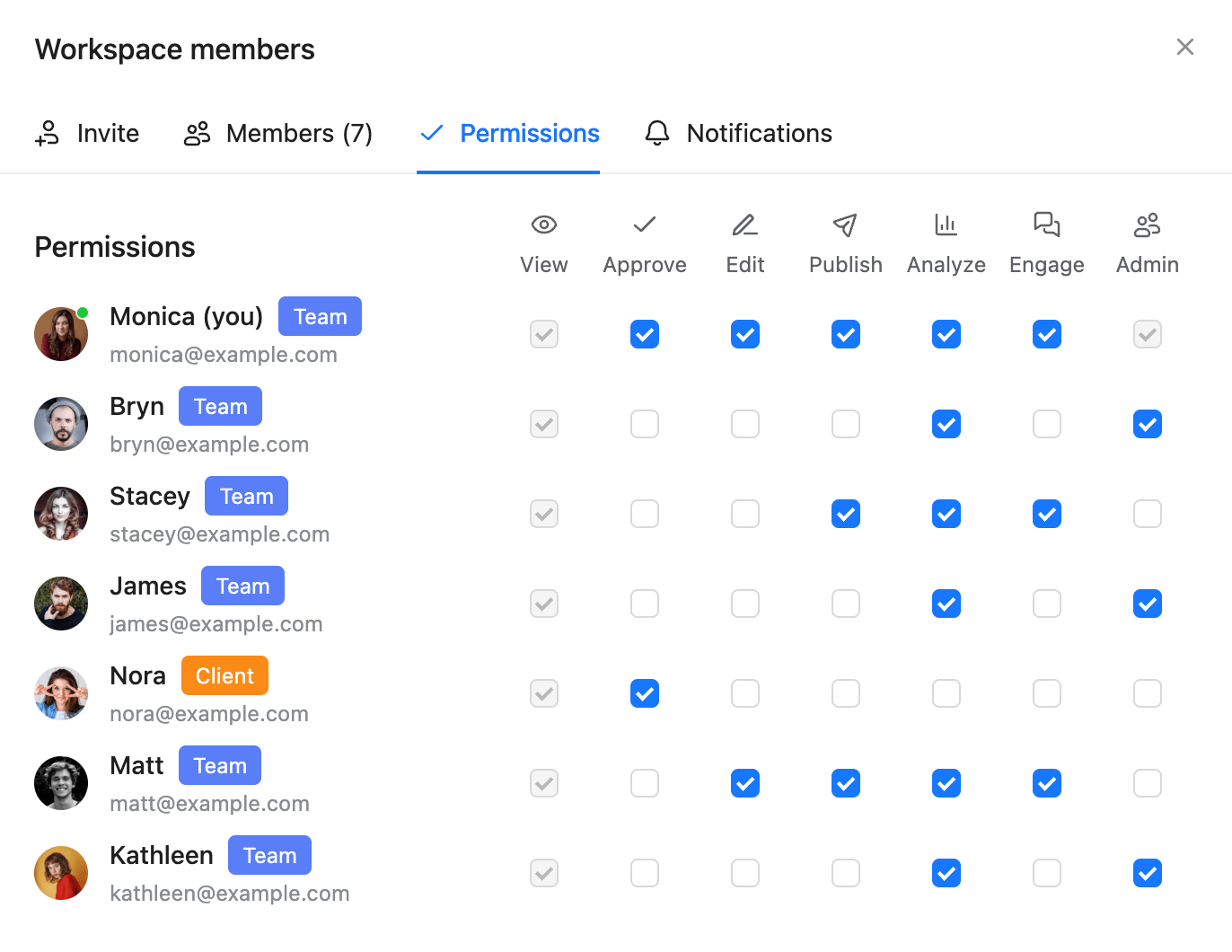
Planable simplifies multi-step content approval workflows across synced social platforms.
Your team members can work on and collaborate on posts via comments, direct annotations, and text suggestions, while social media managers can keep track of work via version control and activity history. They can also keep behind-the-scenes work out of the client’s view by marking comments (or complete posts) as internal.
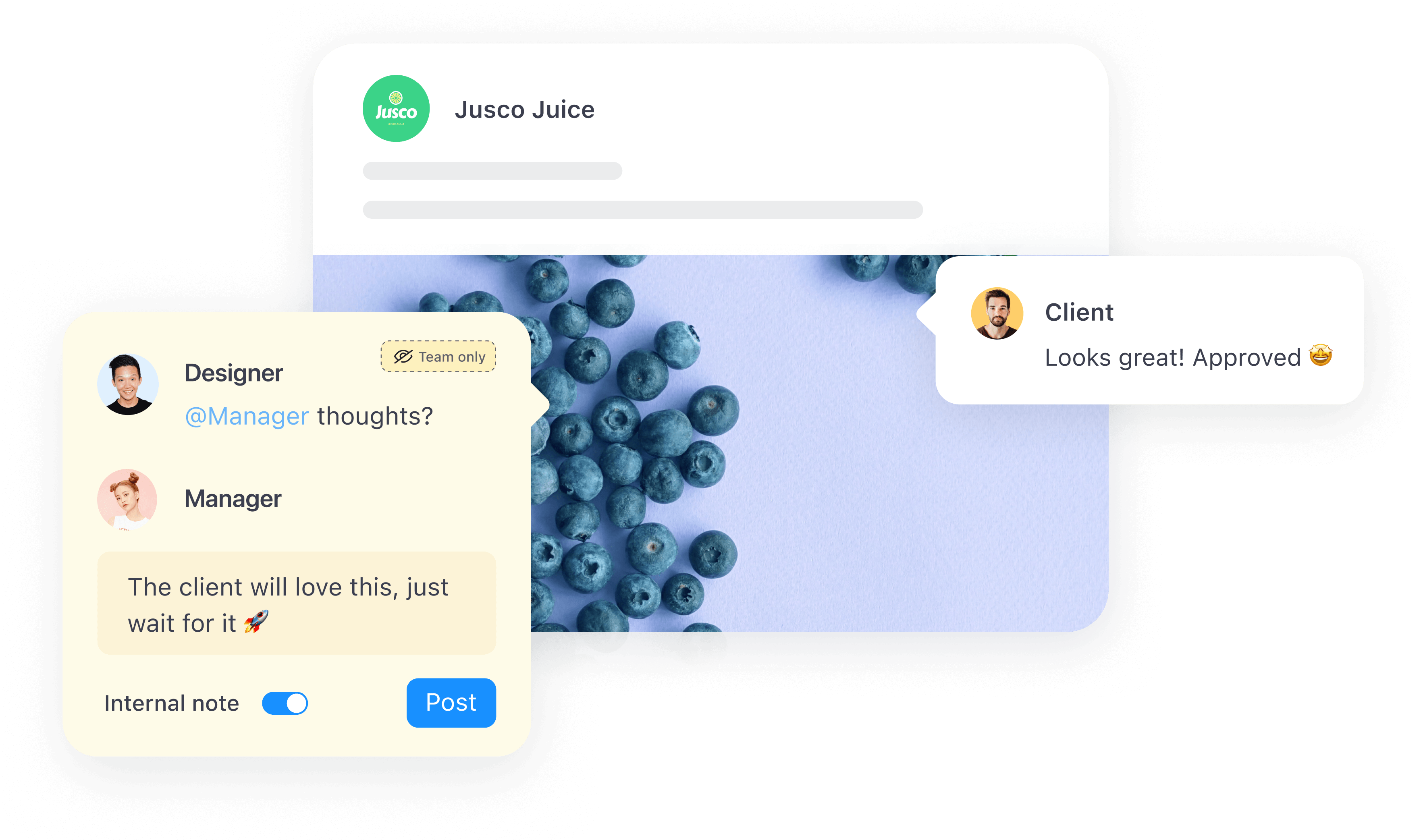
Planable supports internal notes so teams can align before sharing posts with clients.
Plus, the platform’s multi-level content approval workflows ensure content is as polished as possible before reaching the client. You can set up multiple approval layers containing as many team members as needed. Content has to pass through each distinct layer, while clients decide whether to give the green light.
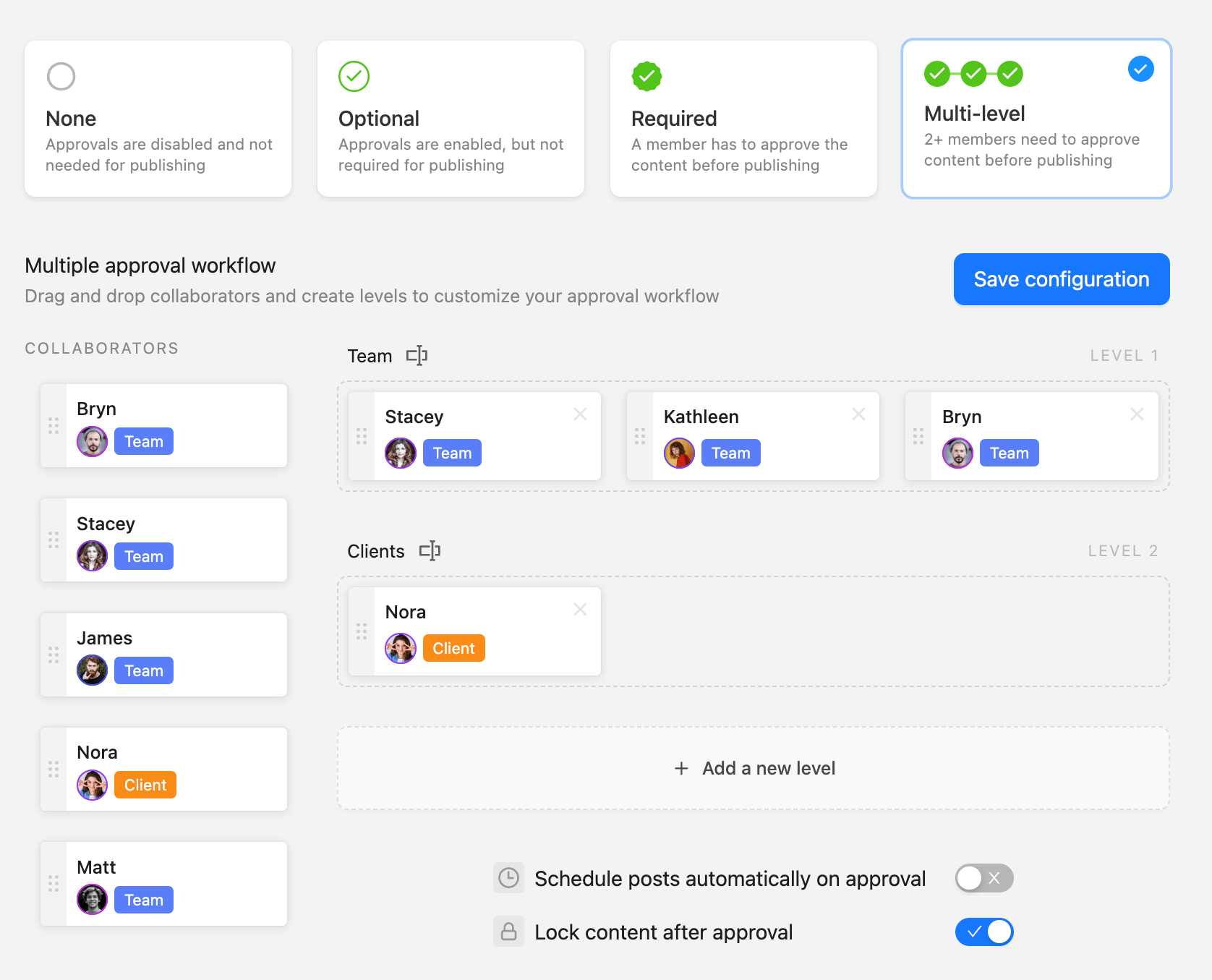
Planable enables custom multi-level approval flows, letting teams define reviewers by role and stage.
Add in the Planable’s built-in cross-channel scheduling tools, drag-and-drop calendars, analytics, and engagement tools, and you’ve got a platform that really makes social media management for multiple clients easy. That’s why I gave it the top spot here.
I love that I am able to communicate easily with my clients and get approvals on posts. It is also seamless and my whole team is on the same page. The various ways I can see content is also nice and easy to use. The analytics are great and readily available. Very user friendly platform.
Magdalena D., Founder of E-Ssistant.
Key features
- Content calendar: Schedule, reschedule, and organize posts via a drag-and-drop calendar with notes and color-coded labels. Use the Campaigns feature to group and track campaign-specific posts across multiple social media accounts.
- Content publishing: Publish the same post across multiple social media platforms with the SYNC ON/OFF feature. Schedule evergreen content with custom re-publishing frequencies and expiration dates.
- Custom approval workflows: Choose between 4 distinct approval workflow types: none, optional, required, and multi-level. Automatically schedule posts once they get the green light.
- Universal Content: Go outside social media posts with Universal Content. Plan, collaborate, and work on newsletters, blog posts, video scripts, or any other written content type.
- Planning views: Go beyond the calendar view and plan posts with the Grid view (purpose-built for Instagram), feed view (ideal for blog posts), and list view (great for visualizing multiple content formats).
Integrations: Instagram (Reels and Stories included), Threads, Facebook, X, Pinterest, YouTube, TikTok, LinkedIn, and Google Business Profile.
Pricing: Paid plans start at $33/month/workspace (billed annually) with no user cap whatsoever. There’s also a free trial that lets you schedule up to 50 posts.
- No UTM parameter tracking
- Intuitive user interface with one-click access to most features
- No direct CMS integration for blog post publishing
- Great scalability with affordable analytics and engagement add-ons
- Excellent team and client collaboration tools and approval features
- Intuitive user interface with one-click access to most features
- Great scalability with affordable analytics and engagement add-ons
- No UTM parameter tracking
- No direct CMS integration for blog post publishing
2. Agorapulse
Best for: Social media community management
Rating: 4.5/5 (capable social media tool with top-notch inbox management features, but quite pricey)
Why I picked Agorapulse
Just like SocialBee and Planable, Agorapulse is a unified platform that handles end-to-end social media strategies. Still, its community management and moderation tools include significantly more advanced features compared to SocialBee, and that is perfect if you also cover community management services for your clients.
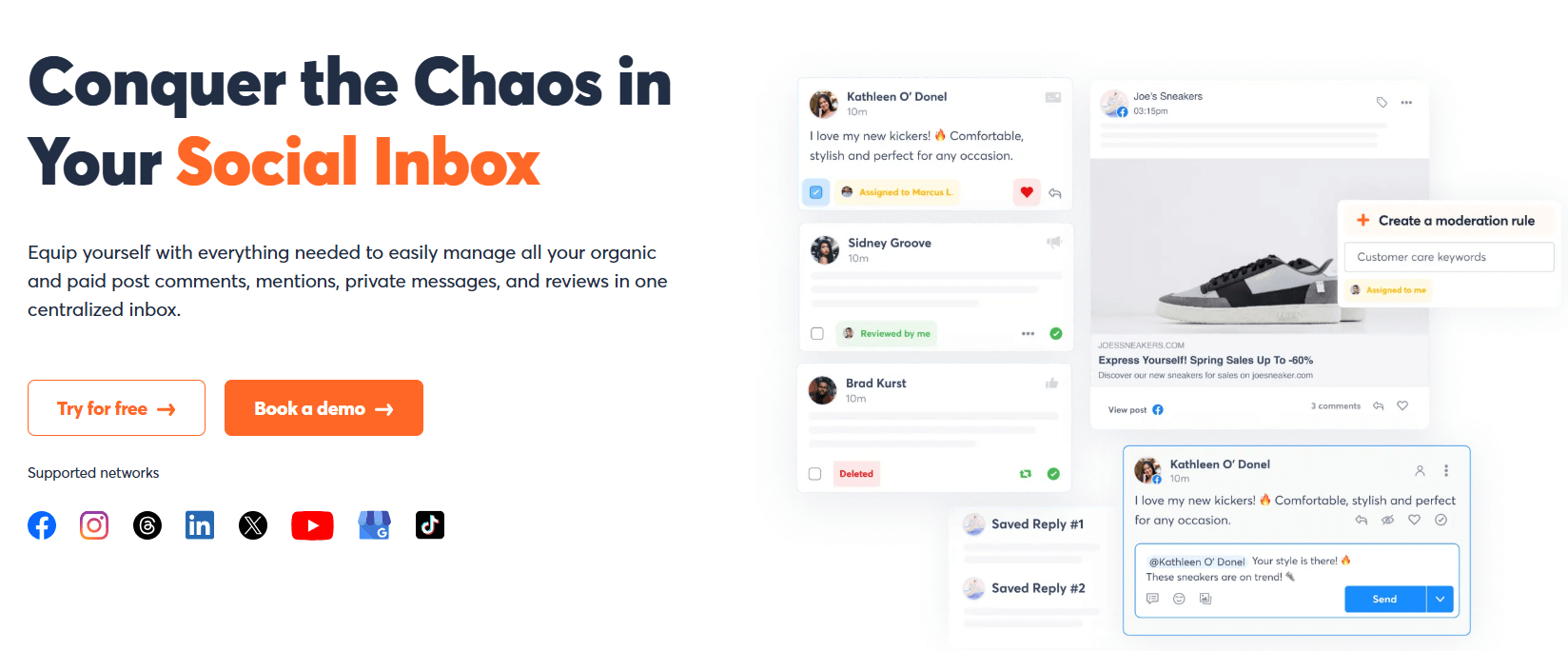
You can set up automated workflows to delete or reply to comments that include particular keywords or links, for example.
Agorapulse also integrates with HubSpot and Salesforce, so you can add social media accounts to your CRM contacts list, great for lead nurturing. However, these integrations are locked behind high-tier pricing plans, which brings us to one of the platform’s main drawbacks.
Agorapulse is quite pricey by default, and nudges you to move up through pricing tiers to access new or otherwise basic features, like calendar notes.
New features have been known to be locked behind a price wall, which can inhibit the opportunity to thoroughly explore and determine the usefulness. While timed free trials are provided upon launch, it isn’t always feasible to join at that time.
Ashley E., Digital Marketing Assistant Director.
Key features
- Use the platform’s unified inbox to track and respond to comments across multiple platforms via AI-assisted reply suggestions, canned responses, sentiment analysis, and more.
- Get access to detailed analytics by connecting Agorapulse’s reporting tools with Google Analytics and measure website traffic from multiple social channels.
- View and publish posts across all major social media networks through a unified calendar, with notes, bulk scheduling, link tracking, and more.
Integrations: Facebook, Instagram, Threads, X, Bluesky, Reddit, Pinterest, YouTube, TikTok, LinkedIn, Google Business Profile.
Pricing: Agorapulse starts at $79/user/month with a 30-day free trial available.
- Excellent inbox management capabilities
- Ample set of supported networks, with Reddit and BlueSky included
- The per-user pricing model makes the platform expensive for larger companies with multiple users
- Google Analytics integration is a big plus
- The platform’s complexity gives it a rather clunky user experience
- Excellent inbox management capabilities
- Ample set of supported networks, with Reddit and BlueSky included
- Google Analytics integration is a big plus
- Limited collaboration tools in entry-level plans
- The per-user pricing model makes the platform expensive for larger companies with multiple users
- The platform’s complexity gives it a rather clunky user experience
3. Loomly
Best for: Boosting social media presence across multiple channels
Rating: 4/5 (versatile social media management tool, but with some limitations)
Why I picked Loomly
Loomly stands out through the number of social accounts you can manage. For example, the platform’s Starter package lets you connect up to 12 accounts, which is more than Socialbee’s mid-tier package. You can also add up to three users and set up unlimited calendars on top of that.
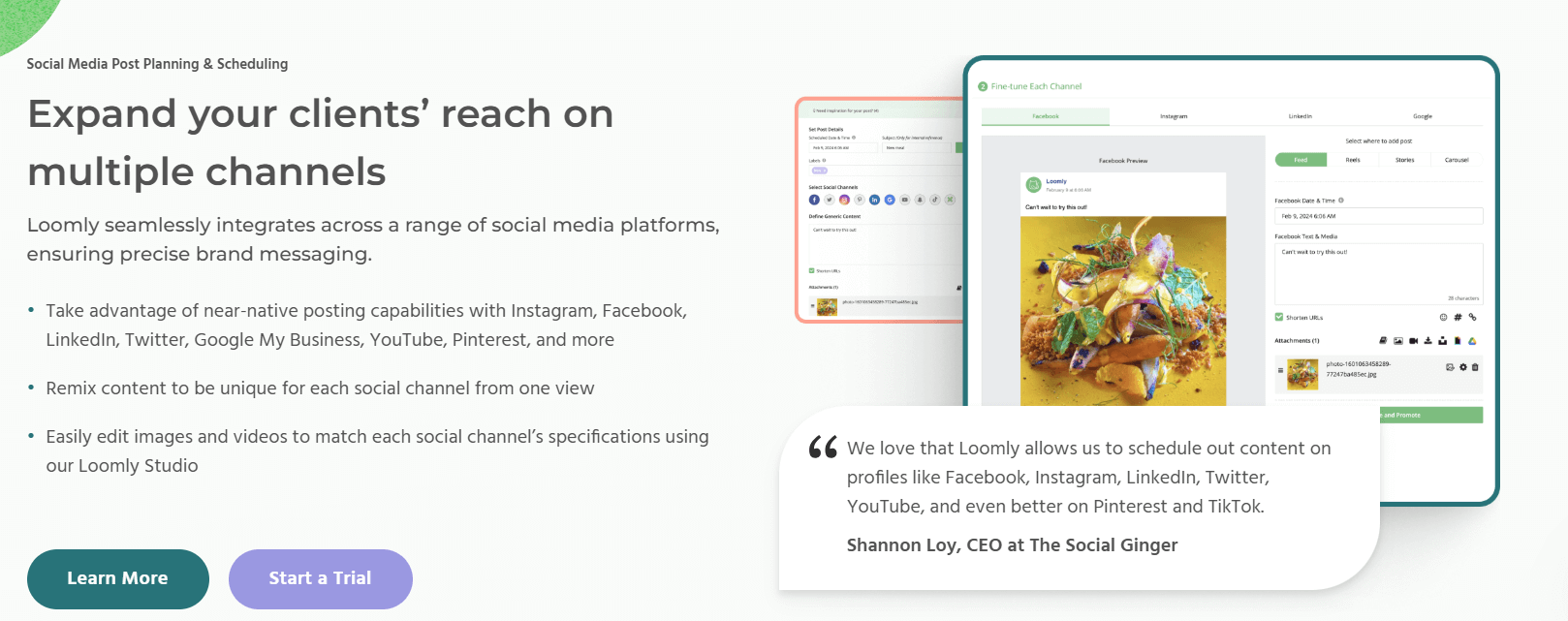
As for features, Loomly handles anything and everything social media-related: from scheduling content across multiple social media channels to engagement, reporting, and collaboration. But despite its versatility, some of its features are rather shallow.
Users commonly bring up Loomly’s lack of detailed analytics, for instance.
My only disappointment is the lack of detail in the analytics and that you have to invite people to the platform for approvals.
Emma S., Divisional Marketing Manager.
Key features
- Get an automated feed of social media post ideas and trending hashtags to find relevant topics.
- Make network-specific tweaks as you schedule posts across multiple platforms, like adjusting a TikTok video into a YouTube Short.
- Use Loomly’s collaboration tools to invite clients to your workspace, leave comments (internal and public), and request or give out content approvals.
Integrations: Instagram, Facebook, Threads, Bluesky, YouTube, TikTok, Pinterest, Snapchat, LinkedIn, Google Business Profile.
Pricing: Pricing is not disclosed; you’ll have to reach out to the sales team. But there’s a 15-day free trial available.
- Ideal posting time and hashtag suggestions included
- Collaboration features not as in-depth as other tools like Planable
- The option to store content ideas and target hashtags within the platform
- Limited analytics capabilities
- Lacks transparent pricing
- Ideal posting time and hashtag suggestions included
- The option to store content ideas and target hashtags within the platform
- Community management tools available for all major social media platforms
- Collaboration features not as in-depth as other tools like Planable
- Limited analytics capabilities
- Lacks transparent pricing
4. Sendible
Best for: Businesses managing multiple clients on a budget
Rating: 4/5 (great value for money, but prone to occasional bugs and glitches)
Why I Picked Sendible
Sendible‘s pricing structure lets you add multiple users and social media profiles without blowing the budget.
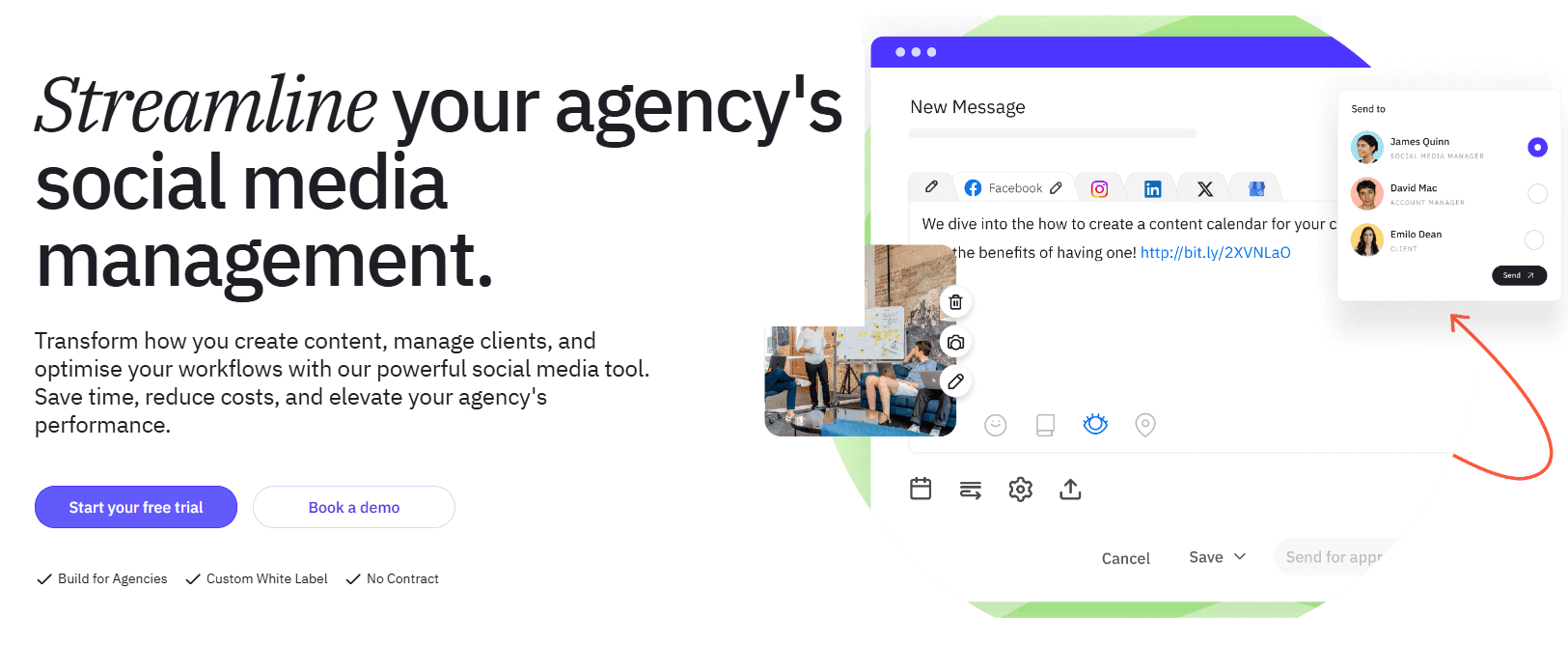
Sendible helps teams compose, preview, and route posts for approval within one dashboard.
For example, the Scale package (the mid-tier plan) costs $149/month (billed annually), with 7 users and 49 social profiles. That comes down to about $21/user/month, which is in stark contrast to SocialBee’s entry-level plan that costs $24/month and includes only one user, one workspace, and up to 5 social profiles.
Plus, Sendible offers a solid feature set: inbox management, team collaboration, analytics, marketing campaign planning and management, and so on. But it does suffer from bugs and glitches, hence I didn’t place it higher in this list.
We’ve experienced recurring issues with LinkedIn integration. Posts don’t always publish as scheduled, and at times the connection between Sendible and LinkedIn needs to be refreshed or reauthorized unexpectedly.
Ashley H., VP Marketing and Communications.
Key features
- Track social media campaigns by grouping multiple posts belonging to the same campaign, then measure their performance under dedicated dashboards.
- Use the platform’s content library to store relevant assets, hashtags, and content ideas. Also, organize content by type, client, or campaign.
- Use the platform’s client management tools to speed up agency workflows: set up dedicated client dashboards, invite external stakeholders onto the platform, and collaborate via comments.
Integrations: Instagram, Facebook, Threads, X, BlueSky, YouTube, TikTok, Pinterest, LinkedIn, Google Business Profile, WordPress.
Pricing: Sendible starts at $25/month (billed annually), with 1 user and 6 profiles. There’s a 14-day free trial available.
- Sendible’s native WordPress integration is a big plus
- No precise feedback tools, like annotations and clear text suggestions
- Low learning curve despite its diverse feature set
- Sendible’s multi-level approvals are quite clunky: each reviewer has to manually pass the content on to the next
- Suitable for marketing agencies on tighter budgets
- Prone to workflow-disrupting bugs and glitches
- Sendible’s native WordPress integration is a big plus
- Low learning curve despite its diverse feature set
- Suitable for marketing agencies on tighter budgets
- No precise feedback tools, like annotations and clear text suggestions
- Sendible’s multi-level approvals are quite clunky: each reviewer has to manually pass the content on to the next
- Prone to workflow-disrupting bugs and glitches
5. Buffer
Best for: Solopreneurs and freelance social media managers
Rating: 4/5 (perfect platform for solo users, but not advanced enough for proper agencies)
Why I picked Buffer
If you’re a solo user who got held back by SocialBee’s entry-level plans, Buffer might be a solid fit. It’s a small business-friendly platform with flexible pricing plans that lets you select the exact number of social channels you need. And it’s quite good at making your job easier.
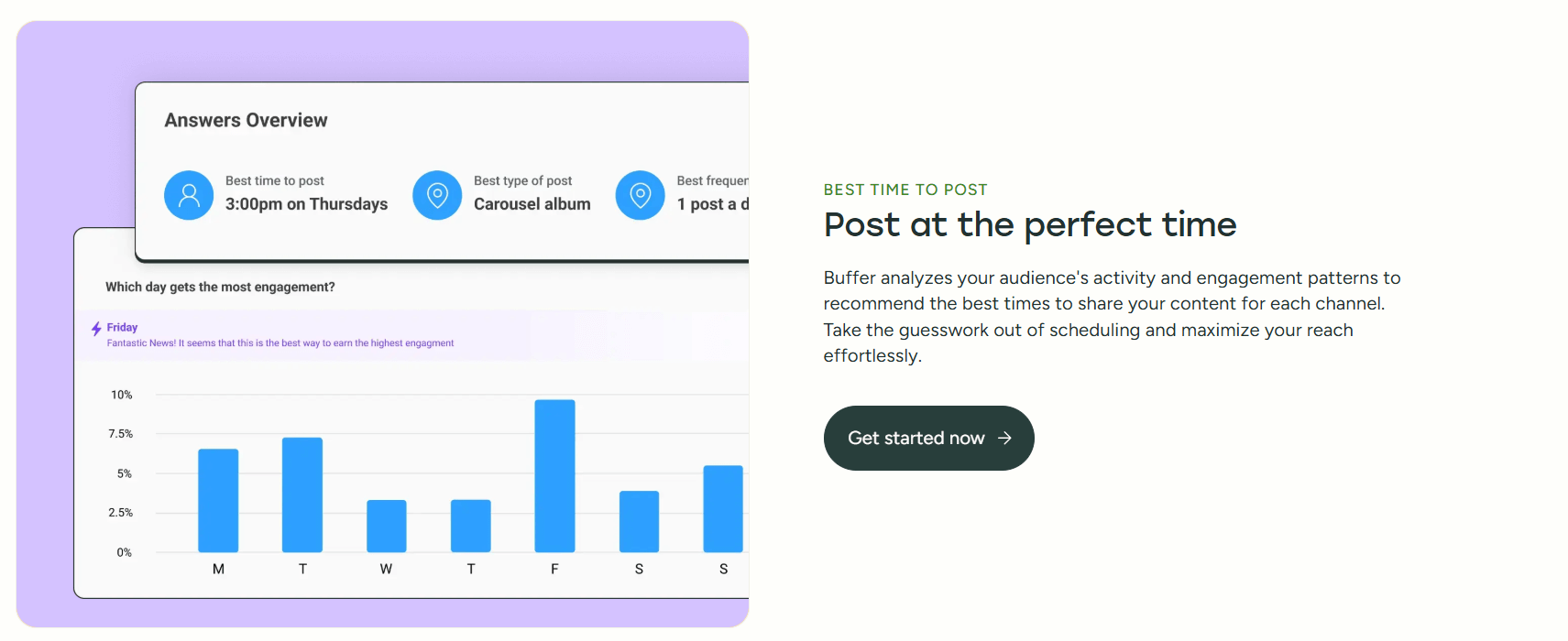
For example, its AI features measure your existing social media performance and use that data to suggest ideal posting times, publishing frequencies, and content formats for your future posts to maximize engagement.
Plus, you get access to inbox management tools, an AI assistant for content creation, and WordPress integrations (suitable for content repurposing or curation).
Still, its toolset might not be advanced enough for larger social media marketing agencies. Its per-channel pricing model can also bump up costs if you handle numerous clients.
Basic Analytics: The reports are often considered too shallow for large teams that require in-depth competitive or custom reporting. Cost for Scale: The pricing can get expensive quickly if you manage a large number of social accounts.
Shishu Raj P., Assistant Vice President.
Key features
- Set up microsites with lead capture forms and shoppable products, and measure metrics like link clicks or pageviews from various social media platforms.
- Duplicate your posts to publish them across different social media platforms and make network-specific tweaks.
- Engage with followers faster through canned responses and AI-assisted replies, and track your community management performance with the Comment Score feature.
Integrations: Facebook, Instagram, Threads, X, BlueSky, Mastodon, TikTok, YouTube, Pinterest, LinkedIn, Google Business Profile.
Pricing: There’s a free forever version available. Paid plans start at $5/channel/month (billed annually).
- Small business-oriented platform with flexible pricing packages
- Quite limited team collaboration tools, like lacking multi-level approvals
- Native integrations with WordPress, Feedly, and Pocket for content curation
- Not suitable for larger-scale companies
- Useful AI content creation, community management, and social media analytics features to speed up workflows
- Lacks advanced analytics capabilities, like competitive benchmarking
- Small business-oriented platform with flexible pricing packages
- Native integrations with WordPress, Feedly, and Pocket for content curation
- Useful AI content creation, community management, and social media analytics features to speed up workflows
- Quite limited team collaboration tools, like lacking multi-level approvals
- Not suitable for larger-scale companies
- Lacks advanced analytics capabilities, like competitive benchmarking
How I chose the best Socialbee alternatives: selection criteria
Here’s my thought process behind how each platform above made it on this list:
- Features: SocialBee is quite a capable all-around social media tool, so how do other platforms match that? What can they do better than SocialBee?
- Pricing accessibility: Is the platform accessible by both smaller and larger businesses? How about solopreneurs?
- User reviews: What did other users find most useful? What did they not like?
- Performance and user experience: Is the platform easy to get used to? Are there any serious bugs and glitches?
Key features & benefits to look for in social media management platforms
Let me walk you through a brief rundown of the features and benefits you should prioritize when picking a social media management solution.
Team and client collaboration
Centralizes communications and eliminates the risk of having critical feedback lost in third-party software.
Multi-level approvals
Engagement tools
Merges community management into existing social media workflows. It reduces the need to rely on multiple tools to handle various activities.
Workspaces
Keep brand or client-specific projects organized.
Core benefit
Centralizes communications and eliminates the risk of having critical feedback lost in third-party software.
Core benefit
Core benefit
Merges community management into existing social media workflows. It reduces the need to rely on multiple tools to handle various activities.
Core benefit
Keep brand or client-specific projects organized.
How to pick the right SocialBee alternative for your social media management needs
Choosing the right SocialBee alternative comes down to your main pain points. That said, here’s a quick recap of the issues each platform I listed above solves:
- If you’re struggling with decentralized social media management and client collaboration workflows, Planable brings it all to one place.
- If you’re having trouble keeping up with your clients’ follower bases, Agorapulse’s community management automation tools will help you out.
- If you struggle to manage loads of accounts spread across multiple platforms, Loomly might be a solid solution.
- A startup marketing agency that just got a sudden influx of new clients? Sendible helps manage them without breaking the bank.
- A busy solopreneur or freelance social media manager who doesn’t need all the bells and whistles of enterprise-grade solutions? Buffer might just fit the bill.
Still, I would definitely recommend Planable as a rock-solid all-around alternative to SocialBee. Besides its team collaboration and workspace management features, the Engagement add-on is super handy to respond to comments from followers across your clients’ accounts.
Plus, the per-workspace pricing model accommodates the exact number of clients you handle, and you can add unlimited users to each workspace.
So why not try it out? Schedule your first 50 posts completely for free!
Horea is a software reviewer and tester, content writer, and tech geek. He loves to fiddle with MarTech solutions to find what each software is best for and help you decide which one might be your best fit. His content is allergic to fluff and eats research for breakfast. If you’re on the fence about whether you should commit to a particular platform, Horea probably already wrote about it.