7 best Hootsuite alternatives for 2026 (tried & tested)
The search for robust Hootsuite alternatives is growing as the platform shows its age. In my testing, the same friction kept coming up: a dashboard that feels cluttered, social profiles that need reconnecting at the worst moment, and core features (analytics, approval processes, reporting) that get expensive fast. To build this list, I onboarded into each tool, connected multiple social accounts, and ran the same planning + publishing + inbox + reporting workflow to see what actually holds up day to day.
My top alternatives to Hootsuite for 2026
1. Planable
Agency content collaboration and approval workflows
2. Buffer
Simple scheduling for creators and small teams
3. Agorapulse
Unified social inbox and ROI reporting
4. Sprout Social
Enterprise-grade analytics and social listening
5. Later
Visual-first Instagram content planning
6. Statusbrew
High-volume inbox management and moderation automation
7. SocialBee
Evergreen content recycling and category-based scheduling
Best for
Agency content collaboration and approval workflows
Best for
Simple scheduling for creators and small teams
Best for
Unified social inbox and ROI reporting
Best for
Enterprise-grade analytics and social listening
Best for
Visual-first Instagram content planning
Best for
High-volume inbox management and moderation automation
Best for
Evergreen content recycling and category-based scheduling
I’ve spent the last six years inside social media marketing platforms, so I know where the friction hides: permissions, reconnect loops, and features that break the moment you scale. For this review, I didn’t rely on marketing pages. I onboarded into each tool, connected multiple social accounts, and ran the same campaign workflow across all of them (planning, publishing, engagement, and reporting). I evaluated each platform on UI clarity, reliability, and how transparently pricing and permissions scale with more channels and users.
Why switch from Hootsuite?
Hootsuite still has strengths, especially for monitoring, social listening, and larger teams that need a broad social media command center. But in day-to-day use, it can feel heavier than many modern alternatives.
The biggest reason to switch is usually workflow friction. During testing, the dashboard felt dense, and newer teammates could easily get lost between streams, tabs, permissions, and settings. That matters because social media tools should reduce operational work, not add another layer of navigation.
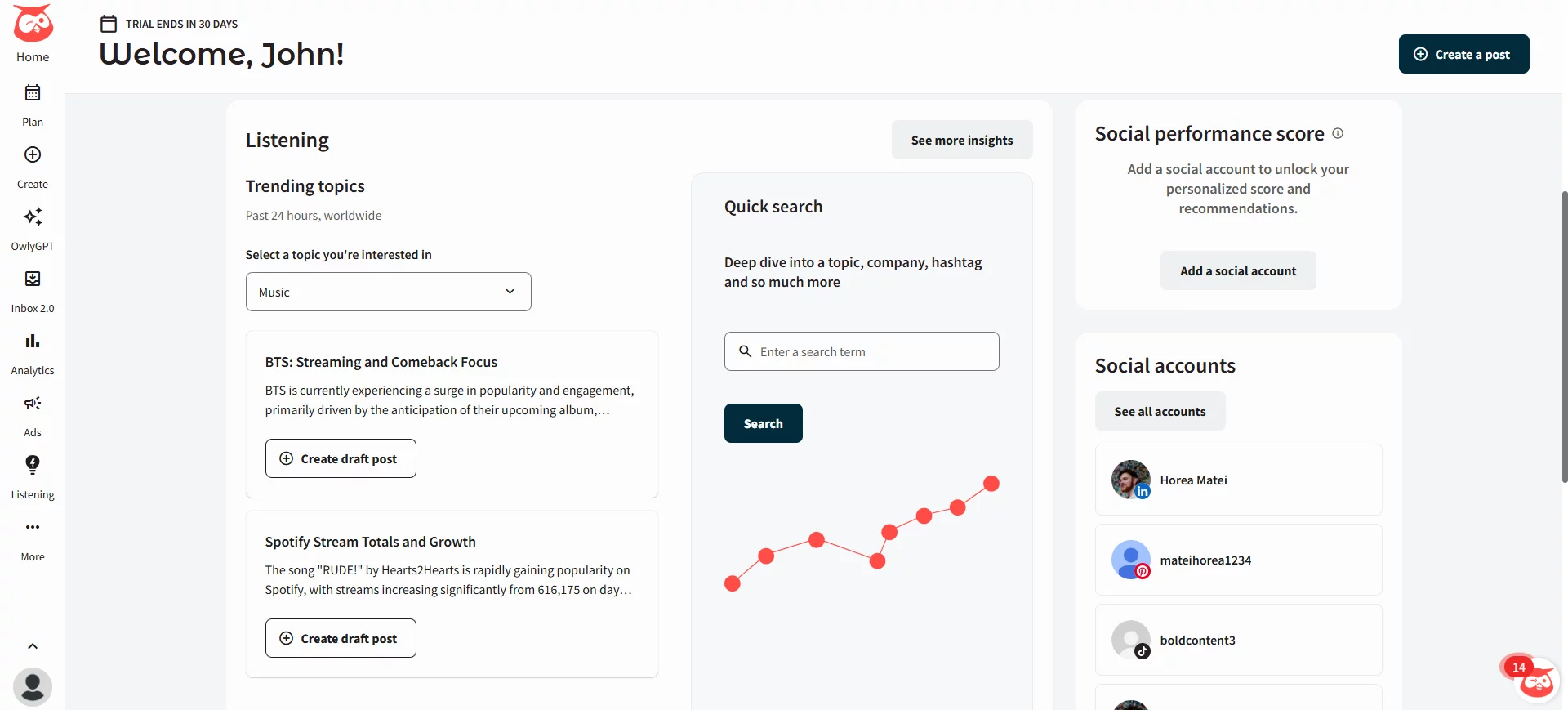
Hootsuite’s general dashboard
Reliability is another common concern. Reconnecting profiles, re-authorizing permissions, and checking whether a post published correctly can slow teams down, especially during campaigns. When a publishing tool makes you second-guess what is scheduled or live, trust becomes a problem.
Pricing is also part of the decision. Hootsuite can become expensive as teams add users, channels, analytics, approvals, and reporting needs. For smaller teams, agencies, and creators, some alternatives may offer a better fit because they focus on a narrower workflow at a lower total cost.
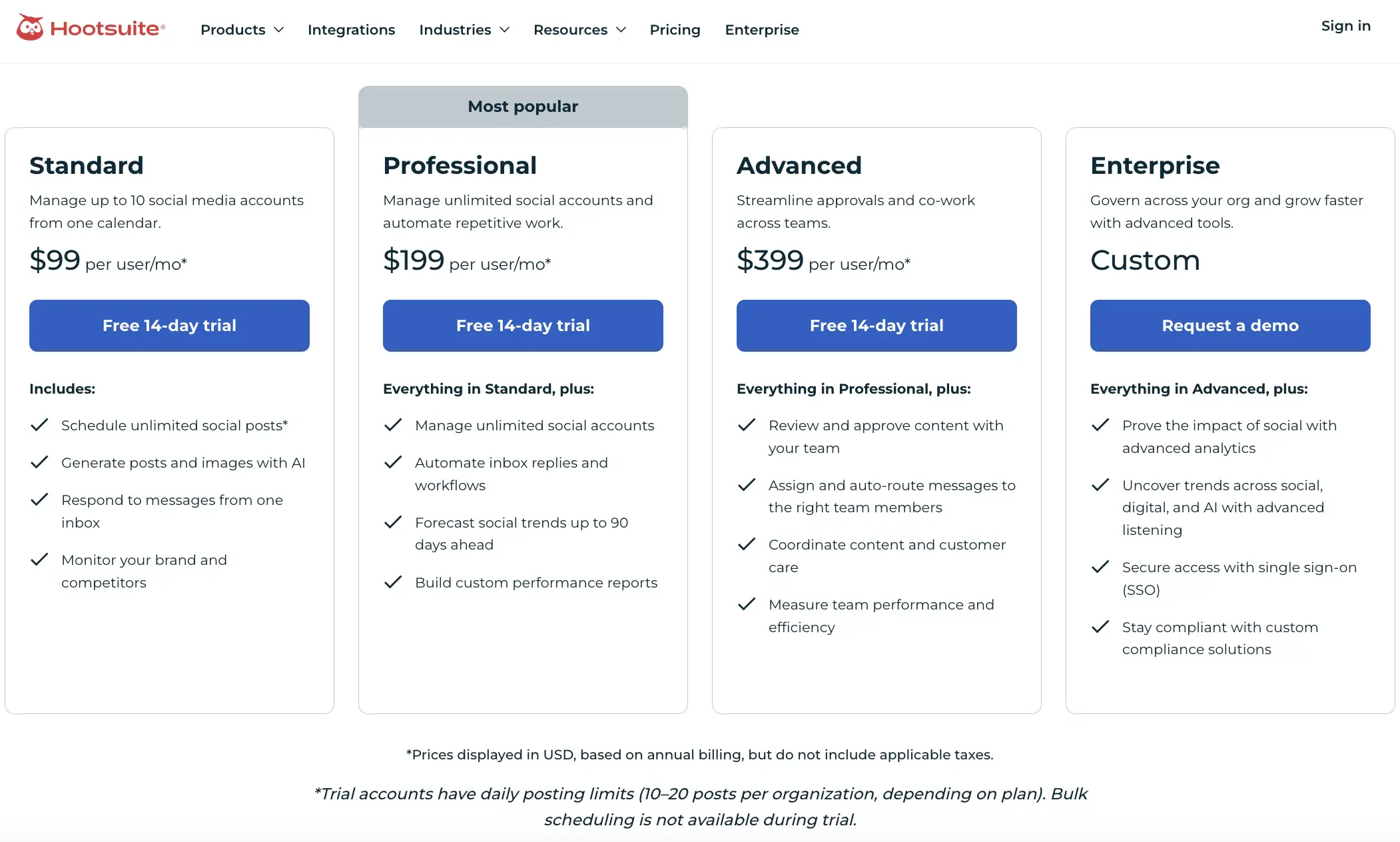
Hootsuite’s pricing plans
Finally, support was a pain point for me. When I ran into an issue during testing, getting a clear, human answer took more effort than it should.
The right replacement depends on what you need most. Choose a collaboration-first tool if approvals are the bottleneck, an inbox-first tool if engagement is the problem, an analytics-first tool if reporting matters most, or a lightweight scheduler if you simply need to plan and publish content faster.
Hootsuite alternatives: pricing and limits to check before choosing
Pricing changes often, so treat this section as a decision checklist rather than a permanent price list. Before switching from Hootsuite, compare each tool on the limits that usually affect real teams: number of users, social channels, approval workflows, analytics access, inbox features, and client/stakeholder access.
Planable
$33/workspace/mo
Teams and agencies that need collaboration and approvals
Reporting depth, listening features, number of workspaces, approval limits
Buffer
$5/channel/mo
Creators, solo marketers, and small teams
Channel limits, analytics depth, team collaboration features
Agorapulse
$79/user/mo
Teams that need inbox management and reporting
User seats, inbox automation, reporting exports, listening features
Sprout Social
$199/user/mo
Larger teams and enterprises
Per-user pricing, advanced analytics, listening, approval workflows
Later
$25/mo
Visual-first brands, creators, and Instagram-heavy teams
Platform coverage, analytics depth, link-in-bio features
Statusbrew
$69/mo
Teams managing high-volume engagement
Inbox automation, moderation rules, team permissions
SocialBee
$24/mo
Teams focused on evergreen posting and content categories
Analytics depth, inbox features, collaboration limits
Starting price
$33/workspace/mo
Pricing fit
Teams and agencies that need collaboration and approvals
Watch closely for
Reporting depth, listening features, number of workspaces, approval limits
Starting price
$5/channel/mo
Pricing fit
Creators, solo marketers, and small teams
Watch closely for
Channel limits, analytics depth, team collaboration features
Starting price
$79/user/mo
Pricing fit
Teams that need inbox management and reporting
Watch closely for
User seats, inbox automation, reporting exports, listening features
Starting price
$199/user/mo
Pricing fit
Larger teams and enterprises
Watch closely for
Per-user pricing, advanced analytics, listening, approval workflows
Pricing fit
Visual-first brands, creators, and Instagram-heavy teams
Watch closely for
Platform coverage, analytics depth, link-in-bio features
Pricing fit
Teams managing high-volume engagement
Watch closely for
Inbox automation, moderation rules, team permissions
Pricing fit
Teams focused on evergreen posting and content categories
Watch closely for
Analytics depth, inbox features, collaboration limits
Pricing note: Starting prices are entry-level public prices and may vary by billing cycle, users, channels, workspaces, add-ons, approvals, analytics, and inbox access.
The cheapest tool is not always the best Hootsuite replacement. A small team may save money with Buffer or Later, while an agency may get more value from Planable’s approval workflows. A support-heavy brand may be better served by Agorapulse or Statusbrew, and an enterprise team may still need Sprout Social or Hootsuite for deeper analytics and listening.
Best Hootsuite competitors for 2026
The best Hootsuite alternatives need to go beyond scheduling posts and empower marketing teams to regain control over their social workflows, ensure reliability across channels, and justify the impact of every dollar spent. In my testing, the winners were the tools that kept publishing reliably across channels, reduced approval & inbox chaos, and made reporting simple.
Here’s my take on the top competitors & replacements I’d recommend in 2026:
1. Planable
Best for content collaboration & approval workflows, Planable is the premier social media collaboration tool for teams exhausted by “feature bloat.” Instead of managing rows of data, I worked within a clean visual content calendar where I could drag, drop, and approve posts in real-time. It handles social media scheduling for all 9 major platforms but focuses entirely on team collaboration and approval speed rather than just mechanical posting.
See an interactive comparison of Planable vs Hootsuite’s calendar by sliding the divider across
Planable’s standout features
Beyond standard scheduling, in Planable I can plan blogs and newsletters alongside social posts, a flexibility I missed in Hootsuite. The Engagement Inbox uses sentiment analysis to automatically prioritize urgent comments for you, while Planable Analytics delivers clean, client-ready reports.
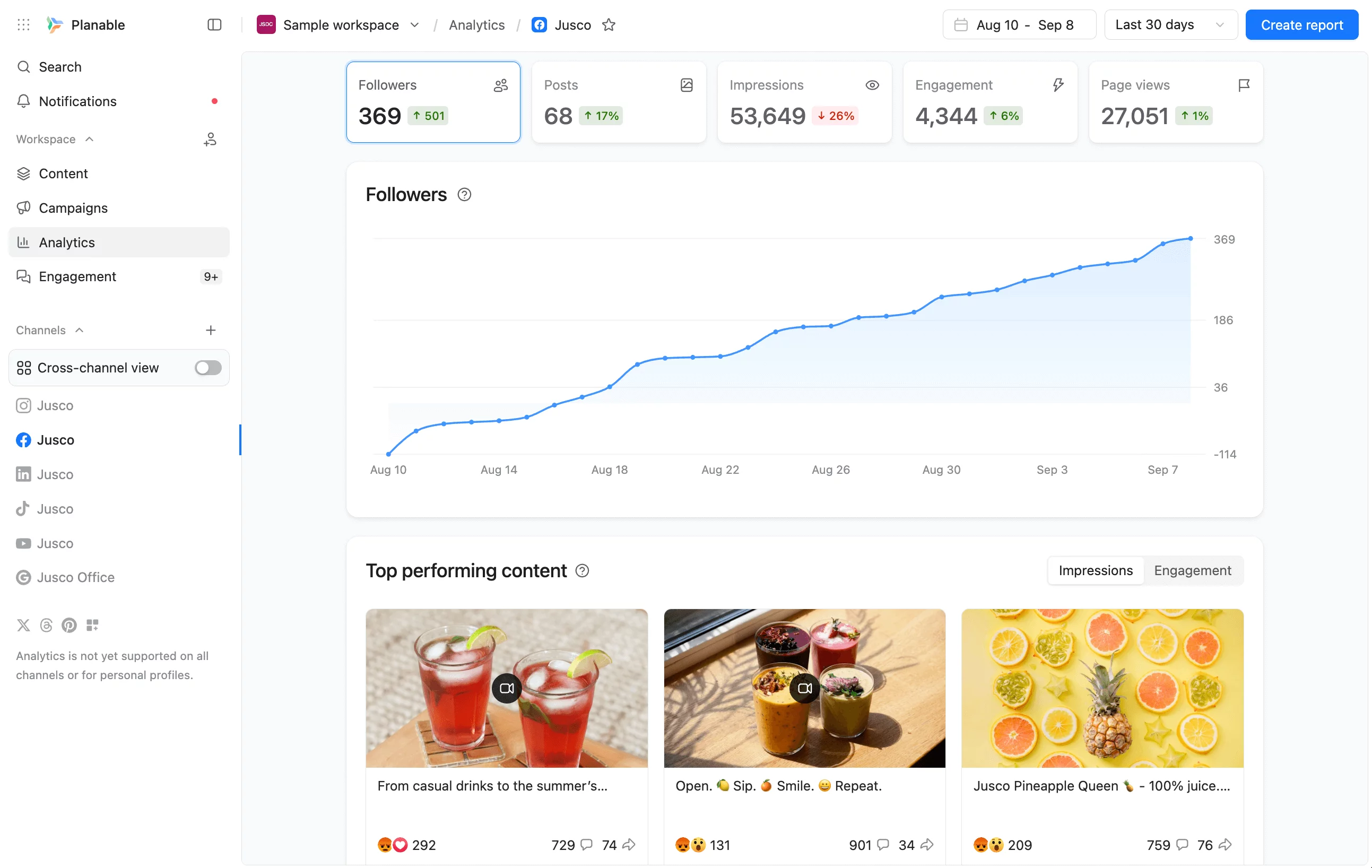
Planable analytics dashboard showing follower growth, top posts, and engagement metrics
Most importantly, I was able to create new posts with AI based on my previous posts, which supercharged my creative batteries.
The Canva integration is another favorite because I was able to export content from Canva straight into my Planable workspace. The platform supports TikTok, Instagram (Reels + Stories), Threads, LinkedIn, Facebook, X (Twitter), Pinterest, YouTube & Google Business Profile.
Why I chose Planable
I chose Planable because I was tired of the visual blindness I experienced inside Hootsuite. One of my biggest frustrations during testing was the inability to see exactly how my Instagram grid or Facebook carousel would look before it went live. Hootsuite often felt like I was working inside a text-heavy spreadsheet, forcing me to cross my fingers and hope the formatting held up. Planable fixed this immediately for me with its visual content calendar and pixel-perfect previews that mirror the native platforms exactly.
Beyond the aesthetics, Planable eliminated the “collaboration tax” that drove me crazy with most legacy tools. While Hootsuite restricted my team collaboration capabilities (might I add, forcing me to upgrade just to add a team member or share a calendar!) Planable felt built for approval loops from day one.
I found the guest view links to be a lifesaver. I could send a read-only link to a stakeholder without forcing them to create a login, bypassing the friction that usually choked my sign-off process.
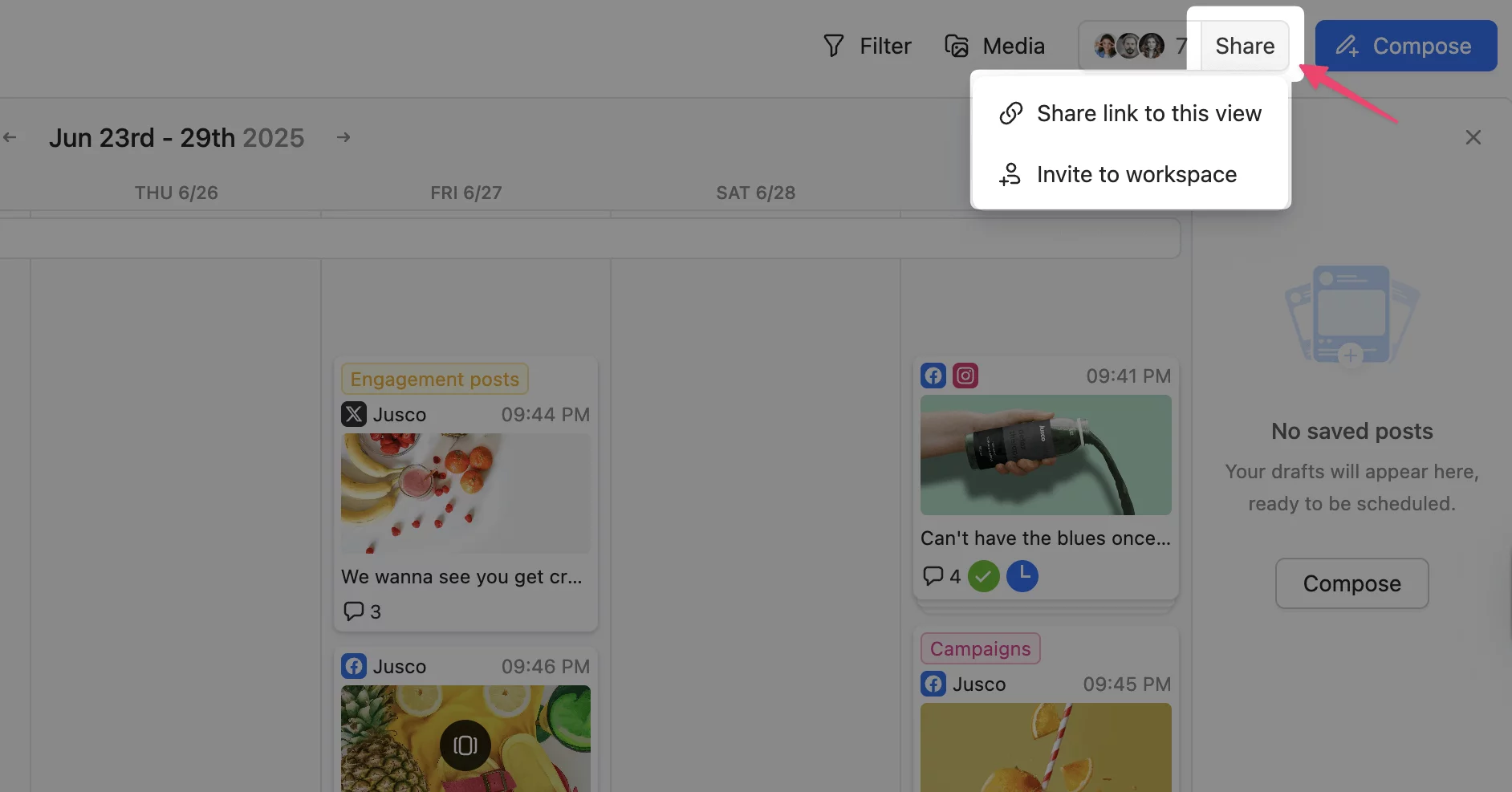
Shareable guest link in Planable lets users preview scheduled content without needing an account.
I didn’t have to deal with the infuriating 5-minute rule that locked me out of editing posts right before they published, and the interface didn’t feel like a database from 2010.
If you are looking for a user-friendly alternative to Hootsuite that prioritizes content and supports your social media strategy, this was the clear winner in my tests.
- Visual calendar with platform-specific post previews
- No full social listening suite
- Strong approval workflows for teams, clients, and stakeholders
- Reporting is lighter than enterprise analytics tools
- Guest view links reduce review friction
- Not ideal for teams that mainly need monitoring streams
- Clean interface compared with Hootsuite’s denser dashboard
- Some advanced workflows may require higher-tier plans
- Useful for agencies managing client feedback and approvals
- Less suitable for teams focused only on publishing volume
- Visual calendar with platform-specific post previews
- Strong approval workflows for teams, clients, and stakeholders
- Guest view links reduce review friction
- Clean interface compared with Hootsuite’s denser dashboard
- Useful for agencies managing client feedback and approvals
- No full social listening suite
- Reporting is lighter than enterprise analytics tools
- Not ideal for teams that mainly need monitoring streams
- Some advanced workflows may require higher-tier plans
- Less suitable for teams focused only on publishing volume
Planable vs. Hootsuite takeaway
Choose Planable over Hootsuite if your biggest problem is collaboration: getting content drafted, reviewed, approved, and scheduled without losing feedback across tools. Planable is easier to work in for visual planning and stakeholder review.
Where Hootsuite still wins
Choose Hootsuite over Planable if you need deeper listening, broader monitoring, or more advanced social data workflows. Hootsuite still has the edge for teams whose main job is tracking conversations, monitoring streams, and managing social intelligence at scale.
2. Buffer
Best for simple scheduling & individual creators, Buffer is a streamlined social media management tool that gets out of your way. After signing up, I didn’t have to navigate complex streams or learn a legacy interface, I just connected my social accounts and immediately started building.
Buffer’s standout features
I felt Buffer’s biggest strength was the ease of getting started. It has a clean, intuitive UI, just connect your accounts and immediately start scheduling across multiple platforms. The Start Page feature was a genuine surprise. This is a fully customizable link in bio tool, included for free, which meant I could immediately cancel my Linktree subscription.
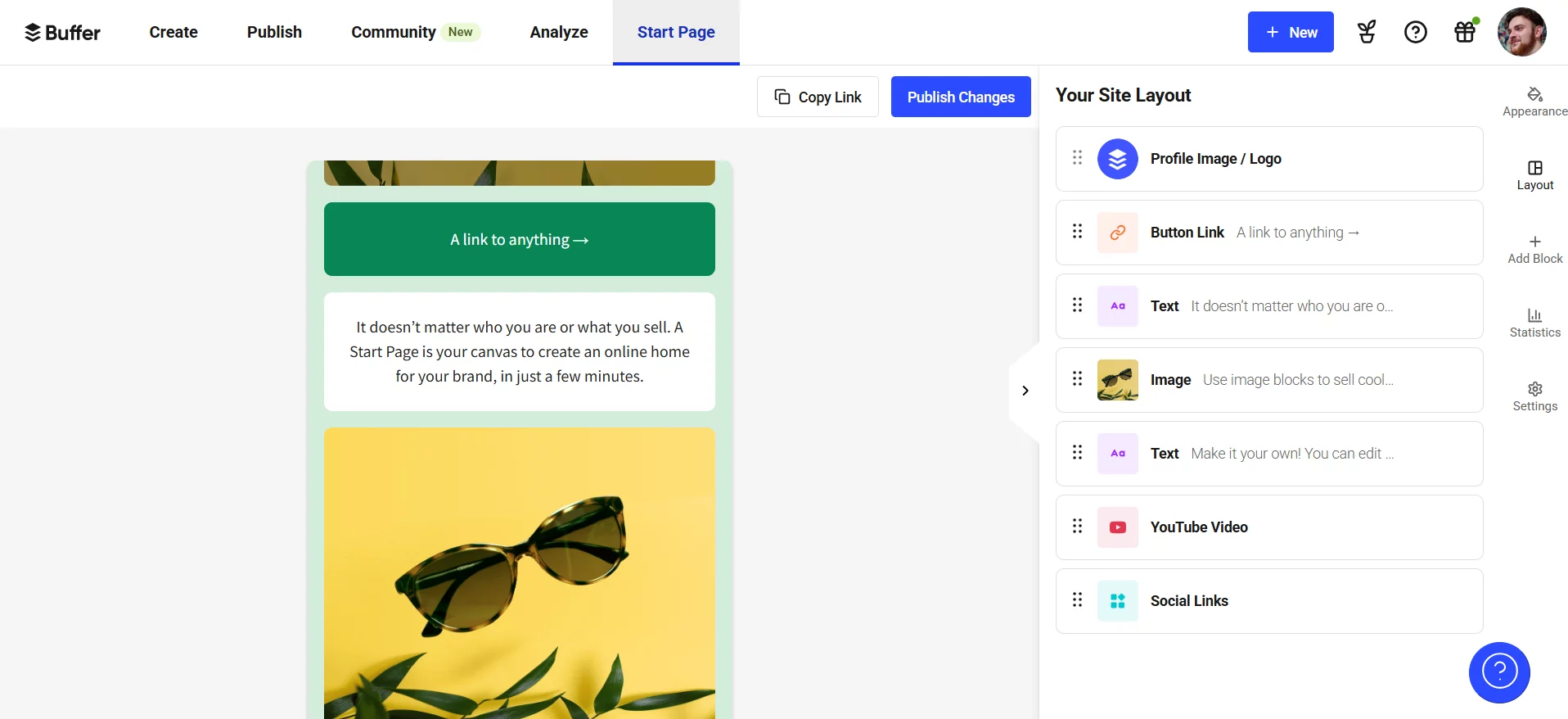
Buffer’s Start Page
I also relied heavily on the Ideas space, a shared space to capture ideas before they turn into content, something that Hootsuite’s rigid scheduling flow doesn’t allow. With Buffer, I could connect newer platforms like Bluesky next to Instagram and LinkedIn with no headaches, and build a consistent cadence using the queue and a clear calendar view.
Unlike Hootsuite’s complex reporting that requires a degree in data science to decipher, Buffer’s social media analytics are refreshingly easy to make sense of. I could easily find and see exactly what I needed to know: what’s working, best times to post, and how to improve, without the data overkill.
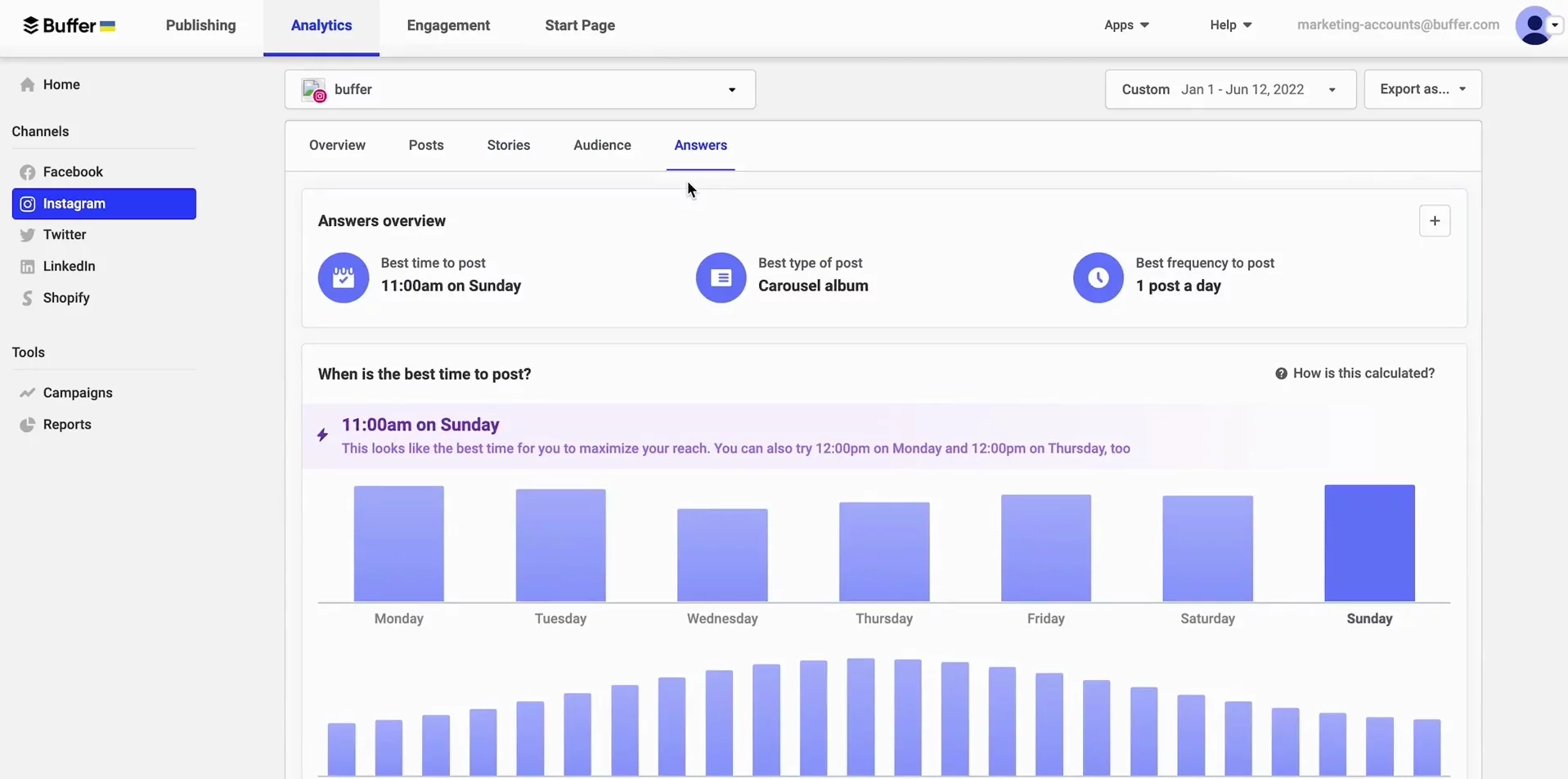
Buffer’s Analytics dashboard
Why I chose Buffer
I chose Buffer for the same reason many teams start looking beyond Hootsuite: less friction. With Buffer, I didn’t feel like I was wrestling permissions, digging through layers of menus, or second-guessing whether something would publish correctly. The key features felt stable and predictable and the software wasn’t adding work for me.
It’s also the tool I’d pick when I’m working solo or in a small team where collaboration and approvals aren’t the main event. If I don’t need deep social listening, complex workflows, or enterprise-style reporting, Buffer gives me what I need without the noise.
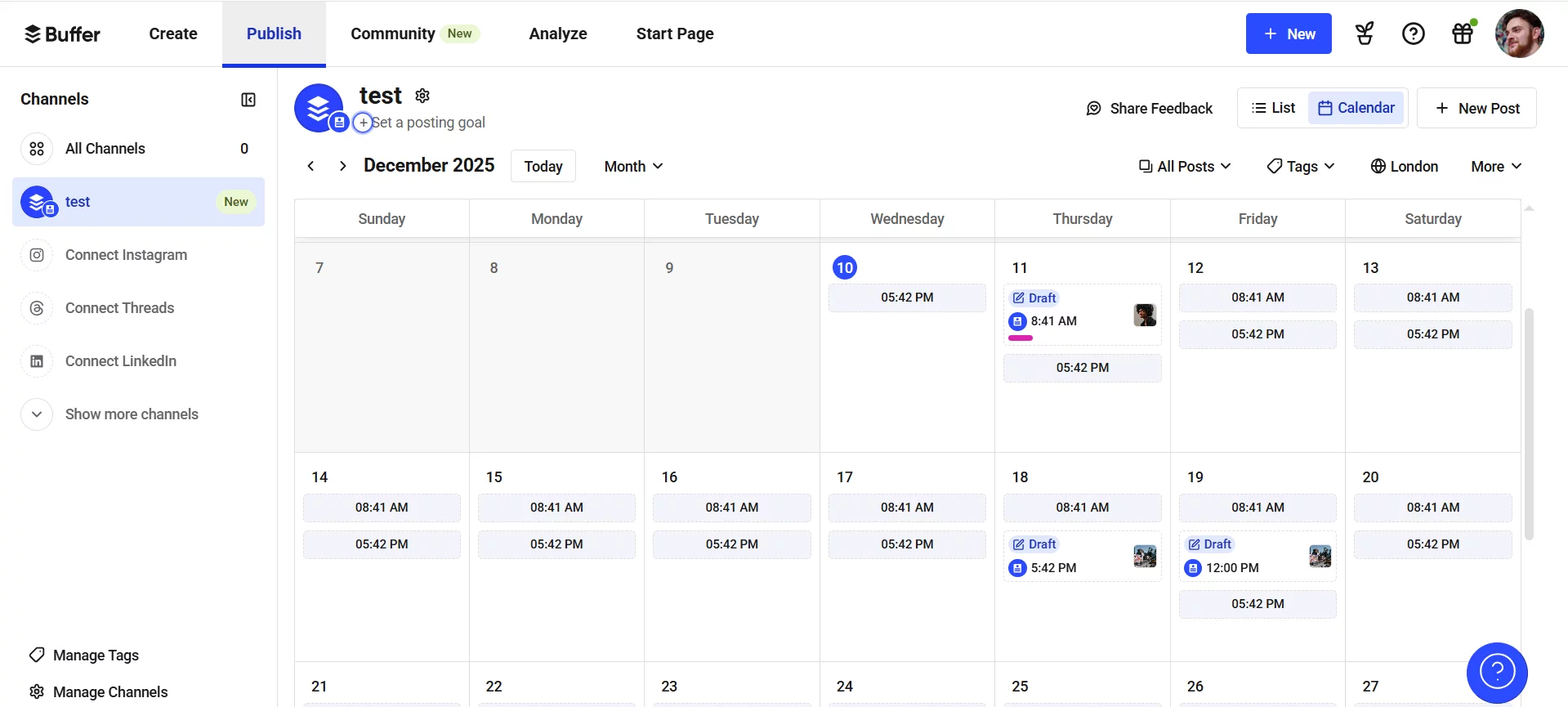
Buffer’s content calendar
But Buffer’s simplicity is also its ceiling. When I started wanting more depth (think reporting and more advanced workflows) I could instantly feel the limits with advanced features. And as you scale to channels and more users, analytics become insufficient compared to native platforms and the pricing can start to feel less “simple” than the product experience.
- simple scheduling + visual calendar
- hit-or-miss customer support experience
- easy interface
- simple scheduling + visual calendar
- lightweight analytics
- no complex workflows
- hit-or-miss support experience
Buffer vs. Hootsuite takeaway
Hootsuite is a heavyweight social media management dashboard that tries to do everything, feeling overwhelming and pricey in the process. Buffer is the opposite: a cost effective scheduler that keeps things simple. If you want the quickest path from “idea” to “scheduled post” and you’re happy to avoid clutter and high pricing for advanced features, Buffer is a safe upgrade.
Where Hootsuite still wins
If you need a broader, enterprise-style suite, including monitoring / listening workflows and a more complex governance, across lots of channels, Hootsuite makes more sense.
3. Agorapulse
Best for social inbox management & proving ROI, Agorapulse is the tool that makes community management feel less chaotic. With Hootsuite, I often felt like I was juggling too many moving parts in a busy dashboard. Agorapulse was the opposite experience for me: not at all cluttered, more focused, and built around keeping responses, engagement, and reporting going without friction.
Agorapulse’s standout features
The key feature that clicked for me was how strong Agorapulse is for community management. Managing replies and engagement felt genuinely smooth and the workflow was flawless and convenient, with everything living in one space. Instead of bouncing between streams, tabs, and half-hidden sections, I could stay in a single flow and actually get to inbox zero faster.
Scheduling also felt surprisingly solid. Agorapulse’s scheduling tool came across as incredibly intuitive, and the calendar view ended up being a real time-saver when I was mapping campaigns ahead. The ability to bulk upload content was a game-changer for getting a week (or a month) built quickly without doing everything one post at a time.
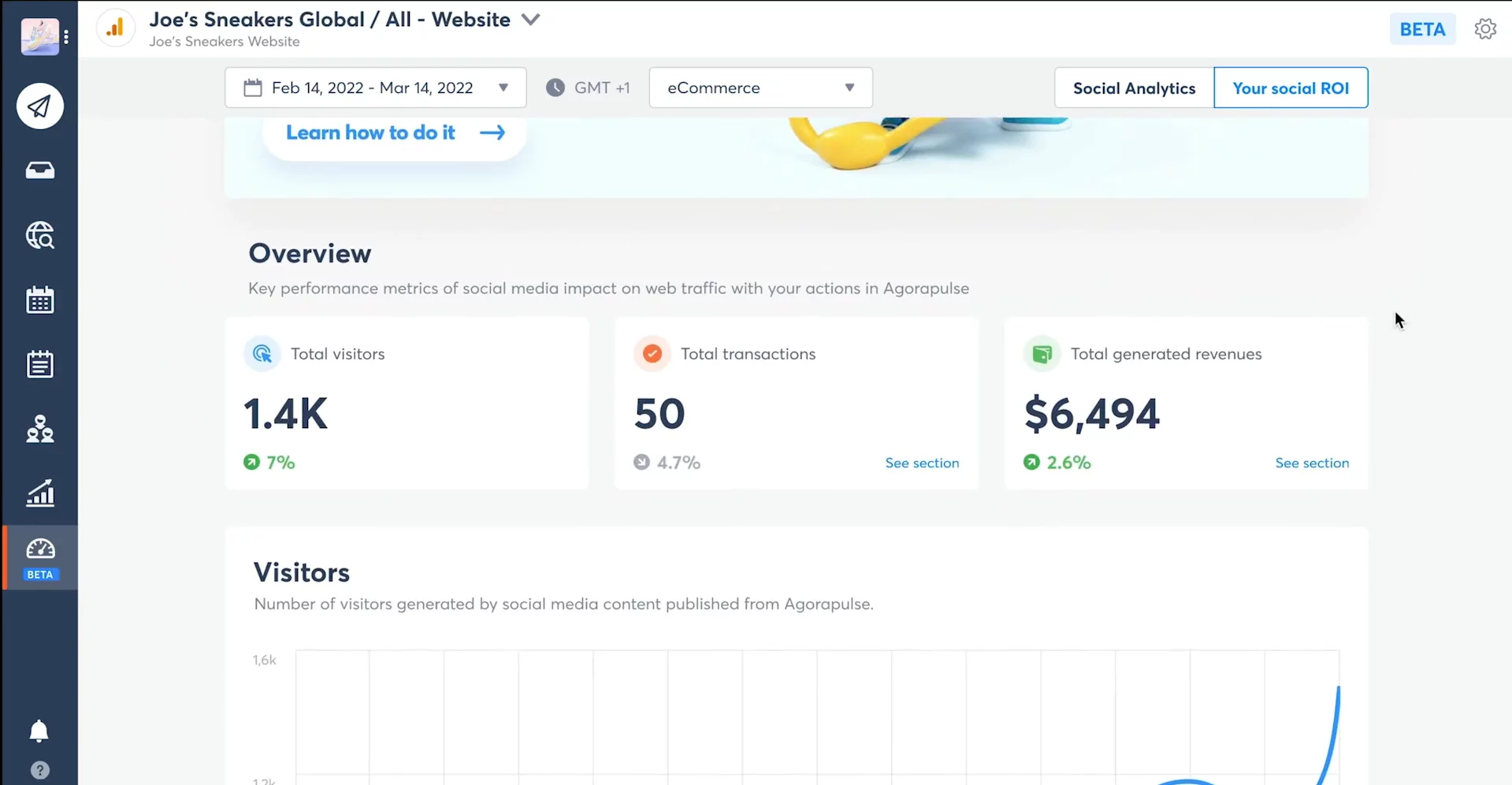
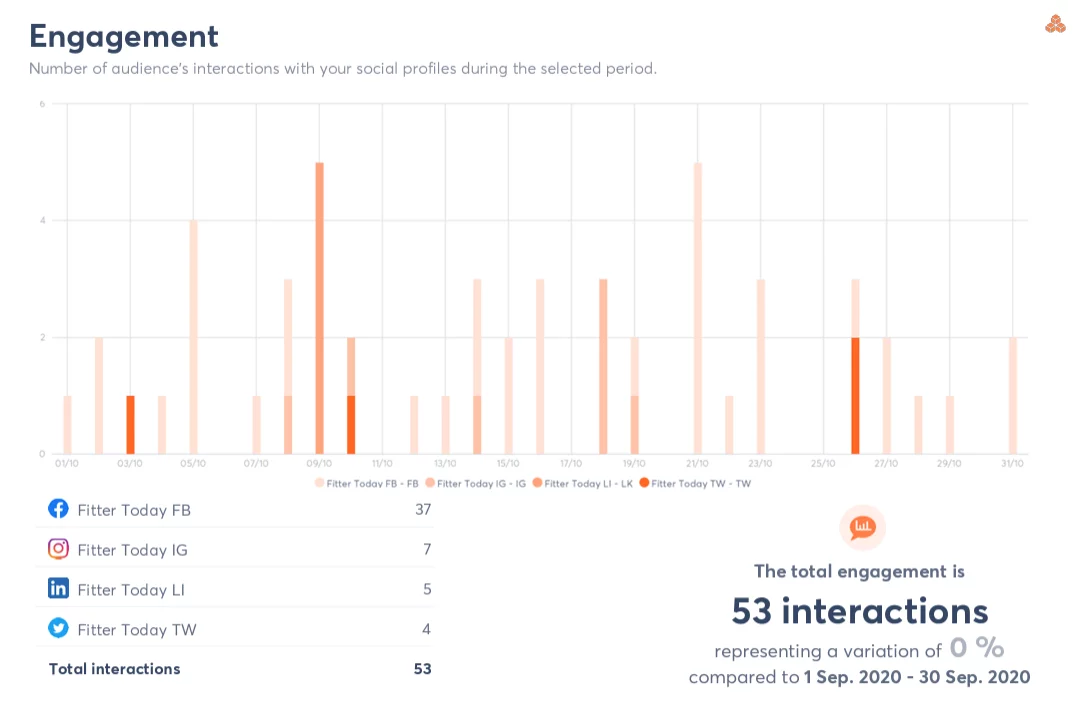
Agorapulse Social ROI dashboard
On the measurement side, Agorapulse helped me connect the work to results. Between analytics and reporting, it was easier to track what’s landing and justify effort, which is exactly the kind of reporting you can use to talk to executives about outcomes and ROI, not just activity.
It has fully-customizable power reports, so I could track cross-channel and channel-specific metrics, making it ideal for stakeholder sharing.
Why I chose Agorapulse
Agorapulse felt built for operational sanity: engagement, moderation, and reporting, all in a tighter workflow. Hootsuite often felt heavier (lots more dashboards, streams, setting up) and I kept running into clunky areas (especially reporting), steep learning curves for new folks, and reliability issues like accounts disconnecting and needing reconnects.
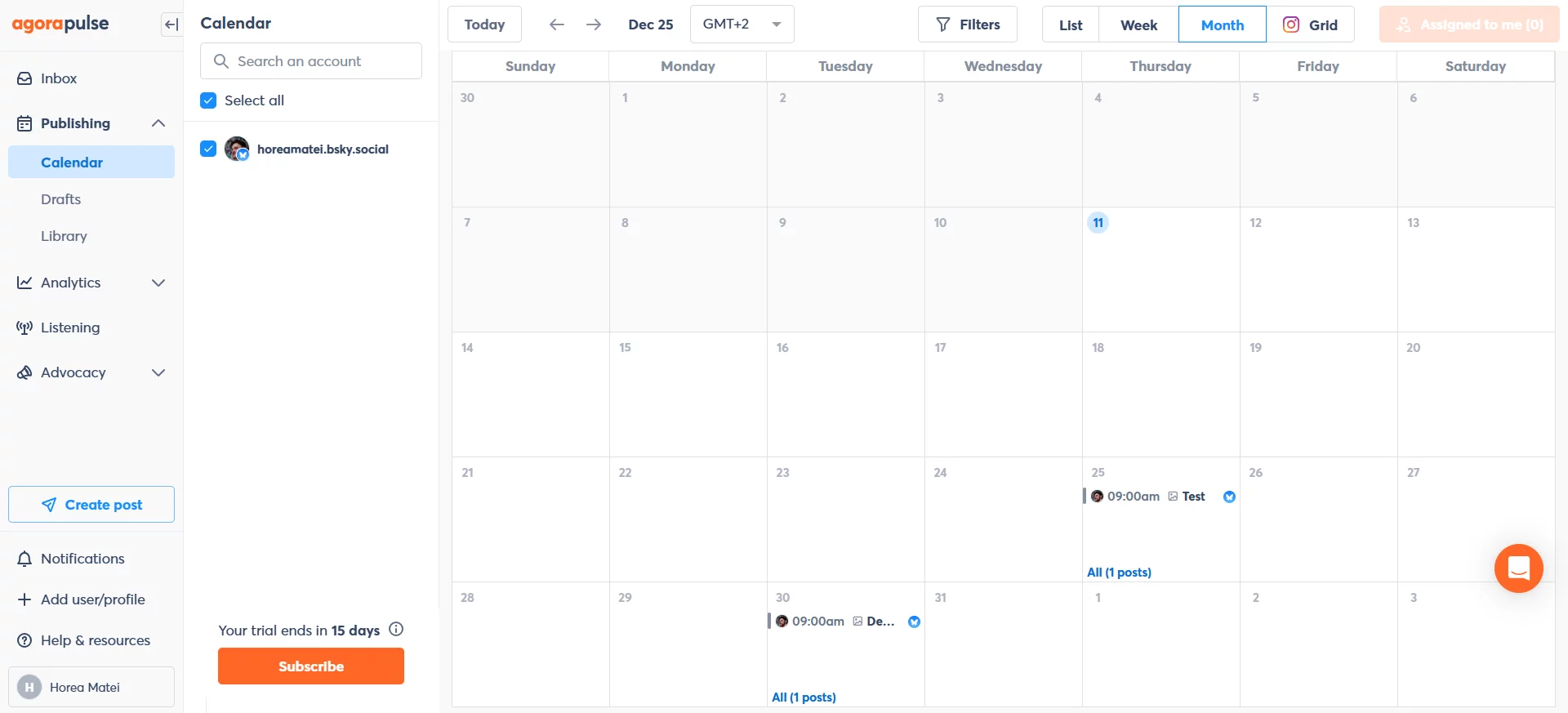
With Agorapulse, the day-to-day work felt simpler because I could manage engagement without getting lost in the interface, I could schedule ahead quickly using calendar + bulk publishing and I could pull reporting without feeling like I’m doing a data science project.
- reporting customization is limiting
- seamless community management
- TikTok community management needs improvement
- reporting that ties work to ROI
- seamless community management
- intuitive scheduling
- reporting that ties work to ROI
- reporting customization is limiting
- TikTok community management needs improvement
Agorapulse vs. Hootsuite takeaway
If you live in engagement and need inbox control + reporting you can use to prove value, Agorapulse felt like a cleaner operating system for social. In my day-to-day, Agorapulse kept me focused on what mattered: managing conversations fast, planning content efficiently, and tying the work back to results.
Where Hootsuite still wins
If your workflow depends on deeper monitoring / listening coverage, lots of stream-based oversight, Hootsuite may fit better than Agorapulse’s more focused inbox-first experience.
4. Sprout Social
Best for enterprise-grade analytics & social listening, Sprout Social is the platform that made Hootsuite feel like a “busy dashboard” by comparison. Hootsuite often pushed me into streams, tabs, and a UI that feels dated, Sprout felt like a cleaner operating system for social: publishing, engagement, reporting, and listening living in one place, in a way that’s easier to reach.
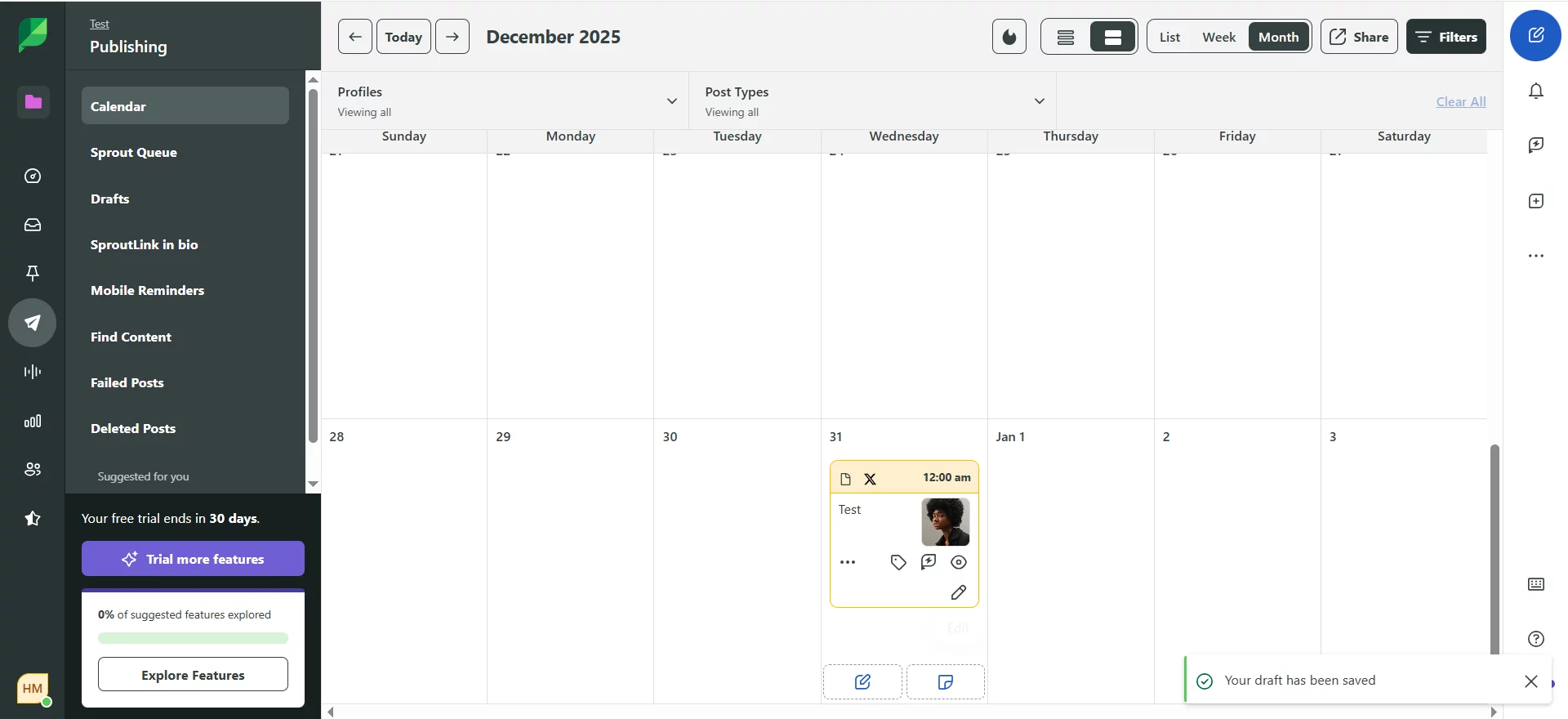
Sprout Social publishing calendar
Sprout Social’s standout features
The biggest difference for me was the Smart Inbox. With Hootsuite, managing engagement can feel like monitoring chaos in multiple streams. In Sprout, everything is clean and organized, and getting to inbox zero felt way more realistic because the flow is built around triage, response, and following through instead of “watching” feeds.
On the analytics side, Sprout’s reporting felt like a job-maker. It’s the kind of dashboard that’s comprehensive without being overwhelming, and it’s much easier to pull insights you can actually use (and reuse) across stakeholders. Tagging is also a real strength here. When I was juggling multiple lines of business, tags made it easier to keep reporting consistent and avoid turning social measurement into a manual mess.
And if you care about broader brand context, Sprout’s social listening / market intelligence capabilities are the big step up from Hootsuite’s monitoring-first vibes. In Sprout, listening feels like it’s meant to inform decisions, not just collect mentions.
Why I chose Sprout Social
I chose Sprout to go beyond scheduling on social media platforms and into serious reporting + executive ready insights, without the constant friction I kept running into with Hootsuite (dashboard heaviness, learning curve, and that occasional disconnect / reconnect drama that makes you second-guess what’s actually publishing).
Sprout also felt more built for teams: clearer workflows, easier handoffs, and a more reliable day-to-day experience when multiple people need to operate inside the same social processes.
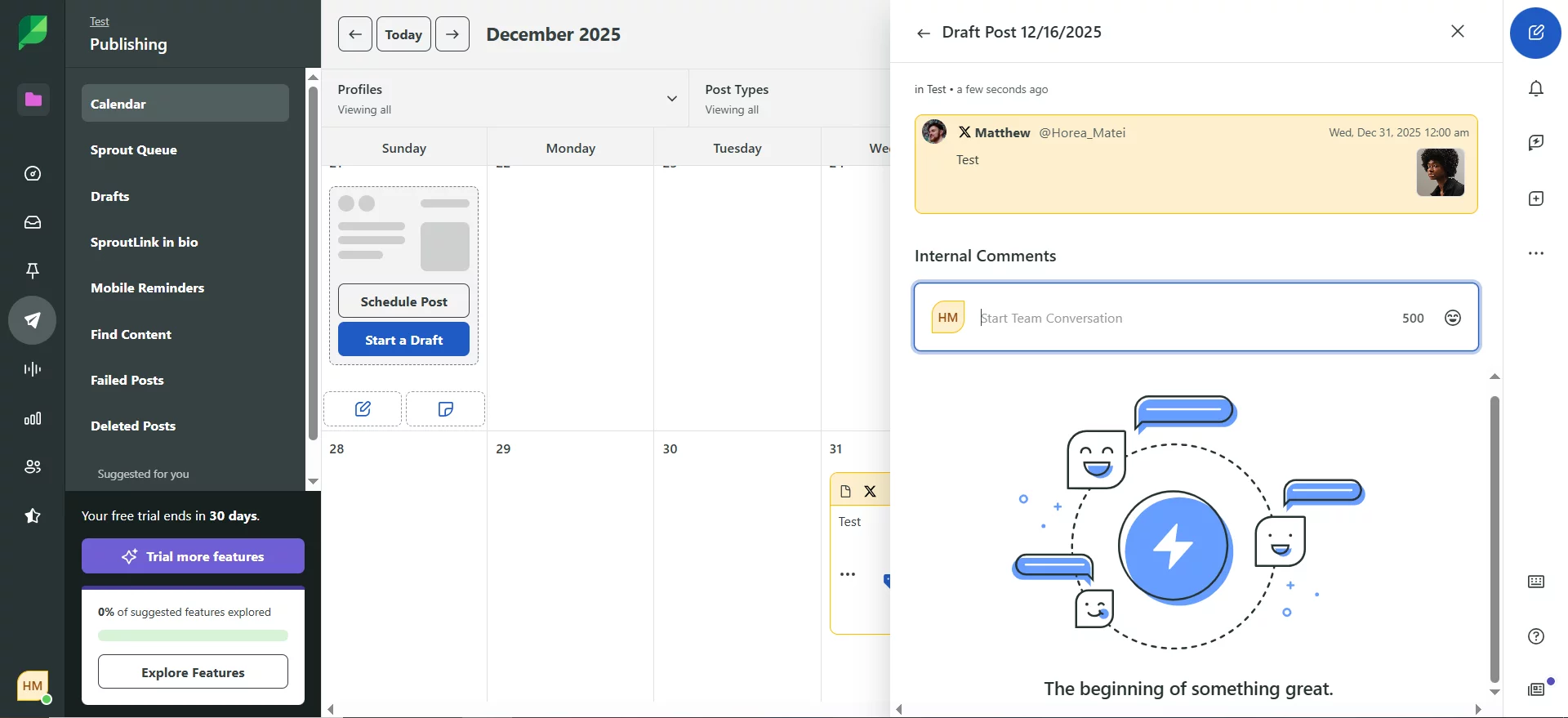
Sprout Social internal comments
That said, Sprout’s biggest quirk is that it’s unapologetically premium. The cost can be hard to justify for smaller teams, and some of the most valuable capabilities (like employee advocacy and certain listening functionality) can feel like paid layers on top of an already expensive base.
I also ran into some platform-specific limitations that felt surprising at this price point: Instagram publishing or engagement features can be restricted (things like Stories/Reels workflows and certain interaction actions), collab metrics may require manual supplementation, and YouTube can be a bit of a “partial picture” versus native analytics. Plus there are workflows where you still have to jump into YouTube directly (like enabling monetization).
- smart inbox to reach inbox zero
- premium pricing is a dealbreaker
- client / exec friendly reporting
- key capabilities feel like add-ons (listening, advocacy)
- smart inbox to reach inbox zero
- client / exec friendly reporting
- competitive insights
- premium pricing is a dealbreaker
- key capabilities feel like add-ons (listening, advocacy)
Sprout Social vs. Hootsuite takeaway
Sprout feels like the “executive layer” of social media management: tight workflows, smart organization, and reporting that’s built to travel across stakeholders. In my testing, it was the tool for when the goal isn’t just publishing, but rather turning social into something leadership can understand, trust, and fund (clean insights, consistent tagging, and market intel you can act on).
Where Hootsuite still wins
If price is a real constraint, Hootsuite can be the more practical choice. It’s also a reasonable fit if you’re already invested in Hootsuite’s setup and don’t need Sprout’s high end reporting or intelligence capabilities to justify the spend.
Dive deeper into the comparison of Hootsuite vs Sprout Social.
5. Later
Best for visual first content planning (Instagram & TikTok), Later is the tool that makes social scheduling feel like planning content rather than managing a dashboard. Compared to Hootsuite’s stream-heavy, menu-y interface (and the clunky moments + paywalled essentials I kept running into), Later felt more clean, visual, and creator-friendly, great for when the priority is keeping a consistent posting cadence and getting the feed to look right.
Later’s standout features
The standout for me is how visual Later is. Planning posts felt more like arranging a layout than filling in a spreadsheet. I could map content ahead using a calendar view, move things around in a more natural flow, and keep my publishing schedule organized without bouncing between streams and tabs like I often had to in Hootsuite.
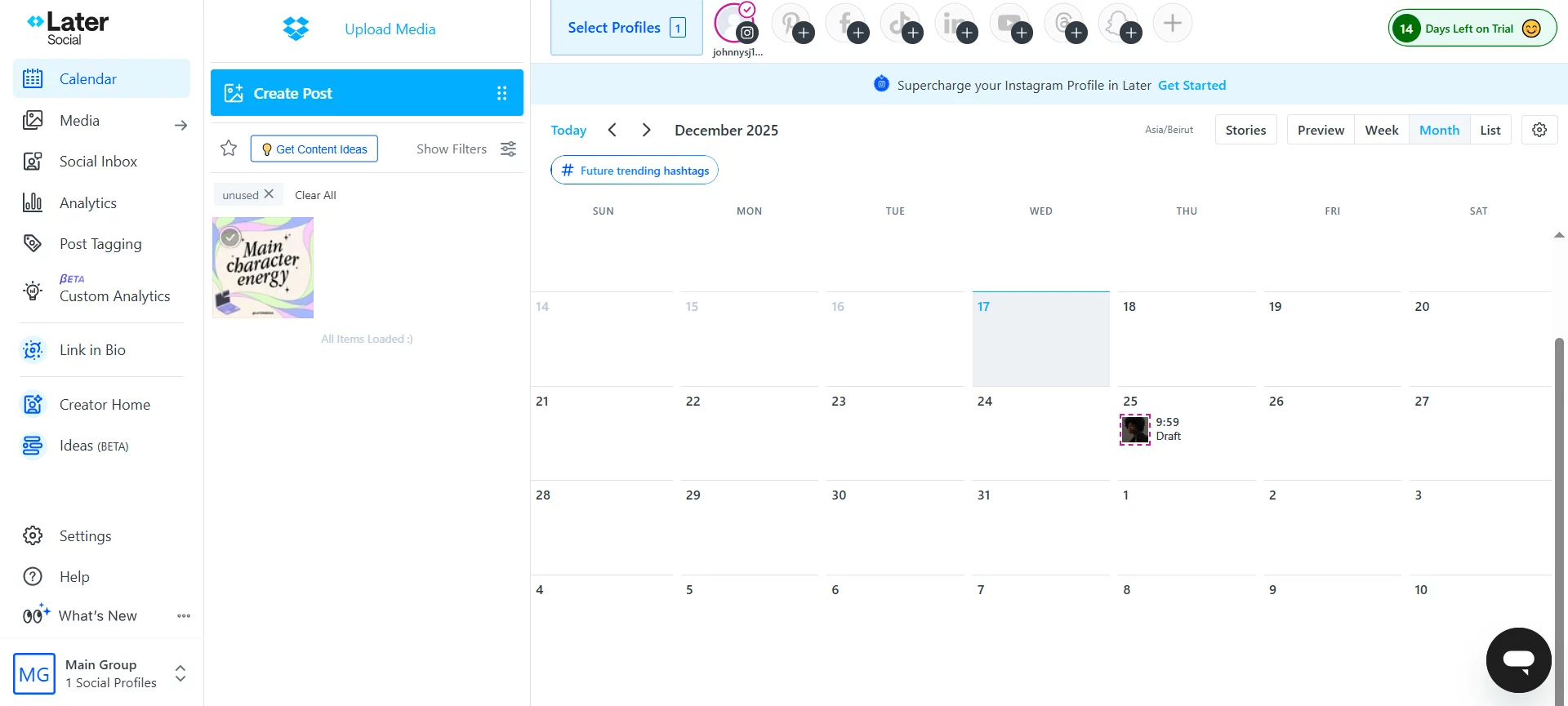
Later social media calendar
Later also shines when you’re wanting to build repeatable content systems. Its Instagram first planning makes it easier to keep the feed cohesive, with less guesswork. I also leaned on the hashtag tools and suggestions to stay consistent without reinventing the wheel every time I wrote a caption. The link in bio style feature is genuinely useful for creators and small brands, and it feels more aligned with how Instagram marketing works than anything I used in Hootsuite. And while Later supports multi-platform scheduling for the usual visual channels, the experience clearly has a stronger center of gravity around Instagram than Hootsuite ever did.
On analytics, Later gives you what you need to understand what’s working, but it’s worth noting that it’s not trying to be an enterprise reporting machine. It felt more like practical insights for content decisions, versus Hootsuite’s big reporting suite vibe.
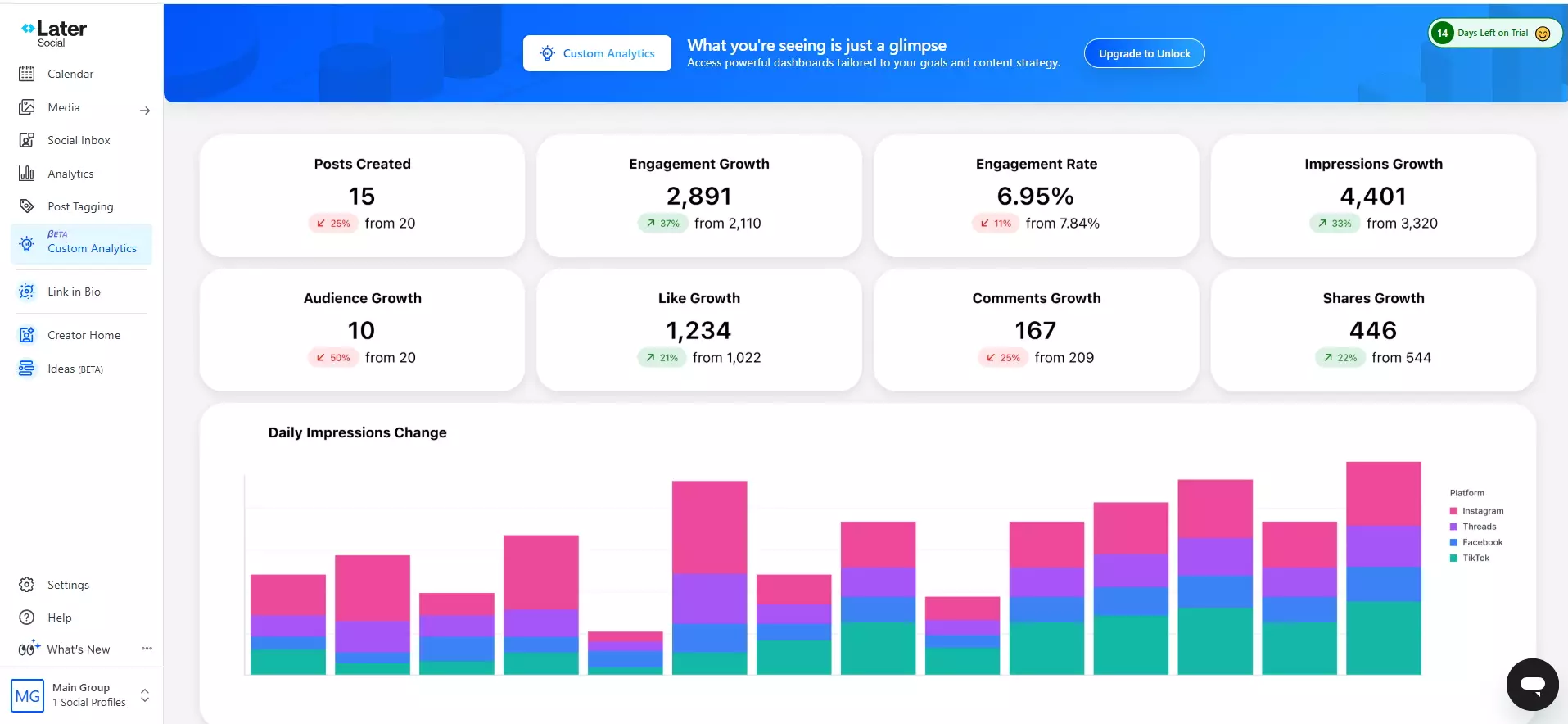
Later Custom Analytics dashboard
Why I chose Later
I chose Later because it outshines Hootsuite when it comes to plan better content, faster, with fewer moving parts. Hootsuite made routine scheduling feel heavier than it needed to be, a result of the dated-feeling interface and the learning curve for new users.
Later felt more like a focused content planner. It’s the tool I’d pick when visuals matter (Instagram grid, campaign cadence, content themes), when I’m publishing a lot and want a much easier planning rhythm, and when I don’t need deep social listening, complex approval workflows, or heavyweight team permissions.
But beware if you’re looking to scale. Multi-account content management and pricing can sting once you’re managing multiple social media channels, and it’s easy to feel like the “simple planner” suddenly isn’t so simple financially. And yes, like Hootsuite, there are occasional reconnect / re-auth moments but more like annoying edge cases.
- analytics depth gated behind higher tiers
- made for Instagram first workflows
- scaling to multiple socials gets expensive
- helpful hashtag & link-in-bio features
- visual content calendar
- made for Instagram first workflows
- helpful hashtag & link-in-bio features
- advanced analytics gated behind higher tiers
- scaling to multiple socials gets expensive
Later vs. Hootsuite takeaway
Later is the visual planner you use to keep social media content production smooth when you’re an Instagram focused brand. Choose it if you’re a creator or brand that cares most about planning, aesthetics & a simpler content workflow.
Where Hootsuite still wins
If you manage a wider mix of channels where visuals aren’t the center of gravity or you need a more standardized one system for everything, Hootsuite is a steadier choice than an Instagram first planner.
6. Statusbrew
Best for unified inbox management and team workflows, Statusbrew is the tool I’d use when social media operations are starting to feel like a support desk: replies, DMs, mentions, approvals, and reporting all happening at once. Compared to Hootsuite’s stream-heavy control room experience, Statusbrew felt more like a single, focused dashboard where I could publish, engage, and stay organized without constantly hopping between views.
Statusbrew’s standout features
The feature that immediately clicked for me was the Engage Inbox. Instead of juggling multiple streams the way I often had to in Hootsuite, Statusbrew gave me a more unified inbox experience that made it easier to keep up with the community and respond faster. What stood out most was how operational it felt: I could assign conversations to the right teammate, add internal notes, and keep track of what was handled, all without leaving the main workspace. It’s the kind of workflow that makes getting to inbox zero feel realistic, especially when multiple people are handling engagement.
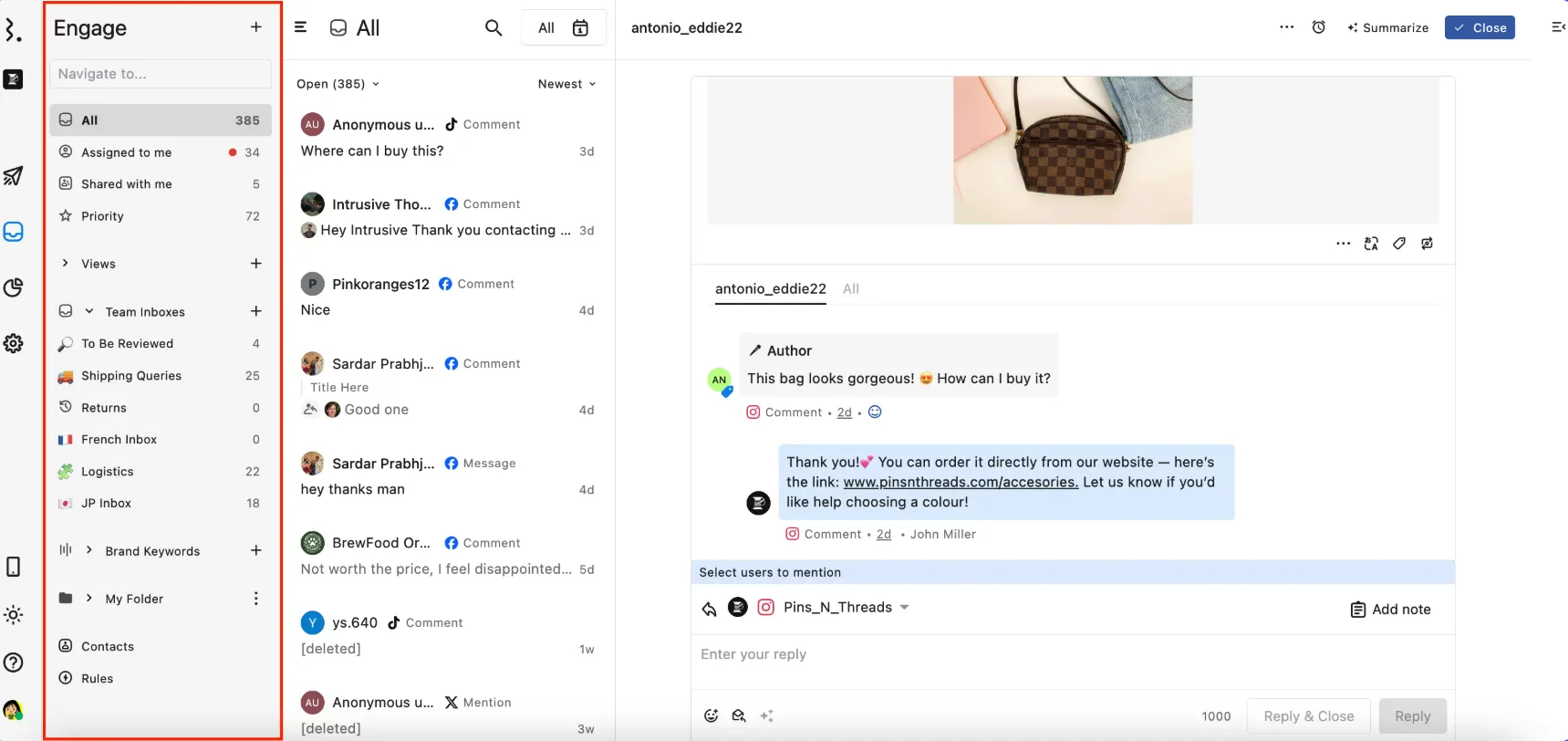
Statusbrew Engage inbox
On the publishing side, Statusbrew felt practical. Scheduling posts across networks was straightforward, and the content calendar helped me plan ahead without the busy-ness feeling that comes with Hootsuite when you’re managing several socials. I liked how everything lives in one place. That meant I wasn’t bouncing between tabs or buried menus, so planning and publishing took fewer clicks and felt clearer.
Reporting in Statusbrew felt more usable than Hootsuite’s heavier analytics because I could share results quickly (including shareable report links) without doing the whole download sheets and stitch them together routine. It also covers monitoring in a lightweight, practical way so tracking conversations, hashtags, and even competitor activity is all done in one dashboard.
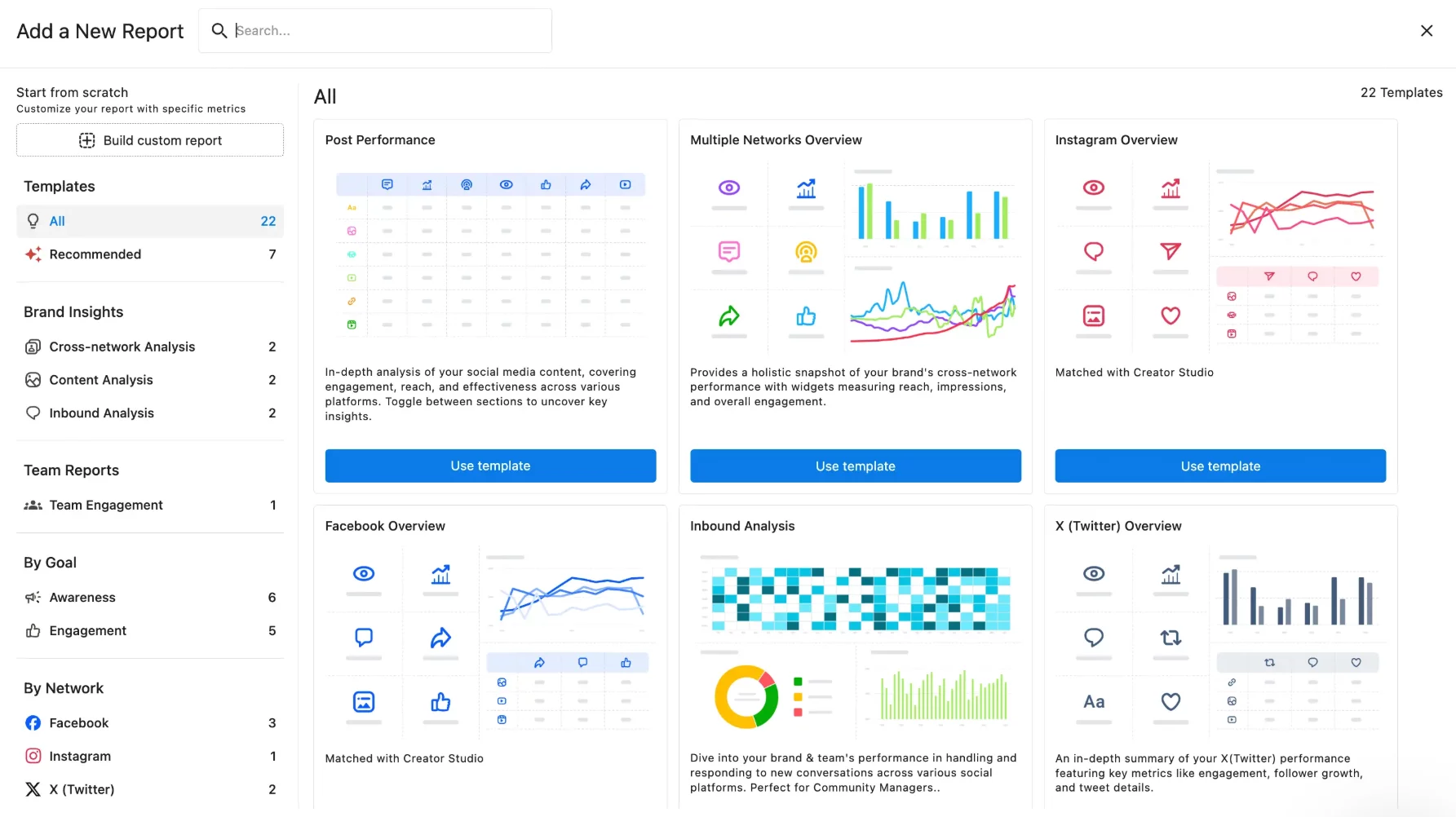
Statusbrew reporting dashboard
Why I chose Statusbrew
Statusbrew keeps social management organized and predictable.. Hootsuite consistently tripped me up in the same places: streams and tabs that feel cluttered, a feature-heavy UI that takes time to learn, and reliability issues like account disconnections & reconnects. Statusbrew felt like the alternative when you need a serious day-to-day social management tool, but you want a cleaner workflow for engagement, assignments, approvals, plus reporting.
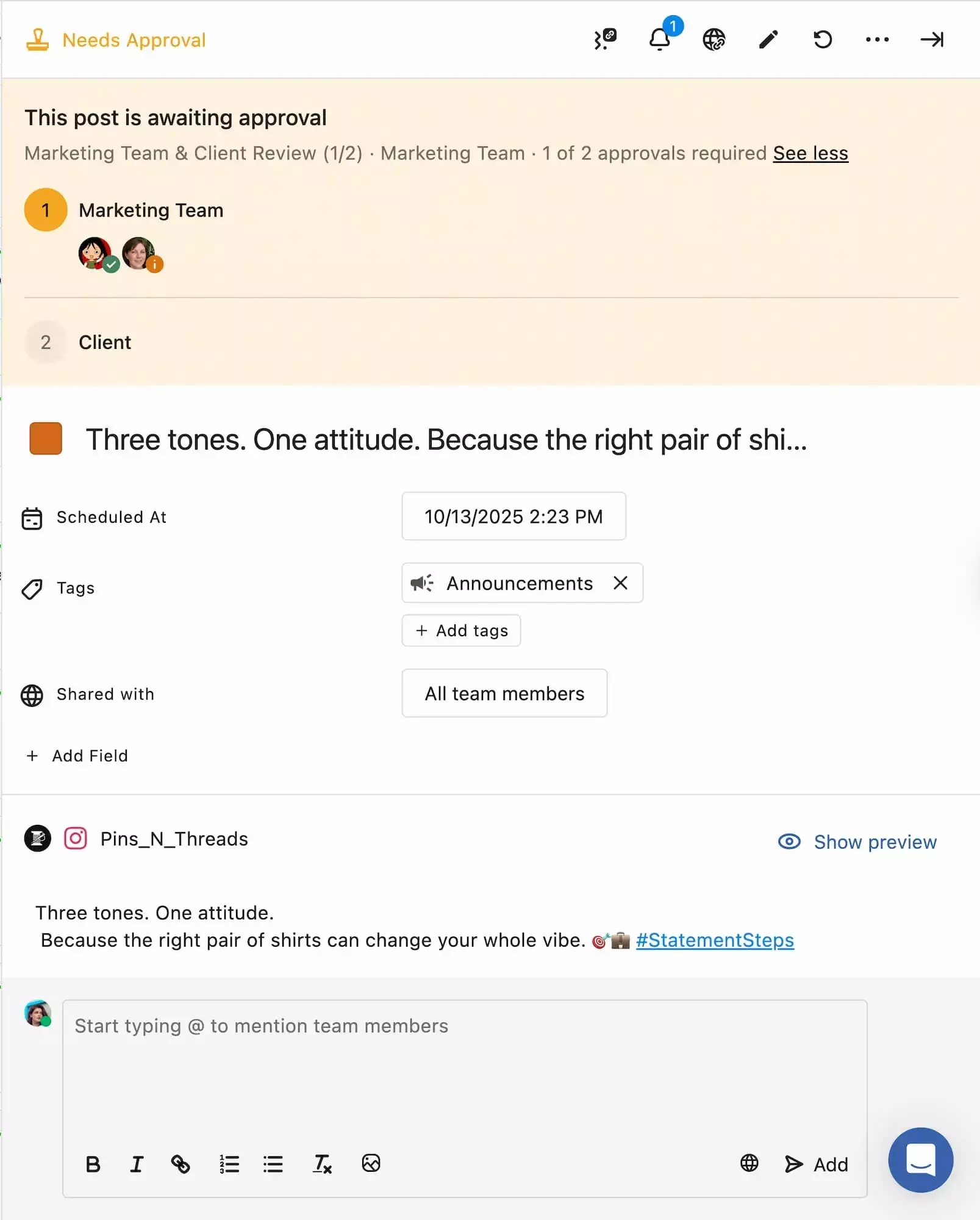
Statusbrew post approval
It also felt more naturally built for teams doing real work inside the tool. Yes, Hootsuite can do collaboration, but it often feels like a monitoring product that’s been stretched into team workflows.
But Statusbrew has a few gaps worth knowing in advance: the biggest is web listening, which can feel lighter if you rely on Hootsuite’s monitoring and deeper listening workflows. Instagram Stories automation can be limited, meaning certain formats may still require manual steps. And finally, the asset manager could be smoother, especially when it comes to sharing stored media externally.
- Unified Engage Inbox for community management
- Unified Engage Inbox for community management
- Team-friendly workflows
- Shareable reporting
- Limited web listening
- TikTok coverage lacking
Statusbrew vs. Hootsuite takeaway
Statusbrew felt like the calmer alternative for teams who live in community management. It’s a great fit when you want a workflow that supports handoffs (assignments, notes, status), a content calendar, and reporting you can share quickly.
Where Hootsuite still wins
If you’re optimizing for a bigger ecosystem and need broader platform coverage, and an established enterprise setup, Hootsuite remains the safer bet.
7. SocialBee
Best for evergreen scheduling, content recycling, and category based planning, SocialBee makes social media management feel structured instead of stream watching. Where Hootsuite often pulled me into a busy dashboard full of streams and tabs, SocialBee felt more like a focused social media scheduler built around what you publish, how often, and how you keep it consistent.
SocialBee’s standout features
SocialBee’s content categories stood out first. Instead of dumping everything into one endless queue, I could organize posts by bucket (think promos, educational, testimonials, curated) and managed to keep a predictable cadence without micromanaging every day. This categorization system also makes evergreen content feel effortless: I could set up recurring content, rotate approved posts on the days I had nothing new, and keep the account active.
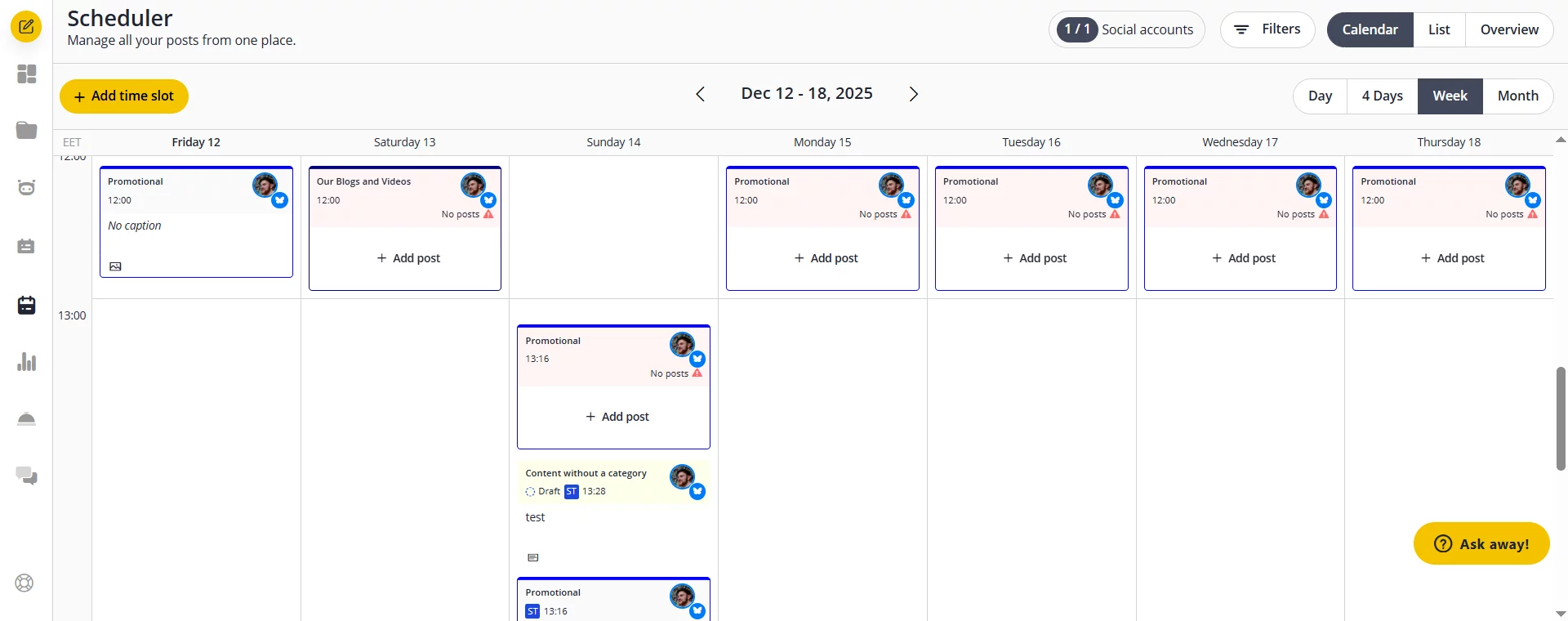
SocialBee content calendar
SocialBee also felt practical for build once, distribute everywhere workflows. I could bulk schedule, then tailor captions per platform so that each channel doesn’t look like a copy-paste job. And the RSS to post flow is a genuine time-saver if you’re regularly turning blog content into social posts (something I always end up doing manually when I’m stuck in Hootsuite’s heavier setup).
Overall, SocialBee kept me in a calmer rhythm: plan by category → schedule in bulk → recycle what performs → stay consistent.
Why I chose SocialBee
SocialBee doesn’t try to be a giant monitoring suite. Rather, it feels more like a purposeful social media management tool for publishing consistency, perfectly suited for creators, small teams, and businesses who want a repeatable system.
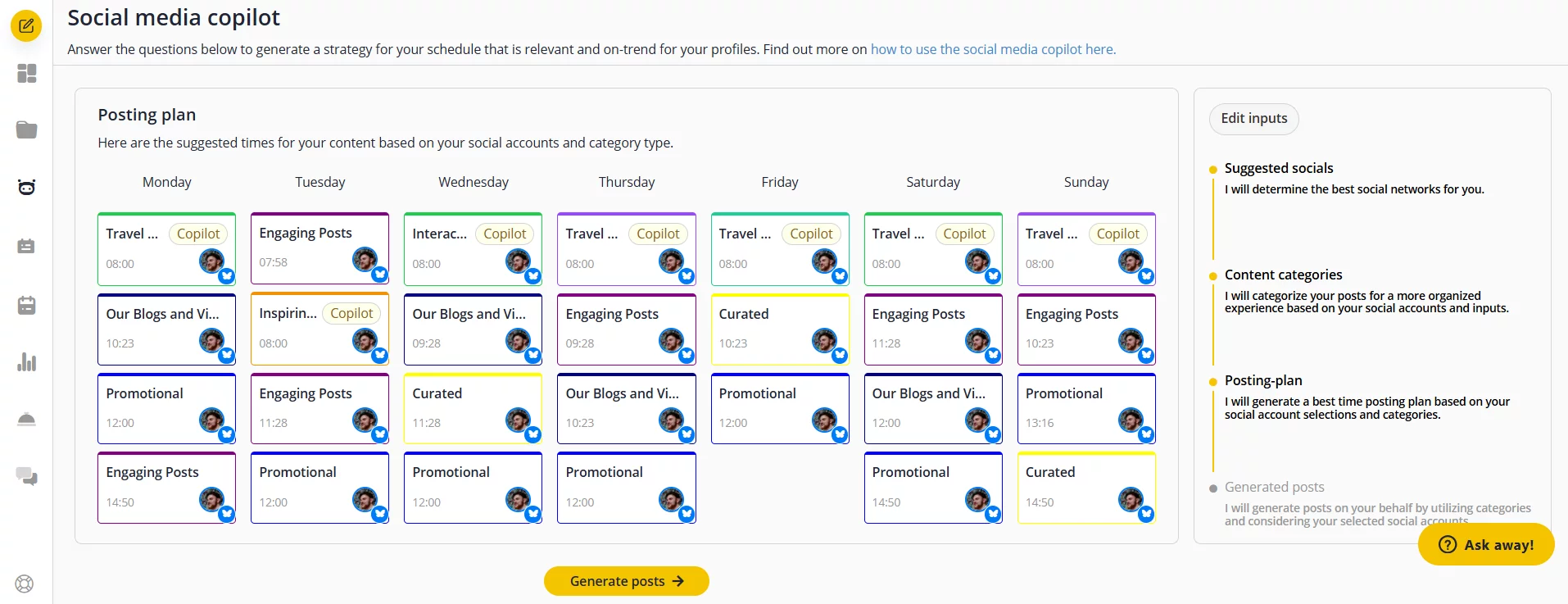
SocialBee AI Copilot
It’s also a solid option when Hootsuite pricing starts to feel like you’re paying enterprise rates just to do normal work.
That said, SocialBee isn’t perfect. The UI can feel a bit cluttered in places, and some sections look too similar, so it takes a minute to build muscle memory (especially early on). Onboarding could be more streamlined, there’s a real “okay, where do I click first?” moment if you’re switching from another tool.
- category-based scheduling that keeps content organized
- occasional scheduling/posting hiccups at higher volume
- bulk scheduling with per-platform customization
- not built for deep monitoring or listening
- rss-to-social workflow for repurposing content
- category-based scheduling that keeps content organized
- bulk scheduling with per-platform customization
- rss-to-social workflow for repurposing content
- occasional scheduling/posting hiccups at higher volume
- not built for deep monitoring or listening
SocialBee vs. Hootsuite takeaway
Choose SocialBee if you want an evergreen system: content categories, recurring posts, bulk scheduling and lightweight workflows that keep you moving. If you want a repeatable publishing system (plan by category → schedule in batches → recycle what still performs), SocialBee is super light and purpose-built.
Where Hootsuite still wins
If your workflow depends on centralized, real-time monitoring for ongoing brand coverage Hootsuite is a stronger choice than an evergreen-first scheduler.
Which Hootsuite alternative should you choose?
The best Hootsuite alternative depends on the workflow you are trying to fix:
- Choose Planable if your team spends most of its time planning content, collecting feedback, managing approvals, and keeping clients or stakeholders aligned.
- Choose Buffer if you want a simpler scheduler for a small team or creator workflow.
- Choose Agorapulse or Statusbrew if inbox management and engagement are the main pain points.
- Choose Sprout Social if your team needs enterprise-level analytics, listening, and reporting.
- Choose Later if visual planning, especially for Instagram and creator-style content, matters most.
- Choose SocialBee if you rely heavily on evergreen content categories and recurring posting.
Hootsuite is not a bad tool, but it is no longer the obvious default for every social media team. If its dashboard, pricing, or workflow feels heavier than what you need, switching to a more focused platform can make daily work faster and easier.
FAQs
What’s the cheapest Hootsuite alternative?
If you want the lowest-cost scheduler, Buffer is usually the most affordable option on this list for basic publishing, especially for solo users and small teams. If your priority is stretching value (not just lowest price), SocialBee can be cheaper long-term for brands that rely on evergreen recycling and bulk scheduling.
What’s the best Hootsuite alternative for teams and approvals?
Planable is the best Hootsuite alternative for teams, approvals, and collaboration workflows. It’s built around review loops (comments, feedback, sign-off) and a visual content calendar, so it fits teams that spend most of their time creating, reviewing, and approving content.
What’s the best Hootsuite alternative for a social inbox?
For day-to-day community management, Agorapulse is the best pick for a unified social inbox plus reporting you can use to prove outcomes. If you’re handling higher volume with more operational workflows (assignments, internal notes, moderation automation), Statusbrew is a strong inbox-first alternative.
Does any Hootsuite alternative include social listening?
Yes. Sprout Social includes social listening (often as an add-on, depending on the plan) and is the strongest option here if listening is a priority. Most of the other tools on this list focus more on publishing, inbox workflows, or approvals than deep listening.
Horea is a software reviewer and tester, content writer, and tech geek. He loves to fiddle with MarTech solutions to find what each software is best for and help you decide which one might be your best fit. His content is allergic to fluff and eats research for breakfast. If you’re on the fence about whether you should commit to a particular platform, Horea probably already wrote about it.