SMS Compliance Checklist for Ecommerce [2026 ]
Key takeaways
Sending marketing texts requires prior explicit opt-in. Transactional SMS doesn’t, provided your messages are non-promotional.
Opt-out capability is a necessary practice for all the texts you send.
Compliance standards differ regionally. The TCPA, CASL, GDPR, and PECR cover different markets; you need to know which apply to you.
There are rules to follow for consent, disclosing what you send, facilitating opt-outs, registering as a sender, and keeping accurate records.
A simple-to-follow text messaging compliance guide informed by the latest regulations worldwide.
Collecting phone numbers is one thing; sending compliant texts to avoid fines of $500–$1,500 per non-compliant SMS in the U.S. is another entirely. Use our SMS compliance checklist today as the reference point to launch or scale your sending.
Legal disclaimer: This SMS compliance guide isn’t legal advice. It is general information. Confirm requirements for your business with a qualified professional.
Harness the combined force of SMS and email marketing with Omnisend
Quick sign up | No credit card required
The SMS compliance checklist at a glance
| Action | Why it matters |
|---|---|
| Know which laws apply | The U.S. (TCPA), Canada (CASL), EU (GDPR), and UK (PECR) all differ. If you send across borders, each recipient’s country sets the rules. |
| Get real consent, and log it | A phone number isn’t permission. Opt-in has to be separate from email, and for SMS marketing compliance, you need written consent. |
| Say what they’re signing up for | Brand, how often you’ll text, possible rates, and that consent isn’t required to buy. Leave these out, and the consent may not count. |
| Keep your records | If a carrier or regulator asks, timestamped opt-in and opt-out logs are what protect you. |
| Let people leave easily | STOP should work instantly. Opt-outs by email or web form get 10 business days. You can’t limit people to one method. |
| Watch content and timing | No SHAFT content, and nothing outside 8 am–9 pm their time. Carriers filter the rest. |
| Register for A2P 10DLC | U.S. carriers need this for local numbers. Skip it, and your texts get filtered as spam. |
1. Know the regulations for your markets
It’s your recipient’s location rather than your sender location that dictates which regulations apply to your SMS efforts.
Two 2025 changes matter. In the U.S., you have 10 business days to act on an opt-out, however it arrives. In Canada, new long codes need A2P registration before sending.
| Region | Who it protects | What’s distinct about it | Potential penalties for non-compliance |
|---|---|---|---|
| U.S. (TCPA) | Anyone you text in the U.S. | Registration (A2P 10DLC) required; 8 am–9 pm local send window | $500–$1,500 per message |
| Canada (CASL) | Canadian recipients | Implied consent expires; new long codes need A2P registration (Mar 2025) | Up to $10M CAD per violation |
| EU (GDPR) | People in the EU | Applies even if you’re based elsewhere; data-handling duties, not just messaging | Up to €20M or 4% of global turnover |
| UK (PECR) | UK recipients | Soft opt-in allowed for existing customers | Up to £500,000 (ICO) |
For legal details, see our SMS regulations guide.
2. Get explicit, documented consent
Every customer you text needs to have opted in to receiving text messages. For your SMS marketing checklist, the consent requirements are more stringent than for transactional texts.
You can get two main types of consent from your customers: single and double opt-in.
- Single opt-in: Involves a user providing their phone number without any further confirmation.
- Double opt-in: Requires users to confirm their subscription via a confirmation message.
There are also differences between regions:
| Region (law) | Consent standard | How consent must be captured |
|---|---|---|
| U.S. (TCPA) | Prior express written consent for marketing | Separate SMS checkbox, unchecked by default; documented and stored |
| Canada (CASL) | Express consent (implied consent expires) | Positive opt-in action; pre-checked boxes don’t count |
| EU (GDPR) | Freely given, informed, unambiguous | Clear affirmative act; consent for one purpose doesn’t cover others |
| UK (PECR) | Consent, or soft opt-in for existing customers | Soft opt-in only for similar products, with opt-out offered at collection |
Your SMS or form-building tool should handle SMS opt-ins. Ideally, it should be able to meet shoppers where they already are: a sign-up pop-up, the Shopify or WooCommerce checkout, or text-to-join. For instance, Omnisend has a Legal consent item to collect SMS opt-in in its form builder that you can edit to match your region:
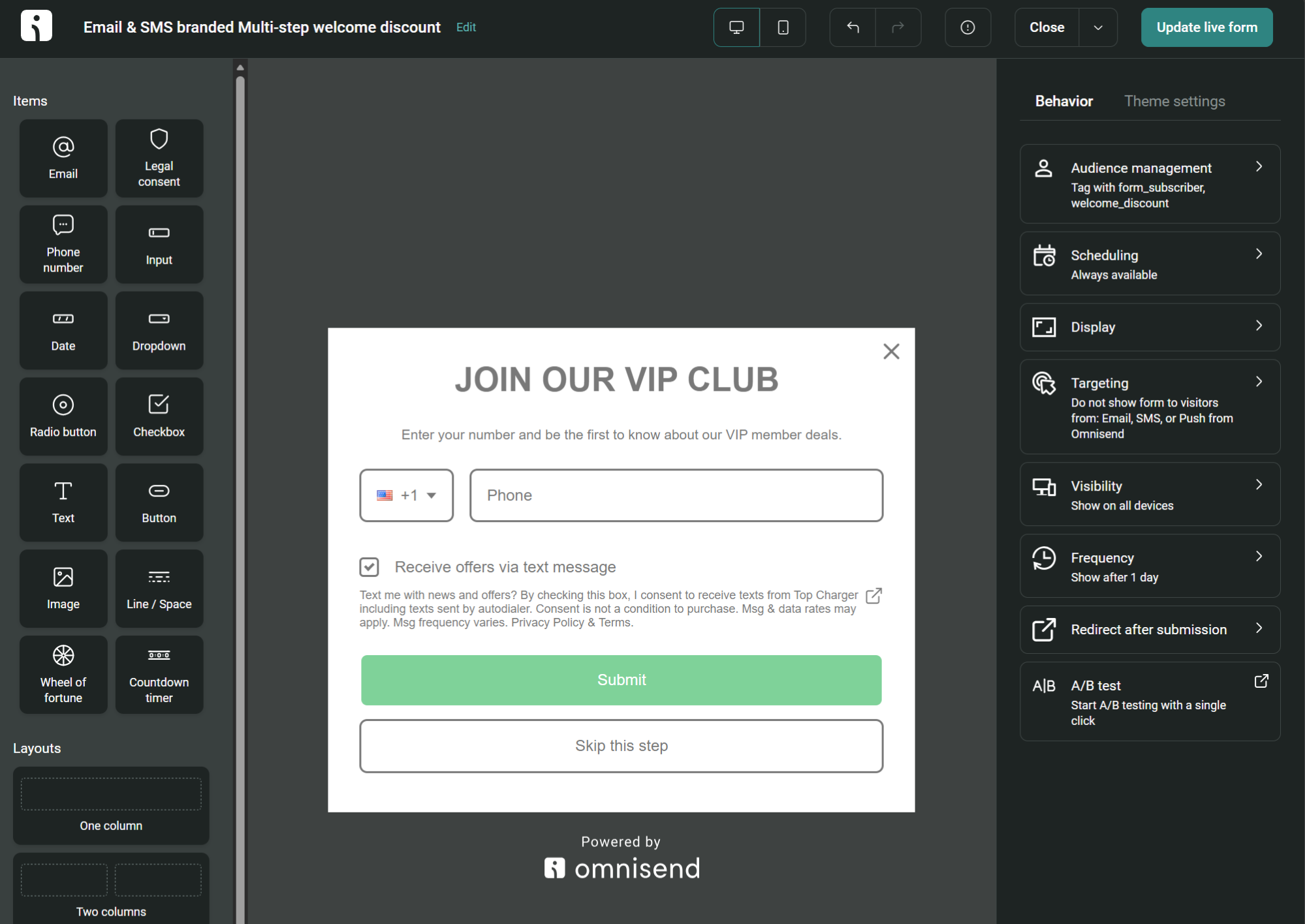
Your signup forms will then feed customer information into your lists and segments with the correct subscription status. The next step is to send your customer an opt-in confirmation text or one of your welcome messages.
You also want to resist the temptation to buy or use third-party lists. These lists are often unreliable, outdated, or fraudulent. The people on them haven’t provided proper or explicit consent.
3. Disclose the right things at opt-in
Customers need to know what you’ll send, how often, and what it costs to receive those messages. The table below details what to disclose:
| Element | What it looks like |
|---|---|
| Who’s sending | Your brand or store name |
| What they get, and how often | Offers and order updates, ~four msgs/month |
| Cost | Message & data rates may apply |
| No purchase condition | Consent is not a condition of purchase |
| Opt-out and help | Reply STOP to cancel, HELP for help |
| Links | SMS terms and privacy policy |
Disclosure should happen on your signup form or next to your signup box. The SMS form below, created in Omnisend, has a legally compliant disclosure underneath the checkbox:
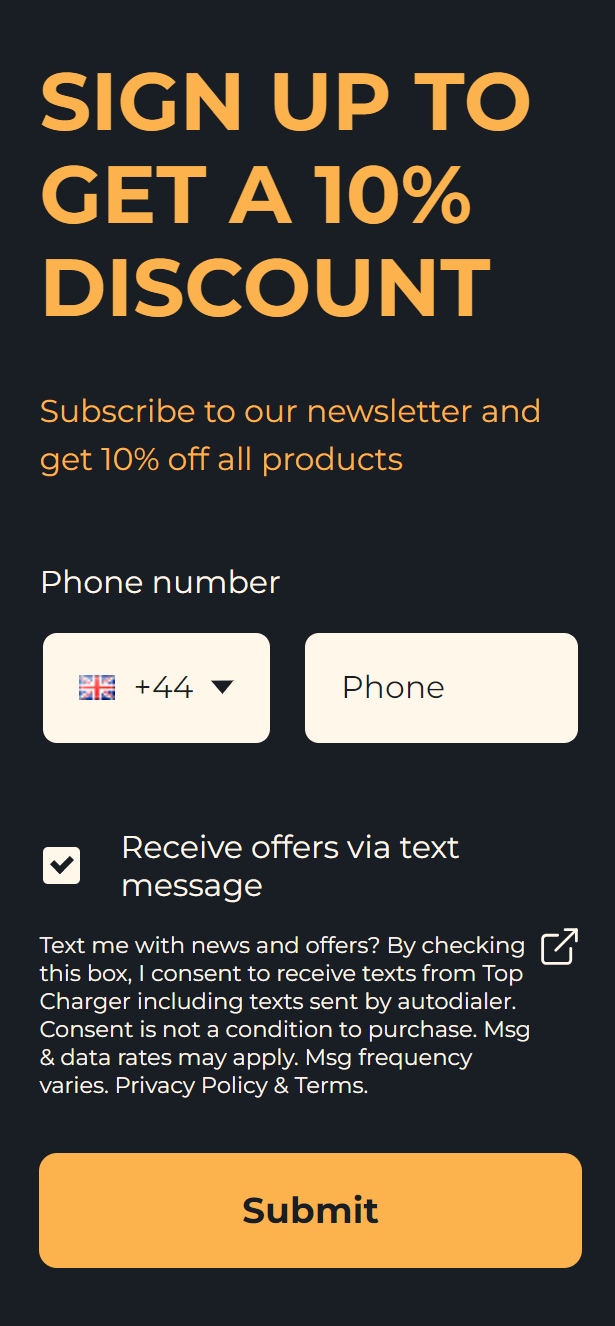
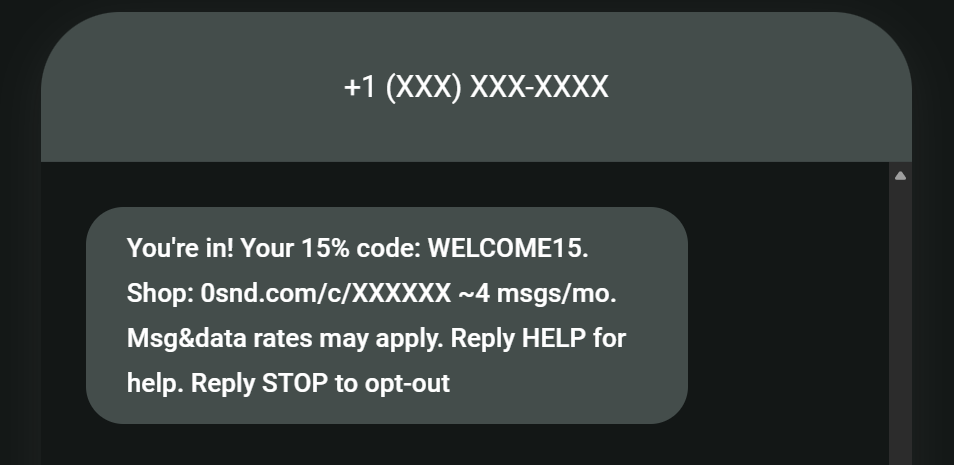
It’s also good practice for your marketing compliance checklist to provide additional disclosure in your confirmation SMS. The text below provides an example of what this can look like:
4. Keep records and protect data
Every opt-in hands you personal data that you must store safely. You also need proof of how each contact consented, ready if a regulator or carrier questions a send.
Keep a record of what each contact agreed to, when, and on which form. Store it with their opt-out date too, so you can show when consent started and ended. Plus, you need to make sure you drop contacts without valid consent from your send list.
Omnisend does this for you, storing a timestamped consent record against each contact and logging STOP replies automatically.
The data itself lives with your SMS provider, so their security is your security. Check that they encrypt stored data, restrict access, and won’t sell or share numbers with third parties.
5. Make opting out painless and honor requests in good time
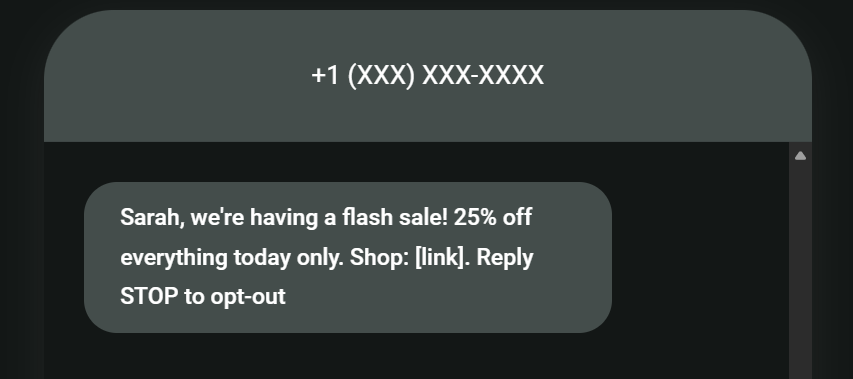
Your texts need a STOP keyword to comply with SMS regulations. The word STOP also increases trust among customers who want to opt out quickly.
The image below shows a marketing text with the STOP keyword:
However, STOP is no longer enough on its own. Since April 2025, customers can opt out however they reasonably choose, whether that’s an off-keyword reply, an email, or a phone call.
In the U.S., the TCPA gives you 10 business days to act. Once you do, a confirmation text is enough to tell the customer it worked, and your records should update, so nothing else goes out.
Omnisend unsubscribes these replies for you, even informal ones like “please stop texting me” instead of STOP. When a customer opts out by email, phone, or live chat instead, you should unsubscribe them manually, so the request still counts.
6. Mind your content and timing
SHAFT content shouldn’t be anywhere near your SMS messages. Sex, hate, alcohol, firearms, and tobacco content risks carrier filtering and deliverability problems.
Time your campaigns and set send windows for your SMS automations to respect the standard quiet hours, which end at 9 pm and start around 8 or 9 am in your customers’ local time.
It isn’t a compliance requirement, but also add your brand name to texts when sending to the U.S. and Canada for recognition’s sake. Carriers in these regions don’t support custom sender names (alphanumeric sender IDs) for commercial traffic.
7. Register your number before sending
Carriers won’t let you send commercial SMS from an unregistered number. Skip approval, and your messages get filtered as spam.
- Long codes require A2P 10DLC registration for U.S. sends. You’ll register your brand and campaign with The Campaign Registry, which typically takes two to four weeks.
- Toll-free numbers need verification, taking around five business days.
- Short codes go through carrier review of your use case, message samples, and opt-in flow, which takes several weeks.
New Canadian long codes bought on or after March 26, 2025, now need A2P registration too, even for Canada-to-Canada sends. Toll-free numbers stay exempt.
Most ecommerce stores send from a toll-free number, so verification is the most likely path for your SMS compliance checklist, with Omnisend providing the number and submitting it for you.
How Omnisend maintains your SMS compliance
Omnisend has built-in compliance tools to support its global SMS capabilities. Integrate your Shopify or other ecommerce platform, and you can publish forms, automatically sync customer data, and segment them for targeting.
Here are the crucial features for SMS marketing compliance:
- Compliant opt-in forms. These include a checkbox to collect explicit consent, plus a written disclosure for the customer.
- Timestamped consent records. Your contacts have profiles with the dates they provided consent.
- Consent-based segments. Apply the “Consent is TCPA” or GDPR filter to send only to properly consented contacts.
- Automatic opt-out language. The default is “Reply STOP to opt-out” for U.S./CA recipients. Non-U.S./CA recipients can receive an opt-out URL.
- Toll-free verification. You can choose to receive a toll-free number from Omnisend, with verification handled for you.
- Region-aware sending tools. The campaign preview tool lets you see separate previews for the U.S./CA versus other markets.
Legal disclaimer: This SMS compliance guide isn’t legal advice. It is general information. Confirm requirements for your business with a qualified professional.
Join Omnisend to complete your SMS compliance checklist and send marketing messages to customers
Quick sign up | No credit card required
FAQs
What is SMS compliance?
SMS compliance is the requirement to follow the laws and carrier rules that cover commercial texts across marketing and transactional sends. It protects your customers and shields you from fines and carrier blocking.
Do I need consent to text existing customers?
Existing customers have a relationship with you, but haven’t necessarily said yes to marketing texts. You need prior express consent for U.S. recipients, in writing under current FCC rules. A customer checking a box satisfies that.
How much must I honor an SMS opt-out?
You must honor opt-outs 100% of the time. In the U.S., the TCPA gives you 10 business days to act on them, and the sooner the better. Also, opt-outs need to be honored regardless of how you receive them, whether by text, email, phone, or web form.
Do I need to register my number to send SMS?
Long codes need A2P 10DLC registration with The Campaign Registry. Toll-free numbers require verification, and short codes need carrier vetting.